
Latest ads
-
V2ray VPN for Tunneling
- hu KANNA
- Updated:
-
 ඕනම රටකට සෙට් වෙන CV එකක්
- ErMurazor
- Updated:
-
 Hambantota 7 Acres Beachfront Land For Sell DownSouth , PerPerch Price 420 000
- 1024 Digital
- Updated:
-
 Baseus PI LITE INDOOR CAMERA
- ErMurazor
- Updated:

Microsoft Office 2016 + Activator
- Thread starter AWRORA
- Start date
You are using an out of date browser. It may not display this or other websites correctly.
You should upgrade or use an alternative browser.
You should upgrade or use an alternative browser.


machan mediafire kea file eka remove karala
pissuda ban...man me denuth test kara....


machan MediaFile eka aye upload karapanko pls...
eka remove karala
yes
pissuda ban...man me denuth test kara....

oka ohoma epnnnawa ubata..uba wena namkin aye upload karapan rar file ekak....please
machan e torrent eke comments wala dala thiyanawa activate karaganna widiha.
try that.

im downloading.....


how to active office 2016
note:- you need internet connection for active
1.- Install Office 2016 (Stay connected to the internet)
2.- Download KMSAuto Net 2015 v1.3.8 Portable (https://kat.cr/kmsauto-net-2...-3-8-portable-t11072853.html
3.- Run KMSAuto Net After Installation and click the button to show advanced options.
note:- For first time KMS users - you wont get the advanced options directly ,please go to the about tab and press 'Professional Mode'.
4.- Click the Advanced tab and click in the option Convert Office RETAIL -> VL
5.- Wait for the conversion to finish.
6.- Click Activate Office button from there or in the Main Tab.
works fine in windows 10 also. To check if the office is activated open any of the office tool(such as Word/excel) GO TO FILE>ACCOUNT then check the Product information Panel.
note:- you need internet connection for active
1.- Install Office 2016 (Stay connected to the internet)
2.- Download KMSAuto Net 2015 v1.3.8 Portable (https://kat.cr/kmsauto-net-2...-3-8-portable-t11072853.html
3.- Run KMSAuto Net After Installation and click the button to show advanced options.
note:- For first time KMS users - you wont get the advanced options directly ,please go to the about tab and press 'Professional Mode'.
4.- Click the Advanced tab and click in the option Convert Office RETAIL -> VL
5.- Wait for the conversion to finish.
6.- Click Activate Office button from there or in the Main Tab.
works fine in windows 10 also. To check if the office is activated open any of the office tool(such as Word/excel) GO TO FILE>ACCOUNT then check the Product information Panel.

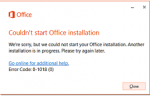


activator eka activete kiyala dunnama me
error eka enawa
Run-Time Error with exception code 0x80070422
error eka enawa
Run-Time Error with exception code 0x80070422

machan MediaFile eka aye upload karapanko pls...
eka remove karala
oka ohoma epnnnawa ubata..uba wena namkin aye upload karapan rar file ekak....please
machan e torrent eke comments wala dala thiyanawa activate karaganna widiha.
try that.
im downloading.....
+7
gedara giyagaman banawa
ado activator eka thiyanawanam upload karapan.
Downloding.....Thanks Machan.....
how to active office 2016
note:- you need internet connection for active
1.- Install Office 2016 (Stay connected to the internet)
2.- Download KMSAuto Net 2015 v1.3.8 Portable (https://kat.cr/kmsauto-net-2...-3-8-portable-t11072853.html
3.- Run KMSAuto Net After Installation and click the button to show advanced options.
note:- For first time KMS users - you wont get the advanced options directly ,please go to the about tab and press 'Professional Mode'.
4.- Click the Advanced tab and click in the option Convert Office RETAIL -> VL
5.- Wait for the conversion to finish.
6.- Click Activate Office button from there or in the Main Tab.
works fine in windows 10 also. To check if the office is activated open any of the office tool(such as Word/excel) GO TO FILE>ACCOUNT then check the Product information Panel.
mage activate wenne nane machan, ai e?
key ekak nadda hoyaganda?
activator eka activete kiyala dunnama me
error eka enawa
Run-Time Error with exception code 0x80070422
Similar threads


- Replies
- 190
- Views
- 42K


