Mp3Doctor PRO

slsaico

Well-known member
  • Jul 19, 2008
    5,414
    2,461
    113
    ඇල්ල
    Mp3Doctor PRO
    1hfmzq.gif

    The best mp3 normalizer, volume enhancer & optimizer!
    New improved normalizing, equalizing, trim, etc. Try it yourself and enjoy the high quality.
    Download Mp3Doctor PRO

    disco.png
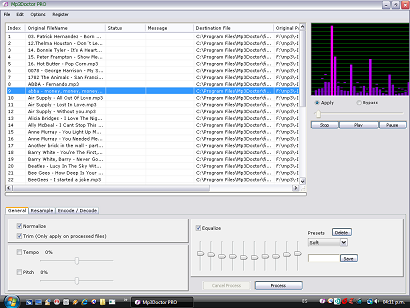
    In this times, with the usage of many mp3 memory sticks and mp3 players, its very important to have a tool that are capable of optimize and standardize your mp3 collection.
    In this Mp3Doctor PRO you can adjust the tempo of the song without change the speed (Ideal tool for DJs) or vice versa: change the pitch without changing the tempo and listen results in real time BEFORE proccessing the file!.
    Also you can listen to the equalization of the song in real time, adjust it and then process the file to keep that equalization as part of your mp3 file.
    Try out the new Mp3Doctor PRO and you will enjoy the real high quality of the results.
    Mp3Doctor PRO is a new age in mp3 quality!
    Mp3DoctorPRO.png
    Some Awards:
    award-most-popular.png

    softpedia_pick_award_b.gif

    Download Mp3Doctor PRO


    Scratch (click here to download) v1.05 381k
    blank.gif


    Why should DJ's have all the fun scratching records? It just isn't fair, and when people across the globe are being ridiculed and laughed at by their peers just because they don't have some 1200's and a bunch of records; then it's time for the ULTIMATE equalizer -> AnalogX Scratch!
    If you can move the mouse, then you can scratch like the best DJ's in the world! Really! Ok, not really, you still need to practice a whole bunch, but at least you don't need to buy any LP's or turntables! No records getting scratched, no needles needing to be replaced, or belts breaking (assuming you're not on a 1200) at the most inopportune times! With AnalogX Scratch, you can load up two wave files (one to help you keep rhythm, the other to actually scratch), and start scratching away...
    Best of all, when you've come up with something you really like, you can output it to a 16bit, 44.1k WAV file! This is GREAT for creating custom scratches for songs, whether you transfer it over to your Emax or load it up in Acid! And just so you aren't starting from scratch (no pun intended), two WAV files are included in the install so you can get a feel for what it's all about!

    ++++++++++++++++++++++++++++++++++++++++++++++++
    Bossa

    innovative music manager for iTunes

    Our Rating:
    30star.gif
    (Good)
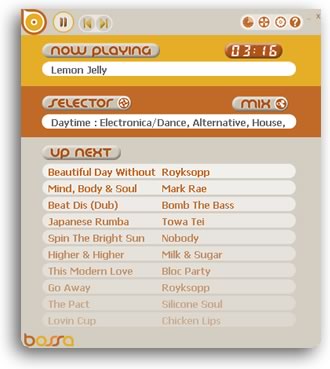
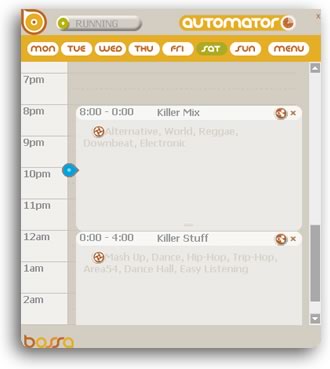
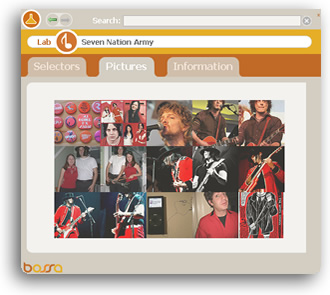
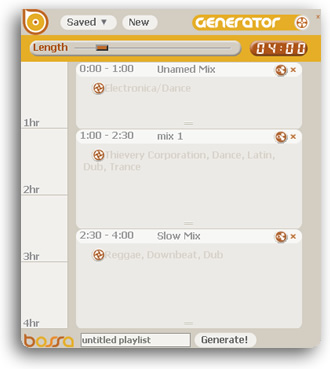
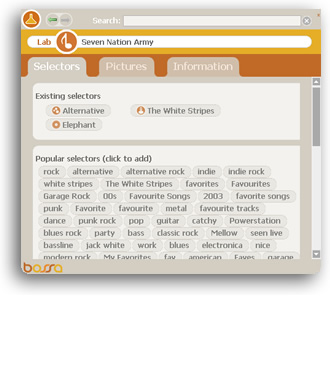
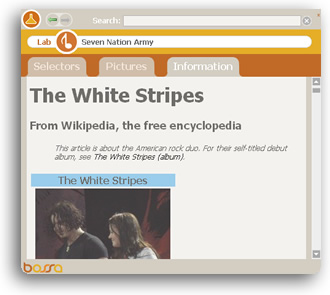
    Bossa is an add-on for iTunes that enables you to schedule your music, create playlists, find artist information and more. The program uses a unique approach of tagging your music based on genre, artist and other ID3 information, as well as custom keywords. While this approach offers an innovative way of accessing your music, we found that it a little confusing and time consuming. The program allows you to create playlists based on your keyword combinations and schedule them to play automatically on certain days and times, you can even create playlists that run up to 24 hours. In addition, a feature called `the Lab` lets you retrieve additional information for the current artist via Wikipedia and view images from Flickr (which often returned rather odd results).
    Pros: Daily and weekly scheduling of playlists
    Cons: GUI and organizing approach can be confusing; unreliable image and web search results


    overview_menu_r3_c2.jpg


    overview_menu_r4_c2.jpg
    overview_menu_r4_c4.jpg


    ++++++++++++++++++++++++++++++++++++++++++++++++++

    iPod Access v4.2.2

    WinScreeenShotLarge.jpg
    iPod Access is the premier application for transfering songs from your iPod to your Macintosh computer. It fills in the void that Apple has left out of iTunes, copying songs from your iPod back to your computer. While almost all other iPod applications must read the MP3 data directly from all the songs iPod Access uses the internal iPod database and thus has access to much more information, such as playlists.


    Download iPod Access v4.2.2


    +++++++++++++++++++++++++++++++++++++++++++++


    VividLyrics v2.5

    ss03.gif
    Karaoke plugin. Displays karaoke lyrics in Windows Media Player 10 and Winamp 5. It supports VL, LRC, TXT and MIDI files. It features accurately highlighting, anti-aliased and gradual blend effects. VividLyrics also provides a visaul lyrics editor, with this tool, you can easily create the high quality karaoke lyrics files for your favorite songs.


    Download VividLyrics v2.5


    ++++++++++++++++++++++++++++++++++++++++


    SuperSync v2.4.2

    transferwindow.gif


    Download SuperSync v2.4.2
    +++++++++++++++++++++++++++++++++
    Mp3tag v2.41b beta
    sht_export.png


    Download Mp3tag v2.41b beta
    +++++++++++++++++++++++++++++
    ||||||||||||||||||||||||||||||||||||||||||||||||||||||||||||||||||||||||||||||||||||||


    slsaico

    Well-known member
  • Jul 19, 2008
    5,414
    2,461
    113
    ඇල්ල
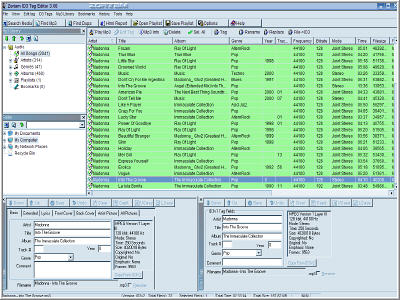
    Zortam ID3 Tag Editor v4.50

    zted30.jpg


    Download Zortam ID3 Tag Editor v4.50


    ++++++++++++++++++++++++++++++++++++


    Media Digitalizer

    tmediadigibk1.gif

    transfer analog audio to digital

    Media Digitalizer is an easy-to-use tool to transfer your analog recording including tapes, cassettes and vinyl LPs to digital audio format. It offers a step-by-step wizard that guides you through the process and even shows how to connect the audio source. The program can save the recordings to MP3, WMA, WAV and Audio CD (burning included). It comes with various recording profiles for common cassete and LP formats, and you can also create your own. Media Digitalizer is aimed at quick, hassle free recording and does not provide many advanced features, however works very well for what is intended to do.
    mediadigisz9.gif

    Because Media Digitalizer uses the power and capabilities of your PC, you don't need to buy any expensive gadgets. We include instructions, tutorials, and graphics to make it as simple as possible.

    Cassette to CD Recording

    Connecting the player to your computer


    The first step is to connect your tape player to your computer. This is very easy.

    connect-cassette-player.png


    You'll need a inexpensive audio cable to connect the tape player to the computer. You'll find this in any electronics store. Click here for details, including a printable guide you can take to the store.

    Connect the cable from the headphone socket on the tape player to your computer's microphone or line-in socket.

    You're ready to begin recording!


    Recording from the tape


    Record the music into your computer. Media Digitalizer will help you connect the tape player, optimize the volume, and set the recording length.
    Edit the recording


    After the music from the tape has been recorded into the computer, you'll be able to select the individual tracks. Media Digitalizer makes this easy by automatically detecting the gaps between tracks.
    Burn the disc


    You're almost done. Media Digitalizer's built-in CD recording software burns the recorded tracks to a disc using your computer's burner.


    Creating MP3s


    If you want to listen to your music on your iPod, you'll appreciate that Media Digitalizer can also make MP3 files from the recording.

    In total, Media Digitalizer can create audio CDs, MP3s, WMAs, or Wave files from the same recording! Using Media Digitalizer you can create music for just about anything!


    Record from any source

    Media Digitalizer can record from tapes, records, live from a microphone, or virtually any source. Use Media Digitalizer when you want to quickly create MP3s or CDs from your music.
    Download http://www.digitope.com/downloads/digitalizer.exe


    +++++++++++++++++++++++++++++++++++++


    whatissigview.gif


    box170_200_1.jpg
    SIGVIEW is a real-time signal analysis software package with wide range of powerful FFT spectral analysis tools, statistics functions and a comprehensive visualization system.

    SIGVIEW is distributed as shareware - you can download a completely functional version and use it for 21 days to find out if it suits your needs. If you decide to use SIGVIEW after that period, you will have to purchase a license. The license key will unlock the time-limited trial version and entitle you to e-mail support, free minor upgrades and possible customization options.

    With its unique user interface and philosophy, SIGVIEW gives you absolute freedom to combine different signal analysis methods in any possible way - there are no artificial rules and limitations. Once you get the basics, everything else in SIGVIEW follows the same logical pattern.


    features.gif


    bullet.gif
    Data acquisition and monitoring from sound cards and professional multichannel A/D devices. NEW in v1.97: Support for NIDAQ and NIDAQmx compatible DAQ devices from National Instruments® and all Measurement Computing® DAQ devices. Various options for triggering, decimation and averaging are included.
    bullet.gif
    Real time data display, signal analysis and control. You can work on live signals and observe results immediately.
    bullet.gif
    Import and export of signal files in numerous formats: WAV, MP3, ASCII, WMA, AU, AIFF, SND, 8/16/32-bit binary files, EDF...
    bullet.gif
    Optimized FFT algorithm with fine parameter tuning and various pre- and postprocessing options: windowing, zero-padding, power spectrum and PSD, automatic averaging, test for spectral peaks integrity,...
    bullet.gif
    Spectrogram and Time-FFT functions with powerful graphical display solutions
    bullet.gif
    Dual channel (cross-spectral) analysis (cross spectrum, coherence, cross corelation,...)
    bullet.gif
    Signal filtering (Bandstop, Bandpass, Lowpass, Highpass)
    bullet.gif
    Real time arithmetic operations on signals (subtract, multiply, add, scale, normalize...)
    bullet.gif
    Various statistics functions: peak hold, averaging, smoothing, removing linear trend, probability distribution... Analog-style instruments for real-time display of important signal parameters
    bullet.gif
    Advanced signal display and handling options: unlimited overlays, unlimited number of markers and annotations for each signal, parallel display (EEG style), cut/copy/paste signal parts, unlimited zoom-in levels, VCR-style commands for audio playing,...
    bullet.gif
    Signal generator including sine signal, white and pink noise, step signal,...
    bullet.gif
    Graphical block diagram environment improves productivity when working with complex analysis systems
    bullet.gif
    Custom tools and workspaces can be created and later reused or exchanged with other Sigview users
    bullet.gif
    No artificial or license-based limitations: million points FFTs can easily be calculated, dozens of signals can be combined and analyzed at the same time.
    screen1_3d.jpg
    screen2_3d.jpg
    screen3_3d.jpg

    applications.gif


    - Vibration analysis

    - General sound analysis

    - Communication signal analysis (radio, wireless, acoustic,...)

    - Seismic signal analysis

    - Research in numerical mathematics

    - Financial trends analysis

    - Voice signal analysis

    - Noise detection, analysis and removal

    - Signal and electronic intelligence

    - Medical signal analysis (ECG, EEG)

    - Statistical data analysis

    - Education

    whysigview.gif


    line_hor.gif
    Powerful: Wide range of functions for spectral and cross-spectral analysis, statistics, filtering, exquisite graphical solutions,... everything in one package at one price.
    line_hor.gif
    Real time: There is no difference between working with live signals in real time and working with signal files from your hard disk. Start researching with your sound card and continue with professional A/D devices.
    line_hor.gif
    Fast: Highly optimized FFT algorithm and 2D/3D graphics
    line_hor.gif
    Looks good: SIGVIEW will make perfect 3D or 2D graphics ready to become part of your conference paper or presentation
    line_hor.gif
    Optimal performance at optimal price: You get professional tools at shareware price. Most other signal analysis applications cost at least 10x-20x more than SIGVIEW. Find out if they are really better...
    line_hor.gif
    Risk-free: Try before you buy. You have 21 days to try a fully functional SIGVIEW version to see if that is exactly what you need.
    line_hor.gif
    Customizable: SIGVIEW can be regarded as a template for more specialized applications. If you need a new analysis option, new design, support for your file formats or data acquisition devices, just talk to us. Customized SIGVIEW versions can be ordered at very affordable price.
    line_hor.gif

    logo_sigview.jpg


    Download SIGVIEW v1.98.7 now (~1MB) >>
    ||||||||||||||||||||||||||||


    slsaico

    Well-known member
  • Jul 19, 2008
    5,414
    2,461
    113
    ඇල්ල
    FutureDecks Pro v1.1

    fdp_screenshot.jpg


    Download FutureDecks Pro v1.1


    :angry::angry::angry::angry::angry::angry::angry::angry::angry:


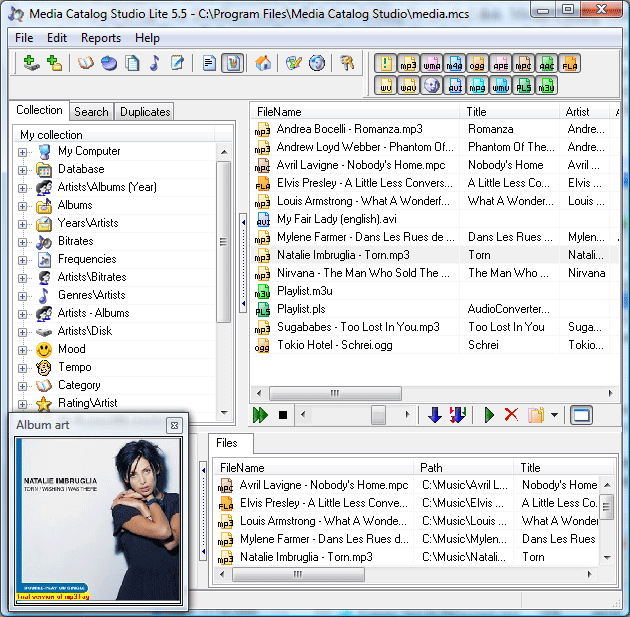
    Media Catalog Studio v5.9 Build 142

    media_catalog_studio.gif


    Download Media Catalog Studio v5.9 Build 142


    :angry::angry::angry::angry::angry::angry::angry::angry::angry:


    Acoustica CD/DVD Label Maker v3.23

    label-maker-screenshot-600x456.jpg
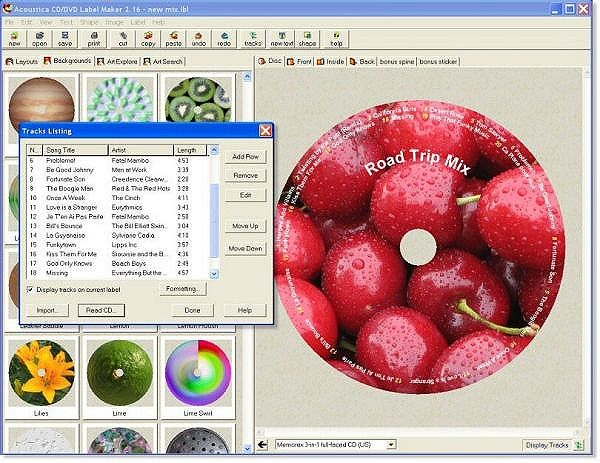
    Create your own CD/DVD and jewel case labels with this new software from Acoustica, the company with the curious idea that software should be easy to use. Let the wizard create labels for you in a hurry with minimum fuss, or man the controls yourself to get every detail of text, fonts, and images just the way your muse demands. Use the built-in art for holidays, events, and just generally good labels, or import your own pictures with the image search feature and thumbnail views. Automatically import your song information from Acoustica MP3 CD Burner, WinAmp, Nero, Easy CD Creator, or virtually any other popular playlist file. Print on plain old printer paper or stock sticker labels and jewel case templates. And above all: have fun! We insist.
    Click to open list of release changes in a new window.


    Download Acoustica CD/DVD Label Maker v3.23


    :angry::angry::angry::angry::angry::angry::angry::angry::angry:


    Ashampoo Music Studio 3 v3.40

    0230_scr_large_en.jpg
    Do you like music? Do you use a computer? Then you need Ashampoo Music Studio 3. This program always been a favorite of digital music fans and the latest version now includes everything you need to create, edit and manage your digital music collection. And using it is nearly as simple as operating a CD player.
    Features
    • Rip CDs: You can rip (copy) tracks from audio CDs directly to the format of your choice (WMA, MP3, Ogg, FLAC and WAV).
    • Import CD data: Automatically import album, title and track details for your audio CDs from an online database.
    • Playlists: Import external playlists in M3U, PLS, ASX, P4U and WPL formats.
    • Burn: Burn your playlists to regular audio CDs or Data CDs, DVDs or Blu-ray discs containing digital audio tracks in single or mixed formats.
    • Edit: Edit your audio tracks. Change the title, artist etc. Convert your tracks to other formats. Cut, mix and modify your tracks. Fade in, fade out, mix, crossfade, change volume, insert silence etc. Normalize volume levels.
    • Record: Record directly from all your sound card inputs (microphone, line in etc.) and store the tracks directly as WMA, MP3, Ogg, FLAC or WAV files.
    • Repair: Find, move and repair damaged digital audio files.

    Download Ashampoo Music Studio 3 v3.40


    :confused::confused::confused::confused::confused::confused::confused::confused::confused::confused::confused::confused:


    slsaico

    Well-known member
  • Jul 19, 2008
    5,414
    2,461
    113
    ඇල්ල
    EXPStudio Audio Editor Free v4.3

    EXPStudio Audio Editor Free v4.3

    audioeditor.gif
    EXPStudio Audio Editor is a visual multifunctional audio files editor which allow you to perform various operations with audio data such as displaying a waveform image of an audio file, filtering, applying various audio effects, format conversion and more. Supports all major audio formats.
    Features
    • Edit your audio files like editing text files
    • Open, create and save audio files
    • Voice converting (female to male, male to female, Chipmunk, Zerus)
    • Display a waveform window of an audio file and apply zooming
    • Play an audio file or any part of it
    • Record new audio file from a microphone or another input device
    • Visually edit an audio file (Cut, Copy, Delete Silence, Paste, Paste From File, Mix, Mix From File)
    • Apply different effects (Amplify, Delay, Equalizer, Fade, Flanger, Invert, Normalize, Reverse, Multi Tap Delay, Silence, Stretch, Vibrato, Echo, Chorus)
    • Apply different filters to the selected part of an audio file (Ban Pass Filter, FFT, FIR, High Pass Filter, High Shelf Filter, Low Pass Filter, Low Shelf Filter, Notch Filter)
    • Insert noise or silence in an audio file
    • Convert an audio file from one format to another
    • Use marker to locate the selected part or special part of the audio data
    • Insert and change information about an audio file (Album, Artist, Channels, Comments, Copyright, Genre, Title, Year)

    Download EXPStudio Audio Editor Free v4.3
     

    slsaico

    Well-known member
  • Jul 19, 2008
    5,414
    2,461
    113
    ඇල්ල
    dBpowerAMP Music Converter

    dBpowerAMP Music Converter

    convert Wave, MP3 and CDA

    dBpowerAMP can convert to and from Wave, Mp3 and from CD Audio (CDA) files, rip audio CDs, view ID3 tag information and more. It works from the Windows Explorer right click menu, where it provides quick access to one-click conversion as well as a new pop-up info box that displays detailed file information for supported formats. In addition, you can use dBpowerAMP to extract (rip) files from a CD, featuring automatic CDDB support. CD Ripping is very fast and according to the developer s tests it claims to be the fastes around. You can install optional Codecs for additional conversion options (e.g. WMA to MP3).
    dbpowerampcs4.gif

    Download: dBpoweramp Music Converter R12.4


    slsaico

    Well-known member
  • Jul 19, 2008
    5,414
    2,461
    113
    ඇල්ල
    Blaze Media Pro v8.02

    screenshot.jpg
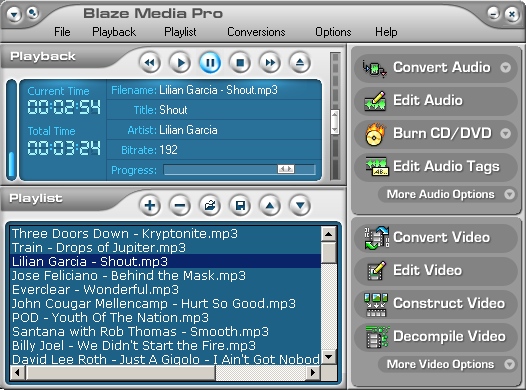
    Powerhouse all-in-one multimedia software offering conversion, ripping, editing, recording, burning, playback, and much more. Powerful, yet easy to use audio, video (VCD/SVCD/DVD), and data CD/DVD burning are all fully supported. Other advanced features include video capture, video creation/combining/extraction, video editing, batch video processing, copy music CDs, media management, audio merge, MusicID audio recognition, lyrics search, audio tag editing, CDDB/CDDB2/FreeDB support, and more. The audio content of video files can be extracted and saved to sound files, and frames can also be extracted to images files in batch mode. Video files can also be created from still frame images and/or other videos.
    Supported conversions include: CD to WAV, MP3, WMA, and OGG; MP3/WMA/OGG/WAV/AIF/VOX/MP2/MPC/G.72x/AU/RAW to MP3/WMA/OGG/WAV; WAV/MP3/WMA/OGG to CD burning, WAV/MP3 Compression, and two-way conversions among MPEG-1, MPEG-2, AVI, WMV, and ASF for video. MPEG options are available for VCD, SVCD, and DVD compliant output. DVD shrink functionality is also present. When converting from audio CD, track information can be dynamically downloaded from the CDDB and used to automatically name saved files.
    Video editing is available for AVI (uncompressed), AVI (compressed using any available codec), MPEG-1, MPEG-2, WMV, and ASF. Comprehensive video editing operations are provided (delete frame, delete selection, crop, resize, rotate, mirror, flip, trim, text overlay, adjust audio volume, etc.). In addition, an extensive list of over 30 effects and color adjustment operations allow for powerful video enhancement and alternation. WAV, WMA, and MP3 audio files can be inserted into the video or extracted from the video; and BMP, GIF, JPG, PCX, PNG, RAS, PPM, TGA, and TIF are the supported image formats that can be inserted or extracted. Most video processing operations can also be performed in batch mode on a list of video files using the Batch Video Processor.


    Download Blaze Media Pro v8.02
     

    slsaico

    Well-known member
  • Jul 19, 2008
    5,414
    2,461
    113
    ඇල්ල
    MiniLyrics v6.0.3665 beta 2

    ml-wa5.png
    MiniLyrics is a fascinating lyrics viewer showing synchronized lyrics of the current playing song in Winamp, Windows Media Player 9.0/10.0, iTunes, MusicMatch Jukebox, Quintessenial Player, Foobar2000, RealPlayer, MediaMonkey, The KMPlayer, JetAudio, Yahoo! Music Engine, Media Jukebox and XMPlay. MiniLyrics makes your music come alive with streaming lyrics that are timed with the song. You can follow along with the artist and catch every word.


    Download MiniLyrics v6.0.3665 beta 2
     

    slsaico

    Well-known member
  • Jul 19, 2008
    5,414
    2,461
    113
    ඇල්ල
    DJPower v3.90

    MainScreen.gif
    DJPower is a full encompassing program to meet all the needs of a modern and professional DJ.
    The DJPower program is specifically designed for DJ’s. The program has been created with the help of professional DJ’s in both the United States and Europe. DJPower gives you the power to record and edit songs, to perform normalization, time stretching, change pitch in real time, etc., gives you the power to program your entire evening and allow you to save it for future use with or without modifications, gives you the power to make changes and find those last minute requests with ease.
    Important: After completing the installation proccess and restarting your computer, launch DJPower and it will ask for a password. To obtain a password, you must fill in the form on the DJPower web site.
    New in this version:
    • Optional Martin LightJockey interface/DMX controller
    • Optional Numark Controller, compatible with Windows® 2000 and XP, Associate Songs with: Lights - Mix - Notes, Compressor/Limiter
    • Optional Bulletin Board
    • Optional Light Show
    • Daily/Weekly/Monthly Scheduling and more

    Download DJPower v3.90