
Latest ads
-
 🛡️ Kaspersky Antivirus – 1 Year / 1 Device | Rs. 2,300 | Only 9 Left
- KSPathirana
- Updated:
-
Professional CCTV Installation Service
- Techguy231
- Updated:
-
I'll research & write an article - Rs. 2000 onwards
- Blogerwiki
- Updated:
-
 House Plan
- lenura
- Updated:
-
 iphone x used
- AssassiN1
- Updated:
New Software Collection 2008-2009
- Thread starter hekrock
- Start date
You are using an out of date browser. It may not display this or other websites correctly.
You should upgrade or use an alternative browser.
You should upgrade or use an alternative browser.


Download Accelerator Plus v8.1.5.6
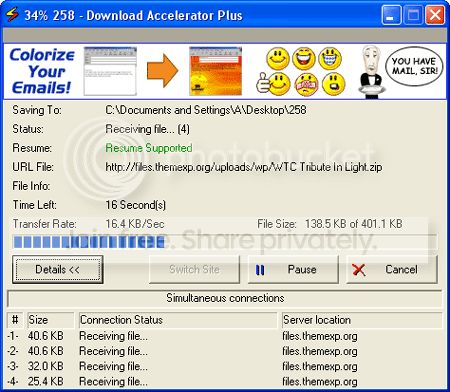
Download Accelerator Plus (DAP) is the world's leading download manager, allows you to download up to 300% faster* with increased reliability, resume support and errors recovery. It searches for mirror sites that most effectively serve your downloads through multiserver connections for optimal utilization of dial-up or broadband connections. DAP automatically recovers from shutdowns, lost connections, and other errors. It is fully integrated into Netscape, Internet Explorer, and Opera, Mozilla/Firefox and offers a toolbar for Internet Explorer with a links catcher and a highlighter, providing the best possible performance from ANY Internet connection (dial-up, cable, DSL / ADSL, T1 etc.), allowing a Faster and more Reliable download experience. It features auto-hang-up after downloading, proxy settings, scheduling, and a unique AlwaysResume service.
http://rapidshare.com/files/21059148/DAP8_1_.1.5.6.for.warez-bb.org.by.cvtje.rar
Thima87 said:Download Faster ekak denawad?
Download Accelerator Plus (DAP) is the world's leading download manager, allows you to download up to 300% faster* with increased reliability, resume support and errors recovery. It searches for mirror sites that most effectively serve your downloads through multiserver connections for optimal utilization of dial-up or broadband connections. DAP automatically recovers from shutdowns, lost connections, and other errors. It is fully integrated into Netscape, Internet Explorer, and Opera, Mozilla/Firefox and offers a toolbar for Internet Explorer with a links catcher and a highlighter, providing the best possible performance from ANY Internet connection (dial-up, cable, DSL / ADSL, T1 etc.), allowing a Faster and more Reliable download experience. It features auto-hang-up after downloading, proxy settings, scheduling, and a unique AlwaysResume service.
http://rapidshare.com/files/21059148/DAP8_1_.1.5.6.for.warez-bb.org.by.cvtje.rar


Internet Download Manager (Idm) 5.15 FULL AND FINAL


Internet Download Manager (IDM) is a tool to increase download speeds by up to 5 times, resume and schedule downloads. Comprehensive error recovery and resume capability will restart broken or interrupted downloads due to lost connections, network problems, computer shutdowns, or unexpected power outages. Simple graphic user interface makes IDM user friendly and easy to use.Internet Download Manager has a smart download logic accelerator that features intelligent dynamic file segmentation and safe multipart downloading technology to accelerate your downloads. Unlike other download managers and accelerators Internet Download Manager segments downloaded files dynamically during download process and reuses available connections without additional connect and login stages to achieve best acceleration performance.
Internet Download Manager supports proxy servers, ftp and http protocols, firewalls, redirects, cookies, authorization, MP3 audio and MPEG video content processing. IDM integrates seamlessly into Microsoft Internet Explorer, Netscape, MSN Explorer, AOL, Opera, Mozilla, Mozilla Firefox, Mozilla Firebird, Avant Browser, MyIE2, and all other popular browsers to automatically handle your downloads. You can also drag and drop files, or use Internet Download Manager from command line. Internet Download Manager can dial your modem at the set time, download the files you want, then hang up or even shut down your computer when it's done.
Other features include multilingual support, zip preview, download categories, scheduler pro, sounds on different events, HTTPS support, queue processor, html help and tutorial, enhanced virus protection on download completion, progressive downloading with quotas (useful for connections that use some kind of fair access policy or FAP like Direcway, Direct PC, Hughes, etc.), built-in download accelerator, and many others.
Version 5.15 adds IDM download panel for web-players that can be used to download flash videos from sites like YouTube, MySpaceTV, and Google Videos. It also features complete Vista support, YouTube grabber, redeveloped scheduler, and MMS protocol support. The new version also adds improved integration for IE and IE based browsers, redesigned and enhanced download engine, the unique advanced integration into all latest browsers, improved toolbar, and a wealth of other improvements and new features.
NO PASSWORDS
http://rapidshare.com/files/166252304/Internet.Download.Manager.v5.15_2.rar
http://depositfiles.com/files/o7u4nyoyh
janaka33 said:
machan IDM ekath hoyala dapan dap walata wadiya hodi neda?


Internet Download Manager (IDM) is a tool to increase download speeds by up to 5 times, resume and schedule downloads. Comprehensive error recovery and resume capability will restart broken or interrupted downloads due to lost connections, network problems, computer shutdowns, or unexpected power outages. Simple graphic user interface makes IDM user friendly and easy to use.Internet Download Manager has a smart download logic accelerator that features intelligent dynamic file segmentation and safe multipart downloading technology to accelerate your downloads. Unlike other download managers and accelerators Internet Download Manager segments downloaded files dynamically during download process and reuses available connections without additional connect and login stages to achieve best acceleration performance.
Internet Download Manager supports proxy servers, ftp and http protocols, firewalls, redirects, cookies, authorization, MP3 audio and MPEG video content processing. IDM integrates seamlessly into Microsoft Internet Explorer, Netscape, MSN Explorer, AOL, Opera, Mozilla, Mozilla Firefox, Mozilla Firebird, Avant Browser, MyIE2, and all other popular browsers to automatically handle your downloads. You can also drag and drop files, or use Internet Download Manager from command line. Internet Download Manager can dial your modem at the set time, download the files you want, then hang up or even shut down your computer when it's done.
Other features include multilingual support, zip preview, download categories, scheduler pro, sounds on different events, HTTPS support, queue processor, html help and tutorial, enhanced virus protection on download completion, progressive downloading with quotas (useful for connections that use some kind of fair access policy or FAP like Direcway, Direct PC, Hughes, etc.), built-in download accelerator, and many others.
Version 5.15 adds IDM download panel for web-players that can be used to download flash videos from sites like YouTube, MySpaceTV, and Google Videos. It also features complete Vista support, YouTube grabber, redeveloped scheduler, and MMS protocol support. The new version also adds improved integration for IE and IE based browsers, redesigned and enhanced download engine, the unique advanced integration into all latest browsers, improved toolbar, and a wealth of other improvements and new features.
NO PASSWORDS
http://rapidshare.com/files/166252304/Internet.Download.Manager.v5.15_2.rar
http://depositfiles.com/files/o7u4nyoyh


thx.welcome bropiyumal sanjeewa said:Elakiri machooo.........................................
janaka33 said:thx.welcome brohekrock said:
aaaaaaaaaaaaaa me thiyenne ela ela
Driver Genius Professional Edition 8.0.0.136 + KeyGen

Driver Genius Professional manage your PC to get 100% up to date Drivers and optimize PC performance. Driver Genius Professional is a powerful driver manager for Windows that can backup, restore ,search and update your drivers automatically in several mouse clicks!
Quickly backup device drivers for your computer. Free backup all drivers now!
Just need one click to restore all drivers at one time.
Clone your drivers to an EXE auto-installer. Easy to install drivers to many same machines.
Easy to get the most recent drivers for your computer. Keep your drivers up to date.
Remove invalid or useless drivers, improve system performance and stability.
Device Diagnostics can help you to find device which doesn't work properly or efficiently and offer an useful solution.
Driver Genius Professional is a professional driver management tool features both driver management and hardware diagnostics. Driver Genius provides useful functions such as driver backup, restoration, update and uninstallation for users. If you often reinstall operating system, you can not forget such painful experiences of searching all around world for all kinds of device drivers. If unfortunately you've lost your driver CD, the search process will be more driftless and time-consuming.
Now with Driver Genius, you can backup all drivers first and restore them after system rebuild. This can obviously save your time during the system installation process, you needn't worry about drivers missing any more. Besides, you even can create an automatic installation package for all drivers by Driver Genius. After you rebuild system, you can install all drivers at one time by this automatic restoration program. It's really convenient.
Driver Genius can find driver for a device wisely even system can't do. It can identify the name and vendor's information of device, offer download address for these required driver directly.
Driver Genius also supports online update. There are more than 30,000 most recent version drivers for hardware devices such as motherboard, video card, sound card, network card, modem, monitor, mouse, keyboard, digital camera, video capture card, etc on it's own download server. Because our daily updates work, our customers can get the newest drivers by Driver Genius's LiveUpdate program, which can synchronize to the database on our site momently.
System Req's:
OS:win98/Me/2000/XP/2003
Memory:128 mb
File size:10mb
http://rapidshare.com/files/166954657/DGPro8.rar

Driver Genius Professional manage your PC to get 100% up to date Drivers and optimize PC performance. Driver Genius Professional is a powerful driver manager for Windows that can backup, restore ,search and update your drivers automatically in several mouse clicks!
Quickly backup device drivers for your computer. Free backup all drivers now!
Just need one click to restore all drivers at one time.
Clone your drivers to an EXE auto-installer. Easy to install drivers to many same machines.
Easy to get the most recent drivers for your computer. Keep your drivers up to date.
Remove invalid or useless drivers, improve system performance and stability.
Device Diagnostics can help you to find device which doesn't work properly or efficiently and offer an useful solution.
Driver Genius Professional is a professional driver management tool features both driver management and hardware diagnostics. Driver Genius provides useful functions such as driver backup, restoration, update and uninstallation for users. If you often reinstall operating system, you can not forget such painful experiences of searching all around world for all kinds of device drivers. If unfortunately you've lost your driver CD, the search process will be more driftless and time-consuming.
Now with Driver Genius, you can backup all drivers first and restore them after system rebuild. This can obviously save your time during the system installation process, you needn't worry about drivers missing any more. Besides, you even can create an automatic installation package for all drivers by Driver Genius. After you rebuild system, you can install all drivers at one time by this automatic restoration program. It's really convenient.
Driver Genius can find driver for a device wisely even system can't do. It can identify the name and vendor's information of device, offer download address for these required driver directly.
Driver Genius also supports online update. There are more than 30,000 most recent version drivers for hardware devices such as motherboard, video card, sound card, network card, modem, monitor, mouse, keyboard, digital camera, video capture card, etc on it's own download server. Because our daily updates work, our customers can get the newest drivers by Driver Genius's LiveUpdate program, which can synchronize to the database on our site momently.
System Req's:
OS:win98/Me/2000/XP/2003
Memory:128 mb
File size:10mb
http://rapidshare.com/files/166954657/DGPro8.rar
ConvertXtoDVD
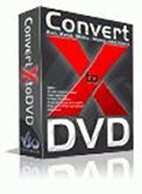
ConvertXtoDVD (formerly DivXtoDVD) is a software to convert and burn your videos to DVD. With ConvertXtoDVD and in a few clicks you can backup your movies to DVD playable on any home DVD player.
FEATURES:
- Supported video formats: DivX, Xvid, MPEG4, MOV, AVI, WMV, WMV HD, DV, and more...
- Supported sources: existing files from digital camcorders, TV/Sat, capture cards
- Can merge up to 4 hours of material from several movies or episodes
- Supported audio formats: AC3, DTS, PCM, OGG, MP3, and more...
- Handles subtitles files (.SRT .SUB/IDX) with color and font selection, and supports tags (italic, bold)
- Video format choice: NTSC, PAL, or automatic and PULL-DOWN
- Picture output: Widescreen, Fullscreen, or automatic
- Create Automatic chapters or edit your owns
- Fast preview mode to check if the source is loaded correctly
- Save the DVD structure on hard drive or burn it to a blank DVD
- Reliable burn engine integrated (supports all DVD formats)
- Fast and quality encoder (typically less than 1 hour for converting 1 movie)
- Variable options and settings for advanced users
- Control of the conversion speed vs quality
- DVD Menu control (auto-start, loop etc)
- DVD Menu edition (background, fond, color)
- Customizable interface (themes, dockable windows)
- Multilingual support (available languages...)
- Optimized for Windows 2000 / XP / Vista
Changes in ConvertXtoDVD - 2.1.12.214:
===============================
- 0000624: [Bug] Slider for audio level always active at first
- 0000618: [Bug] Error while opening decoder for stream #0.0 avi (WMV3)
- 0000625: [Bug] Menu Background Image Support is broken
http://rapidshare.com/files/14726884/Convx2dvd2112214.rar
ConvertXtoDVD (formerly DivXtoDVD) is a software to convert and burn your videos to DVD. With ConvertXtoDVD and in a few clicks you can backup your movies to DVD playable on any home DVD player.
FEATURES:
- Supported video formats: DivX, Xvid, MPEG4, MOV, AVI, WMV, WMV HD, DV, and more...
- Supported sources: existing files from digital camcorders, TV/Sat, capture cards
- Can merge up to 4 hours of material from several movies or episodes
- Supported audio formats: AC3, DTS, PCM, OGG, MP3, and more...
- Handles subtitles files (.SRT .SUB/IDX) with color and font selection, and supports tags (italic, bold)
- Video format choice: NTSC, PAL, or automatic and PULL-DOWN
- Picture output: Widescreen, Fullscreen, or automatic
- Create Automatic chapters or edit your owns
- Fast preview mode to check if the source is loaded correctly
- Save the DVD structure on hard drive or burn it to a blank DVD
- Reliable burn engine integrated (supports all DVD formats)
- Fast and quality encoder (typically less than 1 hour for converting 1 movie)
- Variable options and settings for advanced users
- Control of the conversion speed vs quality
- DVD Menu control (auto-start, loop etc)
- DVD Menu edition (background, fond, color)
- Customizable interface (themes, dockable windows)
- Multilingual support (available languages...)
- Optimized for Windows 2000 / XP / Vista
Changes in ConvertXtoDVD - 2.1.12.214:
===============================
- 0000624: [Bug] Slider for audio level always active at first
- 0000618: [Bug] Error while opening decoder for stream #0.0 avi (WMV3)
- 0000625: [Bug] Menu Background Image Support is broken
http://rapidshare.com/files/14726884/Convx2dvd2112214.rar
Winamp Pro 5.56 Build 2199 + 7 Plugins + 30 Skins

Winamp Player Features:
- Plays Music and Video Files (aacPlus, MP3, AAC, WMA and more!).
- Compatible with Winamp 2 Plug-ins.
- Full Support for Classic and Modern Skins.
- Plays Videos (NSV, WMV, and more!).
- Powerful Media Library.
- Browse SHOUTcast Radio & TV Stations.
- Browse Winamp Music Videos & Songs.
- Integrated AOL Video Content (News, Sports, Movies & more).
- AOL Radio Featuring XM.
- SHOUTcast Wire (podcast directory).
- Predixis MusicMagic (dynamic playlisting).
- Bundled Visualizations.
- Burn CDs (Limited to 2x - 48x in Pro!).
- Rips CDs (Limited to 8x aacPlus, AAC, WMA - Unlimited aacPlus, AAC, WMA and MP3 in Pro!).
- 50 free mp3s from Emusic.
- Includes Winner of the Internet.
- Surround Music Project!
- Includes an MP3 of 'Mercy Me' by Alkaline Trio.
- Rip/Encode music into aacPlus, AAC, WMA, or MP3!
- Burn CDs up to 48x!
Plugins List:
Album List v2.06
DFX Audio Enhancer v8.349
Monkeys Audio Plugin
Nullsoft Musepack Decoder v1.0 Beta
PowerPlayer II v2.40d
SAM Encoders DSP Plugin v3.8.3
WavPack Plugin v2.3
Skins List
AlphaSport by Wilian
Areao 4.2 Winamp Skin by blueslaad
Ashen Winamp by Nevezen
Black Ice by Nevezen
BLAKK by vica
ColdAmp 1.0 by Raw75
Collegiate All Star by blueslaad
CoverSutra For cdART RC1 by neodesktop
DaxVector by Veroka
Fade To Gray by Nevezen
Merry Xmas Winamp by Nevezen
Minimalistic white by LoztProphet
Monochrome by alexxp
Paper Sleeve by imwalkingwithaghost
ROSENROT WINAMP by arcticTransfuse
SimpleX 0.33 by r4dius
Smple drk Modd by david2005l
Street Justice Grey Edit by blueslaad
Winamp Spotlight by elralfaro
Windows Live Winamp by MedivhEldAnar
Wmp Aero English by itemsoft
Wobachi Chocolate by blueslaad
Wobachi Retro II by blueslaad
WSWA ECNMY skin pack by Wilian
Black Ice Luxury by Nevezen
GAIA winamp classic by bernadinho
Schwarze kreuz winamp by arcticTransfuse
Sinai 5000 by sinan
Winamp Vista Spotlight by elralfaro
Winamp WMP11 Skin by ZebNoid
http://www.maishare.com/0urj981e3hz3/Winamp_Pro_5.56_Build_2199___7_Plugins___30_Skins.zip.html

Winamp Player Features:
- Plays Music and Video Files (aacPlus, MP3, AAC, WMA and more!).
- Compatible with Winamp 2 Plug-ins.
- Full Support for Classic and Modern Skins.
- Plays Videos (NSV, WMV, and more!).
- Powerful Media Library.
- Browse SHOUTcast Radio & TV Stations.
- Browse Winamp Music Videos & Songs.
- Integrated AOL Video Content (News, Sports, Movies & more).
- AOL Radio Featuring XM.
- SHOUTcast Wire (podcast directory).
- Predixis MusicMagic (dynamic playlisting).
- Bundled Visualizations.
- Burn CDs (Limited to 2x - 48x in Pro!).
- Rips CDs (Limited to 8x aacPlus, AAC, WMA - Unlimited aacPlus, AAC, WMA and MP3 in Pro!).
- 50 free mp3s from Emusic.
- Includes Winner of the Internet.
- Surround Music Project!
- Includes an MP3 of 'Mercy Me' by Alkaline Trio.
- Rip/Encode music into aacPlus, AAC, WMA, or MP3!
- Burn CDs up to 48x!
Plugins List:
Album List v2.06
DFX Audio Enhancer v8.349
Monkeys Audio Plugin
Nullsoft Musepack Decoder v1.0 Beta
PowerPlayer II v2.40d
SAM Encoders DSP Plugin v3.8.3
WavPack Plugin v2.3
Skins List
AlphaSport by Wilian
Areao 4.2 Winamp Skin by blueslaad
Ashen Winamp by Nevezen
Black Ice by Nevezen
BLAKK by vica
ColdAmp 1.0 by Raw75
Collegiate All Star by blueslaad
CoverSutra For cdART RC1 by neodesktop
DaxVector by Veroka
Fade To Gray by Nevezen
Merry Xmas Winamp by Nevezen
Minimalistic white by LoztProphet
Monochrome by alexxp
Paper Sleeve by imwalkingwithaghost
ROSENROT WINAMP by arcticTransfuse
SimpleX 0.33 by r4dius
Smple drk Modd by david2005l
Street Justice Grey Edit by blueslaad
Winamp Spotlight by elralfaro
Windows Live Winamp by MedivhEldAnar
Wmp Aero English by itemsoft
Wobachi Chocolate by blueslaad
Wobachi Retro II by blueslaad
WSWA ECNMY skin pack by Wilian
Black Ice Luxury by Nevezen
GAIA winamp classic by bernadinho
Schwarze kreuz winamp by arcticTransfuse
Sinai 5000 by sinan
Winamp Vista Spotlight by elralfaro
Winamp WMP11 Skin by ZebNoid
http://www.maishare.com/0urj981e3hz3/Winamp_Pro_5.56_Build_2199___7_Plugins___30_Skins.zip.html
Virtual Hard Drive 2 Pro

DESCRIPTION:
Virtual Hard Drive Pro takes a portion of your system memory and creates a RAM disk drive, which functions like a physical hard drive, only with much better access rates. A RAM disk bypasses the system hard drive, which is the slowest part of a computer. Freeing your data storage and retrieval from this mechanical disk gives your system an immediate boost.
SYSTEM REQUIREMENTS:
CPU: Intel Pentium 133 or higher
RAM: 256 MB or more
Hard Drive: 25 MB free space
Operating System: 64 and 32-bit versions of Windows 2000 Server, 2003, Vista, and XP
Details:
File Size: 18MB
Includes Keygen.
http://rapidshare.com/files/165518895/00411a93ec4465d23a149da648b68faf.rar
password 0xBA572C

DESCRIPTION:
Virtual Hard Drive Pro takes a portion of your system memory and creates a RAM disk drive, which functions like a physical hard drive, only with much better access rates. A RAM disk bypasses the system hard drive, which is the slowest part of a computer. Freeing your data storage and retrieval from this mechanical disk gives your system an immediate boost.
SYSTEM REQUIREMENTS:
CPU: Intel Pentium 133 or higher
RAM: 256 MB or more
Hard Drive: 25 MB free space
Operating System: 64 and 32-bit versions of Windows 2000 Server, 2003, Vista, and XP
Details:
File Size: 18MB
Includes Keygen.
http://rapidshare.com/files/165518895/00411a93ec4465d23a149da648b68faf.rar
password 0xBA572C
FranklinCovey PlanPlus For Windows v5.1

FranklinCovey PlanPlus For Windows v5-1
Get Organized. Focus on Priorities. Accelerate Productivity. Ideal for Windows®-based planning for those in small office and home
office settings.
Our most intuitive planning software ever features the familiar look and functionality of our best-selling paper Planning Pages.
Powerful capabilities help you stay focused and productive every day.
Benefits of using PlanPlus for Windows:
Intuitive paperlike interface
Prioritized Daily Task List, Appointment Schedule, and Daily Notes in familiar, convenient view
Full digital ink support for Tablet PC users
Synchronization with Palm OS® devices and Microsoft Outlook
Weekly Planning Tool, Goal Planning, customizable tabs, and more
Import FranklinCovey Planning Software database
System Requirements: :
* Microsoft Windows Vista, XP, or Tablet PC Edition (sp2)
* 500 MHz or higher
* 100 MB Hard Disk space
* CD-ROM drive
* Microsoft Outlook 2007, 2003, or 2002 for local synchronization
* Palm OS 4.0 or higher for Palm applications
* Tablet PC device to utilize digital ink and pen input features
* Windows Vista for Task list Gadget
28MB
YOUR DOWNLOAD LiNKShttp://rapidshare.com/files/162404775/PlanPlus_For_Windows_v5-1.zip

FranklinCovey PlanPlus For Windows v5-1
Get Organized. Focus on Priorities. Accelerate Productivity. Ideal for Windows®-based planning for those in small office and home
office settings.
Our most intuitive planning software ever features the familiar look and functionality of our best-selling paper Planning Pages.
Powerful capabilities help you stay focused and productive every day.
Benefits of using PlanPlus for Windows:
Intuitive paperlike interface
Prioritized Daily Task List, Appointment Schedule, and Daily Notes in familiar, convenient view
Full digital ink support for Tablet PC users
Synchronization with Palm OS® devices and Microsoft Outlook
Weekly Planning Tool, Goal Planning, customizable tabs, and more
Import FranklinCovey Planning Software database
System Requirements: :
* Microsoft Windows Vista, XP, or Tablet PC Edition (sp2)
* 500 MHz or higher
* 100 MB Hard Disk space
* CD-ROM drive
* Microsoft Outlook 2007, 2003, or 2002 for local synchronization
* Palm OS 4.0 or higher for Palm applications
* Tablet PC device to utilize digital ink and pen input features
* Windows Vista for Task list Gadget
28MB
YOUR DOWNLOAD LiNKShttp://rapidshare.com/files/162404775/PlanPlus_For_Windows_v5-1.zip
Xilisoft Video Cutter v1.0.27.0307

Xilisoft Video Cutter assists you to easily output your favorite segments from a video, and cut out the ones you don't need. It allows you to accurately set the beginning and ending points. The preview function includes both original videos preview and output clips preview. This video cutting software supports almost all popular video formats such as VCD, AVI, MPEG, MP4, WMV, 3GP, H.264/MPEG-4 AVC, H.264/PSP AVC, MOV and ASF etc. To ensure fast processing speed, Xilisoft Video Cutter fully supports Intel Pentium D Dual-Core Processor and AMD Athlon 64 X 2 Dual-Core Processor. The software also offers background running mode which will lower the priority of video cutting to avoid the delay on your other tasks.
http://rapidshare.com/files/166231405/Xilisoft_Video_Cutter_v1.0.27.0307.rarMirror
http://depositfiles.com/files/zrc7bafa6

Xilisoft Video Cutter assists you to easily output your favorite segments from a video, and cut out the ones you don't need. It allows you to accurately set the beginning and ending points. The preview function includes both original videos preview and output clips preview. This video cutting software supports almost all popular video formats such as VCD, AVI, MPEG, MP4, WMV, 3GP, H.264/MPEG-4 AVC, H.264/PSP AVC, MOV and ASF etc. To ensure fast processing speed, Xilisoft Video Cutter fully supports Intel Pentium D Dual-Core Processor and AMD Athlon 64 X 2 Dual-Core Processor. The software also offers background running mode which will lower the priority of video cutting to avoid the delay on your other tasks.
http://rapidshare.com/files/166231405/Xilisoft_Video_Cutter_v1.0.27.0307.rarMirror
http://depositfiles.com/files/zrc7bafa6
Foxit Reader Pro 3.0 Build 1120

Foxit Reader is the only eligible alternative reader/viewer for PDF files (eBooks). It's free, smaller, faster, and cleaner. And it starts up immediately, so you don't need to wait the annoying "Welcome" screen to disappear. Foxit PDF Reader is extremely easy to use, just double click it to start and then click open button to open your PDF document. If you want to print, click on "Print" button. If you want to setup the page layout for printing, select "Print Setup" from "File" menu. Foxit Reader supports Windows 98/ Me/ 2000/ XP/ 2003/ Vista
Unlike Adobe® Reader, this one has size about than 2.5 MB, needs no installation and opens up immediately. You don't need to go throught lengthy installation process to start using Foxit PDF Reader, just UNZIP the downloaded "pdfrd.zip" package into any place you want, then run PDFReader.exe. You can set Foxit PDF Reader as your default PDF reader, so you can double click on PDF files to open them within Foxit PDF Reader.
Now with Foxit Reader, you don't have to endure such pain any more. The following is a list of compelling advantages of Foxit Reader:
* Incredibly small: The download size of Foxit Reader is only 2.5 MB which is a fraction of Acrobat Reader 20 MB size.
* Breezing-fast: When you run Foxit Reader, it launches instantly without any delay. You are not forced to view an annoying splash window displaying company logo, author names, etc.
* Annotation tool: Have you ever wished to annotate (or comment on) a PDF document when you are reading it? Foxit Reader allows you to draw graphics, highlight text, type text and make notes on a PDF document and then print out or save the annotated document.
* Text converter: You may convert the whole PDF document into a simple text file.
* High security and privacy: Foxit Reader highly respects the security and privacy of users and will never connect to the Internet without users' permission. While other PDF readers often silently connect to the Internet in the background. Foxit PDF Reader does not contain any spyware.
Foxit Reader Pro is the professional version of Foxit Reader, the popular free PDF reader.
Foxit Reader Pro supports all features provided in Foxit Reader, and includes the following functions:
* Annotation
* Text viewer and text converter
* Form filler
* Spell checker
* Advanced editing tools, including loupe tool, measure tools, image tool, file attachment tool, link tools, annotation selection tool, and more
Actually without Pro Pack, you are still able to annotate a PDF document and print it out. However when you save the annotated document, it will be stamped with an evaluation mark on the top-right corner of the annotated pages. If you purchase a Pro Pack add-on, then there will be no evaluation mark.
What's new in Version 3.0:
New features:
* Enticing Multimedia Design. Now users can not only play multimedia in Foxit Reader, but also are empowered to add, edit or delete multimedia files with the incredible Movie Tool and Sound Tool.
* Attachment Panel. Lists all the attached files in the PDF document, and provides a number of common options that helps users manage the attachments, such as opening, deleting and adding description to the attachments. Users can also change the security settings when opening an attachment in this panel.
* Thumbnail Panel. Shows thumbnail images for each PDF page and allows users to quickly view relevant portions of a PDF file. Now users can navigate through PDFs with page thumbnails.
* Layout Panel. Lists PDF layers in the document, allows users to control the display of some certain content areas.
* Metric Unit Support. Within the preferences dialog box it gives users the option to set the unit of page dimension in either metric system or imperial system.
* Auto-scrolling with Middle Mouse Button. In the Hand Tool reading mode, users can perform auto-scrolling by holding the middle mouse button/wheel mouse button down.
* Awe-Inspiring Foxit OnDemand Content Management. This new add-on enables users to organize, share and collaborate on documents and forms online. Users can upload from Foxit Reader or send documents with ease. Advanced features include workflow driven document sharing, revisions of documents, CollabRoom for group collaboration.
* Firefox Support. With Firefox Plugin, users can view and work with PDF files loaded in Foxit Reader with Firefox web browser.
Enhanced features:
* Improved Select Text Tool. Not only used for selecting text, but also enables users to add most types of annotations, including highlight, strikeout, underline, squiggly, replacement, etc.
* Enhanced Print Setup. Supports printing separate pages or a range of pages by entering 1, 3, 7-10 or whatever in the Pages text box within the Print dialog box.
* Better Annotation Control. Allows users to align and center multiple annotations on PDF pages, including Notes, Drawing Markups and Typewriter Comments.
* Advanced Toolbar Control. Completely rearranges the toolbar layout and allows users to easily customize the tools that appear in Foxit Reader.
* Better Permission Control. Disables and grays out some UI elements when users are not allowed to perform the corresponding operations on the protected PDF document.
* Improved Upgrade Mode. Foxit Updater Preferences dialog box allows the user to configure the update settings. Foxit Reader supports the ability to check for updates automatically on a weekly or monthly basis.
* Improved Popup Note. A popup note turns transparent when it is open but not selected. Users can also cut, copy or paste text in the new popup note.
* Enhanced Shortcut Keys Input. Press F11 to enter or exit the full screen mode. Use keyboard shortcuts to fill PDF forms easily.
* Transferrable preferences Settings. Foxit Reader creates an INI file to save user's preferences settings so that it can be easily kept and transferred. Users can keep their own settings and don't have to configure them when Foxit Reader is updated or moved.
* Many Bug Fixes
Size: 3.68 MB
Pc Requirements : WinXp/Vista
Download Pro Full:
http://rapidshare.com/files/165698666/Foxit_Reader_Pro_3.0_Build_1120_www.dl4all.com.rar

Foxit Reader is the only eligible alternative reader/viewer for PDF files (eBooks). It's free, smaller, faster, and cleaner. And it starts up immediately, so you don't need to wait the annoying "Welcome" screen to disappear. Foxit PDF Reader is extremely easy to use, just double click it to start and then click open button to open your PDF document. If you want to print, click on "Print" button. If you want to setup the page layout for printing, select "Print Setup" from "File" menu. Foxit Reader supports Windows 98/ Me/ 2000/ XP/ 2003/ Vista
Unlike Adobe® Reader, this one has size about than 2.5 MB, needs no installation and opens up immediately. You don't need to go throught lengthy installation process to start using Foxit PDF Reader, just UNZIP the downloaded "pdfrd.zip" package into any place you want, then run PDFReader.exe. You can set Foxit PDF Reader as your default PDF reader, so you can double click on PDF files to open them within Foxit PDF Reader.
Now with Foxit Reader, you don't have to endure such pain any more. The following is a list of compelling advantages of Foxit Reader:
* Incredibly small: The download size of Foxit Reader is only 2.5 MB which is a fraction of Acrobat Reader 20 MB size.
* Breezing-fast: When you run Foxit Reader, it launches instantly without any delay. You are not forced to view an annoying splash window displaying company logo, author names, etc.
* Annotation tool: Have you ever wished to annotate (or comment on) a PDF document when you are reading it? Foxit Reader allows you to draw graphics, highlight text, type text and make notes on a PDF document and then print out or save the annotated document.
* Text converter: You may convert the whole PDF document into a simple text file.
* High security and privacy: Foxit Reader highly respects the security and privacy of users and will never connect to the Internet without users' permission. While other PDF readers often silently connect to the Internet in the background. Foxit PDF Reader does not contain any spyware.
Foxit Reader Pro is the professional version of Foxit Reader, the popular free PDF reader.
Foxit Reader Pro supports all features provided in Foxit Reader, and includes the following functions:
* Annotation
* Text viewer and text converter
* Form filler
* Spell checker
* Advanced editing tools, including loupe tool, measure tools, image tool, file attachment tool, link tools, annotation selection tool, and more
Actually without Pro Pack, you are still able to annotate a PDF document and print it out. However when you save the annotated document, it will be stamped with an evaluation mark on the top-right corner of the annotated pages. If you purchase a Pro Pack add-on, then there will be no evaluation mark.
What's new in Version 3.0:
New features:
* Enticing Multimedia Design. Now users can not only play multimedia in Foxit Reader, but also are empowered to add, edit or delete multimedia files with the incredible Movie Tool and Sound Tool.
* Attachment Panel. Lists all the attached files in the PDF document, and provides a number of common options that helps users manage the attachments, such as opening, deleting and adding description to the attachments. Users can also change the security settings when opening an attachment in this panel.
* Thumbnail Panel. Shows thumbnail images for each PDF page and allows users to quickly view relevant portions of a PDF file. Now users can navigate through PDFs with page thumbnails.
* Layout Panel. Lists PDF layers in the document, allows users to control the display of some certain content areas.
* Metric Unit Support. Within the preferences dialog box it gives users the option to set the unit of page dimension in either metric system or imperial system.
* Auto-scrolling with Middle Mouse Button. In the Hand Tool reading mode, users can perform auto-scrolling by holding the middle mouse button/wheel mouse button down.
* Awe-Inspiring Foxit OnDemand Content Management. This new add-on enables users to organize, share and collaborate on documents and forms online. Users can upload from Foxit Reader or send documents with ease. Advanced features include workflow driven document sharing, revisions of documents, CollabRoom for group collaboration.
* Firefox Support. With Firefox Plugin, users can view and work with PDF files loaded in Foxit Reader with Firefox web browser.
Enhanced features:
* Improved Select Text Tool. Not only used for selecting text, but also enables users to add most types of annotations, including highlight, strikeout, underline, squiggly, replacement, etc.
* Enhanced Print Setup. Supports printing separate pages or a range of pages by entering 1, 3, 7-10 or whatever in the Pages text box within the Print dialog box.
* Better Annotation Control. Allows users to align and center multiple annotations on PDF pages, including Notes, Drawing Markups and Typewriter Comments.
* Advanced Toolbar Control. Completely rearranges the toolbar layout and allows users to easily customize the tools that appear in Foxit Reader.
* Better Permission Control. Disables and grays out some UI elements when users are not allowed to perform the corresponding operations on the protected PDF document.
* Improved Upgrade Mode. Foxit Updater Preferences dialog box allows the user to configure the update settings. Foxit Reader supports the ability to check for updates automatically on a weekly or monthly basis.
* Improved Popup Note. A popup note turns transparent when it is open but not selected. Users can also cut, copy or paste text in the new popup note.
* Enhanced Shortcut Keys Input. Press F11 to enter or exit the full screen mode. Use keyboard shortcuts to fill PDF forms easily.
* Transferrable preferences Settings. Foxit Reader creates an INI file to save user's preferences settings so that it can be easily kept and transferred. Users can keep their own settings and don't have to configure them when Foxit Reader is updated or moved.
* Many Bug Fixes
Size: 3.68 MB
Pc Requirements : WinXp/Vista
Download Pro Full:
http://rapidshare.com/files/165698666/Foxit_Reader_Pro_3.0_Build_1120_www.dl4all.com.rar
Similar threads


- Replies
- 1
- Views
- 190


- Replies
- 0
- Views
- 598


