


OpenDNS is a free service that works for networks of all sizes, from home networks to K-12 schools, SMBs and large enterprises. Learn more about how OpenDNS can benefit you by selecting your network type on the left.
Security
- Industry-leading anti-phishing protects everyone on your network from fraudulent phishing scams.
- Award-winning Web content filtering gives you the power to block up to 50 categories of content.
- Detailed statistics empower you to understand your network traffic and spot trends before they become problems.
- Our globally distributed network makes Web sites load noticeably faster on your network.
- Anycast routing technology makes your Internet more reliable, freeing you of intermittent outages.
- Browser Shortcuts let your users map a short term to a long URL via the address bar.
- Typo correction auto-corrects the most common typos in top-level domains.
- OpenDNS Guide provides helpful search results when your users try to visit a Web site that isn't resolving.

208.67.222.222
208.67.220.220
How to use
- Select Control Panel from the Start menu.
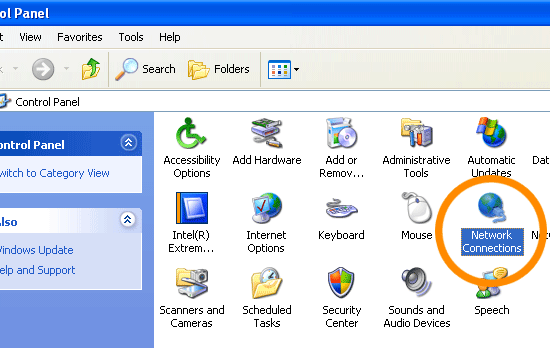
- Click Network Connections from the Control Panel choices.
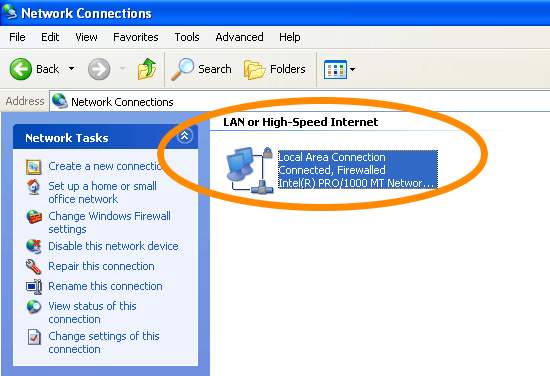
- Choose your connection from the Network Connections window.
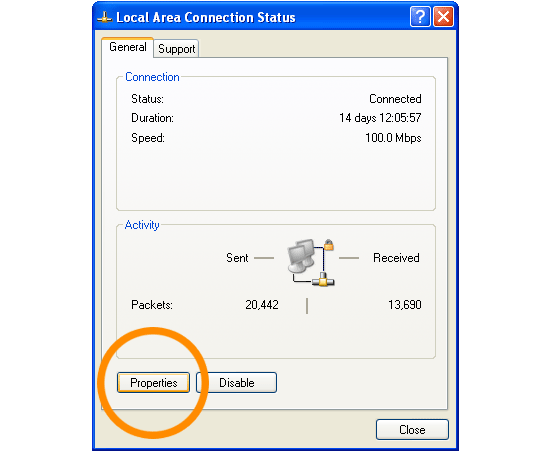
- Click Properties button.
- Select Internet Protocol (TCP/IP) and click Properties.
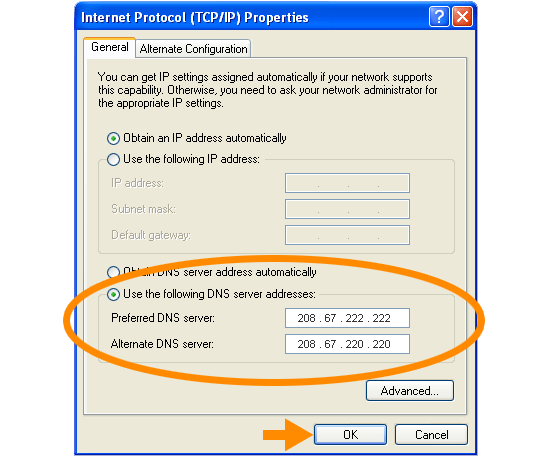
- Click the radio button Use the following DNS server addresses and type in OpenDNS addresses in the Preferred DNS server and Alternate DNS server fields.
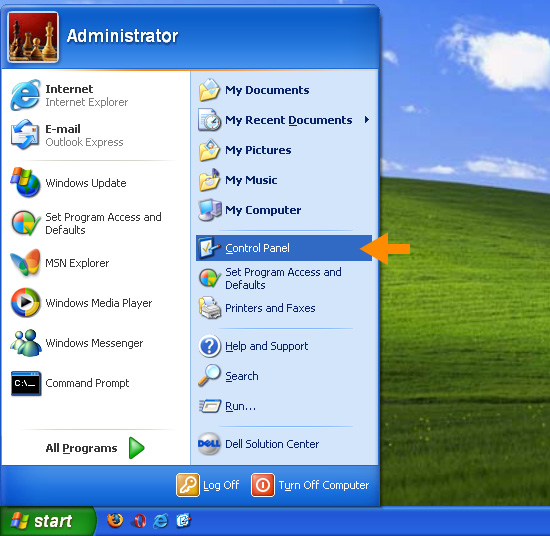
2. Click Network Connections from the Control Panel choices.
3. Choose your connection from the Network Connections window.
In this screenshot, Local Area Connection is the only choice. If you have more than one, choose your default/current connection.
4. Click Properties button.
5. Select Internet Protocol (TCP/IP) and click Properties.
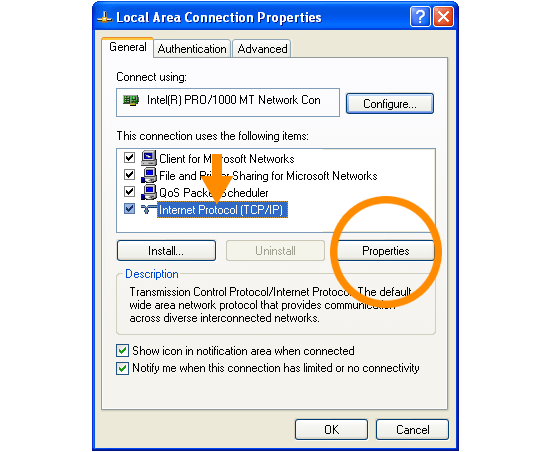
6. Click the radio button Use the following DNS server addresses and type in OpenDNS addresses in the Preferred DNS server and Alternate DNS server fields.
Please write down your current DNS settings before switching to OpenDNS, in case you want to return to your old settings for any reason.
Preferred DNS server address for Open DNS is:
- 208.67.222.222
- 208.67.220.220
If you have recently seen any slow down in your internet connection, I do not hold any responsibilities. According to my opinion, It successfully increased my internet speed.
N0TE: IF ANY PERSON HAS ALREADY KNOWN THIS, PLEASE DO NOT SPAM UNNECCESSARY COMMENTS.


