


Opera Mini, the famous mobile browser has a hidden settings menu for advanced users.
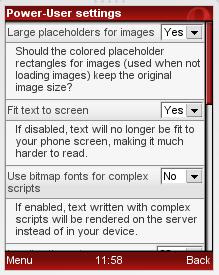
To access it, enter about:config or opera:config in the address bar. This menu have many features that are deactivated in default.
As example, u can read anything written in Sinhala/Tamil/Hindi (or in any other native language) by activating "Use bitmap fonts for complex scripts" in this hidden menu.
Source
To access it, enter about:config or opera:config in the address bar. This menu have many features that are deactivated in default.
As example, u can read anything written in Sinhala/Tamil/Hindi (or in any other native language) by activating "Use bitmap fonts for complex scripts" in this hidden menu.
Source


 then it also work with Opera desktop. I just tried it a min ago after u told it.


