


Latest ads
-
V2ray VPN for Tunneling
- hu KANNA
- Updated:
-
 ඕනම රටකට සෙට් වෙන CV එකක්
- ErMurazor
- Updated:
-
 Hambantota 7 Acres Beachfront Land For Sell DownSouth , PerPerch Price 420 000
- 1024 Digital
- Updated:
-
 Baseus PI LITE INDOOR CAMERA
- ErMurazor
- Updated:
Oracle VM and Red hat error help
- Thread starter redhat
- Start date
You are using an out of date browser. It may not display this or other websites correctly.
You should upgrade or use an alternative browser.
You should upgrade or use an alternative browser.

chatgpteeeeed yet ?Hi Experts
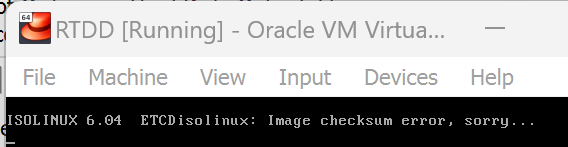
i have installed oracle vertual box and downloaded red hat latest version (64b) from redhat site.
but when isntall in VB it gives bellow error
why is that
View attachment 233323
View attachment 233324
------ Post added on Jul 21, 2024 at 11:02 AM
The error "Image checksum error" usually indicates that the ISO file you downloaded is corrupted or incomplete. Here are a few steps you can take to resolve this issue:
1. **Verify the ISO File**: Check the checksum of the downloaded ISO file against the checksum provided by the Red Hat website to ensure it has not been corrupted during the download.
2. **Redownload the ISO File**: If the checksum does not match, try downloading the ISO file again from the Red Hat website. Ensure that the download completes without interruption.
3. **Check VirtualBox Configuration**: Ensure that your VirtualBox is properly configured and that the ISO file is correctly mounted as a virtual optical disk.
4. **Test with Another Virtualization Software**: If the problem persists, try using another virtualization software like VMware or KVM to see if the issue is specific to VirtualBox.
To check the checksum of the downloaded ISO file, you can use a tool like `md5sum` or `sha256sum` on Linux, or a similar tool on Windows. Compare the output with the checksum provided on the Red Hat download page.
If you need further assistance on any of these steps, please let me know!
------ Post added on Jul 21, 2024 at 11:11 AM
thank u brochatgpteeeeed yet ?
The error "Image checksum error" usually indicates that the ISO file you downloaded is corrupted or incomplete. Here are a few steps you can take to resolve this issue:
1. **Verify the ISO File**: Check the checksum of the downloaded ISO file against the checksum provided by the Red Hat website to ensure it has not been corrupted during the download.
2. **Redownload the ISO File**: If the checksum does not match, try downloading the ISO file again from the Red Hat website. Ensure that the download completes without interruption.
3. **Check VirtualBox Configuration**: Ensure that your VirtualBox is properly configured and that the ISO file is correctly mounted as a virtual optical disk.
4. **Test with Another Virtualization Software**: If the problem persists, try using another virtualization software like VMware or KVM to see if the issue is specific to VirtualBox.
To check the checksum of the downloaded ISO file, you can use a tool like `md5sum` or `sha256sum` on Linux, or a similar tool on Windows. Compare the output with the checksum provided on the Red Hat download page.
If you need further assistance on any of these steps, please let me know!
------ Post added on Jul 21, 2024 at 11:11 AM

secure boot disable karanna. hariyanne naththam redownloadHi Experts
i have installed oracle vertual box and downloaded red hat latest version (64b) from redhat site.
but when isntall in VB it gives bellow error
why is that
View attachment 233323
View attachment 233324
------ Post added on Jul 21, 2024 at 11:02 AM


oke rpm packages daganna widiyak nadda redhat reg nowi?Hi Experts
i have installed oracle vertual box and downloaded red hat latest version (64b) from redhat site.
but when isntall in VB it gives bellow error
why is that
View attachment 233323
View attachment 233324
------ Post added on Jul 21, 2024 at 11:02 AM
Epel repo?oke rpm packages daganna widiyak nadda redhat reg nowi?
RHEL developer license එක free. ඒක දාගත්තනම් හරිනේAdo let me try
Thanks bn
how to disable.?checksum error; right?
experienced same thing on Fedora 40 multiple times
disabling checksum solved the issue for me (at a risk of course)
seems something up with redhat lately
i downloaded 2 times. its 10 GB each ban.. still get check sum error

Similar threads


- Replies
- 2
- Views
- 1K


