Overclocking Guide

chanster

Member
Oct 14, 2007
1,670
0
0
Ratmalana
Guide To Overclock

Overclock your CPU/mobo/memory


1) A mainboard (mobo) that allows you to manually change at least the front side bus (FSB), or multiplier.

2) Adequate cooling for the CPU. What is adequate depends on how far you want to push your system, what vcore (CPU voltage) you’re willing to use, and your specific chip model. You can overclock w/ a stock AMD/Intel heat sink (HS), but better cooling = higher speeds (generally). Use a program like MotherBoard Monitor to check your temps. If they're above say 55C don’t even bother overclocking your CPU until you have upgraded your cooling. Though you can overclock your FSB and lower your multiplier in order to keep your CPU at stock speed.

3) Common sense, general computer knowledge, luck, and good memory helps.

Terms/Definitions

FSB - is the speed at which your CPU, memory, and motherboard transfer data. A higher FSB means higher bandwidth, and performance. Your motherboard and memory will limit your max FSB when overclocking. Generally, your CPU will not, though there have been exceptions.

PCI Bus - is the frequency at which your hard disk drive (HDD), PCI slots, USB ports, etc run at. The stock speed is 33.3mhz. Increasing the PCI bus usually doesn’t increase performance noticeably. Running your PCI bus too high can cause PCI cards not to work, USB to stop functioning (rarely), or HDD corruptions (most common) where you could potentially lose all your files and have to reinstall everything. If your using a VIA chipset or any other motherboard where your FSB is multiplied by 1/4, 1/5, or 1/6 to obtain your PCI bus, make sure it never goes over 37mhz-39mhz (37mhz being safe, 39mhz being slightly risky) unless you don’t care if you lose everything. [PCI Bus] = [FSB] X [the divider]

AGP/PCI Express Bus - is the bus speed your accelerated graphics port and graphics card will run at. On motherboards w/ dividers, AGP/PCI Express bus = the PCI bus x 2. Higher bus speed mean more bandwidth. However, many graphics cards do not need anymore bandwidth than they already have at 66.6mhz(AGP)/100Mhz(PCI Express). Though you might see a very small increase in 3D benchmarking scores by it being higher.

Multiplier - is what your FSB will be multiplied by to get the end CPU clock speed. Most mobos allow you to adjust this by .5 increments.

CPU Cache - is the memory that a CPU has within its self (onboard). There is the level-1 (L1) and level-2 (L2) cache and level-3(L3). L1 is faster. Generally, the L2 cache is bigger (because it’s cheaper to manufacture). The size of the caches depend on the processor’s core.

Voltages:

Vcore (vcc) - is the CPU’s core voltage. The higher the voltage, the faster the clock speed the CPU will be able to run at, and the hotter the CPU will get. And yes, there is a point at which more voltage will hurt your overclock.
Memory voltage (vdimm) - The more voltage, the higher the FSB your memory will be able to hit; and/or the better the memory timings your memory will be able to run at. Some memory modules like higher voltages more than others.
Vdd voltage - is the voltage supplied to your chipset. Generally, the higher the voltage the higher the FSB that your motherboard can obtain.
AGP/PCI Express voltage - is the voltage supplied to your AGP/PCI Express slot/card. Raising the voltage to anything above stock (1.5v) is not recommended. This voltage will not help you overclock your GPU much further. It will only enable you to increase the AGP/PCI Express bus, which in most cases, doesn’t increase performance by more than a very small fraction. Increasing this voltage for an extended period of time can cause damage to your video card.

CPU/RAM Ratio, FSB/RAM Divider, etc - This allows you to run your mobo and CPU at a different clock speed than your memory. However, generally w/ AMD boards, a ratio of 1 (1:1, 3/3, 4/4, 5/5, etc) will yield the best performance. Running your mobo and CPU at 200mhz FSB w/ a memory ratio of 6:4 (memory running at 133mhz) will not be very advantageous.

Memory Timings/Delays - are how many cycles your memory is delayed between certain operations. Different memory have different stock timings. Lower timings are better, but the lower the timings, the lower the max FSB that can be obtained by the memory. Example of very good memory timings:
CAS Latency: 2
RAS/Row Precharge (tRP): 2
RAS-to-CAS Delay (tRCD): 2
Row-active-delay (tRAS): 6

CAS - CAS latency is the number of clock cycles between the memory receiving a "read" command and actually starting to read.

RAS/Row Precharge (tRP) - This Precharge to Active timing controls the length of the delay between the precharge and activation commands.

RAS-to-CAS Delay (tRCD) - This timing controls the length of the delay between when a memory bank is activated to when a read/write command is sent to that bank.

Row-active-delay (tRAS) - The Active to Precharge timing controls how soon after activation the access cycle will be started again.

You can think of memory timings and FSB like this: You're picking up boxes from different locations, organized in rows and columns, and moving them to another given location. The timings would be how long you pause between getting the info for your which box you need, finding the box's column, then the box's row, picking up the box, and leaving that area. Frequency would be how fast you walk/run from the time you leave the pick-up area to the time you return for another box (in other words, it has to do with how many times you could get from the pick-up area, to the drop-off area, and back in one minute if you didn't have to worry about finding/getting the box). The faster you run with the box you're carrying, the slower you are able to find your new box and everything with out freaking out. The more you hussle to find/get your new box, the slower you can hussle to drop off the box and get back. You need to find the best balance. With dual channel there are two of you.
 
Last edited:

chanster

Member
Oct 14, 2007
1,670
0
0
Ratmalana
(continued)

The Process/Theory !

Overclocking Basics:
CPU Speed = FSB x The Multiplier. Note: that a system clocked at 210 x 10 = 2100mhz will perform better than the same system clocked at 200 x 10.5 = 2100mhz. This is because your FSB affects not only your CPU, but your motherboard and memory as well. But because you’re also overclocking your motherboard and memory, these components can limit your max FSB. Your motherboard may be able to run at 220mhz FSB, but if your memory can only run at 200mhz, then that’s where you’re FSB overclock is going to have to stop (unless you buy better RAM). It is also possible that your motherboard will stop you before anything else does. When overclocking hardware for the first time, it’s a good idea to find out how fast each component can run individually. Due to concerns w/ the PCI bus, sometimes this can be a bigger challenge for those w/ out a popular chipset. If you do not find your max overclock for each component, when you hit a wall, it will be harder to deduce what is holding you back. Here is the general process of overclocking your CPU/mobo/memory. The options you have in your BIOS totally depends on your chipset, motherboard make/model, and sometime your BIOS version. Your options may just be named differently or you may not have them. It’s up to you to learn how to use your BIOS. Use google and/or your manual to figure out how. If you don’t have the options you want... buy a new mobo.:P

Finding the max FSB for your motherboard:
1) Insure you have good or sufficient cooling for your CPU!
2) Boot into your BIOS settings by hitting the delete key whiling your computer is starting up. On some mobos you use a different key. If del doesn't work, search google.
3) Lower your multiplier to a low setting (5-8).
4) Raise your memory timings, and/or change your CPU/memory ratio so that your memory’s FSB is always at/below it’s rated speed. This should insure that your memory won’t be limiting your FSB, just your mobo.
5) Disable useless BIOS features (depends on your mobo, but CPU speed spectrum, throttling are common ones).
6) Increase your mobo’s voltage (vdd) as high as you safely can. Most motherboards don’t allow you to increase your vdd more than is safe (1.6v-1.7v or higher w/ a decent northbridge heatsink). When in doubt search Google.
7) Increase your system FSB to 10-15mhz above its rated speed. Always make sure your PCI bus speed isn’t too high before you SAVE and exit your BIOS.
8) Then see if you can boot into your operating system. If your computer boots into your OS, and doesn’t restart, or lock-up, increase the FSB by another 10-15mhz.
9) Continue until your computer reboots unexpectedly, or locks-up. When this happens go back into your BIOS and lower your FSB by maybe 5mhz and try again (if that doesn’t work, lower it some more).
10) If you tried a FSB high enough, you may not be able to get back into your BIOS to lower your settings. In this case, you have to use the jumper located near the battery and CMOS chip of your motherboard. Move the jumper from its current pins, to the only other possible position. Then after about 5 seconds, move it back to it’s original location. If you don’t have one of these jumpers, take out your battery for 1 hour or so and then put it back in. You will now be back at default settings. So you must reset everything to where you were just before you hit trouble.
11) Once you are back into your OS open prime95 (which you have already downloaded and installed from here). Then start the “torture test.” This will test your system for stability. Since we’re only testing out the mobo, once torture test has ran continuously for 4 hours with zero errors/reboots/lock-ups, your FSB is stable. If you get an error or crash, lower your FSB by 1mhz or 2mhz. When running the torture test, check your CPU's temperature. It shouldn’t be above 50C MAX since you lowered your multiplier and is probably running below stock clock speed. As mentioned earlier use a program like MotherBoard Monitor to monitor your uhh... motherboard.
12) You now know and can now write down your motherboard’s max FSB

Finding your memory’s max FSB:
1) Go back into your BIOS.
2) Change your CPU/memory ratio to 1:1 (A.K.A.: 1, 1/1, 3/3. 4/4, 5/5, etc).
3) Increase your memory voltage to the max you're willing to run it at (SAFE: 2.8v; MAX: 3.1v).
4) Adjust your memory timings to 2.0-2-2-6 (The last value is up to you. 5-8 should be good, but many nforceII motherboards run better when the last value is 11).
5) First, try your memory’s stock FSB. You should try your stock speed first because 2.0-2-2-x might be lower than your memory’s recommended timings. Then continue to find your memory’s max FSB just like you did w/ the mobo. Now if you work your way back up to your mobo’s max FSB, and your system is stable, then you know your memory can do a higher FSB than your mobo; but you won’t be able to find out what that is with out a higher clocking mobo.
6) The best memory stability testing program is Memtest86. You should unzip the downloaded file to a floppy/CD, then boot to that floppy/CD in order to start the test. Prime95 will also test your memory. Use both if you wish.
7) Now you have found your memory’s max FSB w/ the memory timings 2.0-2-2-x. Test your bandwidth using SiSoftware Sandra’s “Memory Bandwidth Benchmark.” Depending on a lot of factors, you may have better overall performance w/ the timings 2.0-3-3-x. (or higher). You should definitely be able to reach a higher FSB w/ these timings than you did w/ 2.0-2-2-x. So set your memory timings to 2.0-3-3 and test some more! Once you find this max FSB, test your bandwidth again w/ SiSoftware Sandra, and see which settings yielded the higher score. You can continue to test 2.0-3-2-x, 2.0-2-3-x and whatever other timings you want, or settle on using the one you have already found to work the best thus far.

Finding your max CPU clock speed:

Before we continue, I must say that the important thing is to find the best multi and FSB combination, not necessarily the highest CPU clock speed. Though it is nice to know what the max clock speed is for your chip/cooling. The best combo will depend on which program(s) you want your system to run better on. For your final overclock settings you want your FSB and CPU clock speed to be as close to their maximum's as possible. A system running at 230mhz x 10 = 2300mhz might perform similar to the same system at 210mhz x 11.5 = 2415mhz. You lost 20mhz FSB but gained 115mhz clock speed. Which one is better depends on whether you’re running a CPU intensive application or a “system” intensive application. This is similar to when we found the best memory timing and memory FSB combination. To find out which combo works better: Use a program to benchmark your system such as 3DMark, or play a game while monitoring your frames per second (FPS). Note: the following instructions assume you have found your mobo and memory max FSB. To get started w/ the CPU:

1) Enter your BIOS yet again. Set your FSB to something around 40mhz below your mobo’s/memory’s max FSB.
2) Go into the “monitoring” section of your BIOS. See what the vcc/vcore reading is when your vcc voltage is set to “auto.” Depending on the quality of your power supply, the reading may be slightly under what it’s suppose to be. But from this reading you should be able to tell your stock voltage.
3) You can then either first find your max overclock w/ stock voltage, or you can up your voltage right away to find your max stable clock speed for that given voltage. When overclocking you should never allow your CPU to get above 68C (not above 50C is better), nor increase your voltage by more than 25% from its normal voltage (when using air cooling). Feel free to play around w/ higher voltages (25%-32%) for very short term usage. But for daily use, 25% is pushing it.
4) After deciding/setting your voltage, increase your multiplier one setting. Save and exit BIOS.
5) See if you can boot into your OS. If so, continue increasing the multi by one setting, until you cannot get into your OS. Once you can’t, lower the multi back a setting. Then run Prime95's torture test. If you get an error/crash while Prime95ing lower your FSB some and try again. If you pass for 12hours or more, increase your FSB. You should now be close to your maximum clock speed. Now to consider your overclock 100% stable, you should be able to run the torture test w/ out any errors/reboots/lock-ups for 12-24hours.
6) Now find your best FSB/multiplier combination and your set! Congrats on the overclock! Now go upgrade whatever is slowing you down, and do it again! The nice thing about finding all your max speeds is that if you upgrade say your memory, you already know what your motherboard and CPU can do.
 
Last edited:

zCexVe

Active member
  • Sep 12, 2006
    8,550
    22
    38
    Where I'm now
    This will not be helpful.99% of Sri Lanka use Kingston Value RAM.For DDR1 they max out DDR530 with kingston chips.Nanya>hynix both low than that.Prime stable max @ DDR500.
    For DDR2,DDR 667 can go upto DDR 860 like havent tested with the late cheap ones.So the FSB will be maxed at 215 in 1:1.Performance bottlenecks here.Also when 95% have onboard VGAs no hope in OC.:P
     

    chanster

    Member
    Oct 14, 2007
    1,670
    0
    0
    Ratmalana
    zCexVe said:
    This will not be helpful.99% of Sri Lanka use Kingston Value RAM.For DDR1 they max out DDR530 with kingston chips.Nanya>hynix both low than that.Prime stable max @ DDR500.
    For DDR2,DDR 667 can go upto DDR 860 like havent tested with the late cheap ones.So the FSB will be maxed at 215 in 1:1.Performance bottlenecks here.Also when 95% have onboard VGAs no hope in OC.:P

    This is what i get for trying to help........Cheers......
     

    chanster

    Member
    Oct 14, 2007
    1,670
    0
    0
    Ratmalana
    Now that you've hit your CPU wall. I should tell you that your power supply (PSU) can also limit your overclock as well. If you CPU's voltage is fluctuating alot, your CPU will not be stable. Your vcore fluctuates because your power supply either dosn't have enough power to keep it at the desired level or is too poorly made to keep your voltages at the that level despite how much power it can output. That is why it is important for overclockers to buy good PSUs. To see if your PSU might be the problem, go into your BIOS or use Motherboard Monitor to keep an eye on the voltages. Vcore shouldn't range by more than say 0.07v. Your 3.3v, 5v, and 12v shouldn't jump all over the place or be under/over their ideal voltage by more than 2.5% MAX. BIOS readings aren't always accurate. To test your 5v and 12v lines, test a molex connector using a multimeter. Need more info? Haven't you learned already... Google.com!!


    If you have any suggestions for this guide (something isn’t clear, is inaccurate, grametically sucks, I have a broken link, or you have something to add), PLEASE let me know!! Overclocking is 90% luck... Good luck!
     

    chanster

    Member
    Oct 14, 2007
    1,670
    0
    0
    Ratmalana
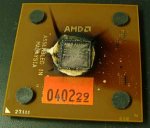
    Have to mention I'm NOT responsible if your CPU will look like this after overclocking......

    burnt1.jpg
     

    fallenzeraphine

    Active member
  • Jan 29, 2008
    1,385
    9
    38
    nice tut chanster, its very good as a general guide line, zcexve u are wrong(unless u r using a bloody old AMD RIG) for Core 2's u dont need a gazillion dollar RAM to OC...a 667MHz or 800MHz will do the trick..only thing is to get a Core 2 with a multiplier mainly higher than 8 (8 is almost perfect) and there are a butt load of them out there EX:

    E 6600 mul 9 OC on a 800MHz = 9x400 = 3.6 GHz (almost the limit of a air cooled Core 2 with a G2 revision G0 go a bit higher)
    E 6420 mul 8 OC on a 800MHz = 8x333 = ~3.0GHz
    * 800MHz Ram with a 1GB is 3500 RS in SL

    and there are some very cheap core 2s like E2xxx series with even higher multiplier cuz they have lower FSB they r just superb to OC with normal white paper RAM...

    And man mobos with onboard VGA are made for ppl who cant afford a mobo that CAN OC, THEY CANT OC cuz they are made not to..not cause they have a onboard VGA...if u want to OC u NEED A VERY GOOD MOBO thats a fact

    cheers...
     

    zCexVe

    Active member
  • Sep 12, 2006
    8,550
    22
    38
    Where I'm now
    chanster said:
    This is what i get for trying to help........Cheers......
    Duh..Dude weve had those convos early and there are no many OCers here.Less than 10.Do you OC? Show your OC to us so we can talk about it too.And the ppl who do have options to OC in LK buy them coz they know about OC.
    But all n all I appreciate your time and effort If you typed that all to make ppl aware and to feel the great in Ocing.Thats appreciated no matter what.
     
    Last edited:

    zCexVe

    Active member
  • Sep 12, 2006
    8,550
    22
    38
    Where I'm now
    fallenzeraphine said:
    nice tut chanster, its very good as a general guide line, zcexve u are wrong(unless u r using a bloody old AMD RIG) for Core 2's u dont need a gazillion dollar RAM to OC...a 667MHz or 800MHz will do the trick..only thing is to get a Core 2 with a multiplier mainly higher than 8 (8 is almost perfect) and there are a butt load of them out there EX:

    E 6600 mul 9 OC on a 800MHz = 9x400 = 3.6 GHz (almost the limit of a air cooled Core 2 with a G2 revision G0 go a bit higher)
    E 6420 mul 8 OC on a 800MHz = 8x333 = ~3.0GHz
    * 800MHz Ram with a 1GB is 3500 RS in SL

    and there are some very cheap core 2s like E2xxx series with even higher multiplier cuz they have lower FSB they r just superb to OC with normal white paper RAM...

    And man mobos with onboard VGA are made for ppl who cant afford a mobo that CAN OC, THEY CANT OC cuz they are made not to..not cause they have a onboard VGA...if u want to OC u NEED A VERY GOOD MOBO thats a fact

    cheers...
    You are better than sasika@Elakiri but buddy I have some little things to show you.No worries.I make mistakes too.I didnt born with these things,I learnt everything by reading a lot and experimenting.
    My post is here because weve had longer covos in 4Q 2006 and first half of 2007 with OCing.You might not have seen them.(coz of EK style,I cant point out a thread,all mixed like achcharu :D)

    I use a bloody old AMD RIG,you point out the fact that AMD is harder to OC coz HT decides both CPU frequency and mem clock.But remeber Always the higher clock doesnt do the trick.You should have a good memory bandwidth with a good FSB/HT:Memory ratio.If not it will not be useful.Just to submit the best clock to hwbot.org.:P You are saying that putting a 1:3 like ratio on memory and run the CPU at a very high clock.That doesn't play well, aint it?Even though a synthetic benchmark like Sandra shows a little margin,It will clearly show some diff in real world applications.Too heat is a factor here as we all know those cheap value RAMs get heated quickly.Also when some of the heated CPU air is on the RAM it gets more worse.
    You dont need a gazillion dollars to buy RAM.My OCZ SLi ready 2x2GB DDR800 4-5-4-12 kit costed 160 USD.Considering it does 800~1200 on 4-5-4-12 Its dirty cheap and I bought them last year.Now its more cheap.DDR2 is like cheap whore.Everywhere.:D

    E6600 on air will do more than 4 gig on air @least on my Striker Extreme.I can show you some results with P35s.

    E 6600 mul 9 OC on a 800MHz = 9x400 = 3.6 GHz
    E 6420 mul 8 OC on a 800MHz = 8x333 = ~3.0GHz
    This is wrong if its 800 MHz,as Intel is Quad pumped it will be 9x200=1600 MHz
    you are telling us about a 1600FSB which will be 400 base and the clock will be 9x400=2600MHz
    And just for the record
    E6600 stock is 9*266=2400MHz
    E6420 stock is 8*266=2130MHz
    You can keep the memory around 800 MHz with a mutiplier you have given with the mobo,higher the merrier.
    With E2XXX series I totally agree with you.Infact you can mod the CPU to get it as a 1066FSB CPU by default by shorting two notches and it will make it easy.Cache is not sooo much important as ppl say.It will make 1~3 second impact in many cases which in real world usually dont count.
    Havent I told the same about onboard VGA?Thats the point.When 95%< ppl use OB VGA how could they OC?I OCed with a 6.5k Asrock conroe 1333 or sumthing with a E4400(10*200)went to like I think 2.4.But memory held it up and had some FSB holes also with OB VGA.So you can see I just have put the 200 to 233 the base clock.The easiest OCs.Like C2Q6600 goes 3gig with 9*333 instead of 9*266.
    Nice talking with you.Long time I had a chat like this in EK.The VGA Fanboysm is too much as always and everything ends up either ATi or nVIDIA.:P
     

    zCexVe

    Active member
  • Sep 12, 2006
    8,550
    22
    38
    Where I'm now
    chanster said:
    Have to mention I'm NOT responsible if your CPU will look like this after overclocking......

    attachment.php

    Dude,You have exaggerated and make people afraid of OCing.You are letting em back :D. As I think the one you show is one of the most popular,even I had one,AMD Athlon 1.6(166x10) 256KB L2 CPU.Those days mobos had just the external CPU thermal sensor.Not much great internal CPU thermal sensors like today.But enen though My then mobo halted @ 100C and immediate turn off.I dont think that is because of OC.
     

    zCexVe

    Active member
  • Sep 12, 2006
    8,550
    22
    38
    Where I'm now
    sasika@Elakiri said:
    Dats not bcoz of overclocking , dats b coz it is an AMD :lol: :lol:

    hemalmenaka said:
    totally agree:D :D :D :D :D
    Those days AMD was renowned for OCing too.And heat was a factor due in K6-II seasons.It was exaggerated that AMDs heat more in SL by some idiots.Hell,what do you call Pentium Ds and IVs compared to Athlon X2?:P
     

    chanster

    Member
    Oct 14, 2007
    1,670
    0
    0
    Ratmalana
    zCexVe said:
    Duh..Dude weve had those convos early and there are no many OCers here.Less than 10.Do you OC? Show your OC to us so we can talk about it too.And the ppl who do have options to OC in LK buy them coz they know about OC.
    But all n all I appreciate your time and effort If you typed that all to make ppl aware and to feel the great in Ocing.Thats appreciated no matter what.

    I know there are only a few who OC here.....But there are only a very few who understands your technicle mumbo jumbo.........So Please just dont boast your knowledge here......99% of Elakiri cant understand what you are talkting.....My tute explains what is what in a very simple way so that everyone can understand......Its not a advance overclocking tute..its a starters guide.....

    So tell about your OCZ SLi ram n all that jazz in one of your threads cause as i said, 99% here don't know what you are talking about........

    I do overclock ...my system is cooled by water...unfortunately the board w/ i could overclocked died and i had to use my old board(al the overclock features are locked)...
     

    chanster

    Member
    Oct 14, 2007
    1,670
    0
    0
    Ratmalana
    zCexVe said:
    Dude,You have exaggerated and make people afraid of OCing.You are letting em back :D. As I think the one you show is one of the most popular,even I had one,AMD Athlon 1.6(166x10) 256KB L2 CPU.Those days mobos had just the external CPU thermal sensor.Not much great internal CPU thermal sensors like today.But enen though My then mobo halted @ 100C and immediate turn off.I dont think that is because of OC.

    If you say that oveclock has no impact on the CPU's life.........Then i don't have anything more to say........
     

    sri_lion

    Member
    Sep 14, 2006
    12,908
    102
    0
    Kuala Lumpur
    chanster said:
    If you say that oveclock has no impact on the CPU's life.........Then i don't have anything more to say........

    Whether it does have a impact or not, Doesn't really bother me.. cuz its not like I'm gonna use the same CPU for the rest of my life :lol: :P