Photoshop help

kdstyle

Well-known member
  • Jan 23, 2011
    827
    34
    48
    Machanla mata Photoshop eka wada tikaka karana hati dana ganna ona:):):):):)
    1st eka tami khomada machanla Ma waga Black and White ekak ganna Photoshop ekan ma Pic wala Thiyna color ekatama
    7mhq.jpg

    jbok.jpg

    7ytz.jpg

    c7ju.png


    2nd eka tami Khomada apita ona tanak withrak color kara ganna ma waga
    7mhq.jpg

    c7ju.png

    anit eka tami khomada Background eka Blur kara ganna PS walin ma waga
    8dkm.jpg

    Photoshop danna kattiya makata podi help ekka danwa Youtube video nam Godak hodi karana hati bala ganna :):):) :D
     

    nOoB_SL

    Well-known member
  • Mar 21, 2013
    2,127
    280
    83
    බෝඩරේ
    ඔයාට ඕන ඔය වගේ රතු පාට ඒරියා එක තියල කලුසුදු ගන්න නම්, Color range, Masking තමයි මම නිර්දේශ කරන්නේ (මාත් වැඩිය දන්නෙ නෑ, හරිය)
    to select a color area. (red area kiyala hithamu)
    go to Select->Color range (see the menu bar, File/Edit/Image/Select etc.)
    then u'l get a preview of your photo.
    color pick the red (or pink or any color u want to keep) area and let it be selected (also u can change the amount by adjusting sliders)
    after u press ok, u can see thers the color u want is selected.
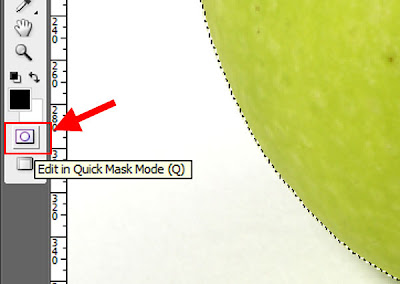
    now press "Q" in keybord. This activates Quick mask.
    ඕක දැම්මම සිලෙක්ට් උන හරිය ඇරෙන්න ඉතුරුවා රතු වෙයි.

    Quick+Mask+Mode.jpg


    the above is the quick mask tool. Click. then u'll get

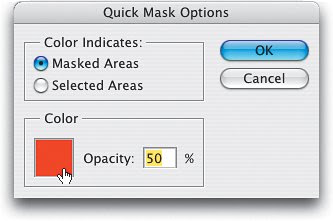
    Adobe%2BPhotoshop%2BChannel%2Band%2BQuick%2BMask%2BOptions2.jpg


    Press "selected areas"

    දැන් බලන්න select කරපු ටික රතු පාටෙන් හයිලයිට් වෙයි. දැන් තියෙන්නෙ පොඩි වැඩක්. ගන්න බ්‍රෂ් එකක්. ඔයාට තව select කරන්න ඕන හරිය පාට කරන්න. ඕන නැති ඒව erase කරන්න.
    Keys, "B" for Brush, "E" for eraser