Pls Help help help help help help help help meeee

pini binduwa

Member
Aug 16, 2008
1,565
5
0
anee oya gollo kauru hari dannawada Gmail walata Html code ekak signature ekak hatiyata ad karaganna hati..

pls kauruhari dannawanam kiyala dennako..
:confused::confused::confused::confused::confused:

I tried using some firefox adons, but couldn't..
 

gazaly

Member
Nov 21, 2006
11,736
207
0
S.A
pini binduwa said:
anee oya gollo kauru hari dannawada Gmail walata Html code ekak signature ekak hatiyata ad karaganna hati..

pls kauruhari dannawanam kiyala dennako..
:confused::confused::confused::confused::confused:

I tried using some firefox adons, but couldn't..

Ehema Puluwanda Daananta Ehema Daapu Ekak Dakala thiyenawada kalin .. :confused::confused: inna hoyala balannam... :yes::yes::yes:
 

gazaly

Member
Nov 21, 2006
11,736
207
0
S.A
Did you notice anything special about this screenshot of GMail message ? Well, it has an embedded animated graphic instead of the plain text signature.

animated-gmail.png

amit-agarwal-email.jpg
GMail has a wonderful rich text editor to compose emails but there are some desirable things that you cannot accomplish in GMail using standard techniques. For example:

1. GMail allows plain text signatures but there's no way to embed HTML signatures with images like the ones you see in Yahoo, Hotmail or Microsoft Outlook email.

2. Gmail Rich text editor has standard text formatting features like font sizes, colors, bullets, hyperlinks, indentation, etc. but there's no way to add other HTML tags like TABLE, DIV, EMBED, etc. So how do you embed Youtube videos, sophisticated table layouts, Flash animation movies, inline podcast players like odeo, etc. in GMail ?

3. You can compose new email in either Plain text or Rich text but how to do you compose a new GMail message in native HTML something like a webpage created in Microsoft Frontpage ?

4. Gmail lets you attach pictures to outgoing email but it shows up as an attachment on the recipients' screen. How do make embed a photograph that appears inline with the actual email message ?

5. You want to embed the Feedburner Headline Animator graphic or the Feedburner Subscriber Counter to your GMail signature which is an animated GIF file.

Now the really good news is that you can do all the above easily with GMail and here's how to do it:

To embed an HTML signature with Images in GMail ?

Create an HTML signature snippet using notepad or WYSIWYG editors like Dreamweaver/Frontpage/Golive or online with Geocities/GooglePages/Tripod Lycos. Your signature can have all kind of HTML tags (including DIV, EMBED, TABLE) but all linked Image files, audio files and video clips must be pointing somewhere the web and not on your desktop.

Once you are satisfied with the layout, select the entire portion of the webpage that you want to appear in the GMail signature and drag it to the GMail compose window. Alternatively you can copy it to the clipboard and then press Ctrl+V in the Gmail window.

I have an illustration here:

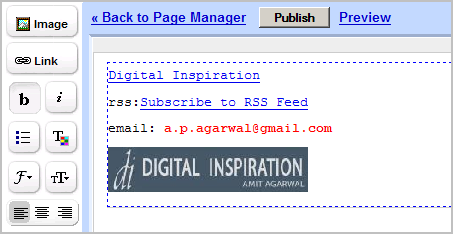
Step 1: The HTML signature is created in Google Page Creator. Select the entire signature and press ctrl+c.

step1.0.png


Step 2: Open a new Gmail compose message window. Now either drag the signature in this GMail window or press Ctrl+V to paste it.

step2.png


The same technique can be applied to embed anything in your gmail message. Say you want to embed an image between two sentences, just drag the image to your gmail compose window and drop it there. It's that simple but makes you email more appealing as if it's composed inside Microsoft Word or Outlook.

To embed Feedburner RSS feed animator, open that graphic in your browser window and drag-n-drop it anywhere in your gmail message.

You can even point images to your blog or embed HTML forms so that recipients can subscribe to your blog directly from your gmail message. Or create tables in Microsoft word and place them in your email. Or even send entire webpages as email so readers can view the page in the message itself without having to click the link. The possibilities are endless.
 

gazaly

Member
Nov 21, 2006
11,736
207
0
S.A
gazaly said:
Did you notice anything special about this screenshot of GMail message ? Well, it has an embedded animated graphic instead of the plain text signature.

animated-gmail.png

amit-agarwal-email.jpg
GMail has a wonderful rich text editor to compose emails but there are some desirable things that you cannot accomplish in GMail using standard techniques. For example:

1. GMail allows plain text signatures but there's no way to embed HTML signatures with images like the ones you see in Yahoo, Hotmail or Microsoft Outlook email.

2. Gmail Rich text editor has standard text formatting features like font sizes, colors, bullets, hyperlinks, indentation, etc. but there's no way to add other HTML tags like TABLE, DIV, EMBED, etc. So how do you embed Youtube videos, sophisticated table layouts, Flash animation movies, inline podcast players like odeo, etc. in GMail ?

3. You can compose new email in either Plain text or Rich text but how to do you compose a new GMail message in native HTML something like a webpage created in Microsoft Frontpage ?

4. Gmail lets you attach pictures to outgoing email but it shows up as an attachment on the recipients' screen. How do make embed a photograph that appears inline with the actual email message ?

5. You want to embed the Feedburner Headline Animator graphic or the Feedburner Subscriber Counter to your GMail signature which is an animated GIF file.

Now the really good news is that you can do all the above easily with GMail and here's how to do it:

To embed an HTML signature with Images in GMail ?

Create an HTML signature snippet using notepad or WYSIWYG editors like Dreamweaver/Frontpage/Golive or online with Geocities/GooglePages/Tripod Lycos. Your signature can have all kind of HTML tags (including DIV, EMBED, TABLE) but all linked Image files, audio files and video clips must be pointing somewhere the web and not on your desktop.

Once you are satisfied with the layout, select the entire portion of the webpage that you want to appear in the GMail signature and drag it to the GMail compose window. Alternatively you can copy it to the clipboard and then press Ctrl+V in the Gmail window.

I have an illustration here:

Step 1: The HTML signature is created in Google Page Creator. Select the entire signature and press ctrl+c.

step1.0.png


Step 2: Open a new Gmail compose message window. Now either drag the signature in this GMail window or press Ctrl+V to paste it.

step2.png


The same technique can be applied to embed anything in your gmail message. Say you want to embed an image between two sentences, just drag the image to your gmail compose window and drop it there. It's that simple but makes you email more appealing as if it's composed inside Microsoft Word or Outlook.

To embed Feedburner RSS feed animator, open that graphic in your browser window and drag-n-drop it anywhere in your gmail message.

You can even point images to your blog or embed HTML forms so that recipients can subscribe to your blog directly from your gmail message. Or create tables in Microsoft word and place them in your email. Or even send entire webpages as email so readers can view the page in the message itself without having to click the link. The possibilities are endless.


Menna mey Link Eketh Thiyenawa Wistharayak...

http://sim.plified.com/2008/02/02/slick-looking-gmail-html-signature/
 

pini binduwa

Member
Aug 16, 2008
1,565
5
0
gazaly said:
Did you notice anything special about this screenshot of GMail message ? Well, it has an embedded animated graphic instead of the plain text signature.

''''''''''''''''''''''''''''''''''''''
animated-gmail.png

amit-agarwal-email.jpg
.

meka mail ekak yawana hama welawema api drag karanna ona .. ehema newei mama kiyanne.. mail ekak compose karanakota auto ad wena ekak
 

xing

Well-known member
  • Sep 18, 2006
    616
    279
    63
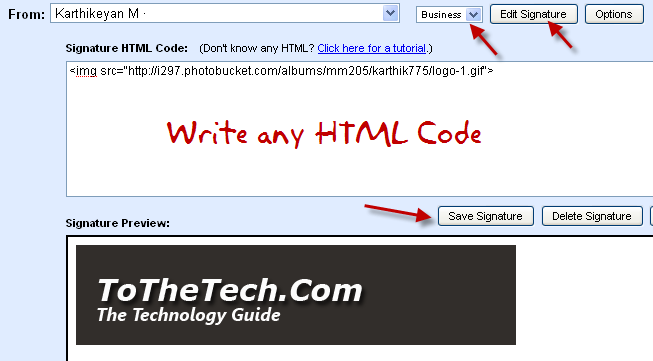
    Gmail the mostly used Email service by all people. But it has one small disadvantage that Gmail does not allow to insert HTML Signatures inside settings. This small disadvantage is solved by using an Firefox Add on Blank Canvas Gmail Signatures.

    html-code-gmail-signature.jpg


    Install Firefox Add on Blank Canvas Gmail Signatures on your Firefox browser, perhaps to install Blank Canvas Gmail Signature Add on you need to sign up for Firefox Add On.

    After installing restart your Firefox browser and move to Compose Mail in your Gmail account.

    3078015767_67c98c2653_o.png


    You can see a drop down box near From address which contains list of template names like Default, Friends, Family and Business in that select any option and create signatures as shown in above figure.

    Insert HTML code in first box you can get preview in second box and save it. Every time when you send mail just select the template it will automatically insert HTML signature in your Compose Mail.


    More Information and Starting Guide
    for Blank Canvas Gmail Signature.
     

    pini binduwa

    Member
    Aug 16, 2008
    1,565
    5
    0
    xing said:
    Gmail the mostly used Email service by all people. But it has one small disadvantage that Gmail does not allow to insert HTML Signatures inside settings. This small disadvantage is solved by using an Firefox Add on Blank Canvas Gmail Signatures.

    html-code-gmail-signature.jpg


    Install Firefox Add on Blank Canvas Gmail Signatures on your Firefox browser, perhaps to install Blank Canvas Gmail Signature Add on you need to sign up for Firefox Add On.

    After installing restart your Firefox browser and move to Compose Mail in your Gmail account.

    3078015767_67c98c2653_o.png


    You can see a drop down box near From address which contains list of template names like Default, Friends, Family and Business in that select any option and create signatures as shown in above figure.

    Insert HTML code in first box you can get preview in second box and save it. Every time when you send mail just select the template it will automatically insert HTML signature in your Compose Mail.


    More Information and Starting Guide
    for Blank Canvas Gmail Signature.

    tnx, i tried this way, but couldn't :confused::confused:
     

    thm14

    Member
    Dec 30, 2007
    21,734
    205
    0
    Interpol HQ | Lyon, France
    pini binduwa said:
    nehe, signature ekata pic ekak hari html code ekak hari ad karanna.. :rolleyes:


    ah eka Gmail walin denne nane :P but google documents walin new doc ekak open karagena ekata pic eka hari HTML code eka hari insert karama dena preview eka copy paste denna puluwan Gmail walata :yes:
    mamanam e widiyata thama karanne :rolleyes: