^^..Portable software mega thread..^^

maheshsenadheera

Well-known member
  • Mar 13, 2009
    18,399
    3,712
    113
    කන්ද උඩරට
    Portable Autodesk AutoCAD 2010

    Portable Autodesk AutoCAD 2010

    portable-autodesk-autocad-2010.jpg


    With AutoCAD 2010, you can tackle your most challenging problems with ease. The 2010 release is loaded with many powerful new tools. Your designs can now exist in any shape imaginable, thanks to new 3D free-form design tools. Also new with AutoCAD 2010 are the parametric drawing tools, allowing you to define persistent relationships between objects. Many critical features have been automated, making your workflow more efficient and the move to 3D design even smoother. Sharing and working on projects with colleagues has never been easier, thanks to multiple upgrades to the PDF capabilities and the addition of 3D printing. With these and countless other new capabilities youve been asking for, AutoCAD 2010 takes any idea and turns it into a reality faster than ever before.

    http://www.megaupload.com/?d=MXJ4TTR0

    http://www.mediafire.com/?3a5e357gkhmjtqk
     

    maheshsenadheera

    Well-known member
  • Mar 13, 2009
    18,399
    3,712
    113
    කන්ද උඩරට
    Google Translate Client 5.0.517

    Google Translate Client 5.0.517

    Google%2BTranslate%2BClient.png


    Version: 5.0.517
    Release Date: 2010-12-17
    File Size: 2.35 MB
    OS: Windows 98/2000/XP/Vista/7
    Requirements: Internet connection
    License: Freeware (Paid upgrade available)

    This is a free translator for Windows which enables the fast translation of text in the most applications, such as Web Browsers, Office apps, Messengers and ect. using the Google Translate service.
    Google Translate is one of the most popular free translation services, however, using an online-translator for text translation is inconvenient: you have to launch the browser, open the website, copy and paste the text, select the language... Too time-consuming!
    Now you can translate web-pages, electronic mail and other documents without opening online-translation sites and buying expensive bulky programs - you simply need to select the text with your mouse!

    http://translateclient.com/translateclient.exe

    Portable version
    http://translateclient.com/TranslateClientPortable.exe
     

    maheshsenadheera

    Well-known member
  • Mar 13, 2009
    18,399
    3,712
    113
    කන්ද උඩරට
    Portable Speccy V1.08.218 (x32-x64)

    Portable Speccy V1.08.218 (x32-x64)

    speccy-system-information-details.png


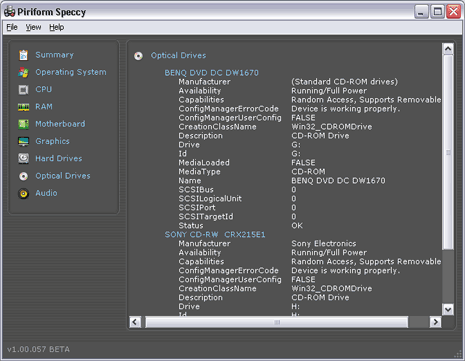
    Speccy will give you detailed statistics on every piece of hardware in your computer. Including CPU, Motherboard, RAM, Graphics Cards, Hard Disks, Optical Drives, Audio support. Additionally Speccy adds the temperatures of your different components, so you can easily see if there's a problem! At first glance, Speccy may seem like an application for system administrators and power users. It certainly is, but Speccy can also help normal users, in everyday computing life. If you need to add more memory to your system, for example, you can check how many memory slots your computer has and what memory's already installed. Then you can go out and buy the right type of memory to add on or replace what you've already got.

    Why do We need Speccy?

    -At first glance, Speccy may seem like an application for system administrators and power users. It certainly is, but Speccy can also help normal users, in everyday computing life.

    -If you need to add more memory to your system, for example, you can check how many memory slots your computer has and what memory's already installed. Then you can go out and buy the right type of memory to add on or replace what you've already got.

    -If you're going to be selling your PC, you can use Speccy to quickly list out the components. Or, if you're buying a PC, you can use Speccy to check that the computer has what the label says it has.

    -Also, Speccy comes in handy for support. If you're on the phone with technical support and they want to know what video card you have installed, there's no need to hunt around Windows. Speccy has all the information on one easy-to-understand screen.

    What's new:

    •New information in Operating System: TimeZone, Power Profile, Scheduler, Services, Device Tree.
    •New information in Network: Sharing and Discovery, Network Shares List, Computer Name, Remote Desktop.
    •Improved drive size recognition for some Hitachi drives.
    •Added Physical Memory to RAM section.
    •Added PCI Data to Motherboard section.
    •Added a credit for translators.
    •Minor bug fixes.
    •GUI improvements.

    OS : Windows Xp/Vista/7 (x32-x64)

    www.mediafire.com/?tkb1172nmzjekcp

    www.megaupload.com/?d=UNU5321D
     

    maheshsenadheera

    Well-known member
  • Mar 13, 2009
    18,399
    3,712
    113
    කන්ද උඩරට
    Portable Google Earth 6.0.0.1735

    Portable Google Earth 6.0.0.1735

    images


    Google Earth - a fresh assembly of the popular client software to work with three-dimensional model of the Earth, created on the basis of high resolution satellite images. Ability to use the original zoom (sometimes down to individual houses), and much more, including the identification of the origin of property. Map can be rotated to any angle, most of the maps - these are ordinary 2D-pictures, but some objects (settlements) are presented in the form of three-dimensional models. Google Earth gives you a wealth of photographic, geographic and astronomical information. With it, you can visit many different parts of the world and the cosmos, whether the island of Maui, Paris and the Milky Way, and view content from Wikipedia, National Geographic, images obtained with Hubble Space Telescope, and much more.

    http://www.megaupload.com/?d=6VX29F4G

    http://www.mediafire.com/?xc8ocqxx1txwcn9
     
    • Like
    Reactions: EPCO

    maheshsenadheera

    Well-known member
  • Mar 13, 2009
    18,399
    3,712
    113
    කන්ද උඩරට
    Portable ACDSee Photo Manager 10.0.219

    Portable ACDSee Photo Manager 10.0.219

    ACDSee%2BPro.jpg


    If you want to organize, find and share images quickly, ACDSee 10 is the perfect solution. Use keywords, categories and your own Windows filing system to instantly locate the right image. Easily correct or improve those less than perfect photos. Share your favorites by email, on your free online album or as high-quality prints. Version 10 allows to see your photos on a virtual calendar, upload your photos to Flickr, add effects to selected areas of your photos, and create Microsoft PowerPoint presentations.

    Instant Viewing
    With ACDSee, you’ll never wait for another image to open. Get instant access to your photos with the fastest viewer on the market.
    See your photos on a virtual calendar, fill your screen with images and quickly browse through your thumbnails. Plus, ACDSee’s Quick View mode is the fastest way to open an e-mail attachment or a file on your desktop. NEW! Mouse over your thumbnails for instant previews.

    Get organized with ACDSee
    With ACDSee, organize the way that works best for you. Organize your Windows® file folders, add keywords and ratings, edit your metadata, and create your own categories. Assign images to as many categories as you like without duplicating files.

    NEW! Use multi-word keywords like ‘Trip to Mexico’ to make finding images even easier.

    Stay organized with smart features that automatically import, rename and categorize your new images when your camera, iPod, camera phone, or other device is connected.

    Organize images stored on CDs, DVDs, and external hard drives without copying them to your computer with the time-saving PhotoDisc feature.

    NEW! Unzip files and start viewing and organizing archived items right away, without leaving ACDSee.

    View, browse and manage over 100 file types

    Get extensive format support for audio, video and images including BMP, GIF, IFF, JPG, PCX, PNG, PSD, RAS, RSB, SGI, TGA and TIFF.

    www.mediafire.com/?3wfhp0myzq5ej4z

    www.megaupload.com/?d=36PI37ER


    maheshsenadheera

    Well-known member
  • Mar 13, 2009
    18,399
    3,712
    113
    කන්ද උඩරට
    Portable ACDSee Photo Manager 12.0 Build 344

    Portable ACDSee Photo Manager 12.0 Build 344
    391154-0.jpg


    ACDSee Photo Manager has everything you need to organize your photos, perfect your shots, and share your memories with friends and family. With ACDSee Photo Manager you can quickly and easily browse and find photos, and fix red-eye, lighting and more with easy-to-use editing tools.

    Note: In order to obtain the 30 days trial key, you need a valid email. If not, you can use the software for 7 days.

    Browse fast:
    · Browse your existing collection instantly. There's no need to waste time importing your photos into a separate library. Access your folders and files live, in real time. Sort, group and filter photos by camera information, edited state or other criteria for super fast scanning. You can also browse by date or event to see photos from a specific occasion.

    Organize flexibly:
    · Create custom categories, add descriptive keywords, edit EXIF and IPTC metadata, and assign ratings to your photos. Tag images with one click and bring them all together for further editing or sharing. You can even organize your photos as you import them from your camera or storage device, saving you even more time.

    Find in a flash:
    · Find any photo, even if you have thousands in your collection. Enter multi-word keyword phrases like “ski trip” or “birthday party”, search only specific folders, leverage your camera's file information, and find that one special image with the Quick Search bar. Build detailed searches and save them for ongoing use.

    Manage everything:
    · Bring together over 100 file types into one convenient place. View, manage and get extensive format support for your photos, audio and video clips including BMP, GIF, JPG, PNG, PSD, MP3, MPEG, TIFF, WAV and many others. View your files even quicker by setting ACDSee as the default program to open these types of files. Take a look at the complete list of supported file formats.

    Protect your photos:
    · Keep copies of your photos in case your computer should fail. Synchronize your folders with an external hard drive or networked drive. Or backup your photos and database information to CD or DVD. You can even schedule automatic backups and reminders.

    http://www.mediafire.com/?e242xah6c46ar9r

    http://www.megaupload.com/?d=3UTL7GXR
     

    maheshsenadheera

    Well-known member
  • Mar 13, 2009
    18,399
    3,712
    113
    කන්ද උඩරට
    Portable QuarkXPress 9.0.0.0

    Portable QuarkXPress 9.0.0.0

    QuarkXPress%2B9.0.0.0%2BPortable%2B%2528repost%2529.jpg


    QuarkXPress is powerful layout software with an intuitive, versatile interface that lets you combine writing, editing, and typography with color and pictures to produce dynamic final output. QuarkXPress is widely used by magazines, newspapers, advertising agencies, typesetters, printers, corporate publishers, design firms, catalog houses, book publishers, and form designers. It is also used by businesses with publishing requirements.

    Print Design & Publishing:
    Over the past 25 years, millions of designers have used QuarkXPress® to produce advertising, brochures, magazines, books, catalogues, newspapers, and more. Why? Because QuarkXPress offers the ultimate in creativity, design control, and professional print output.

    Spectacular Print Design:
    QuarkXPress lets you turn your ideas into reality. It gives you precise control over text, images, shapes, colour, and opacity, and it’s compatible with a broad range of file formats. No design is too simple or too complex — and no page layout software gives you more control over design.

    Professional Print Output:
    Great design, of course, is only half of the equation. The other half is output; the final printed piece has to match what’s on the screen. To make sure that happens, QuarkXPress provides soft proofing features, comprehensive colour management, and support for international colour standards.
    QuarkXPress also includes a built-in preflighting feature that can identify potential output issues early in the design process. When your layout is ready to go, easy-to-use presets for print-ready PDFs make sure output will go without a hitch.

    Digital Design & Publishing:
    Use a Single Tool to Create and Publish Richly Designed, Interactive Content for the Web, eBooks, Smartphones, the iPad, and More

    Entering the Digital Marketplace:
    QuarkXPress opens a whole new world of digital design and publishing to you in one tool, with one familiar interface — at one reasonable price — without requiring coding or programming.
    Why spend the time and money to buy and learn a whole suite of applications, when you can create beautiful, functional digital designs and publications with a single tool? Only QuarkXPress delivers a complete set of intelligent cross-media design and export features in a single application.

    With QuarkXPress:
    · Print designers are right at home with digital publishing, interactive content, and Web content
    · You can easily convert content from print to digital format
    · You can synchronise content between print layouts, digital projects, and designs for different tablet orientations
    · You can share colour definitions, style sheets, and other resources between different types of layouts
    · You only have to learn one skill set to design for multiple media — so you’re more productive, faster
    · Adding digital design and publishing skills to your portfolio can open a world of new opportunities, both for you and for your clients

    Create iPad Apps:
    Combine Rich Design with Interactivity for the Ultimate Mobile Experience
    Create your own custom iPad apps and publications with App Studio for QuarkXPress, then sell them in the Apple App Store

    Design for Blio eReader:
    Bring Rich, Interactive Design to the eBook Marketplace
    Stand out in this new and growing market by designing interactive content for the Blio eReader — the most accessible and versatile eReader on the market
    Export to Flash and HTML
    Web and Flash Design Without Coding — Directly in QuarkXPress
    Build rich, fully interactive Web pages and Flash® projects, complete with animation, video, and more

    Here are some key features of “QuarkXPress”:
    · Easy to use
    · Integration with other applications, including common graphics, video, and other programmes
    · Powerful design tools
    · Precision typography
    · Reliable print output
    · Web, iPad, SWF (Flash), and interactive design
    · Design and publish e-books
    · Digital Design & Publishing
    · Web Sites
    · e-books
    · Banner Ads
    · Digital Magazines
    · Digital Signage
    · Digital Newspapers
    · Interactive Presentations
    · e-catalogues
    · Print Design & Publishing
    · Brochures
    · Magazines
    · Advertising
    · Newspapers
    · Posters
    · Catalogues and Circulars
    · Direct Marketing
    · Packaging
    · Books and User Guides
    · Postcards
    · Financial Reports
    · Collateral
    · Directories and Yearbooks

    241.4 MB

    part 1=
    www.megaupload.com/?d=PZRA8C2Y
    part 2= http://www.megaupload.com/?d=5K9UB4EJ

    part 1= http://www.megaupload.com/?d=5K9UB4EJ
    part 2= http://www.megaupload.com/?d=5K9UB4EJ
     

    maheshsenadheera

    Well-known member
  • Mar 13, 2009
    18,399
    3,712
    113
    කන්ද උඩරට
    Portable Corel Paint Shop Pro Photo Ultimate X2 v12.50

    Portable Corel Paint Shop Pro Photo Ultimate X2 v12.50

    Portable-Corel-Paint-Shop-Pro-Photo-Ultimate-X2-v12.50.jpg


    Corel Paint Shop Pro is a powerful graphics editor. According to its numerous features are quite similar to the well-known adobe Photoshop, but easier to use. Version X2 Corel Paint Shop Pro Photo remained at altitude in terms of performance and features, though. Editor of digital images will satisfy the needs of most photographers and Designers.
    Express Lab:
    This fundamentally new, super fast photo fixing mode, Amazing! You will save a lot of time, because now you can edit dozens of photos in a short vremya.Podumat just how easy it would be cropping, rotating, removing red eye,
    and straightening, without waiting for each individual photo.

    Graphite Workspace:
    Only Paint Shop Pro Photo X2 includes new features as soon as you start the program, you will see a new graphite workspace theme. This dark theme really makes photos vydelyayuschemisya! And for people who would not want to change anything, you can switch to
    classic interface with just a few mouse clicks.

    HDR Photo Merge:
    With NEW HDR Photo Merge, you can easily create photos that give you the full detail of shadows and lighting in your photos. HDR Photo Merge allows you to combine two or more photos taken with different exposures, then automatically Dodge unite them.

    Layer Styles:
    You can easily add shadows, embossing, outer and inner radiance, the slopes and even reflections to tekstu.Vidimye znaki.Bud water you are Professional photographer or not, who wants to share their photos online, its a good idea to add a discrete Watermark that reminds those who created these masterpieces.

    Picture Tubes and Picture Frames:
    Paint Shop Pro Photo X2 includes over 30 brand new, Professionally Designed Picture Tubes and 30 new Picture Frames! Plus there is a unique set of brand new, never you never seen before Picture Tubes and Picture Frames just for vas.Cherno and white film conversion, this feature allows you to make dynamic black and white photos by simulating the effect of fire and black
    white film with colored filtrami.Teper you can choose from a virtually infinite range of color combinations, it gives you full creative control. Plus you can adjust brightness and apply clarified by further strengthening the black and white effect.

    Makeover Tools:
    Paint Shop Pro Photos Makeover tools give you a set of Professional retouching tools that are easy to use. This year we added two new features to your toolbox: New Thinify, which makes the people in your photos looking thinner one nazhatiem.Krome addition, changes were also made to the Blemish Remover and the tan brush.

    New Image:
    For those who scan a lot of images, especially multiple images at the same time, Image will save you time!

    part1-http://www.megaupload.com/?d=P0PWJA80
    part2-www.megaupload.com/?d=0DEG770A
    part3-www.megaupload.com/?d=8YW6I2JD
     

    maheshsenadheera

    Well-known member
  • Mar 13, 2009
    18,399
    3,712
    113
    කන්ද උඩරට
    Portable Corel PDF Fusion v1.0 | 61.12 MB

    Portable Corel PDF Fusion v1.0 | 61.12 MB

    9.jpg


    Corel PDF Fusion delivers all the power of the leading PDF solution—without the high price. This unique PDF creator lets you open, view and work with over 100 different file formats even if you don’t have the software used to create the file! Open PDFs, graphics, Microsoft® Office formats, photos and many more. Create new PDFs just by dragging and dropping or save files to PDF, XPS and DOC formats. Edit or add text, and review and comment with ease. Once you're done, assemble documents quickly and share them in a single PDF package.

    Boost your productivity with Corel PDF Fusion, an all-in-one PDF creator that lets you view files, plus assemble, edit and create PDFs. View more than 100 different file types just by dragging and dropping them into the Welcome Screen. Take pages from multiple files, including documents, spreadsheets and presentations, and combine them into a single PDF to share with anyone. Add new text, bookmarks and comments. Plus, convert files to PDF, XPS and DOC formats with just a click.

    * Save money by viewing over 100 file types without purchasing additional software
    * Easily create and edit PDFs
    * Drag and drop to combine multiple file types in one PDF package
    * Save time by easily re-purposing content, instead of retyping, and cutting and pasting
    * Share files with anyone by converting to PDF, XPS or Microsoft® Word formats

    Features:
    View over 100 file types
    Open over 100 file types—even if you don't have the software used to create the file!
    Open Microsoft® Word, Microsoft® Excel®, Microsoft® PowerPoint®, Microsoft® Project, Adobe® Illustrator®, Adobe® ® Photoshop®, Microsoft® Visio® and many other file types
    Choose from Page, Assembly or Flick views to work with your document

    Edit and rearrange content
    Just select a phrase or sentence and start typing to make changes
    Edit or add text anywhere in a document
    Easily add bookmarks and comments
    Mark up documents using highlighting and sticky notes
    Redact sensitive information and save securely
    Add watermarks
    Insert hyperlinks to other pages in your document, other files or websites
    Rearrange, rotate or crop pages

    Assemble new documents with ease
    Drag and drop to easily add content from multiple sources—including documents, spreadsheets, presentations and images—into a single PDF package to share with anyone
    Quickly assemble new documents using pages from existing material
    Export and email PDF documents
    Convert to PDF or XPS

    Create files in PDF, DOC and XPS formats
    Create new PDF documents from within any application that can print
    Organize and send related files in a single PDF package
    Convert multiple files at once with the Corel® PDF Batch Converter

    www.megaupload.com/?d=Z1AV649B

    www.mediafire.com/?l99gik9ckm5rx86
     

    maheshsenadheera

    Well-known member
  • Mar 13, 2009
    18,399
    3,712
    113
    කන්ද උඩරට
    Portable YouTube Music Downloader 3.7.4

    Portable YouTube Music Downloader 3.7.4

    images


    An easy-to-use Windows software to download YouTube music videos and convert them to MP3, AVI, WMV, MOV, MP4, 3GP formats. You can download millions of music from YouTube and listen them on your iPod, MP3 Player or watch them on your PC, iPod, iPhone. Unlimited download 6,000,000+ music from YouTube, get started now.

    YoutubeGet is an all-in-one software designed to make quick and easy work to download Youtube videos and convert them. Offering a multitude of methods to acquire the video, this application has all the power you need while still remaining small and easy to use. After downloading videos it will auto convert FLV files to MP4, 3GP, AVI, WMV, MOV etc. Soon, you can see youtube videos on your MP4 or Cell phone.

    YoutubeGet Benefits & Features:
    • Download Youtube Videos to Cell Phone
    • YoutubeGet will auto convert Youtube Videos to 3GP Cell Phone Format, then you can see all youtube videos on your Cell Phone!
    • Download Youtube Videos to iPod
    • You can download youtube videos and save them as iPod MOV or MP4 format, and play them anywhere!
    • Download Youtube Videos to PSP
    • After playing games on your PSP, would you like to see some cool videos? YoutubeGet will download youtube videos and save them as PSP format!
    • Download Youtube Videos and Burn to a CD/DVD
    • Download youtube videos and save as AVI or WMV. It is much easier to burn these funny videos to a CD/DVD by this two formats.
    • Clipboard Monitor Helps You to Download Youtube Videos Much Easier
    • YoutubeGet monitors your Clipboard all the time. when you are copying a Youtube Video URL, immediately the Add New Download window will auto pop up.
    • FLV Converter (Free in YoutubeGet V4 Suite)
    • You can convert your local FLV files to AVI, WMV, MOV, 3GP, MP4 etc.
    • Youtube Browser
    • Search Youtube Videos and Preview them before downloading. When you want to download them you just one-click on Download Now Button.

    www.megaupload.com/?d=WYFT77QQ

    www.mediafire.com/?nhn49fwo0c4v668
     

    maheshsenadheera

    Well-known member
  • Mar 13, 2009
    18,399
    3,712
    113
    කන්ද උඩරට
    Portable Photodex ProShow Gold v4.52.3049 | 33.6 MB

    Portable Photodex ProShow Gold v4.52.3049 | 33.6 MB

    images


    ProShow Gold makes it easy to create a slide show with your photos, videos and music in a few simple steps. Just drag and drop your content into a show, edit photos, add effects, set the timing and you’re done! You can easily create a unique and personalized photo slide show for any occasion whether it’s a birthday, anniversary, graduation, holiday, wedding or just showing-off vacation photos. Drag and drop your photos, videos and music into ProShow Gold’s easy-to-use interface. There you can add borders to photos, crop and edit video and audio clips, use built-in editing tools like red-eye removal and more.

    Create spectacular effects by adding a pan, zoom or rotate to any photo in your show. Choose from over 280 transition styles including dissolves, fades, wipes, and shapes. Add custom captions and backgrounds to any photo. ProShow Gold will output your slide show to over 40 formats including DVD, Blu-ray, CD, the Web and dozens of devices like the iPod®, iPhone® and Blackberry®. You can even upload your slide shows directly to YouTube.

    Features:
    • Add an unlimited number of layers to any slide
    • Drag and drop to easily add content to a show
    • Supports 100+ file types
    • Transparency support for PSD, PNG, TIFF and GIF files
    • Turn any layer into a fully-customized mask to conceal or reveal aspects of underlying layers
    • Add a gradient or solid color as a slide layer to a layer to get incredible results
    • Spice up a presentation using interactive slide actions to launch PDFs, spreadsheets, webpages and more
    • Set transition effects for individual layers
    • Optimize your workflow using built-in image correction tools like sharpen, colorize, saturate and more
    • Create enhanced borders for your photos and videos with ProShow Producer's all-new vignette effect
    • Create Hollywood-style greenscreen effects with the all-new Chroma Key Transparency tool
    • Specify opacity for any layer on a slide
    • Add depth to your composition by adjusting the color and opacity of a shadow on any layer in a slide
    • Crop and rotate your photos and videos with precision
    • Use the red-eye removal tool to correct any photo in your show in seconds
    • Use adjustment effects to produce spectacular effects. Make a video move through color shifts or create a sequence of photo fades
    • Add multiple keyframes to each adjustment effect
    • Add motion like pan, zoom and rotate to any layer on a slide for a cinematic effect
    • Zoom X and Y coordinates for a layer individually and zoom out further than ever before
    • Create complex motion paths by setting multiple keyframe points on the keyframe timeline
    • The fully-customizable slide preview grid allows you to accurately position your photos and videos on a slide
    • Control the font, size and color of captions in your slides
    • Use caption keyframing to create multiple caption motion effects on a single slide
    • Animate your captions with more amazing effects to choose from than ever before
    • Add interactive captions to launch actions like Pause, Resume, Next Slide, Previous Slide, Write Email and many more
    • Gain greater design control over captions with ProShow Producer's new caption styles, caption line spacing and caption character features
    • Enhance slide shows by dropping in any MP3 or WAV audio file
    • Save an audio track directly from a CD and drop it right into your slide show
    • Crop your audio and set fades using the built-in Audio Trimmer
    • Built-in soundtrack waveform in slide list
    • Add interest to your slide shows with solid colors, gradients, or videos as backgrounds
    • Use the new, built-in backgrounds to spruce-up your slide shows
    • Control the adjustment levels of your background content
    • And many many more...

    www.mediafire.com/?baea67k8616qa7w

    www.megaupload.com/?d=BODC219O
     

    lahirukasun

    Well-known member
  • Nov 28, 2006
    1,637
    101
    63
    maxxa...... puluwan nam honda Audio Editing SW 1k daapanko.
    umba daala thiyena AVS Audio weda karanne na.