Professional NAS storage system (Do It Yourself way)

lankavee

Member
Apr 24, 2009
41
2
0
After looking everywhere for professional grade NAS system (network attached storage), I learned the bitter truth of pricing Vs features. Golden rule “Get what you pay for”. A 4 bay NAS with 4x1TB drives with it shoots well over Rs. 200,000. A two bay NAS with 2x1TB drive merely breaks bellow 100,000. My requirement was a 6 bay (6x500TB drives), so not to mention how much something of this scale would cost. So my logical and financial reasoning would not permit buying off-the-shelf unit. Back to the drawing board, I love DIY.

Here goes the hardware itinerary;

1)High-tower server casing and PSU
2)6 Removable Hard Disk bays
3)6x500GB hard disks
4)Motherboard and Processor
5)2GB RAM
6)6 channel SATA raid controller card
7)CF to IDE adaptor and 1GB CF card
8)Duel channel LCD temperature display
9)USB-LCD Display (System status)
10)eSATA connector

Both Unity Plaza and eBay helped me to find the required components. Here goes what I have bought (some as still on the way)
Following description of each item carries an indicative pricing information as at the time of my purchase (two weeks back).

Total cost of hardware is around Rs. 110,000. When comparing a 6bay Raid 5 NAS storage system (including disks), this price is a fraction of the cost at par or probably exceeding quality.
 

lankavee

Member
Apr 24, 2009
41
2
0
High-tower server casing and PSU

I had to spend lot of time finding this since nobody carries high-tower casings which can accommodate 6 externally accessible 5.25” bays. eBAY has plenty, but due to the size it would cost lot on shipping which didn’t make the option attractive.
Finally I manage to find one (rather accidentally) in one of the Unity plaza shops on 1st floor. However, this only has 5 externally accessible bays (not 6). I have settled with this due to the fact that spending more time on 6 bay unit proved to be near impossible. To my pleasant surprise, it comes with a 550w power supply unit, having plenty of SATA power connectors. Quite neat and handy.


COST – Rs. 17,000 (PSU+casing)
 

VSGM

Well-known member
  • Aug 2, 2007
    10,330
    213
    63
    I have a 500GB NAS ;) (Not so Large but enough for me ;))

    Specs:
    Pentium Dual Core E2200
    Foxconn G31MB
    2*250GB HDD (SATA)
    1*80 HDD (Old HDD PATA)
    2GB Of DDR2 667MHz
    Windows Home Server 2008
    PSU: 450 Watt

    Total: Rs 20,000/- ;)
     

    lankavee

    Member
    Apr 24, 2009
    41
    2
    0
    6 Removable Hard Disk bays

    I could not find any local supplier who carries hot-swap hard disk bays in Sri Lanka. So only option was eBAY.

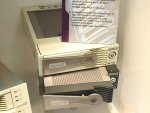
    SuperSwap 1100 from PROMISE is a single bay unit for SATA hard disks in hot-swap configuration. This fits into 5.25” drive bay and lockable. I ordered 6, since my original plan was to use 6 drives, but ended up with a PC case with only 5 bays. (shipment yet to arrive)

    [FONT=&quot]Promise SuperSwap 1100 hard disk bay (6 units) – Rs 12,000

    attachment.php

    [/FONT]
     

    Attachments

    • promise_superswap1100.jpg
      promise_superswap1100.jpg
      47.5 KB · Views: 129
    Last edited:

    lankavee

    Member
    Apr 24, 2009
    41
    2
    0
    6x500GB hard disks

    Identical drives needed for the raid array, and I yet to purchase the 6x500GB drives. This can be easily purchased locally, around Rs. 7000 a unit.

    Mostly I will be purchasing SAMSUNG SpinPoint T Series HD501LJ 500GB 7200 RPM 16MB Cache SATA 3.0Gb/s Hard Drive

    Samsung SpinPoint 500GB – Rs. 35,000
     

    lankavee

    Member
    Apr 24, 2009
    41
    2
    0
    Motherboard and Processor

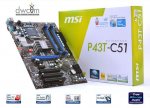
    Already purchased locally. MSI P43T-C51 is probably an overkill for the intended NAS system, but I decided to purchase this without a dire reason. Since the selected casing has enough space, full size ATX motherboard gives me expansion capability, should ever requires. However, this does not come with built-in VGA, which requires adding a separate VGA card. I will only use this VGA for initial testing and remove it once the system is up and running.

    Motherboard – Rs. 9600


    attachment.php


    I resort to duel core processor Intel E5200 (commonly known as Intel Pentium Dual-Core, 2.5 GHz, 2M L2 Cache, 800MHz FSB, LGA775). Again this is a porche engine on corolla, but the only available processor with less power was Celeron duel core, which I avoided.

    Processor – Rs. 8100
     

    Attachments

    • msi-motherboard.jpg
      msi-motherboard.jpg
      39 KB · Views: 148

    lankavee

    Member
    Apr 24, 2009
    41
    2
    0
    2GB RAM

    Kingston 2GB DDR2 is fixed on one slot. 1GB would have been enough.

    2gb (Ddr2) Kvr667 Kingston– Rs 5800
     

    lankavee

    Member
    Apr 24, 2009
    41
    2
    0
    6 channel SATA raid controller card

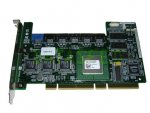
    Perhaps one of the most critical component of the system. After so much research I decided to purchase Adaptec AAR 2610 SATA RAID controller from eBAY. This supports 6 SATA drives on RAID 0,1,10,5 configurations. My original intention was to build RAID 10 array, which gives good performance and security at the expense of half of total capacity, meaning 6x500GB will give 1.5TB of total storage capacity with fault tolerance on one drive failure.

    However, since now I have only 5 bays, using raid 10 is not possible (requires even number of drives. Either I will have to use 4x1TB on Raid 10 or 5x500GB on Raid 5. Later option gives 2TB space with one drive failure protection but at small performance degradation. Maintaining parity requires additional reads and writes which tends to slows down the array quite significantly if the harddrive access is dense. In my situation, this will not be a major issue, so it will not affect.

    attachment.php


    This card is not officially supported by Adaptec, since it is an OEM product for DEL and HP. With some effort I manage to find the manual at DEL site, so it is not much of a problem.

    Most interestingly, this card is known to work with FreeNAS, the OS I am going to use (details later), so fingers crossed till I get my hands on the package.

    [FONT=&quot]Adaptec AAR 2610 – Rs. 10,000[/FONT]
     

    Attachments

    • 2610SA_1.JPG
      2610SA_1.JPG
      42.3 KB · Views: 134

    lankavee

    Member
    Apr 24, 2009
    41
    2
    0
    CF to IDE adaptor and 1GB CF card

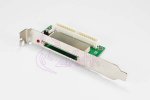
    This is completely optional but I declare it as a great addition. The selected NAS OS (FreeNAS) can be booted with a flash drive (64MB would be enough) more efficiently than from another hard disk. So my NAS system is flash booting and magnetic hard disks are dedicated for the RAID array. In case of OS failure, I only have to slide in backup CF card and system should boot up without a problem.

    attachment.php


    I selected a bracketed CF adopter, since it will allow CF removal without opening the computer case. If security is a concern, this can be fixed inside the casing, after removing the bracket. Header fit into the IDE cable quite conveniently. There are also other models which can be inserted directly into the motherboard IDE header, which also can be considered.

    Even a 64MB CF card would have been enough, but I bought 3x1GB CF cards on a package deal at US$30. (yet to receive)

    CF adopter - Rs 1200

    CF card 1GB – Rs 1000
     

    Attachments

    • cf2ide.jpg
      cf2ide.jpg
      26.4 KB · Views: 129
    Last edited:

    lankavee

    Member
    Apr 24, 2009
    41
    2
    0
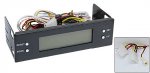
    Three channel LCD temperature display

    Again an optional component, but I think would be something good to have. This displays temperature on 3 points (hard disk, CPU etc.). I intend to use all 3 sensors in-between hard disk array.

    [FONT=&quot]Temperature and Fan speed display – Rs. 1000

    attachment.php

    [/FONT]
     

    Attachments

    • display-temp.jpg
      display-temp.jpg
      32.7 KB · Views: 124

    lankavee

    Member
    Apr 24, 2009
    41
    2
    0
    USB-LCD Display (System status)

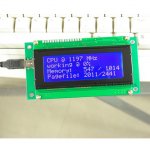
    Another option, but again I am more excited to have this up and running in my NAS box. Idea is to display system information on a 4 line LCD panel. As I intend to use the system even without a VGA card (no display), it is essential to have a display showing PC parameters straight away.

    Any LCD display would do, but I decided to go with USB connection and LCDProc software, which can be run on FreeBSD (OS which FreeNAS is based on). There is much work to do getting the unit up and running, but worth the try.

    USB-LCD 4 Line 20 Character module – Rs 2500

    attachment.php
     

    Attachments

    • display-smartie.jpg
      display-smartie.jpg
      53.1 KB · Views: 109

    lankavee

    Member
    Apr 24, 2009
    41
    2
    0
    eSATA connector

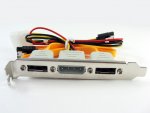
    Since the motherboard I have chosen does not carry eSATA connector on board, I had to use an external bracket for adding eSATA capability. This is used to synchronize external hard disks with the NAS. eSATA provides upto 3Gb/s speed, which is more than 8 times faster than USB. Quite essential for backing up without loading LAN.

    Duel eSATA connector Rs. 1000

    attachment.php
     

    Attachments

    • esatabracket.jpg
      esatabracket.jpg
      82 KB · Views: 110

    lankavee

    Member
    Apr 24, 2009
    41
    2
    0
    Operating system for the NAS

    I have selected FreeNAS after evaluating few open source solutions. Due to the fact that FreeNAS is quite stable and runs on 32MB of footprint, and flash bootable, alongside web based easy management console, FreeNAS stood ahead of others. True it has few hiccups and lack of very few good-to have features, but all in all it is the best free NAS OS out there.
    NAS box in theory should not run other software except bear minimum to facilitate file sharing. In this sense FreeNAS will not impose any issues on extendability ect.
    My greatest challenge with FreeNAS is the fact that FreeBSD is alien to me, and getting LCDProc to work there is lot of work ahead.[FONT=&quot]
    [/FONT]
    [FONT=&quot]NOTE: One can easily use Linux, stripping off other software and keep SAMBA etc. making a Linux file server. There are many web based file browsing software available, which can give easy remote access to the GUI file management. In this case, there are many LCD software’s out there and setting them up on Linux is well documented and proved to be easy.[/FONT]
     

    lankavee

    Member
    Apr 24, 2009
    41
    2
    0
    Received most of the components from eBay. Quite convenient, delivered by post to the doorstep, no hassle at customs.
    Yet to receive the 6 superswap drive cases, which is bulky and I am sure a trip to the GPO is ahead.

    Currently testing the LCD with LCDProc on FreeBSD. A bit harder than expected. Could not get anything on the display yet.

    Tune in for the updates...
     

    lankavee

    Member
    Apr 24, 2009
    41
    2
    0
    Got my LCD devise working with LCDProc. Sound easy but a bit complicated since the unit i purchased is from Sure Electronics, something which does not natively supported by LCDProc, hence no readily available driver on the current stable release. I will post a detail configuration guide on setting up LCDProc with Sure Electronic's LCDSmartie module later.

    Why Sure Electronic's LCDSmartie? well, that is the cheapest 20x4 Blue back-lighted LCD devise with CP2102 USB communication module, readily available for online purchase. US$ 20 was all it took for getting it to my doorstep through eBay on standard shipping within a week.
     
    Last edited:

    lankavee

    Member
    Apr 24, 2009
    41
    2
    0
    Finally the system is complete, after receiving all the parts from eBay. Except the SuperSwap 1100 drive bays, everything else were delevered to doorstep most conveniently. Absolutely No local taxes and within 10 days of payment and ordering. Petty impressive, right!

    I had to go to the GPO fort, and collect the drive bays, which came in a large box, and it was taxed too. No complains, government needs money too.

    it took me few hours to put things together, and finally test the OS on real hardware. only the LCDs are lying on my table, which needs to be fixed after cutting the chassis keeping the box aesthetically pleasing. This is precision and delicate work, which needs time and a steady hand more than anything else. Will be doing it over the weekend.

    I am really happy that LCDProc is up and running on FreeNas .7-2 (FreeBSD 7.2-RELEASE-p4) driving SureElec Smartie module version 1 (20x4 character display) like a charm. Nevertheless, i had to pay considerable time getting this particular LCD hardware working on FreeNas. Will be posting separately on getting this done, since i found it very difficult to get information regarding this on net. SureElec hardware is the cheapest and easiest to get, from countries like ours, so I believe a guide would help everybody else who wanted to put up a LCD display hooked into FreeNas. Fancy, but looks really cool and makes your device looks expensive :)