


සමහරවිට මේක Android phones පාවිච්චි කරන අය දන්නවත් ඇති.කමක් නැහැ.නොදන්නා අයත් ඇතිනේ.
එහෙනම් මේ තියෙන්නේ App එක.
මේක file sharing app එකක්.wi-fi router එක through තමයි file share වෙන්නේ.Bluetooth නැති laptops වලට ගොඩක් වටිනවා.USB cable ගහන්න ඕන නැහැ.Phone එකෙන් computer එකටයි,computer එකෙන් phone එකටයි ලේසියෙන්ම file transfer කරන්න පුළුවන්.
එහෙනම් මුලින්ම මේ link එකෙන් ගිහිල්ල App එක phone එකට install කරගන්න.
https://play.google.com/store/apps/details?id=com.estrongs.android.pop&feature=search_result#?t=W251bGwsMSwxLDEsImNvbS5lc3Ryb25ncy5hbmRyb2lkLnBvcCJd
ඊට පස්සේ මෙන්න මේ වගේ window එකක් එයි.
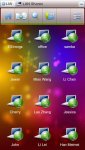
මේ පෙන්නන්නේ LAN එකේ share වෙලා තියන devices ටික.දැන් ඔයගොල්ලෝ අලුතෙන් මේ app එක install කරපු නිසා මුකුත් devices පෙන්නන්නේ නැහැ.ඒක නිසා මුලින්ම අපි අලුත් server එකක් හදා ගන්න ඕන.ඒකට කරන්න තියෙන්නේ එකේ උඩම ඇති new කියල option එකක්.ඒක select කරලා එකේ තියන details දෙන්න තියෙන්නේ.එකේ IP එක ඉල්ලයි.ඒකට දෙන්න තියෙන්නේ ඕගොල්ලන්ගේ machine එකේ IP එක.ඒක තමයි App එක gateway ip එක විදියට ගන්නේ.ඕගොල්ලන්ගේ machine එකේ ip එක බලාගන්න command prompt එකේ "ipconfig" කියල type කරන්න.එතකොට "IPv4 Address" කියල පෙන්නයි.
ඊට පස්සේ ඉතින් වැඩේ හරි.
මේ තියෙන්නේ app එකේ snapshots ටිකක්.
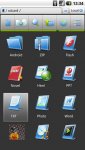
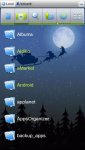
දැන් තියෙන්නේ machine එකෙන් file share කරන එක.මුලින් කරන්න ඕන machine එකෙන් share කරන්න ඕන file ටික එක folder එකකට දාගන්න.ඊට පස්සේ ඒ folder එකට sharing permissionදෙන්න "Everyone" කියල.දැන් App එකේ LAN view එකට ගිහින් machine එක තෝර ගන්න.දැන් ඔයාලගේ file එක එකේ පෙන්නයි.ඊළඟට ඒ file එක ඇතුලට ගිහින් files ටික copy කරගෙන phone එකේ ඕන folder එකට paste කරගන්න.එච්චරයි.
වැඩිපුර විස්තර ඕන නම් මෙන්න තියනවා video එක.
https://www.youtube.com/watch?feature=player_embedded&v=woulv0zp7Sg
හොඳ නම් ඉතින් සලකල යන්න.මේක මගේ දෙවැනි thread එක.
එහෙනම් මේ තියෙන්නේ App එක.
මේක file sharing app එකක්.wi-fi router එක through තමයි file share වෙන්නේ.Bluetooth නැති laptops වලට ගොඩක් වටිනවා.USB cable ගහන්න ඕන නැහැ.Phone එකෙන් computer එකටයි,computer එකෙන් phone එකටයි ලේසියෙන්ම file transfer කරන්න පුළුවන්.
එහෙනම් මුලින්ම මේ link එකෙන් ගිහිල්ල App එක phone එකට install කරගන්න.
https://play.google.com/store/apps/details?id=com.estrongs.android.pop&feature=search_result#?t=W251bGwsMSwxLDEsImNvbS5lc3Ryb25ncy5hbmRyb2lkLnBvcCJd
ඊට පස්සේ මෙන්න මේ වගේ window එකක් එයි.
මේ පෙන්නන්නේ LAN එකේ share වෙලා තියන devices ටික.දැන් ඔයගොල්ලෝ අලුතෙන් මේ app එක install කරපු නිසා මුකුත් devices පෙන්නන්නේ නැහැ.ඒක නිසා මුලින්ම අපි අලුත් server එකක් හදා ගන්න ඕන.ඒකට කරන්න තියෙන්නේ එකේ උඩම ඇති new කියල option එකක්.ඒක select කරලා එකේ තියන details දෙන්න තියෙන්නේ.එකේ IP එක ඉල්ලයි.ඒකට දෙන්න තියෙන්නේ ඕගොල්ලන්ගේ machine එකේ IP එක.ඒක තමයි App එක gateway ip එක විදියට ගන්නේ.ඕගොල්ලන්ගේ machine එකේ ip එක බලාගන්න command prompt එකේ "ipconfig" කියල type කරන්න.එතකොට "IPv4 Address" කියල පෙන්නයි.
ඊට පස්සේ ඉතින් වැඩේ හරි.
මේ තියෙන්නේ app එකේ snapshots ටිකක්.
දැන් තියෙන්නේ machine එකෙන් file share කරන එක.මුලින් කරන්න ඕන machine එකෙන් share කරන්න ඕන file ටික එක folder එකකට දාගන්න.ඊට පස්සේ ඒ folder එකට sharing permissionදෙන්න "Everyone" කියල.දැන් App එකේ LAN view එකට ගිහින් machine එක තෝර ගන්න.දැන් ඔයාලගේ file එක එකේ පෙන්නයි.ඊළඟට ඒ file එක ඇතුලට ගිහින් files ටික copy කරගෙන phone එකේ ඕන folder එකට paste කරගන්න.එච්චරයි.
වැඩිපුර විස්තර ඕන නම් මෙන්න තියනවා video එක.
https://www.youtube.com/watch?feature=player_embedded&v=woulv0zp7Sg
හොඳ නම් ඉතින් සලකල යන්න.මේක මගේ දෙවැනි thread එක.
Last edited:


