


Today I'd like to intruduce a powerful dvd converter, which is Cucusoft Ultimedia DVD Converter, it enables you to convert dvd to any video and audio formats, and also supports convert dvd to any portable devices.
So the following will show you how to convert dvd with this program
Make preparation: Download Cucusoft Ultimedia DVD Converter, install and run it.
Step 1::Click "Open DVD" button to load your dvd after insert your dvd to DVD-ROM
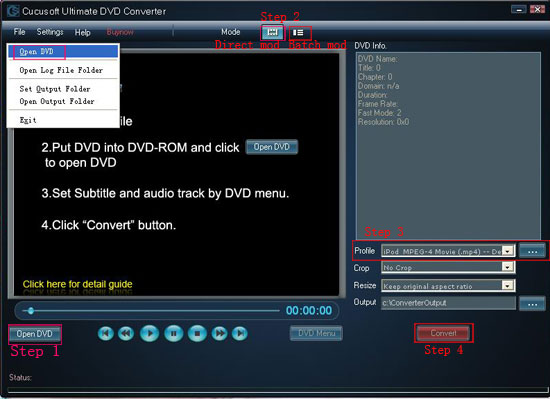
Step 2: Select "Direct mode" or "Batch Mode"
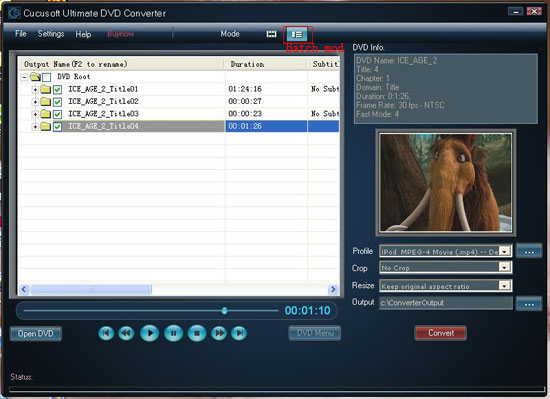
"Direct Mode" means that you can directly click the DVD Menu to select the DVD movie you want to rip. This mode is very easy for ripping a movie DVD's.
"Batch Mode" means that you can select the DVD titles/chapters and audio track they want to rip via checkbox list. This mode is very easy for batch ripping Music DVD's, MTV DVD's and Episodic DVD's.
Step 3: Select output format from the "Profile" drop-down list.
Note 1: Click the "…" button at the right of the "profile" drop-down list to set the important parameters: Video Bitrate, Audio Bitrate, Frame Rate and Video Size.
For a high image/sound quality you can increase the value of Video/Audio Bitirate and for a compressed file you can decrease the value.
Note 2 From the "Crop" drop-down list, you can select "No Crop", "Crop both black bands" or "Crop the upper black band".
Note 3: From the "Resize" drop-down list, you can select "Stretch to full screen" or "Keep original aspect ratio".
Note 4: Click the "…" button at the right of the "Output" button to set the conversion destination.
Step 4: Click the "Convert "button to start the conversion.
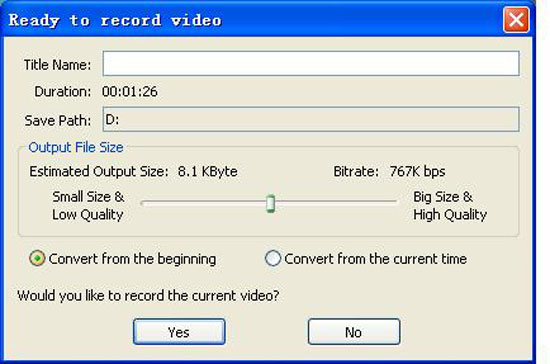
A dialog will pop up, which enables you to set Title Name, Save Path, Output File Size etc, Click "Yes" button after you setted.
Tips
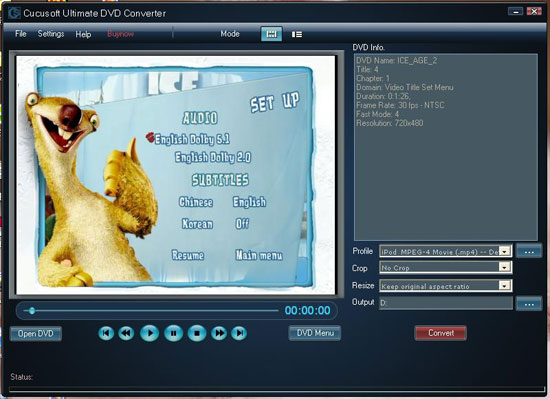
You can set Subtitle and Audio track via this program.
Clicking "DVD Menu" button, then choose "SET UP", so you can set Subtitle and Audio track as you like.
It is really powerful and easy to use, just have a try now!
HD Converter
Best DVD Ripper
So the following will show you how to convert dvd with this program
Make preparation: Download Cucusoft Ultimedia DVD Converter, install and run it.
Step 1::Click "Open DVD" button to load your dvd after insert your dvd to DVD-ROM
Step 2: Select "Direct mode" or "Batch Mode"
"Direct Mode" means that you can directly click the DVD Menu to select the DVD movie you want to rip. This mode is very easy for ripping a movie DVD's.
"Batch Mode" means that you can select the DVD titles/chapters and audio track they want to rip via checkbox list. This mode is very easy for batch ripping Music DVD's, MTV DVD's and Episodic DVD's.
Step 3: Select output format from the "Profile" drop-down list.
Note 1: Click the "…" button at the right of the "profile" drop-down list to set the important parameters: Video Bitrate, Audio Bitrate, Frame Rate and Video Size.
For a high image/sound quality you can increase the value of Video/Audio Bitirate and for a compressed file you can decrease the value.
Note 2 From the "Crop" drop-down list, you can select "No Crop", "Crop both black bands" or "Crop the upper black band".
Note 3: From the "Resize" drop-down list, you can select "Stretch to full screen" or "Keep original aspect ratio".
Note 4: Click the "…" button at the right of the "Output" button to set the conversion destination.
Step 4: Click the "Convert "button to start the conversion.
A dialog will pop up, which enables you to set Title Name, Save Path, Output File Size etc, Click "Yes" button after you setted.
Tips
You can set Subtitle and Audio track via this program.
Clicking "DVD Menu" button, then choose "SET UP", so you can set Subtitle and Audio track as you like.
It is really powerful and easy to use, just have a try now!
HD Converter
Best DVD Ripper


