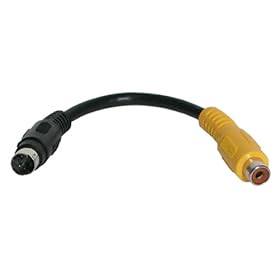
If your TV only has Yellow/Red/White AKA composite inputs, then you’ll have to get a S-Video to Composite adapter like the following :
Yellow jack is for video, Red and White connectors are for Stereo audio. For audio you have to connect the sound card output separately using a cable like this :
After connecting the TV, go to the advanced display settings of your video card driver, there you should be able to find a place to set the output to TV.
Naa, color penawa, Color system eka PAL set karanna one (video driver settings wala). NTSC thiyanakota thamail black n white upset picture ekak enne (U.S wala NTSC nisa default system eka NTSC set wela thiyenne, eka manually change karanna one). Habai, TV ekata NTSC/PAL auto detect karanna puluwan nam eka prashnayak wenne naa.
Naa, color penawa, Color system eka PAL set karanna one (video driver settings wala). NTSC thiyanakota thamail black n white upset picture ekak enne (U.S wala NTSC nisa default system eka NTSC set wela thiyenne, eka manually change karanna one). Habai, TV ekata NTSC/PAL auto detect karanna puluwan nam eka prashnayak wenne naa.
machan mage vga eke video out ekata rc port ekeki ne::tyenne s video wage ekaki::e cable eke tyenne rc port 3ki red blue green eka kohomada tv ekata conect karaganne
machan mage vga eke video out ekata rc port ekeki ne::tyenne s video wage ekaki::e cable eke tyenne rc port 3ki red blue green eka kohomada tv ekata conect karaganne
If your TV only has Yellow/Red/White AKA composite inputs, then you’ll have to get a S-Video to Composite adapter like the following :
Yellow jack is for video, Red and White connectors are for Stereo audio. For audio you have to connect the sound card output separately using a cable like this :
After connecting the TV, go to the advanced display settings of your video card driver, there you should be able to find a place to set the output to TV.

 Pure VPN - Up to 27 Months
 Gemini AI PRO 18 months Offer