


SMS එකකින් PC එක Shutdown කරමුද?
මුලින්ම කියන්න ඕනෙ මම Programming වලට අලුත්. නිකන් ඉන්න එකේ පොඩි software කෑල්ලක් හදන්න හිතුනා. මේකෙන් මහ ලොකු වැඩක් නම් වෙන්නෙ නෑ.
Dialog KBB50 හුගක් වෙලාවට මම උදේ 6.00 ට download වෙන්න දාලා.. පැය 2 ක් ගියාට පස්සෙ අම්මට PC එක off කරන්න කියලා යන්නෙ. එතකොට අම්ම කෙලින්ම plug එකෙන්ම off කරලා දානවා.
  නැත්නම් හවස එනකම්ම machine එක වැඩ.
sheduled shutdown දාන්න ගියාමත් මල වදේ. IDM එකෙන් shutdown වෙන්න දැම්මහමත් ඔක්කොම download වුනේ නැත්නම් shutdown වෙන්නෙ නෑ.
ඒක හින්දා මට හිතුනා මට ඕන වෙලාවට machine එක shutdown කරගන්න විදිහක් හදන්න.
මේකයි මේකෙන් වෙන්න. dongle එක machine එකට ගහලා dongle එකේ තියන sim එකට message එකක් අපේ Mobile එකෙන් යවලා.. machine එක..
SHUTDOWN, RESTART, LOGOFF, LOCK කරන්න පුලුවන්.
දැන් මට BUS එකේ යන ගමන් PC එක OFF කරන්න පුලුවන්. Monitor එක ඕෆ් කරලා යන්න විතරයි තියෙන්නෙ. 
පල්ලෙහා link එකෙන් software එක බාගෙන install කරගන්න.

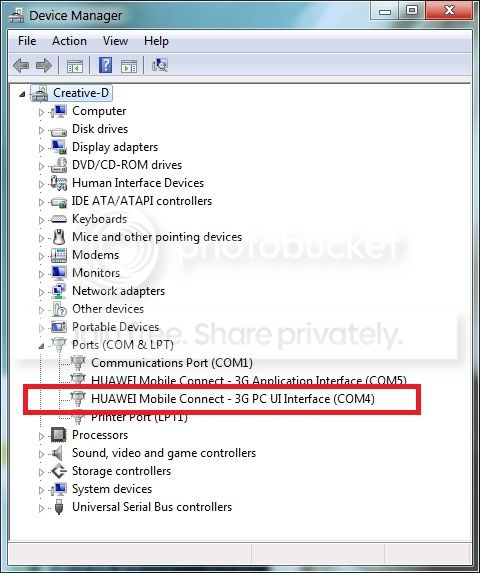
install කලාට පස්සෙ dongle එක machine එකට ගහලා "Device Manager" යන්න. ඒකෙ Ports node එක expand කලාට පස්සෙ ඇති Dongle එකේ communication port දෙක.
ඒ දෙකෙන් "3G PC UI Interface" කියන එකේ පෝට් එක තමයි ඕන කරන්නෙ.
Power SMS කියන Desktop icon එක run කලාට පස්සෙ එන මේ dialog box එකෙන් අර COM port number එක select කරලා OK කරන්න.

ඊට පස්සෙ එන මේ වින්ඩොව් එකෙන් connect කරන්න විතරයි තියෙන්නෙ. port එක හරියට සෙට් කරා නම් බඩු වැඩ.
දැන් phone එක අරන් Dongle එකේ number එකට msg එකක් දාලා බලන්න "lock" කියලා. capital simple ප්රශ්නයක් නෑ. machine එක ලොක් වුනානම් බඩු වැඩ.
අනිත් commands තමයි... "shutdown", "logoff", "restart".

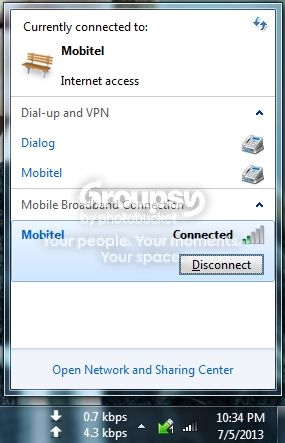
තව දෙයක් තමයි. මේකෙන් connect කරලා තියන වෙලාවට Dongle එකේ "Mobile Partner" ඔන් කරලා තියෙන්න බෑ. Internet යන්න පුලුවන් කිසි අවුලක් නැතුව හැබැයි පල්ලෙහා taskbar එකෙන් connect වෙලා. dongle එක ගලවලා වෙන usb port එකකට ගැහුවොත් ආපහු Device manager එකෙන් බලලා software එකේ device settings වලින් අලුත් port එක දීලා save කරන්න ඕනෙ.
වැඩේ වුන ගමන් ඔයාගෙ ෆෝන් එකට sms එකක් එනවා command successful කියලා.හැබැයි sms එක එන්නෙ dongle එකේ තියන සිම් එකේ සල්ලි තිබුනොත් විතරයි. ඔන්නම් nortification cancel කරන්න පුලුවන්. ඔන්නම් specific number එකකින් එන commads විතරක් accept කරන්න හදන්නත් පුලුවන්.
එහෙනම් කට්ටිය බාගෙන බලලා කොහොමද කියන්න. හා හා පුරා කියලා පලවෙනියට හදපු software එක. කට්ටියටම ජය වේවා..!!
මුලින්ම කියන්න ඕනෙ මම Programming වලට අලුත්. නිකන් ඉන්න එකේ පොඩි software කෑල්ලක් හදන්න හිතුනා. මේකෙන් මහ ලොකු වැඩක් නම් වෙන්නෙ නෑ.
Dialog KBB50 හුගක් වෙලාවට මම උදේ 6.00 ට download වෙන්න දාලා.. පැය 2 ක් ගියාට පස්සෙ අම්මට PC එක off කරන්න කියලා යන්නෙ.
එතකොට අම්ම කෙලින්ම plug එකෙන්ම off කරලා දානවා. නැත්නම් හවස එනකම්ම machine එක වැඩ.sheduled shutdown දාන්න ගියාමත් මල වදේ. IDM එකෙන් shutdown වෙන්න දැම්මහමත් ඔක්කොම download වුනේ නැත්නම් shutdown වෙන්නෙ නෑ.
ඒක හින්දා මට හිතුනා මට ඕන වෙලාවට machine එක shutdown කරගන්න විදිහක් හදන්න.
මේකයි මේකෙන් වෙන්න. dongle එක machine එකට ගහලා dongle එකේ තියන sim එකට message එකක් අපේ Mobile එකෙන් යවලා.. machine එක..
SHUTDOWN, RESTART, LOGOFF, LOCK කරන්න පුලුවන්.
දැන් මට BUS එකේ යන ගමන් PC එක OFF කරන්න පුලුවන්. Monitor එක ඕෆ් කරලා යන්න විතරයි තියෙන්නෙ.
පල්ලෙහා link එකෙන් software එක බාගෙන install කරගන්න.
install කලාට පස්සෙ dongle එක machine එකට ගහලා "Device Manager" යන්න. ඒකෙ Ports node එක expand කලාට පස්සෙ ඇති Dongle එකේ communication port දෙක.
ඒ දෙකෙන් "3G PC UI Interface" කියන එකේ පෝට් එක තමයි ඕන කරන්නෙ.
Power SMS කියන Desktop icon එක run කලාට පස්සෙ එන මේ dialog box එකෙන් අර COM port number එක select කරලා OK කරන්න.

ඊට පස්සෙ එන මේ වින්ඩොව් එකෙන් connect කරන්න විතරයි තියෙන්නෙ. port එක හරියට සෙට් කරා නම් බඩු වැඩ.
දැන් phone එක අරන් Dongle එකේ number එකට msg එකක් දාලා බලන්න "lock" කියලා. capital simple ප්රශ්නයක් නෑ. machine එක ලොක් වුනානම් බඩු වැඩ.
අනිත් commands තමයි... "shutdown", "logoff", "restart".

තව දෙයක් තමයි. මේකෙන් connect කරලා තියන වෙලාවට Dongle එකේ "Mobile Partner" ඔන් කරලා තියෙන්න බෑ. Internet යන්න පුලුවන් කිසි අවුලක් නැතුව හැබැයි පල්ලෙහා taskbar එකෙන් connect වෙලා. dongle එක ගලවලා වෙන usb port එකකට ගැහුවොත් ආපහු Device manager එකෙන් බලලා software එකේ device settings වලින් අලුත් port එක දීලා save කරන්න ඕනෙ.
වැඩේ වුන ගමන් ඔයාගෙ ෆෝන් එකට sms එකක් එනවා command successful කියලා.හැබැයි sms එක එන්නෙ dongle එකේ තියන සිම් එකේ සල්ලි තිබුනොත් විතරයි. ඔන්නම් nortification cancel කරන්න පුලුවන්. ඔන්නම් specific number එකකින් එන commads විතරක් accept කරන්න හදන්නත් පුලුවන්.
එහෙනම් කට්ටිය බාගෙන බලලා කොහොමද කියන්න. හා හා පුරා කියලා පලවෙනියට හදපු software එක. කට්ටියටම ජය වේවා..!!
Last edited:


