---------SOFTWARE 4 ALL--------

sanjeeme

Well-known member
  • Mar 12, 2008
    3,901
    335
    83
    Colombo
    Typing.Assistant.v4.2.Incl.Keymaker-CORE

    boxshot.jpg


    Features

    listicon.png
    Universal Compatibility: Works with virtually all programs.
    Typing Assistant seamlessly integrates with all popular programs, Microsoft Word, Microsoft Outlook, Outlook Express, Notepad, UltraEdit, WordPad, ICQ Messenger, MSN Messenger, Yahoo Messenger, common used web browser, etc.

    listicon.png
    Freely Dictionary Selecting: General or professional dictionary is available.
    You can select a general dictionary or professional dictionary as the basic dictionary, this selection will change the content in Typing Assistant suggestion window.

    listicon.png
    Auto-Learn: Learns unknown and recently typed words.
    If you type a word that not in the dictionary (e.g. your name, or a long string such as "m_strUserName"), Typing Assistant will learn the word. The next time you begin to type it the word will be suggested. This saves you thousands of keystrokes.

    Typing Assistant learns all the words you type and is invaluable in any repetitive typing task. Its Auto-Learn vocabulary list will be bigger and bigger and so its functionality and accuracy.

    listicon.png
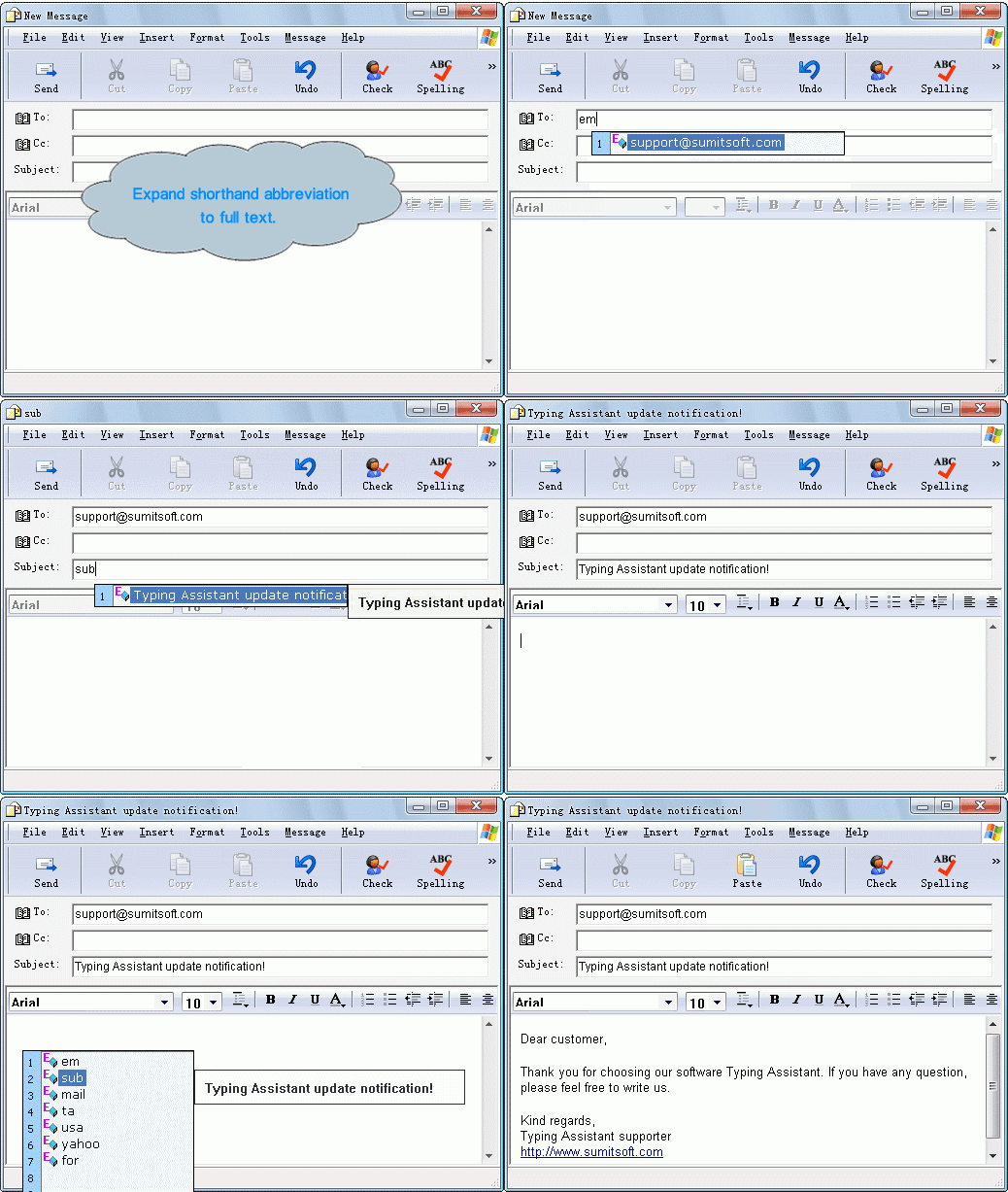
    Auto-Expand: Expands shorthand to full text.
    You can define shorthand shortcuts and abbreviations, for example, when you type "usa", Typing Assistant can autoexpand it to the full text: United States of America. Thus with one key stroke (ENTER – the default hotkey), a full text replaces your shorthand. You can quickly define multiple shorthand entries yourself and have them automatically replace anything, phrases, tradenames, people's names, anything you wish.

    Typing Assistant can expand your shorthand to whole paragraphs, and unicode characters are fully supported in the Full Text.

    listicon.png
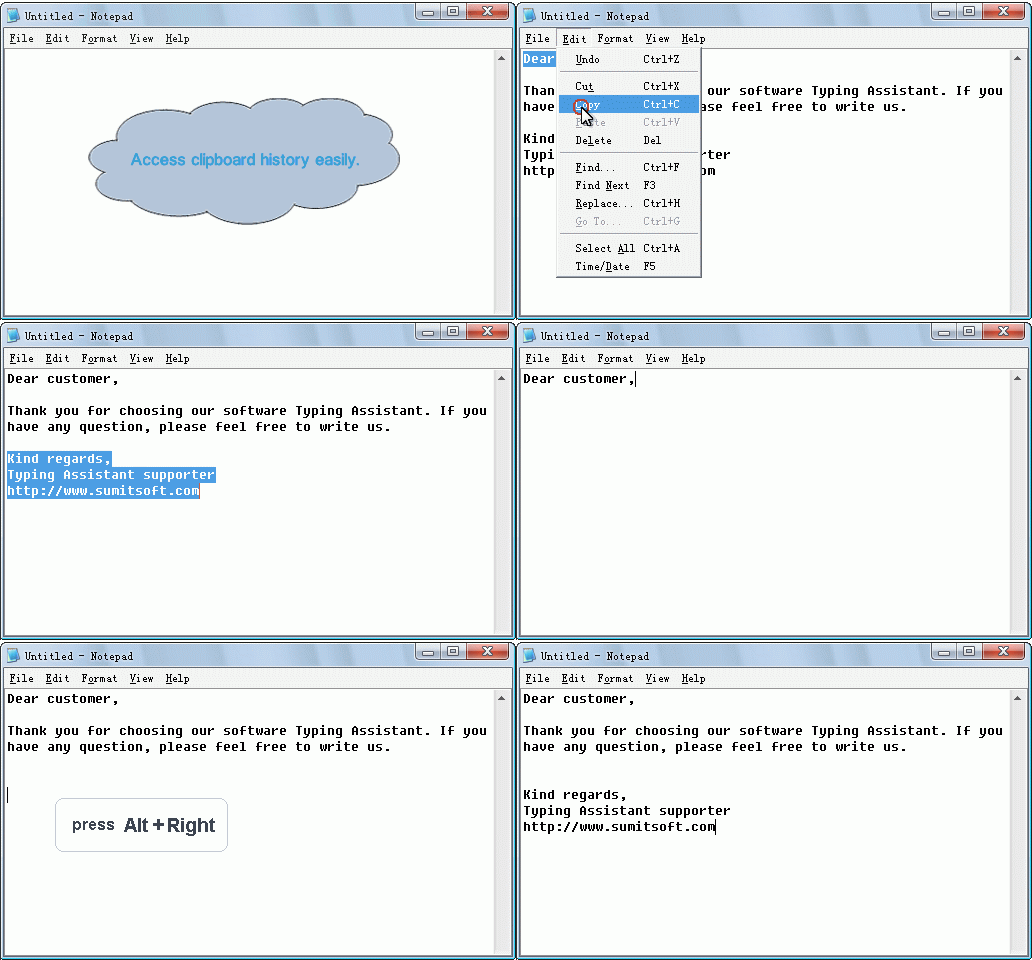
    Auto-Clipboard: Quickly accesses clipboard history.
    Typing Assistant automatically caches previous clipboard contents and provides quick access to them.

    listicon.png
    Auto-Launch: Launches frequently used application conveniently.
    Typing Assistant provides you a quick way to launch any application in your computer.

    listicon.png
    Spell Checking: Beep on misspelled words.
    When you type a word that not in the dictionaries for the first time, Typing Assistant can warn you with a beep.

    listicon.png
    Easy to Configure: Satisfies the needs of both fast typist and hunt and peck typing.
    Both fast typist and hunt and peck typing can benefit from this program by suitable settings.

    listicon.png
    Portable: Runs from a USB memory device.
    Just copy the Typing Assistant installed directory to your USB memory device and run it anywhere, all settings and dictionaries are available and no traces left on the host PC.

    listicon.png
    Easy to use.
    There is no training or learning curve with this software. You simply use your computer as normal and Typing Assistant helps with your typing automatically. The whole process is mastered in 5 minutes and it will save you hours of work and needless effort.


    Tips
    • If you need real-time suggestion at anytime, you can set Real-time Suggestion Window Delay for to 0 ms.
    • If you are fast typist, perhaps the frequent suggestion window is not necessary, you can set Real-time Suggestion Window Delay for to a value more then 0 ms, then the suggestion window only appears when you are spelling.
    • You can even set Real-time Suggestion Window Delay for to Never Show, then the real-time suggestion is disabled, but the Auto-Expand, Auto-Clipboard and Auto-Launch can still be activated by hotkey.
    mainmenu.png


    SCREENSHOTS:

    anim-RealtimeSuggest.gif


    anim-AutoExpand.gif
    anim-AutoClipboard.gif


    Download:
    Code:
    http://rapidshare.com/files/179599124/Typing.Assistant.v4.2.Incl.Keymaker-CORE.rar
     

    sanjeeme

    Well-known member
  • Mar 12, 2008
    3,901
    335
    83
    Colombo
    3D ANALYZE V2.36

    3D-Analyze is a tool for transform and lightning hardware emulation. So it is very useful for running TnL games on video cards that have not on board dedicated circuits for TnL calculations (like all Voodoo, Kyro, some Radeon and older). It uses power of central processing unit to do emulation.

    3d analyze is a Graphics Card Emulator that can emulate all the feature of a 3d graphics card like pixelshader 1.1, 1.4, 2.0, bump maps and a lota stuff. If a game stops running on your system just because u dont have a graphics card, dont worry 3d analyze will do it for ya. run 3danalyze select the game exe, select a few options u wanna emulate and there u go the game run perfectly now.


    dpygz7.jpg


    Test By Me : An Example
    An error message comes up saying "Your GFX card does not have Pixel shader capibilities" or something to that end.
    Now, open 3D Analyzer, click Select, go to your M2TW exe file. THEN, check the following boxes if you have the pixel shader problem:
    'force anisotropic filtering'
    'skip pixel shader version 2.0' (or whatever version you decide)

    That should do the trick. However, if the game still doesnt work, check the error message for the problem - chances are it can be changed in 3D Analyzer.
    e.g. Error message=Problem with textures... to solve, check the 'disable textures'.

    If it still doesnt work, try some of the following:
    *Try running 3D Analyze with another game besides m2tw. If it then doesnt work, nothing will.
    *Run 3D Analyze in Debug mode - you will then see what is wrong.
    *If all else fails, update your GFX card/RAM/processor!


    Code:
    Http://www.mediafire.com/?xkm5nfvmzmm
     

    sanjeeme

    Well-known member
  • Mar 12, 2008
    3,901
    335
    83
    Colombo
    Windows Home Server

    homeserver.jpg


    msfthomeserver.jpg


    Introducing Windows Home Server

    For years, you've used servers in the office. It's time to start using one at home. With Windows Home Server, you can easily back up, access, share, and store all your family's digital media.


    Digital memories and media stored and organized in a central location

    Home computers backed up daily, automatically

    Simple restore of lost files or even entire hard drive contents

    Complete access to files from both inside and outside the home

    A secure and personalized website address for sharing photos and home videos

    Easily add storage space and new software capabilities


    Code:
    http://rapidshare.com/files/181057987/WHS_OEM.part01.rar
    http://rapidshare.com/files/181064331/WHS_OEM.part02.rar
    http://rapidshare.com/files/181070390/WHS_OEM.part03.rar
    http://rapidshare.com/files/181076979/WHS_OEM.part04.rar
    http://rapidshare.com/files/181083681/WHS_OEM.part05.rar
    http://rapidshare.com/files/181090119/WHS_OEM.part06.rar
    http://rapidshare.com/files/181096954/WHS_OEM.part07.rar
    http://rapidshare.com/files/181103846/WHS_OEM.part08.rar
    http://rapidshare.com/files/181110358/WHS_OEM.part09.rar
    http://rapidshare.com/files/181119994/WHS_OEM.part09.rar
    http://rapidshare.com/files/181126415/WHS_OEM.part10.rar
    http://rapidshare.com/files/181133509/WHS_OEM.part11.rar
    http://rapidshare.com/files/181136096/WHS_OEM.part12.rar
     

    sanjeeme

    Well-known member
  • Mar 12, 2008
    3,901
    335
    83
    Colombo
    Replay Video Capture 3.0

    kmk8ubl2dqb3buuefp1.jpeg


    Using Replay Video Capture is easy. Use the Get Window option to locate the video window (or mark it manually), then click Record to start. Once you're recording, click Stop to end the recording, or Pause to pause and resume. With Replay Video Capture, you'll get amazing video quality, or compact portable files. You can choose between high-quality, high-speed MPEG-2 files, or smaller Windows Media (WMV) files. Replay Video Capture's super-fast MPEG-2 codecs don't bog down your CPU, so you won't lose video frames or get choppy audio. These are preferred for high-motion video, or for use on slower PC's.

    Replay Video Capture is the best way to make production quality videos from hard-to-record sources, including:
    * ANY Video Web Site, using ANY streaming protocol
    * DVD's
    * Webcam sites
    * Powerpoint Presentations
    * Skype Video calls
    * Video Chat sessions
    * And more!

    Download:
    Code:
    http://rapidshare.com/files/170429355/revodcon_WwW.DownloadPresent.Com.rar
     

    waleryan

    Member
    Jun 11, 2006
    1,266
    5
    0
    machan XVID to DVD converter ekak thiyenawada??? naththang ona video format ekak DVD walata convert karanna puluwan sftware ekak dennakooooo.plsssssssssss....thnkuuuuuuu
     

    Manchi™

    Member
    Dec 29, 2008
    102
    0
    0
    waleryan said:
    machan XVID to DVD converter ekak thiyenawada??? naththang ona video format ekak DVD walata convert karanna puluwan sftware ekak dennakooooo.plsssssssssss....thnkuuuuuuu

    Menna meka try karanna maeka maru
    ona 1k dvd walata convert karanna puluwan....
    View attachment 9132
    Features:
    - Video formats supported: avi, divx, xvid, mov, mkv, flv , mpeg1, mpeg2, mpeg-, nsv, dvr-ms, tivo, ts, ifo, vob, asf, wmv, realmedia, rm, rmvb, ogm, existing files from digital camcorders, TV/Sat, capture cards, etc. No external codecs needed like avi codec download
    - Create DVD menus with different templates available, possibility to add background video, image or audio, have chapter and audio/subtitle menus
    - Conversion advisor wizard, control of the conversion speed vs. quality
    - Fast and quality encoder, typically less than 1 hour for converting 1 movie, and supports Multi-Core processors!
    Code:
    [URL="http://rapidshare.com/files/166109172/Vso3.2.9.94.rar.html"]http://rapidshare.com/files/166109172/Vso3.2.9.94.rar.html[/URL]
    PASS: 250885-69331628-041471
     

    sanjeeme

    Well-known member
  • Mar 12, 2008
    3,901
    335
    83
    Colombo
    Autodesk 3Ds Max 2009 FULL (32 - 64 Bit) + Keygen

    atdsmttnyq4.jpg


    Autodesk 3Ds Max 2009 FULL (32 - 64 Bit) + Keygen | RS Link & Mirror​

    With each new release, Autodesk software solutions become more intuitive and user friendly, while gaining functionality and a broader tool set. The following videos introduce the new features and functionality of Autodesk? 3ds Max? software.

    Modeling and Animation
    With the introduction of the ForeFeet option, Biped now fully supports four-legged characters, In this video, animators see that the center of mass can be animated using external pivots, like the working pivot, making it easier to create realistic body movements like falling forward. Animators also see how the Walkthrough Assistant simplifies the process of creating walk-throughs and how soft selections can be interactively adjusted with a few mouse-clicks.

    Iterative Rendering
    This video introduces the new Reveal™ rendering technology that streamlines the process of tweaking, finalizing, and experimenting with animator's renders. The framebuffer adds a subset of render settings, enabling animators to switch from high to low-quality settings and to include or exclude features, while continuing to make test renderings and scene changes.

    Materials and Maps
    This video introduces ProMaterials™ technology, a set of powerful and flexible materials new to Autodesk 3ds Max. These mental ray? software materials can create extremely realistic surfaces and have a full set of customizable features. The new composite map adds numerous features and a simple workflow for the creation of complex maps, with layers, masks, opacity, and more. The viewports now support the display of multiple maps so results can be seen without test renderings.

    Mapping
    The new Spline Mapping tool can map otherwise difficult geometry by using splines to drive the UV generation. In this video, animators see how they can map twisted roads, arches, and characters limbs in minutes. In addition, improved Relax and Pelt workflows streamline UVW unwrapping, enabling animators to achieve desired results in fewer steps.

    Lighting
    Powerful photometric lights make realistic light creation a snap. Templates, distribution, and shapes are all available in a single light object. This video demonstrates how the viewport can display IES lights and their web distribution. It also highlights the daylight system sky, which now supports new sky models. Learn about how support for weather data files can accurately re-create weather and lighting conditions on specific dates or over a period of time.

    Mental Ray
    Support for mental ray proxies allows animators to create scenes with a huge number of object instances, while allowing fast rendering and keeping memory usage low. This video introduces new options that let animators control how individual objects interact with Final Gather. It highlights the new mental ray-specific render elements that offer many options for post-processing and compositing. Learn about the glare shader, which provides realistic glare around bright areas of the rendered image.

    Production Shaders
    This video introduces the mental ray production shaders that further improve the rendering capabilities of 3ds Max 2009. With two images and a few shaders, artists can match lighting and reflection of an existing background image. The new easy-to-use HDR Image Motion Blur shader creates fast and realistic motion blur effects.

    Navigation Tools
    This video introduces two easy-to-use viewport navigation tools in Autodesk? 3ds Max? 2009 software: ViewCube™ and the SteeringWheels™ technology. These tools, which can also be found in other Autodesk 3D products, provide users with a familiar way to navigate scenes. The ViewCube control makes it easy to orbit or look at an object from different angles. The SteeringWheels control makes exploring an architectural interior or a game level a whole new experience.

    User Interface
    The 3ds Max user interface has been improved and made more consistent by renaming and reorganizing some of the tools. The new Infocenter tool, which is used in other Autodesk products, is the front end for a new way to access help files and get to the information artists are looking for. Scene Explorer now has permanent zxcs to further improve the way scenes can be managed.

    3ds Max Design
    With each new release, Autodesk software solutions becomes intuitive and user friendly, while gaining functionality and a broader tool set. The following videos introduce the features and functionality of Autodesk? 3ds Max? Design software.

    Exposure Part 1
    In part one of the Exposure™ series, this video will show animators how to set up a scene for lighting analysis. It also features the 3ds Max Design sun and sky models, a quick-settings dashboard interface, and an intelligent user interface for accessing the various aspects of the software used in a light simulation, such as render settings, light settings, and material settings.

    Exposure Part 2
    In part two of the Exposure series, this video will help animators understand the power of light analysis. Exclusive to 3ds Max Design 2009, Exposure technology is used for simulating and analyzing sun, sky, and artificial lighting in a 3D scene. Ideal for sustainable-architecture projects, this powerful feature set is designed to assist architects in evaluating light intensity in their designs and can help facilitate the evaluation of indoor environmental quality required, for example, for LEED EQ 8.1 Credit.

    Reveal Workflow
    With 3ds Max Design 2009, Autodesk introduces Reveal™ rendering technology, a system that gives animators very precise control over renders, which in turn streamlines iterative workflows and enables animators to render final imagery. Highlighting this key feature, the video demonstrates how animators can visualize and manipulate a given region in both the viewport and the framebuffer. Animators will see that the rendered image framebuffer contains a simplified set of tools to quickly validate changes in a render, by optionally zxcing out objects, regions, and/or processes to temporarily balance quality, speed, and completeness. For instance, render speed can be modulated by toggling geometry translation, lighting calculation, and image-quality settings. Learn how animators can also auto-generate regions around selections and reuse temporary Final Gather maps at any time.

    Enhanced Per-object Render Settings
    In this video, learn how additional object-level settings for mental ray? rendering technology gives animators, designers and visualization specialists the maximum level of control over their renders.

    Revit Interoperability
    This video introduces animators to the new FBX-base Recognize™ scene-loading technology, which gives architects, designers, and visualization professionals fast access to high-accuracy geometry, light, material, and camera data from their Revit? Architecture 2009 software scenes.

    ProMaterials
    ProMaterals™, a library of easy-to-use, physically based materials for mental ray software—based on manufacturing-supplied data and professional images—is included in 3ds Max Design 2009. This video demonstrates how these tools give architects and designers fast access to commonly used building and design materials like professional wall paint—with glossy or matte finishes and solid glass or concrete surfaces.

    Photometric Lighting Enhancements
    Learn how 3ds Max Design 2009 delivers a number of photometric lighting enhancements. In this video, animators will learn that this software supports artists with types of area lights such as photometric web previews, both circular and cylindrical, in the Browse dialog and Light UI, as well as near-field photometry quality and spot distribution. Plus, distribution types support any emitting shape, and light shapes can appear in a rendered image.

    Composite Map and Color Correction Map
    The composite map has been designed in 3ds Max Design 2009 to give animators options for independent color correction of texture maps. This video demonstrates how the feature set supports multiple blending modes, color correction via the color-correction map, opacity adjustments, reordering of images or layers, as well as hiding and deleting of layers. Learn about a feature that gives animators the option of replacing or creating alpha channels with any type of map, including procedurals.

    Edit Soft Selection
    Learn about the Edit Soft Selection hotkey and how it enables animators to interactively manipulate falloff, pinch, and bubble directly on the screen. In this video, animators will see that the cursor changes to indicate which values are being affected, and feedback is given directly on the object.

    FBX Import/Export & Mudbox Interoperability
    This video demonstrates the interoperability between Autodesk 3ds Max Design software and other Autodesk software such as Autodesk? Maya? and Autodesk? MotionBuilder? software with improved Autodesk? FBX? software memory management, data translation fidelity, and import options. Support for the OBJ file format, including export options, facilitates the importing and exporting of model data between Autodesk? Mudbox™ software and 3ds Max Design, and other third-party 3D modeling applications. Learn how animators can take advantage of export presets and additional geometry options, including hidden splines/lines and optimize options that reduce file sizes and performance. Also, there is exture map handling, and there is import information available in regard to face-counts-per-object.

    Working Pivot Rotation & Hands Like Feet Option & Mirror Animation Options & Triangle Neck
    Autodesk? 3ds Max? Design 2009 software supports rotating Biped objects around the working pivot, as well as the pick pivot, for the creation of certain kinds of dramatic animations, such as a character falling to the ground. This video demonstrates how animators can have their Biped characters? hands behave like feet with regard to the ground plane, which dramatically simplifies the number of steps needed to create quadruped animations. Animators have a choice to mirror Biped animation while keeping the COM orientation intact. Learn how Biped gives animators the ability to link a character?s clavicles to the top spine link, instead of to the neck—similar to the triangle pelvis feature.

    Render Final Gather and Global Illumination
    In this video, animators will learn about two settings— the Render Final Gather Only setting and the Render Global Illumination Only setting. They enable animators to quickly cache specific types of maps for animation rendering.

    Review Enhancements
    Using Review, multiple maps can be simultaneously displayed in the viewport for accurate previewing. In this video, animators will see that Review has full photometric light support (including IES files) for instant feedback on how real luminaries will affect the environment. Animators will also see that support has been for real-time shadowing of objects that use architectural and design materials.

    Enhanced Accessibility of Production Shaders
    This video demonstrates how the mental ray production shaders are accessible in 3ds Max Design 2009. For example, a lens shader enables mental ray to evaluate only those rays that intersect specified objects, a matte/shadow material can capture indirect illumination, and a chrome ball shader enables the designer to quickly create reflection maps.

    Mental Ray Proxy Objects
    In this video, animators will see that a primitive is in 3ds Max Design, enabling high-resolution meshes (that can be demand-loaded at render time) to be cached. Learn how this process saves memory, increases performance, and allows designers to render much larger scenes.

    Mental Ray Render Elements
    This video highlights elements in mental ray. One mental ray-specific render element is included in 3ds Max Design for extracting HDR data from architecture and design materials. Another element allows animators to define the type of data they would like to extract from the shader tree.

    Spline Mapping
    This video demonstrates how the new spline mapping feature in Autodesk 3ds Max and included in Autodesk 3ds Max Design software can be used to map tubular and spline-like objects.

    ViewCube Navigation & SteeringWheels Navigation
    This video introduces the ViewCube™ and SteeringWheels™ navigation technology, features of the Autodesk 3ds Max Design 2009 software solution, which are also found in several other Autodesk 3D software products. Learn how the ViewCube provides feedback about current viewing angle in relation to the model world. Animators can use this on-screen, cube-shaped widget to click directly on a face or rotate the ViewCube (with a click-and-drag motion) to change the view. Animators will also learn about SteeringWheels™ navigation technology, a simple-to-use camera interface that creates a comfortable transition from the world of 2D to 3D—perfect for design and architectural visualization professionals to 3ds Max Design.


    http://rapidshare.com/files/107684881/Autodesk.3ds.Max.2009.32bit.64bit.FULL.part01.rar
    http://rapidshare.com/files/107681273/Autodesk.3ds.Max.2009.32bit.64bit.FULL.part02.rar
    http://rapidshare.com/files/107677980/Autodesk.3ds.Max.2009.32bit.64bit.FULL.part03.rar
    http://rapidshare.com/files/107674427/Autodesk.3ds.Max.2009.32bit.64bit.FULL.part04.rar
    http://rapidshare.com/files/107670945/Autodesk.3ds.Max.2009.32bit.64bit.FULL.part05.rar
    http://rapidshare.com/files/107667427/Autodesk.3ds.Max.2009.32bit.64bit.FULL.part06.rar
    http://rapidshare.com/files/107663583/Autodesk.3ds.Max.2009.32bit.64bit.FULL.part07.rar
    http://rapidshare.com/files/107659200/Autodesk.3ds.Max.2009.32bit.64bit.FULL.part08.rar
    http://rapidshare.com/files/107654943/Autodesk.3ds.Max.2009.32bit.64bit.FULL.part09.rar
    http://rapidshare.com/files/107651856/Autodesk.3ds.Max.2009.32bit.64bit.FULL.part10.rar
    http://rapidshare.com/files/107648823/Autodesk.3ds.Max.2009.32bit.64bit.FULL.part11.rar
     

    coolshano

    Well-known member
  • Sep 1, 2007
    14,327
    618
    113
    N/A
    machan mata mage pc ekata automatic song ekak recognize karanna puluwan software ekak thiyenawada????? pls machan

    mic ekata song eka play karama song eke name eka dena software ekak...