


Typing.Assistant.v4.2.Incl.Keymaker-CORE

Features
 Universal Compatibility: Works with virtually all programs.
Typing Assistant seamlessly integrates with all popular programs, Microsoft Word, Microsoft Outlook, Outlook Express, Notepad, UltraEdit, WordPad, ICQ Messenger, MSN Messenger, Yahoo Messenger, common used web browser, etc.
Freely Dictionary Selecting: General or professional dictionary is available.
You can select a general dictionary or professional dictionary as the basic dictionary, this selection will change the content in Typing Assistant suggestion window.
Auto-Learn: Learns unknown and recently typed words.
If you type a word that not in the dictionary (e.g. your name, or a long string such as "m_strUserName"), Typing Assistant will learn the word. The next time you begin to type it the word will be suggested. This saves you thousands of keystrokes.
Typing Assistant learns all the words you type and is invaluable in any repetitive typing task. Its Auto-Learn vocabulary list will be bigger and bigger and so its functionality and accuracy.
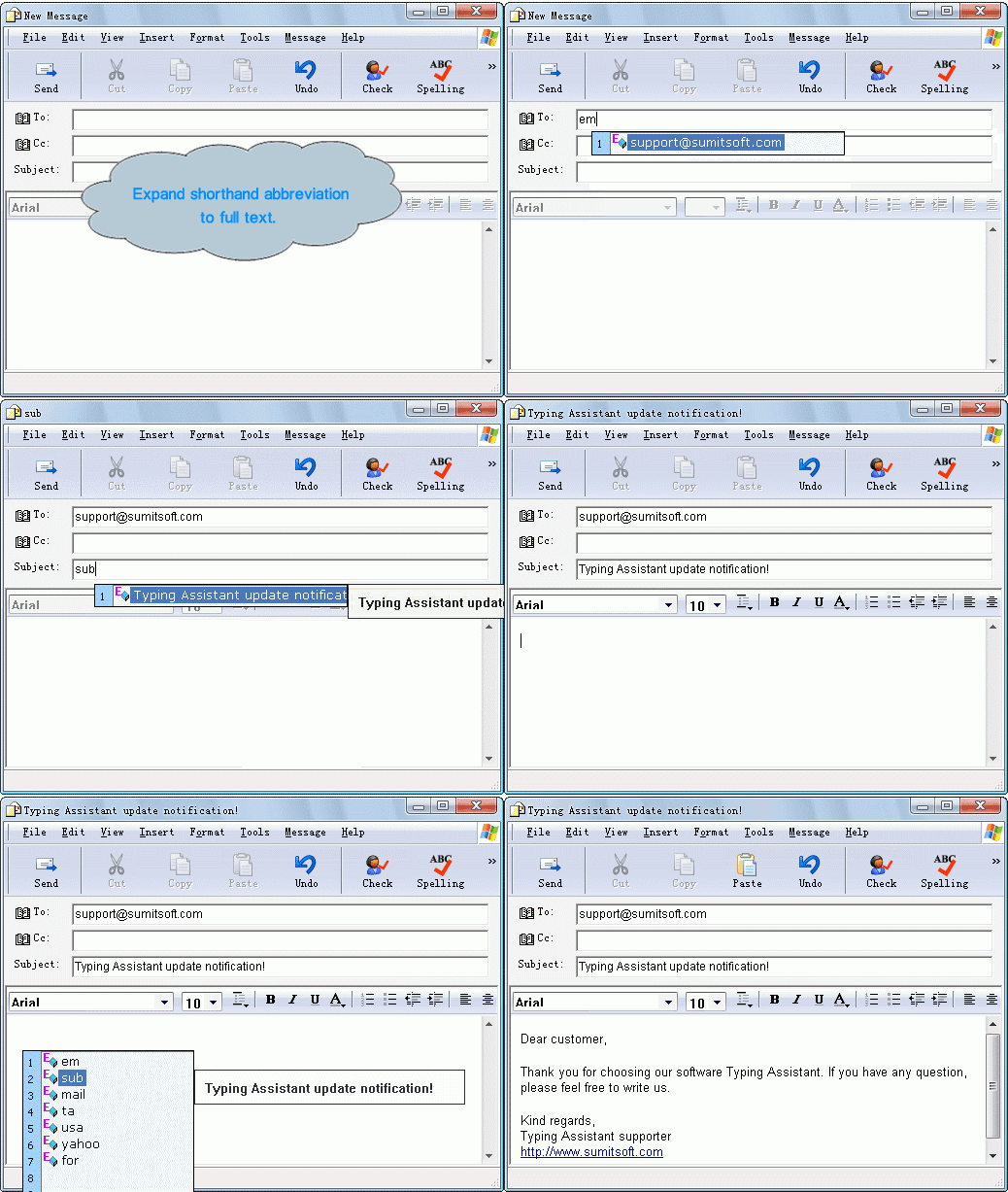
Auto-Expand: Expands shorthand to full text.
You can define shorthand shortcuts and abbreviations, for example, when you type "usa", Typing Assistant can autoexpand it to the full text: United States of America. Thus with one key stroke (ENTER – the default hotkey), a full text replaces your shorthand. You can quickly define multiple shorthand entries yourself and have them automatically replace anything, phrases, tradenames, people's names, anything you wish.
Typing Assistant can expand your shorthand to whole paragraphs, and unicode characters are fully supported in the Full Text.
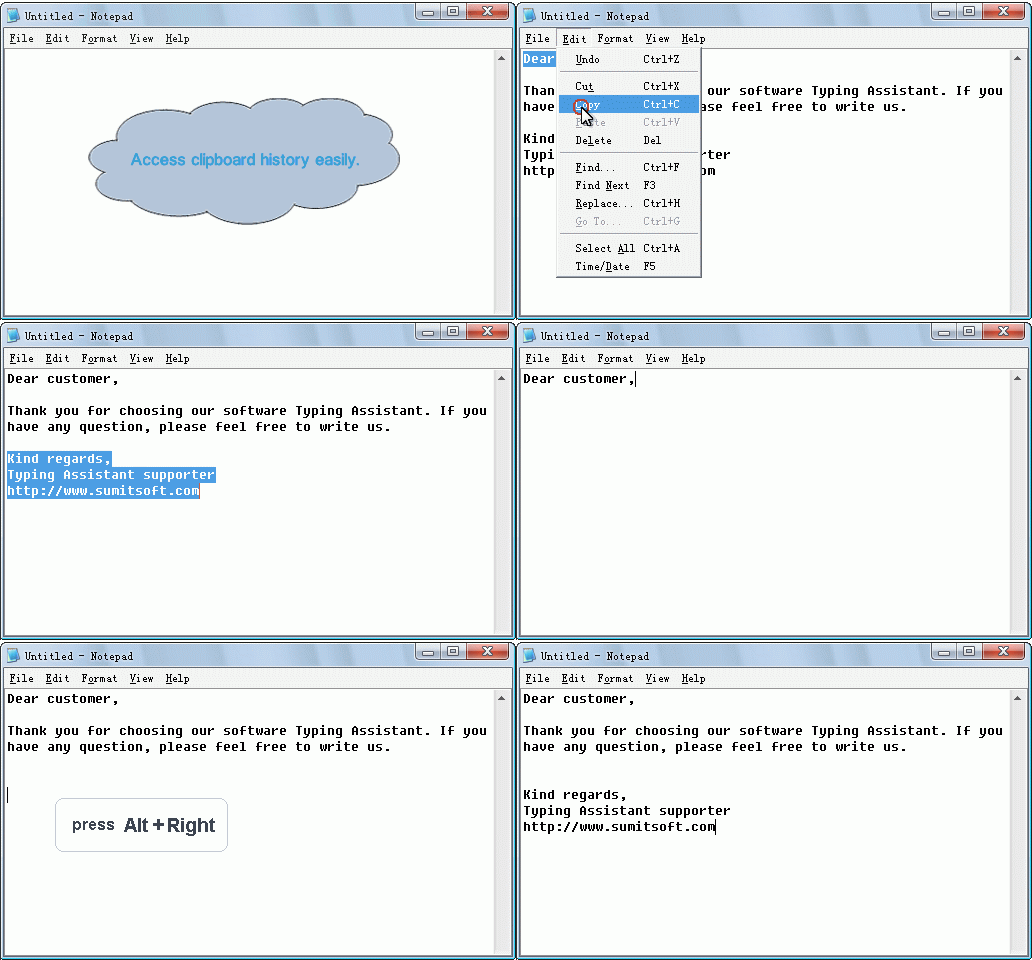
Auto-Clipboard: Quickly accesses clipboard history.
Typing Assistant automatically caches previous clipboard contents and provides quick access to them.
Auto-Launch: Launches frequently used application conveniently.
Typing Assistant provides you a quick way to launch any application in your computer.
Spell Checking: Beep on misspelled words.
When you type a word that not in the dictionaries for the first time, Typing Assistant can warn you with a beep.
Easy to Configure: Satisfies the needs of both fast typist and hunt and peck typing.
Both fast typist and hunt and peck typing can benefit from this program by suitable settings.
Portable: Runs from a USB memory device.
Just copy the Typing Assistant installed directory to your USB memory device and run it anywhere, all settings and dictionaries are available and no traces left on the host PC.
Easy to use.
There is no training or learning curve with this software. You simply use your computer as normal and Typing Assistant helps with your typing automatically. The whole process is mastered in 5 minutes and it will save you hours of work and needless effort.
Tips

Download:
Code:
http://rapidshare.com/files/179599124/Typing.Assistant.v4.2.Incl.Keymaker-CORE.rar

Features

Typing Assistant seamlessly integrates with all popular programs, Microsoft Word, Microsoft Outlook, Outlook Express, Notepad, UltraEdit, WordPad, ICQ Messenger, MSN Messenger, Yahoo Messenger, common used web browser, etc.
You can select a general dictionary or professional dictionary as the basic dictionary, this selection will change the content in Typing Assistant suggestion window.
If you type a word that not in the dictionary (e.g. your name, or a long string such as "m_strUserName"), Typing Assistant will learn the word. The next time you begin to type it the word will be suggested. This saves you thousands of keystrokes.
Typing Assistant learns all the words you type and is invaluable in any repetitive typing task. Its Auto-Learn vocabulary list will be bigger and bigger and so its functionality and accuracy.
You can define shorthand shortcuts and abbreviations, for example, when you type "usa", Typing Assistant can autoexpand it to the full text: United States of America. Thus with one key stroke (ENTER – the default hotkey), a full text replaces your shorthand. You can quickly define multiple shorthand entries yourself and have them automatically replace anything, phrases, tradenames, people's names, anything you wish.
Typing Assistant can expand your shorthand to whole paragraphs, and unicode characters are fully supported in the Full Text.
Typing Assistant automatically caches previous clipboard contents and provides quick access to them.
Typing Assistant provides you a quick way to launch any application in your computer.
When you type a word that not in the dictionaries for the first time, Typing Assistant can warn you with a beep.
Both fast typist and hunt and peck typing can benefit from this program by suitable settings.
Just copy the Typing Assistant installed directory to your USB memory device and run it anywhere, all settings and dictionaries are available and no traces left on the host PC.
There is no training or learning curve with this software. You simply use your computer as normal and Typing Assistant helps with your typing automatically. The whole process is mastered in 5 minutes and it will save you hours of work and needless effort.
Tips
- If you need real-time suggestion at anytime, you can set Real-time Suggestion Window Delay for to 0 ms.
- If you are fast typist, perhaps the frequent suggestion window is not necessary, you can set Real-time Suggestion Window Delay for to a value more then 0 ms, then the suggestion window only appears when you are spelling.
- You can even set Real-time Suggestion Window Delay for to Never Show, then the real-time suggestion is disabled, but the Auto-Expand, Auto-Clipboard and Auto-Launch can still be activated by hotkey.

SCREENSHOTS:


Download:
Code:
http://rapidshare.com/files/179599124/Typing.Assistant.v4.2.Incl.Keymaker-CORE.rar


