

Latest ads
-
 Hambantota 7 Acres Beachfront Land For Sell DownSouth , PerPerch Price 420 000
- 1024 Digital
- Updated:
-
 Baseus PI LITE INDOOR CAMERA
- ErMurazor
- Updated:
-
Colombo Hard Disk For Sale
- mazza
- Updated:
-
 land for sale
- justasking
- Updated:
-
 AMD AM 5 Ryzen setup
- prabodhamadusanka
- Updated:
SPEED UP YOUR TORRENTS 200% - DETAILED REVIEW
- Thread starter Gomida
- Start date
You are using an out of date browser. It may not display this or other websites correctly.
You should upgrade or use an alternative browser.
You should upgrade or use an alternative browser.


rehan1986 said:THere is a software called Utorrent Turbo Booster..It works! try that too!
balamu balamu............

ela ela thanks machan!!!

SPEED UP YOUR TORRENTS 200%
DETAILED REVIEW
ONNA MAGEN GODAK TORRENT USERSLATA WADAGATH WENA THREAD EKAK.......
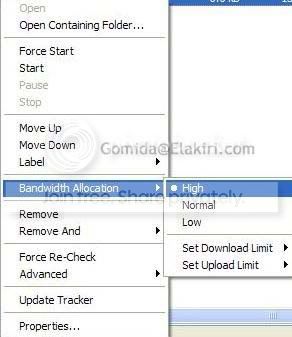
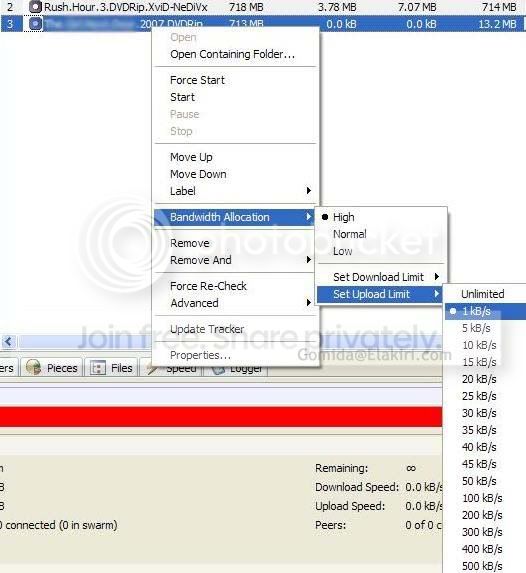
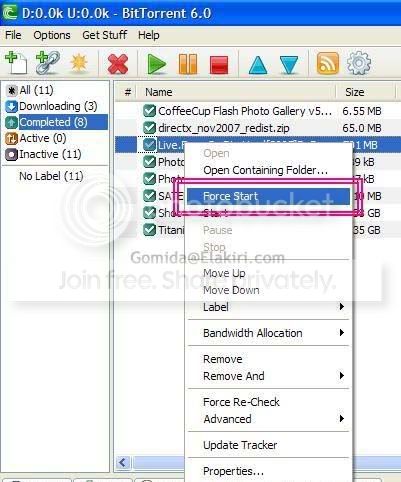
Right click on the torrent and then select these options
- Go Bandwidth Allocation -> High (You can have about 30% speed gain from this, but the normal web browsing speed will be reduced)
- Go Bandwidth Allocation -> Set Upload Limit -> 1kB/s (This will boost the speed almost 60%) *READ THE POST SCRIPT BELOW
- Update Tracker (This will add some 1-3% speed) [You will see the option in one of the below screenshots]
- Force Start (This will Boost the speed a bit)
- Move Up (Prioritize the torrent - Move the torrent priority up)
If the specific torrent doesnt have enough seeds, and a good share ratio, then you will experience a low download speed.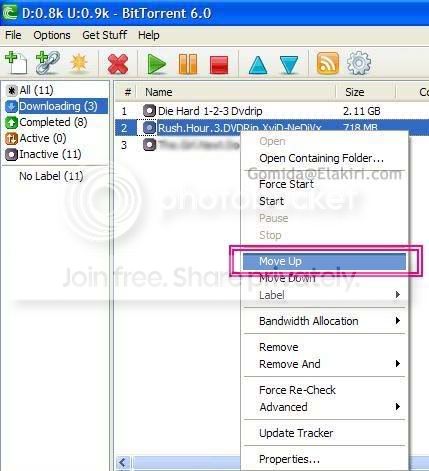
(Answer for this problem : Select another torrent which has a good share ratio and good number of seeds!)
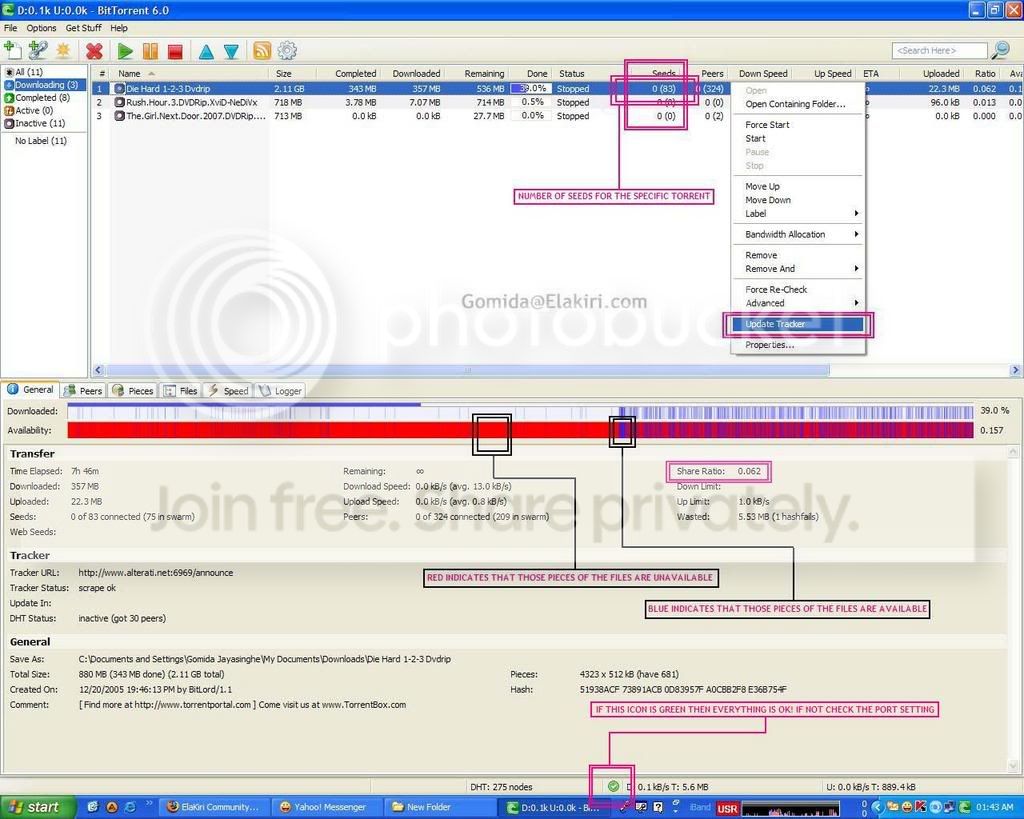
If you detect the download speed is unusually low or if that green icon is yellow then you have a port problem..
Everytime you power down the router/modem/PC and power it on again, you MUST do the following in order to gain more speed
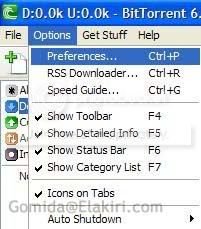
Go Options -> Preferences -> Connection -> Click on the Random Port Button, Then click Apply and OK
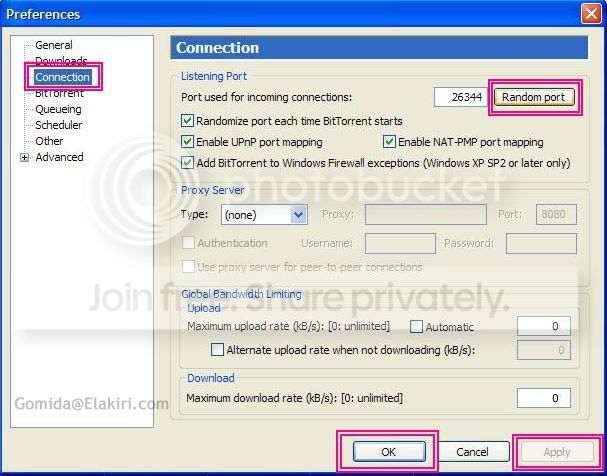
(If you don't do the last option, your download speed will be around 5-6kbps)
Prioritize files
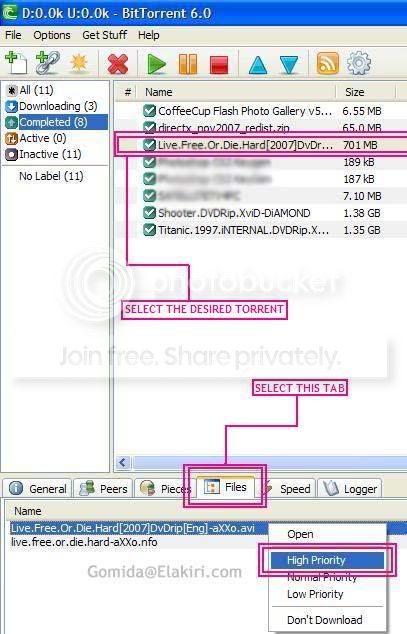
Normal download speed is around 45-52kbps if everything I told you is OK
To get a torrent download software,

CLICK HERE
** POST SCRIPT :-
- IF YOU / THE TORRENT USE A GET LIKE YOU GIVE TYPE TORRENT WEB SITE [Like if you upload over xx MB you get the time limit reduced] Then you may have your own decision, whether to use upload limit or not
- If the Upload limit doesnt show 1kB/s, then first select the lowest number (It'll be 10kB/s I think) Then right click again and see, you'll see 5kB/s like that 1kB/s will show up
)
THIS GUIDE IS FOR BITTORRENT AND uTORRENT AND USERS WITH TORRENT PROGRAMMES WHICH USES SIMILAR USER INTERFACE.
FOR AZUREUS AND OTHER TORRENT PROGRAMME USERS CAN FIND SIMILAR COMMANDS


Similar threads

- Replies
- 6
- Views
- 437


- Replies
- 1
- Views
- 201
- Replies
- 10
- Views
- 816
