

Latest ads
-
 ඕනම රටකට සෙට් වෙන CV එකක්
- ErMurazor
- Updated:
-
 Hambantota 7 Acres Beachfront Land For Sell DownSouth , PerPerch Price 420 000
- 1024 Digital
- Updated:
-
 Baseus PI LITE INDOOR CAMERA
- ErMurazor
- Updated:
-
Colombo Hard Disk For Sale
- mazza
- Updated:
-
 land for sale
- justasking
- Updated:
Welcome To The Graphic World (Dream Work)
- Thread starter sihina_lahiru
- Start date
You are using an out of date browser. It may not display this or other websites correctly.
You should upgrade or use an alternative browser.
You should upgrade or use an alternative browser.


VRay – THE COMPLETE GUIDE – second edition is the first book in the world completely devoted to VRay. Its aim is to provide an advanced support for the specialists in this branch. All too often we lose a lot of time searching the meaning of a particular parameter. Who hasn’t spent entire days trying to understand what was wrong with their rendering? Having some “presets” is not enough: it is necessary to understand and have knowledge of the tools daily used. This is the only way thanks to which you’ll be able to face more and more difficult tasks.
VRay – THE COMPLETE GUIDE – second edition was born thanks to two year’s hard work, during which we tried to produce a high-quality handbook committed to VRay’s users. Not just a basic list of commands, but a special tool, composed by technical and theoretical parts, by which you’ll be carried away! You’ll be able to find, through 1060 pages, 2300 images and 3200 renderings expressly created for this handbook.
Enclosed you’ll also find a DVD-ROM containing 32 animations in .mov format, bearing examples otherwise impossible to understand via images only.
It’s an unrepeatable handbook, difficult to find elsewhere: made up of 1060 pages, full color, A4 21×29x6cm (other manuals are usually smaller: 21×19x4cm). Bound with extreme care, through paperback binding stitched with wire referendum and not simply glue, it holds up through the time. The hardback cover also is hardbound disk, allowing a better usability.
NEW EDITION
The SECOND EDITION, is available only in PDF digital format and we upgrade to VRay 1.5 SP3a, with 30 new pages unpublished. For a research we make a full interactive index. Now you can quickly reach any part of the book with one click. This index is inside in the sample files you can download below.The PDF has a little watermark noninvasive with the with client info (name, address), the print, copy-paste function is disable. Plus there is a password to open the PDF, which will be used to access the private section of our FORUM, a place where to discuss directly with the author. Also, each PDF will has a little difference than the other (text changes, different images position, etc. …), which will make each copy unique and immediately recognizable The book price is 25 euro, but the old customers can buy the PDF version only for 15 euro!
More Info:http://www.francescolegrenzi.com/blog/static.php?page=vray_guide_eng

Rapidshare:
http://rapidshare.com/files/380707379/VR.T.C.G.DVD.PDF.part01.rar
http://rapidshare.com/files/380707170/VR.T.C.G.DVD.PDF.part02.rar
http://rapidshare.com/files/380706614/VR.T.C.G.DVD.PDF.part03.rar
http://rapidshare.com/files/380707877/VR.T.C.G.DVD.PDF.part04.rar
http://rapidshare.com/files/380706427/VR.T.C.G.DVD.PDF.part05.rar
http://rapidshare.com/files/380707820/VR.T.C.G.DVD.PDF.part06.rar
http://rapidshare.com/files/380706426/VR.T.C.G.DVD.PDF.part07.rar
http://rapidshare.com/files/380706430/VR.T.C.G.DVD.PDF.part08.rar
http://rapidshare.com/files/380707190/VR.T.C.G.DVD.PDF.part09.rar
http://rapidshare.com/files/380705730/VR.T.C.G.DVD.PDF.part10.rar
PDF Only:
http://rapidshare.com/files/380707208/VR.T.C.G.2.E.PDF.part1.rar
http://rapidshare.com/files/380706463/VR.T.C.G.2.E.PDF.part2.rar
http://rapidshare.com/files/380707063/VR.T.C.G.2.E.PDF.part3.rar
Hotfile:
http://hotfile.com/dl/40048725/1e7f5d2/VR.T.C.G.DVD.PDF.part01.rar.html
http://hotfile.com/dl/40048885/f43013d/VR.T.C.G.DVD.PDF.part02.rar.html
http://hotfile.com/dl/40049013/4f5a5cf/VR.T.C.G.DVD.PDF.part03.rar.html
http://hotfile.com/dl/40049140/0bb3790/VR.T.C.G.DVD.PDF.part04.rar.html
http://hotfile.com/dl/40049293/110cd67/VR.T.C.G.DVD.PDF.part05.rar.html
http://hotfile.com/dl/40049645/e5d859c/VR.T.C.G.DVD.PDF.part06.rar.html
http://hotfile.com/dl/40049869/87ac3e3/VR.T.C.G.DVD.PDF.part07.rar.html
http://hotfile.com/dl/40050036/d874f5b/VR.T.C.G.DVD.PDF.part08.rar.html
http://hotfile.com/dl/40050248/ba03961/VR.T.C.G.DVD.PDF.part09.rar.html
PDF Only:
http://hotfile.com/dl/40048247/086a7db/VR.T.C.G.2.E.PDF.part1.rar.html
http://hotfile.com/dl/40048375/9e7c125/VR.T.C.G.2.E.PDF.part2.rar.html
http://hotfile.com/dl/40048491/44196af/VR.T.C.G.2.E.PDF.part3.rar.html
Password: tdmf


Python scripting is one of the most powerful tools inside RealFlow.Any fluid and dynamics artist who is seriously interested in professional results sooner or later has to deal with scripting techniques. With scripting it’s possible to overcome many of RealFlow’s limitations and introduce spectacular effects. Especially for beginners, but also for advanced users, it’s of course a real challange to learn a programming language. Nevertheless it’s almost unavoidable today, to know at least one language. Fortunately Python makes it rather easy to find access to the exciting field of scripting with RealFlow. On the other hand, RealFlow provides a tremendous richness of different instructions for almost any node and parameter. Additionally you have to keep track of various script types, like batch, events or custom daemons.
RF_magazine “Scripting with RealFlow” is your guide through a “jungle” of statements, formats and automatized actions. Detailed, though easy-to-follow introductions will help you to get your hands on this mighty feature. The chapters are supported by a range of different scripts covering many aspects of your daily work. Each example is fully documented and explained.
Of course you also get a complete overview about standard techniques, like if-else conditions and looping, data types, and operators. “Scripting with RealFlow” rapidly became one of the standard works for RealFlow’s programming interface. Now it’s completely revised and updated – so don’t miss it!
Megaupload:
http://www.megaupload.com/?d=6KRKKIPB

Gnomon Master Classes: Overview of the Feature Film VFX Process | 829MB
From the job interview, to the script breakdown, the storyboards, the budgeting, the running amock on set, the politics, the editing room, the DI and the premier of the film, Jeff will share the dirty secrets that form a complete visual effects project.
Instructor: Jeff Okun – Visual Effects Supervisor
Jeff Okun has contributed visual effects and 2nd unit direction to a wide range of films such as The Day The Earth Stood Still, Blood Diamond, Stargate, Deep Blue Sea, The Last Starfighter, Lolita, Cutthroat Island, Sphere and Wes Craven’s Shocker.
His credits also include ground breaking music videos from such varied artists as Sting, The Beatles, Jimi Hendrix, Janet Jackson, Wayne Newton, Bryan Adams, Amy Grant, Dolly Parton, Prince, Michael Jackson, the Neville Brothers and Rod Stewart.
Jeff has also created visual effects tracking and bidding software that is in wide use within the industry. He is also responsible for the revolutionary visual effects technique dubbed the “PeriWinkle Effect” and the “Pencil Effect”, which has been used in many projects to help achieve a more realistic sense of danger and more accurate budgets.
Jeff began his career in the 1970’s as a photographer chronicling the rock music scene, first shooting Crosby, Stills, Nash & Young, then moving on to Jimi Hendrix, The Who, Albert King, the Kinks, Johnny Winter, Spirit, Captain Beefheart, Mountain, Arlo Gutherie, Buddy Miles Express and many more.
Jeff is also the Chair of the Visual Effects Society has served as chair of the VES Awards Committee.
DOWNLOAD:
http://rapidshare.com/files/377601928/Overview_of_the_Feature_Film_VFX_Process.part01.rar
http://rapidshare.com/files/377601968/Overview_of_the_Feature_Film_VFX_Process.part02.rar
http://rapidshare.com/files/377601688/Overview_of_the_Feature_Film_VFX_Process.part03.rar
http://rapidshare.com/files/377601695/Overview_of_the_Feature_Film_VFX_Process.part04.rar
http://rapidshare.com/files/377601611/Overview_of_the_Feature_Film_VFX_Process.part05.rar
http://rapidshare.com/files/377601826/Overview_of_the_Feature_Film_VFX_Process.part06.rar
http://rapidshare.com/files/377601719/Overview_of_the_Feature_Film_VFX_Process.part07.rar
http://rapidshare.com/files/377601954/Overview_of_the_Feature_Film_VFX_Process.part08.rar
http://rapidshare.com/files/377601498/Overview_of_the_Feature_Film_VFX_Process.part09.rar

In Volume 1, you’ll learn the entire creative process for generating convincing character disintegration effects; similar to the visual effects created for the upcoming action feature film Day Breakers (release date early 2010) to create a character bursting into flames and burning away. Each layer of this effect is meticulously handled through advanced particle systems, scripting, fluids and advanced shader techniques.
This training includes the initial construction of each layer of the effect, the rendering out of each layer pass and the construction of a heavy 2D composite to bring all of the render elements together into one seamless visual. You will see how to effectively tweak each layer and utilize compositing tricks to enhance the overall visual effect. Not only will you cover how to create this effect, but also how to conceptualize and create an intuitive workflow process for building the entire visual effects pipeline, so you can make changes on the fly and the entire system will update and adapt. Moreover, you’ll see how to replicate the pipeline easily for dozens of other effects shots!
With over 8 hours of advanced training content designed for intermediate to expert level artists but designed in a way that any 3D user should be able to follow and understand – CreatureFX: Volume 1 is guaranteed to raise the level of anyone’s visual effects work, teaching them core techniques and evolving into Hollywood blockbuster visual effects methods.
Just look at the course outline:
DISC 1: Effects Creation
1. Introduction
2. Particle Mask Generation
3. Creating Particle Triggers
4. Creating Sparks
5. Generating Flames
6. Tweaking the Flame effect
7. Creating Ash Layers
8. Bringing the Fire and Ash Layers Together
9. Creating Smoke
10. Building a Burn Shader
11. Floor Impact FX Elements
12. Generating Fire Sparks
DISC 2: Compositing
1. Masking Channels
2. Building the Initial Comp Tree
3. Illumination
4. Lighting
5. Advanced Compositing
6. Finalizing the Look
Megaupload:
http://www.megaupload.com/?d=5VW168W8
http://www.megaupload.com/?d=938GHKF6
http://www.megaupload.com/?d=MSUGSLMG
http://www.megaupload.com/?d=43ZPQVHA
http://www.megaupload.com/?d=69HRX65E
http://www.megaupload.com/?d=YMAUTKWG
http://www.megaupload.com/?d=ROAOS6RF
http://www.megaupload.com/?d=YIKYIBVC
http://www.megaupload.com/?d=DZ7R6QMF
http://www.megaupload.com/?d=C5IWAZP7
Pass: sharing_is_caring
In Volume 1, you’ll learn the entire creative process for generating convincing character disintegration effects; similar to the visual effects created for the upcoming action feature film Day Breakers (release date early 2010) to create a character bursting into flames and burning away. Each layer of this effect is meticulously handled through advanced particle systems, scripting, fluids and advanced shader techniques.
This training includes the initial construction of each layer of the effect, the rendering out of each layer pass and the construction of a heavy 2D composite to bring all of the render elements together into one seamless visual. You will see how to effectively tweak each layer and utilize compositing tricks to enhance the overall visual effect. Not only will you cover how to create this effect, but also how to conceptualize and create an intuitive workflow process for building the entire visual effects pipeline, so you can make changes on the fly and the entire system will update and adapt. Moreover, you’ll see how to replicate the pipeline easily for dozens of other effects shots!
With over 8 hours of advanced training content designed for intermediate to expert level artists but designed in a way that any 3D user should be able to follow and understand – CreatureFX: Volume 1 is guaranteed to raise the level of anyone’s visual effects work, teaching them core techniques and evolving into Hollywood blockbuster visual effects methods.
Just look at the course outline:
DISC 1: Effects Creation
1. Introduction
2. Particle Mask Generation
3. Creating Particle Triggers
4. Creating Sparks
5. Generating Flames
6. Tweaking the Flame effect
7. Creating Ash Layers
8. Bringing the Fire and Ash Layers Together
9. Creating Smoke
10. Building a Burn Shader
11. Floor Impact FX Elements
12. Generating Fire Sparks
DISC 2: Compositing
1. Masking Channels
2. Building the Initial Comp Tree
3. Illumination
4. Lighting
5. Advanced Compositing
6. Finalizing the Look
Megaupload:
http://www.megaupload.com/?d=5VW168W8
http://www.megaupload.com/?d=938GHKF6
http://www.megaupload.com/?d=MSUGSLMG
http://www.megaupload.com/?d=43ZPQVHA
http://www.megaupload.com/?d=69HRX65E
http://www.megaupload.com/?d=YMAUTKWG
http://www.megaupload.com/?d=ROAOS6RF
http://www.megaupload.com/?d=YIKYIBVC
http://www.megaupload.com/?d=DZ7R6QMF
http://www.megaupload.com/?d=C5IWAZP7
Pass: sharing_is_caring

3Delight 9 & 3Delight for Maya 5 32Bit & 64Bit Win/Linux
3Delight For Maya is our plug-in for Maya users wishing to create high quality work that is sometimes difficult to achieve using Maya’s internal renderer. The plug-in was designed to be easy to use for Maya artists as well as provide the necessary power and flexibility for the more demanding production environments. Users can rapidely experience the power of the 3Delight renderer in their projects thanks to HyperShade support, complete geometry support and direct rendering to Maya’s render view. Advanced features include multi-pass work-flow, RIB output, MEL RenderMan® binding, multiple output variables, photon mapping, etc …This tool has already a wealth of production experience and has been used with success in productions such as X-Men 3, Chronicles of Narnia and Fantasic Four.
Rendering Features
Two Render Modes
Both direct rendering in Maya (including rendering into Maya’s render view) and RIB export are supported. Direct rendering is useful in normal lighting and rendering work while RIB export can be used for render farm rendering. RIBs exported by 3Delight For Maya are optimized for size and can be written in compressed binary form.
HyperShade and RenderMan Shaders Support
Both RenderMan shaders and Maya’s HyperShade nodes can be assigned to objects. HyperShade nodes are automatically converted into human-readable SL code and compiled for rendering. New HyperShade nodes can easily be added by providing 3Delight For Maya with their SL code.
Motion Blur and Depth of Field
Multi-Segment motion blur and realistic camera shutter simulation contribute to high quality rendered images. Compared to other rendering software, motion blur in 3Delight For Maya is fast. Depth of field is fully supported and simulates a realistic camera bokeh.
High Quality Anti-AliasingEdge anti-aliasing, motion blur and depth of field quality are all controlled using very simple and predictable controls. “Pixel Samples”, “Pixel Filter” and “Filter Width” are the most common parameters one needs to know. Contrary to other rendering packages, such as ray tracers, increasing pixel samples for higher quality anti-aliasing does not affect performance significantly.
Geometric Displacements
Displacements are efficiently rendered to sub-pixel accuracy. Hypershade displacement shaders as well as RenderMan shaders can be assigned to geometry.
ShadowsBoth ray tracing and shadow maps can be used to render shadows. Shadow maps can be rendered in “deep” mode for realistic shadows in hair and fur. Additionally, 3Delight For Maya can automatically generate “cube shadow maps” for point lights. Contrary to other rendering packages, cube shadow maps are not stored as six separate shadow maps but in one special shadow map.
Ray Tracing
Reflections and refractions are accurately rendered.
Global Illumination
Photon maps, caustics, final gathering and image based lighting are supported.
Subsurface Scattering
Automatic subsurface scattering can be enabled on a per-object basis and delivers impressive results, fast.
Workflow
3Delight For Maya offers a multi-pass rendering workflow that is suitable for production work. “Render Passes” can be used to render different components of a scene (as in “Render Layers” or to render different lighting characteristics of a scene (such as diffuse, specular or ambient occlusion). In short, a render pass can define the following parameters (please refer to the User’s Manual for a thorough description):
Camera and quality options
Render mode. Either direct render or RIB export.
Objects to render. Maya sets can be used to define groups of objects to render in a given pass. The default is to render all objects in the scene.
Light sources to render. Maya sets can be used to define the light sources that are used. The default is to use all light sources.
Clipping planes to use. A 3Delight For Maya clipping plane can cut space in any desired direction to clip away geometry. Clipping is performed at sub-pixel accuracy and can be used, for example, to cut an object in two.Additionally, a given render pass can use a certain “shader collection.” This means that objects can have different shaders assigned to them, depending on the pass being rendered. The User’s Manual provides more information about this unique feature. Note that one could simply use one render pass for the more traditional one layer rendering.
Supported Geometry
Maya Hair and Paint Effects
Rendered using 3Delight’s efficient `RiNuCurves’ primitive.
Polygons
All types of polygons, including those with holes, are supported. Additionally, polygonal geometry can be tagged as a subdivision surface and rendered as such.
NURBS (Maya surfaces)All NURB surfaces are supported. Trim curves on surfaces are also fully supported and rendered to sub-pixel accuracy. All surfaces are rendered smooth.Hierarchical Subdivision SurfacesFully supported, including both creasing and partial creasing on edges and vertices as well as per-level UV sets. As always, all hierarchical subdivisions are rendered smooth and to sub-pixel accuracy.
Particles
“Point”, “blobby”, “sphere” and “patch” particles are supported. “Point” particles are rendered using 3Delight’s efficient lightweight particle primitive.
Curves.Maya curves can be tagged as renderable on a per object basis and rendered using 3Delight’s RiNuCurves primitive.Additionally, UV sets, texture reference objects and normals (if any) are correctly assigned to all primitives.
Configurability and Flexibility
As with all serious production tools, 3Delight For Maya has been designed with flexibility in mind. In fact, no other rendering plug-in on the market achieves the same balance between integration and configurability.
We implemented most of the RenderMan interface in MEL, which means that you can call RenderMan commands in your MEL scripts. Other packages mainly provide “RIB boxing” capability.
3Delight For Maya was written mostly using the MEL RenderMan interface which means that one can modify it at will. Only core functionalities have been programmed in C++ for performance reasons.
Import and Export
Output Formats
3Delight For Maya can save rendered images in many file formats, including: TIFF, IFF, OpenEXR, cineon, bmp, sgi, softimage and PSD.
Input Formats
Maya’s textures used in HyperShade shaders are automatically converted to 3Delight “.tdl” textures. When using RenderMan shaders, 3Delight’s texture converter (tdlmake) can be used to convert the most common images formats to “.tdl” textures.
HDR Images tdlmake can convert high dynamic range probes (both normal and “twofish” probes) images into environment maps suitable for image based lighting.
3Delight 8.5 and 3Delight for Maya 4.5 released
This release includes support for RSL 2.0 (shader objects and co-shaders) and further ray-tracing optimizations that should give significant performance gains when rendering displacements and motion-blur. 3Delight for Maya includes a new relationship editor to quickly explore and assign shaders and attributes as well as new “edge rounding” features to easily bevel edges on polygonal geometry.
All rights reserved. All trademarks contained herein are the property of their respective owners.
If you like this software,Buy it
Enjoy !
Play BOY’s

3Delight 9 & 3Delight for Maya 5 x32Bit & x64Bit Windows Version
Download From RapidShare
http://rapidshare.com/files/319783807/3Delight_9___3Delight_for_Maya_5_x32Bit___x64Bit.rar
Download From DepositFiles
http://depositfiles.com/files/8yftjzehz
3Delight 9 & 3Delight for Maya 5 x32Bit & x64Bit Linux Version
Download From RapidShare
http://rapidshare.com/files/319790979/3Delight_9___3Delight_for_Maya_5_Linux_Version.rar
Download From DepositFiles
http://depositfiles.com/files/muoirzpnr

In this lecture the instructor demonstrates the digital sculpting and rendering of a classical style marble sculpture, showing how accurate anatomy and a dynamic pose combine to produce a professional and aesthetically pleasing result.
In this novel approach to teaching anatomy, the instructor regularly overlays the model with anatomy images as he sculpts, which makes it easy to visualize how the underlying anatomy relates to the sculpted surface of the model.
Apps Used:Autodesk Mudbox 2009, Autodesk Maya 2009
Rapidshare:
http://rapidshare.com/files/373203359/ECS.part1.rar
http://rapidshare.com/files/373248231/ECS.part2.rar

SolidThinking is the 3D conceptual design and styling software that empowers designers to visualize, explore and fully evaluate more ideas in less time.Grasp solidThinking to swiftly capture your latest sketch or idea, relying on its powerful NURBS modeling, highly intuitive graphic user interface (GUI) and advanced ConstructionTreeTM history. Or take it in hand as a tool to render 3D photorealistic product designs in stunning environments. Watch your concept emerge in real time and get instantaneous feedback. solidThinking will help you develop your projects faster than ever was possible before, bringing your ideas to life quickly and cost-effectively. It’s all available on both Windows and Mac operating systems, promoting design flexibility and freedom to express yourself.
solidThinking is redesigning the way the world looks. You can see the new perspectives that solidThinking generates when you look at products by such style leaders as Pininfarina, Automotive Lighting, Brosway Jewels, Bulgari, Diesel, Korg, MacGregor Golf, Mares, Nestle, Nikon, Novellini, Officine Panerai, Peg Perego, Scavolini and scores of other global brands that are noted for their advanced design.
More Info: http://www.solidthinking.com/default.aspx
Hotfile:
http://hotfile.com/dl/38546026/bd9dbae/solidThinking_8_AmonRa.rar.html

Get both DVDs in one shipment and enjoy 16 hours of training on Particle Flow Toolbox 1,2,3,Krakatoa and RayFire.
The complete course outline:
Box 1 videos:
1. Feather Rig
2. Scripted Fracture
3. Laola Wave
4. Brittle Wall
5. Floating Money
Box 3 Pro videos:
1. Introduction
2. Driving Particles with Grayscale values
3. Gradient by Distance
4. Speed by Gradient
5. Color by Camera Angle
6. Ocean Wake Particles
7. Revolve along Surface
8. Pipe Sub-Operator
9. Random Sub-Operator
10. Align to Object
11. Positional Object Locks
12. Force Influencer
13. Influence by Distance
14. Animated Collisions
15. Fire Embers
16. Shape Controls
17. Nanomites Part 1
18. Nanomites Part 2
19. Contol by Proxy
20. Pimp my Toolbox
Box 2 Pro videos:
1. Introduction
2. Explaining the Glue Operator
3. Me & My Katamari
4. Squash
5. Donuts
6. Bomb
7. Particle Cloth
8. Capture Net
9. Bamboo Ragdoll
10. Foliage
11. Ripping & Tearing
12. Glass Shattering
Box 2 Pro & Box 3 Pro videos:
1. Box 2 & 3: Bomb
2. Box 2 & 3: Avalanche
3. Pimp my Toolbox
RayFire videos:
1. Grayscale Fracture
2. Activate by Force
3. Custom Properties
4. Glue
Rapidshare:
http://rapidshare.com/files/368502334/PFlowTO01.part01.rar.html
http://rapidshare.com/files/368529382/PFlowTO01.part02.rar.html
http://rapidshare.com/files/368537366/PFlowTO01.part03.rar.html
http://rapidshare.com/files/368545172/PFlowTO01.part04.rar.html
http://rapidshare.com/files/368553304/PFlowTO01.part05.rar.html
http://rapidshare.com/files/368560937/PFlowTO01.part06.rar.html
http://rapidshare.com/files/368568382/PFlowTO01.part07.rar.html
http://rapidshare.com/files/368575678/PFlowTO01.part08.rar.html
http://rapidshare.com/files/368581943/PFlowTO01.part09.rar.html
http://rapidshare.com/files/368593565/PFlowTO01.part11.rar.html
http://rapidshare.com/files/368587690/PFlowTO01.part10.rar.html
http://rapidshare.com/files/368600115/PFlowTO01.part12.rar.html
http://rapidshare.com/files/368606242/PFlowTO01.part13.rar.html
http://rapidshare.com/files/368612084/PFlowTO01.part14.rar.html
http://rapidshare.com/files/368618447/PFlowTO01.part15.rar.html
http://rapidshare.com/files/368631381/PFlowTO01.part17.rar.html
http://rapidshare.com/files/368624921/PFlowTO01.part16.rar.html
http://rapidshare.com/files/368636963/PFlowTO01.part18.rar.html
http://rapidshare.com/files/368647554/PFlowTO01.part20.rar.html
http://rapidshare.com/files/368642252/PFlowTO01.part19.rar.html
http://rapidshare.com/files/368653219/PFlowTO01.part21.rar.html
http://rapidshare.com/files/368664803/PFlowTO01.part23.rar.html
http://rapidshare.com/files/368658915/PFlowTO01.part22.rar.html
http://rapidshare.com/files/368671061/PFlowTO01.part24.rar.html
http://rapidshare.com/files/368685255/PFlowTO01.part26.rar.html
http://rapidshare.com/files/368678372/PFlowTO01.part25.rar.html
http://rapidshare.com/files/368691971/PFlowTO01.part27.rar.html
http://rapidshare.com/files/368698961/PFlowTO01.part28.rar.html
http://rapidshare.com/files/368706869/PFlowTO01.part29.rar.html
http://rapidshare.com/files/368723125/PFlowTO01.part31.rar.html
http://rapidshare.com/files/368713650/PFlowTO01.part30.rar.html
http://rapidshare.com/files/368730708/PFlowTO01.part32.rar.html
http://rapidshare.com/files/368747475/PFlowTO01.part34.rar.html
http://rapidshare.com/files/368739001/PFlowTO01.part33.rar.html
http://rapidshare.com/files/368755875/PFlowTO01.part35.rar.html
http://rapidshare.com/files/368763640/PFlowTO01.part36.rar.html
http://rapidshare.com/files/368772032/PFlowTO01.part37.rar.html
http://rapidshare.com/files/368781037/PFlowTO01.part38.rar.html
http://rapidshare.com/files/368791478/PFlowTO01.part39.rar.html
http://rapidshare.com/files/368800775/PFlowTO01.part40.rar.html
http://rapidshare.com/files/368809489/PFlowTO01.part41.rar.html
http://rapidshare.com/files/368817971/PFlowTO01.part42.rar.html
http://rapidshare.com/files/368826250/PFlowTO01.part43.rar.html
http://rapidshare.com/files/368834156/PFlowTO01.part44.rar.html
http://rapidshare.com/files/368842182/PFlowTO01.part45.rar.html
http://rapidshare.com/files/368893254/PFlowTO02-1.part01.rar.html
http://rapidshare.com/files/368901650/PFlowTO02-1.part02.rar.html
http://rapidshare.com/files/368909392/PFlowTO02-1.part03.rar.html
http://rapidshare.com/files/368917278/PFlowTO02-1.part04.rar.html
http://rapidshare.com/files/368924769/PFlowTO02-1.part05.rar.html
http://rapidshare.com/files/368932480/PFlowTO02-1.part06.rar.html
http://rapidshare.com/files/368940059/PFlowTO02-1.part07.rar.html
http://rapidshare.com/files/368947135/PFlowTO02-1.part08.rar.html
http://rapidshare.com/files/368953866/PFlowTO02-1.part09.rar.html
http://rapidshare.com/files/368960761/PFlowTO02-1.part10.rar.html
http://rapidshare.com/files/368967239/PFlowTO02-1.part11.rar.html
http://rapidshare.com/files/368973392/PFlowTO02-1.part12.rar.html
http://rapidshare.com/files/368979789/PFlowTO02-1.part13.rar.html
http://rapidshare.com/files/368986442/PFlowTO02-1.part14.rar.html
http://rapidshare.com/files/368998385/PFlowTO02-1.part16.rar.html
http://rapidshare.com/files/368991941/PFlowTO02-1.part15.rar.html
http://rapidshare.com/files/369004013/PFlowTO02-1.part17.rar.html
http://rapidshare.com/files/369008807/PFlowTO02-1.part18.rar.html
http://rapidshare.com/files/369013559/PFlowTO02-1.part19.rar.html
http://rapidshare.com/files/369019708/PFlowTO02-1.part20.rar.html
http://rapidshare.com/files/369024592/PFlowTO02-1.part21.rar.html
http://rapidshare.com/files/369029555/PFlowTO02-1.part22.rar.html
http://rapidshare.com/files/369039742/PFlowTO02-1.part24.rar.html
http://rapidshare.com/files/369034575/PFlowTO02-1.part23.rar.html
http://rapidshare.com/files/369044799/PFlowTO02-1.part25.rar.html
http://rapidshare.com/files/369050428/PFlowTO02-1.part26.rar.html
http://rapidshare.com/files/369055792/PFlowTO02-1.part27.rar.html
http://rapidshare.com/files/369068185/PFlowTO02-1.part29.rar.html
http://rapidshare.com/files/369061907/PFlowTO02-1.part28.rar.html
http://rapidshare.com/files/369074837/PFlowTO02-1.part30.rar.html
http://rapidshare.com/files/369094242/PFlowTO02-1.part31.rar.html
http://rapidshare.com/files/369108030/PFlowTO02-1.part32.rar.html
http://rapidshare.com/files/369118909/PFlowTO02-1.part33.rar.html
http://rapidshare.com/files/369139009/PFlowTO02-1.part35.rar.html
http://rapidshare.com/files/369129149/PFlowTO02-1.part34.rar.html
http://rapidshare.com/files/369150942/PFlowTO02-1.part36.rar.html
http://rapidshare.com/files/369165697/PFlowTO02-1.part37.rar.html
http://rapidshare.com/files/369179058/PFlowTO02-1.part38.rar.html
http://rapidshare.com/files/369189868/PFlowTO02-1.part39.rar.html
http://rapidshare.com/files/369210991/PFlowTO02-2.part01.rar.html
http://rapidshare.com/files/369219244/PFlowTO02-2.part02.rar.html
http://rapidshare.com/files/369228199/PFlowTO02-2.part03.rar.html
http://rapidshare.com/files/369235781/PFlowTO02-2.part04.rar.html
http://rapidshare.com/files/369245383/PFlowTO02-2.part05.rar.html
http://rapidshare.com/files/369272262/PFlowTO02-2.part06.rar.html
http://rapidshare.com/files/369281521/PFlowTO02-2.part07.rar.html
http://rapidshare.com/files/369290248/PFlowTO02-2.part08.rar.html
http://rapidshare.com/files/369298796/PFlowTO02-2.part09.rar.html
http://rapidshare.com/files/369306556/PFlowTO02-2.part10.rar.html
http://rapidshare.com/files/369314166/PFlowTO02-2.part11.rar.html
http://rapidshare.com/files/369334519/PFlowTO02-2.part14.rar.html
http://rapidshare.com/files/369328886/PFlowTO02-2.part13.rar.html
http://rapidshare.com/files/369321786/PFlowTO02-2.part12.rar.html
http://rapidshare.com/files/369340978/PFlowTO02-2.part15.rar.html
http://rapidshare.com/files/369353940/PFlowTO02-2.part17.rar.html
http://rapidshare.com/files/369347443/PFlowTO02-2.part16.rar.html
http://rapidshare.com/files/369360161/PFlowTO02-2.part18.rar.html
http://rapidshare.com/files/369366082/PFlowTO02-2.part19.rar.html
http://rapidshare.com/files/369371719/PFlowTO02-2.part20.rar.html
http://rapidshare.com/files/369377475/PFlowTO02-2.part21.rar.html
http://rapidshare.com/files/369389136/PFlowTO02-2.part23.rar.html
http://rapidshare.com/files/369382955/PFlowTO02-2.part22.rar.html
http://rapidshare.com/files/369395066/PFlowTO02-2.part24.rar.html
http://rapidshare.com/files/369401569/PFlowTO02-2.part25.rar.html
http://rapidshare.com/files/369407725/PFlowTO02-2.part26.rar.html
http://rapidshare.com/files/369413955/PFlowTO02-2.part27.rar.html
 « KeyShot Pro 1.9.54 |x32
Digital Tutors: Advanced Compositing Workflows with Maya and Nuke »
RayFire Tool v1.5005
Apr 16th, 2010 by NoBaX

RayFire Tool v1.5005
RayFire Tool gives you the ability to fragment, destroy, demolish, wreck, break down, wreak havoc, blow up, burst, detonate, explode, shoot and do other similar things you have always dreamed of to do in Max.
* NVidia PhysX Rigid Body support via RayFire user interface. Newest RayFire Tool 1.5 supports PhysX for 32 and 64 bit 3ds Max versions.
* NVidia PhysX Influence. Allows You to affect on objects in sumulation by forces, spacewarps and mouse cursor. Animatable Time Scale property allows You to create Bullet Time effect in a seconds.
* Glueing. Allows you to glue objects together and break connections between them during simulation.
* Interactive Demolition System for NVidia PhysX engine. Creates dynamic simulation and demolishes objects accordingly to their material and collision strength. Each fragment can demolish further with proper amount of collision strength.
* Different Fragmentation types. Allows you to fragment geometry objects. RayFire Tool supports Irregular, Uniform, Voronoi, Wood splinters fragmentation types. Ability to draw cuts over your objects by mouse.
* Explosion. Allows you to realistically explode objects.
* Reactor Rigid Body support via RayFire user interface.
* Reactor Hit, Displace, and Holes Impact dformations for shooting.
* Various effects for shooting, such as Impact flash, Muzzle Flash, Particle Debris, Geometry Debris, Fragmented Debris from Holes, Smoke, Sparks, Blood, Decals, Bullets and any Custom objects which you can define by yourself.
* Interactive Layer Manager. Allows you to interactively change properties in the already created effects, select, hide\unhide, freeze\unfreeze and delete any created layer or effect.
* Automatic update system.
Patch Only
Rapidshare:
http://rapidshare.com/files/376769208/RayFireTool_v1.5005_iND.rar.html
Megaupload:
http://www.megaupload.com/?d=TA8DGX99
Hotfile:
http://hotfile.com/dl/38295264/ade4f5f/RayFireTool_v1.5005_iND.rar.html
Install Note:
Extract to 3dsmax pligin dir.
“Thank to nOMOD for the crack”
Forum Link:
http://forum.cgpersia.com/f56/rayfiretool_v1-5005_ind-10595/

KeyShot creates images.Simple, beautiful, and fast.
KeyShot is the first interactive raytracing and global illumination program of it’s kind that behaves more like a digital camera than a rendering application. It works on Windows and on Mac OS X.KeyShot works with any 3D digital data. Using scientifically accurate materials, real world lighting and all of your computers processor power to deliver stunning images of your data – instantly!
KeyShot doesn’t require any expertise. Nor any special hardware.Creating a photographic images takes all of 6 steps. You always see what you are getting. No delay, no waiting.
Info:
http://www.keyshot.com/index.html
Patch Only:
http://www.mediafire.com/?5zddnjnznzl
Install Note:
-Install(do not run)
-Copy patch and lic file in to keyshot directory and apply the patch.

Window Generator & PlacementToolThe Window Generator and Placement Tool is a plugin to dramatically speed up the creation and placement of windows for achitectural visualisations within Cinema4D. It features an intuitive and fast way to position and scale windows in your scenes, and features many settings to adjust the look of your windows. Placing windows in your scenes becomes a matter of seconds, and with the multitude of settings and the flexible detail system, you are able to create a wide variety of different window styles. It also features it’s own PresetBrowser that comes with a variety of stock presets and detail objects, and which will allow you to save and re-use your own window creations.
http://www.mediafire.com/?otd4kqtzgye
Install Note:
Install (extract to plugin directory) If it ask for serial just hit cancel(Don’t type anything) and call the Plugin again.
“Thanks to Amon^Ra for the crack”
Forum Link:
http://forum.cgpersia.com/f55/wingen-v1-03-update-c4d-release-11-a-10578/
The Window Generator and Placement Tool is a plugin to dramatically speed up the creation and placement of windows for achitectural visualisations within Cinema4D. It features an intuitive and fast way to position and scale windows in your scenes, and features many settings to adjust the look of your windows. Placing windows in your scenes becomes a matter of seconds, and with the multitude of settings and the flexible detail system, you are able to create a wide variety of different window styles. It also features it’s own PresetBrowser that comes with a variety of stock presets and detail objects, and which will allow you to save and re-use your own window creations.
http://www.mediafire.com/?otd4kqtzgye
Install Note:
Install (extract to plugin directory) If it ask for serial just hit cancel(Don’t type anything) and call the Plugin again.
“Thanks to Amon^Ra for the crack”
Forum Link:
http://forum.cgpersia.com/f55/wingen-v1-03-update-c4d-release-11-a-10578/

SideFX Houdini Master 10.0.595 for Windows x32Bit & x64Bit
SideFX Houdini Master – a powerful program for modeling and creating special effects, while a functional set of 3D graphics. The program allows you to produce complex images without the need for additional plug-ins or a group of programmers. Film industry can rely on Houdini Master to creating incredible video effects and animation. Among the innovations the tenth version is worth noting the possibility of using multiple computers together within a local area network, to simulate the behavior of fluids, Pyro FX, new tools for creating smoke and fire, technology, Interactive Photorealistic Rendering (IPR) to quickly view the changes being made in light of three-dimensional scenes, work with the stereoscopic data. Houdini Master is the availability of tools for creating dynamic and visual effects with particles.
Features:
Houdini Master is a full-featured 3D animation and
visual effects software renowned for its node-based procedural workflow. Houdini Master is indispensible for visual effects artists and technical directors (TDs) and includes a fully unified dynamics environment. Houdini Escape is a complete 3D modeling, animation, lighting, rendering and compositing package that works well on its own or with Houdini Master. Houdini Escape includes strong character animation features such as
powerful auto-rigging and muscle tools.
Interoperability: Use Houdini Master to set up sophisticated particle and physical effects, then view and render them in Houdini Escape. Encapsulate those effects into Houdini Digital Assets, and you can bring them into Houdini Escape as interactive artist tools.
What’s new in Houdini 10:
Dynamics:
The new Pyro FX shelf tools let you create production-quality smoke and fire effects quickly. The shelf tools are backed by new DOP nodes (Pyro solver), SOP nodes (DOP I/O surface node), and a very flexible, production material (Pyro material). More information.
You can now divide the work of a fluid simulation and distribute it to multiple networked computers.
The wire, fluid, and cloth solvers are now faster due to multi-threading and/or algorithmic improvements.
Motion FX:
Motion FX allows you to easily add CHOPs effects to parameters using the parameter’s menu. More information.
You can add effects to objects using the Lag Object and Jiggle Object tools on the Animation shelf tab.
Fur:
You can now create a clear part line in combed fur by using the Add Parting tool on the shelf.
Replaced parameters on the Fur Object for specifying how thickness, frizz, and color vary along the length of each hair with ramps.
Network usability:
The network editor now has a toolbar to allow easier access to network functionality. Use the network editor’s Gear menu to turn the toolbar off.
Sticky notes in the network. Press Ctrl + P to create a new note. More information.
You can now nest network boxes inside each other.
Improvements to wiring.
Shaking a node disconnects it.
Dropping a node onto a wire connects it. Hold ? Shift to connect the next free input instead of the first one. This new behavior is disabled if you turn selectable wires off in the main preferences.
Dropped nodes now automatically snap to line up with their parents and siblings.
Holding ? Shift while dragging a node will move it with its children, and holding ? Shift + Ctrl will move the node with its parents. You can also turn on a checkbox called Move Tiles With Their Children on the Network editor page of the main preferences, which automatically move it together with its children.
You can now press B in the network editor to quickly set/unset the bypass flag on the node under the mouse pointer. Press ? Shift + B to set/unset the bypass flags on the selected nodes.
You can now use the HOUDINI_NODE_WIDTH environment variable to control the width of nodes in the network editor. The variable is a multiple of the flag width.
The “current” node (the node displayed in the parameter editor) is now marked in the network editor with a dark outline when it’s not selected.
General usability:
Motion Effects let you very easily override a parameter with a CHOP network, allowing you to quickly apply an effect such as jitter or overshoot. More information.
There is now stereoscopic viewing in the viewport, a stereo camera rig, stereoscopic rendering in ROPs, and stereoscopic MPlay and IPR viewing. The stereo camera rig is also on the Lights and Cameras tab of the shelf. More information.
Better display and manipulation performance.
Multi-line editor fields, such as on the Code tab in the type properties window, now feature a toolbar with common editing functions.
Expression evaluation is now faster.
Shading and rendering:
The render view now supports fast previews that update as you change parameters. More information.
New production-quality Pyro shader. More information.
New occlusion materials. Useful for general occlusion passes, occlusion-for-compositing passes, or simple colored/textured type occlusion renders. More information.
New Simple Ramp material in the palette, which makes for a useful x-ray or toon type material. More information.
VOP networks now automatically convert datatypes when possible. You can middle-click an auto-converted connection and choose to create an explicit conversion node.
The PBR rendering engine is now implemented in VEX. This allows you to export deep raster variables in PBR and to use a shader to control PBR rendering.
You can now export deep raster planes such as direct_diffuse (Direct lighting, diffuse component) and direct_glossy (Direct lighting, glossy component) from PBR.
Better filtering of shadow maps (also in 9.5).
New shelf tools:
The new Pyro FX shelf tab contains new pyro effects tools.
There are two new Cloth shelf tools.
Elastic Object is useful for simulating objects that try to regain their original shapes after a collision, such as a rubber ball.
Dentable Object is useful for simulating objects that do not try to regain their original shapes after a collision, such as a crushed can.
There is a new Animation shelf tab.
Lag Object uses Motion FX to add lag to an object.
Jiggle Object uses Motion FX to add jiggle to an object.
The Freeze transforms tool pushes an object’s Scene-level transforms down into a Transform surface node at the geometry level.
The Knife tool lets you interactively split polygons along a drawn line.
The Edge loop tool lets you easily insert a loop of edges in quad polygon geometry.
Other improvements:
Mac port is faster and more reliable.
HOM is more completely implemented and better documented.
Many improvements and new options in FBX translation.
The context menu for parameters is now defined by an editable XML file.
New Houdini Dark color scheme available in the color settings menu.
Scripts can now disable ramp parameters.
Bug fixes and optimizations.
All rights reserved. All trademarks contained herein are the property of their respective owners.
If you like this software,Buy it
Enjoy !
Play BOY’s

SideFX Houdini Master 10.0.595 for Windows 32Bit & 64Bit

http://rapidshare.com/files/376035003/SideFX_Houdini_Master_10.0.595_Win_X86_X64.part1.rar
http://rapidshare.com/files/376037339/SideFX_Houdini_Master_10.0.595_Win_X86_X64.part2.rar
http://rapidshare.com/files/376039586/SideFX_Houdini_Master_10.0.595_Win_X86_X64.part3.rar
http://rapidshare.com/files/376040675/SideFX_Houdini_Master_10.0.595_Win_X86_X64.part4.rar

http://www.filefactory.com/file/b11dcca/n/SideFX_Houdini_Master_10.0.595_Win_X86_X64.part1.rar
http://www.filefactory.com/file/b11dcc8/n/SideFX_Houdini_Master_10.0.595_Win_X86_X64.part2.rar
http://www.filefactory.com/file/b11dcc9/n/SideFX_Houdini_Master_10.0.595_Win_X86_X64.part3.rar
http://www.filefactory.com/file/b11dcc7/n/SideFX_Houdini_Master_10.0.595_Win_X86_X64.part4.rar
Enjoy it !
Play BOY’s
Play BOY’s Files
http://www.filefactory.com/f/81884f97cee6b4e2/
Join FileFactory
http://www.filefactory.com/affiliates/refer/qbzJ284
This post was submitted by Play BOY's.
SideFX Houdini Master 10.0.595 for Windows x32Bit & x64Bit
SideFX Houdini Master – a powerful program for modeling and creating special effects, while a functional set of 3D graphics. The program allows you to produce complex images without the need for additional plug-ins or a group of programmers. Film industry can rely on Houdini Master to creating incredible video effects and animation. Among the innovations the tenth version is worth noting the possibility of using multiple computers together within a local area network, to simulate the behavior of fluids, Pyro FX, new tools for creating smoke and fire, technology, Interactive Photorealistic Rendering (IPR) to quickly view the changes being made in light of three-dimensional scenes, work with the stereoscopic data. Houdini Master is the availability of tools for creating dynamic and visual effects with particles.
Features:
Houdini Master is a full-featured 3D animation and
visual effects software renowned for its node-based procedural workflow. Houdini Master is indispensible for visual effects artists and technical directors (TDs) and includes a fully unified dynamics environment. Houdini Escape is a complete 3D modeling, animation, lighting, rendering and compositing package that works well on its own or with Houdini Master. Houdini Escape includes strong character animation features such as
powerful auto-rigging and muscle tools.
Interoperability: Use Houdini Master to set up sophisticated particle and physical effects, then view and render them in Houdini Escape. Encapsulate those effects into Houdini Digital Assets, and you can bring them into Houdini Escape as interactive artist tools.
What’s new in Houdini 10:
Dynamics:
The new Pyro FX shelf tools let you create production-quality smoke and fire effects quickly. The shelf tools are backed by new DOP nodes (Pyro solver), SOP nodes (DOP I/O surface node), and a very flexible, production material (Pyro material). More information.
You can now divide the work of a fluid simulation and distribute it to multiple networked computers.
The wire, fluid, and cloth solvers are now faster due to multi-threading and/or algorithmic improvements.
Motion FX:
Motion FX allows you to easily add CHOPs effects to parameters using the parameter’s menu. More information.
You can add effects to objects using the Lag Object and Jiggle Object tools on the Animation shelf tab.
Fur:
You can now create a clear part line in combed fur by using the Add Parting tool on the shelf.
Replaced parameters on the Fur Object for specifying how thickness, frizz, and color vary along the length of each hair with ramps.
Network usability:
The network editor now has a toolbar to allow easier access to network functionality. Use the network editor’s Gear menu to turn the toolbar off.
Sticky notes in the network. Press Ctrl + P to create a new note. More information.
You can now nest network boxes inside each other.
Improvements to wiring.
Shaking a node disconnects it.
Dropping a node onto a wire connects it. Hold ? Shift to connect the next free input instead of the first one. This new behavior is disabled if you turn selectable wires off in the main preferences.
Dropped nodes now automatically snap to line up with their parents and siblings.
Holding ? Shift while dragging a node will move it with its children, and holding ? Shift + Ctrl will move the node with its parents. You can also turn on a checkbox called Move Tiles With Their Children on the Network editor page of the main preferences, which automatically move it together with its children.
You can now press B in the network editor to quickly set/unset the bypass flag on the node under the mouse pointer. Press ? Shift + B to set/unset the bypass flags on the selected nodes.
You can now use the HOUDINI_NODE_WIDTH environment variable to control the width of nodes in the network editor. The variable is a multiple of the flag width.
The “current” node (the node displayed in the parameter editor) is now marked in the network editor with a dark outline when it’s not selected.
General usability:
Motion Effects let you very easily override a parameter with a CHOP network, allowing you to quickly apply an effect such as jitter or overshoot. More information.
There is now stereoscopic viewing in the viewport, a stereo camera rig, stereoscopic rendering in ROPs, and stereoscopic MPlay and IPR viewing. The stereo camera rig is also on the Lights and Cameras tab of the shelf. More information.
Better display and manipulation performance.
Multi-line editor fields, such as on the Code tab in the type properties window, now feature a toolbar with common editing functions.
Expression evaluation is now faster.
Shading and rendering:
The render view now supports fast previews that update as you change parameters. More information.
New production-quality Pyro shader. More information.
New occlusion materials. Useful for general occlusion passes, occlusion-for-compositing passes, or simple colored/textured type occlusion renders. More information.
New Simple Ramp material in the palette, which makes for a useful x-ray or toon type material. More information.
VOP networks now automatically convert datatypes when possible. You can middle-click an auto-converted connection and choose to create an explicit conversion node.
The PBR rendering engine is now implemented in VEX. This allows you to export deep raster variables in PBR and to use a shader to control PBR rendering.
You can now export deep raster planes such as direct_diffuse (Direct lighting, diffuse component) and direct_glossy (Direct lighting, glossy component) from PBR.
Better filtering of shadow maps (also in 9.5).
New shelf tools:
The new Pyro FX shelf tab contains new pyro effects tools.
There are two new Cloth shelf tools.
Elastic Object is useful for simulating objects that try to regain their original shapes after a collision, such as a rubber ball.
Dentable Object is useful for simulating objects that do not try to regain their original shapes after a collision, such as a crushed can.
There is a new Animation shelf tab.
Lag Object uses Motion FX to add lag to an object.
Jiggle Object uses Motion FX to add jiggle to an object.
The Freeze transforms tool pushes an object’s Scene-level transforms down into a Transform surface node at the geometry level.
The Knife tool lets you interactively split polygons along a drawn line.
The Edge loop tool lets you easily insert a loop of edges in quad polygon geometry.
Other improvements:
Mac port is faster and more reliable.
HOM is more completely implemented and better documented.
Many improvements and new options in FBX translation.
The context menu for parameters is now defined by an editable XML file.
New Houdini Dark color scheme available in the color settings menu.
Scripts can now disable ramp parameters.
Bug fixes and optimizations.
All rights reserved. All trademarks contained herein are the property of their respective owners.
If you like this software,Buy it
Enjoy !
Play BOY’s
SideFX Houdini Master 10.0.595 for Windows 32Bit & 64Bit
http://rapidshare.com/files/376035003/SideFX_Houdini_Master_10.0.595_Win_X86_X64.part1.rar
http://rapidshare.com/files/376037339/SideFX_Houdini_Master_10.0.595_Win_X86_X64.part2.rar
http://rapidshare.com/files/376039586/SideFX_Houdini_Master_10.0.595_Win_X86_X64.part3.rar
http://rapidshare.com/files/376040675/SideFX_Houdini_Master_10.0.595_Win_X86_X64.part4.rar
http://www.filefactory.com/file/b11dcca/n/SideFX_Houdini_Master_10.0.595_Win_X86_X64.part1.rar
http://www.filefactory.com/file/b11dcc8/n/SideFX_Houdini_Master_10.0.595_Win_X86_X64.part2.rar
http://www.filefactory.com/file/b11dcc9/n/SideFX_Houdini_Master_10.0.595_Win_X86_X64.part3.rar
http://www.filefactory.com/file/b11dcc7/n/SideFX_Houdini_Master_10.0.595_Win_X86_X64.part4.rar
Enjoy it !
Play BOY’s
Play BOY’s Files
http://www.filefactory.com/f/81884f97cee6b4e2/
Join FileFactory
http://www.filefactory.com/affiliates/refer/qbzJ284
This post was submitted by Play BOY's.

versions added)
Vray 1.5 SP4a
It includes the following modified features:
• Added support for projection mapping when doing texture baking;
• Added new option to link the V-Ray VFB to PDPlayer;
And several bug fixes:
• Turning off “Affect specular” for a dome light made it invisible to reflections as well;
• Fixed a crash when importing a particular .vrmesh file;
• Fixed crash with VRayFastSSS2 material with VRayDirt map and a standard light with VRayShadowMap;
• The “prepass samples” option in the motion blur rollout did not work;
• Fixed stuck buckets with VRayEnvironmentFog and mesh gizmos;
• Fixed issues with VRayEnvironmentFog and mesh gizmos with modifiers;
• User could not remove gizmos/lights from VRayEnvironmentFog;
• ParticleFlow instancing did not render all mapping channels of original mesh;
• Fixed crash with VFB region render when region is outside of image;
• Turned off by default the option to save the DR servers to the scene (caused slowdown on scene save if servers are offline);
• Fixed some licensing issues.


Download:
RS: Update2: (32bit and 3dsmax 2009 versions added)
3dsmax 2009 (32bit):
http://rapidshare.com/files/375695717/vr2009_x86cgp.rar
Mirror:
http://hotfile.com/dl/37848125/71c4ff7/vr2009_x86cgp.rar.html
3dsmax 2009 (64bit):
http://rapidshare.com/files/375695761/vr2009_x64cgp.rar
Mirror:
http://hotfile.com/dl/37848192/52a4a4a/vr2009_x64cgp.rar.html
3dsmax 2010-11 (32bit):
http://rapidshare.com/files/375695728/vr2010_x86cgp.rar
Mirror:
http://hotfile.com/dl/37848249/b2a2ae4/vr2010_x86cgp.rar.html

installation info:
1. Install plugin.
2. Replace vray20xx.dll and vrender20xx.dlr files.
(you need to replace dlr file only if you wish to fix presets load)
*Update3 – Vray RT for 3dsmax 2009 32/64Bit + 2010 32bit
Vray RT:
RT 0.10.20:
http://rapidshare.com/files/376419112/2009_x86.rar
http://rapidshare.com/files/376419104/2009_x64.rar
http://rapidshare.com/files/376419108/2010_x86.rar
3dsmax 2010-11 (64bit) (Included vray RT):
http://rapidshare.com/files/3750266..._Sp4a_for_3dsmax__2010_64_bit_By_CrazyMan.rar
Megaupload:
http://www.megaupload.com/?d=4ZVJIRAL
Hotfile:
http://hotfile.com/dl/37603886/6202..._for_3dsmax__2010_64_bit_By_CrazyMan.rar.html
installation notes:
1.install Vray_adv_1.5_SP4a
2.insatll VrayRT_1.5SP1a
3. if you want ,use crack1 or crack02 (my sp4a crack) copy and replace vray2010.dll,cgauth.dll and vraydummy201.xml in 3dsmax root folder
4.enjoy!
with thanks to Crazyman81,Oblique and Russian cracker team and also dear Valdo!
and also a special thanks to esanti for his dramatic story!

Update1:
Proper Vray RT 1.5 Sp1a crack
Oblique: Crazyman’s version was using an older cracked dll, the dll changed in 1.5
sp1a so therefore his crack wasn’t considered “proper”Probably just a nativity update, but here’s the proper installer and
dll for max 2010 x64.
Download
More info

Forum links/info:
Crazyman81
http://forum.cgpersia.com/f56/vray-rt-sp1a-vray-sp4a-3dsmax-2010-64-bit-crazyman-10203/
Oblique
http://forum.cgpersia.com/f56/fully-working-vray-1-5-sp4a-rt-cracked-max-2010-x64-10188/
http://forum.cgpersia.com/f56/vray-sp4a-max-2009-2010-x86-x64-full-cracked-10365/
ENjoy!


Cebas Final ToonR3 For 3DsMax 2011 32Bit & 64Bit
Finally, there is a choice for more quality – more effects- more individual renderings! Your renderings will never look the same anymore. finalToon R3 opens up a whole new world of illustration and cartoon rendering effects for 3ds Max 2008-2011 and 3ds Max Design 2009-2011 (32 and 64 bit). For such a long time, there was nothing to choose for 3ds Max users. A highly accurate line and cartoon rendering system like finalToon R3 was just missing.
The wait is over! Thanks to the unique functions and features, finalToon R3 has to offer, we are pretty sure that you will be soon a part of the upcoming NPR (Non Photo Realistic) rendering community of 3ds Max and 3ds Max Design users.
What’s new in R3 ?
finalToon R3 accelerates all line renderings and enables you to even render many more outlines and objects than before. The line rendering algorithms have been worked over in this R3 release to perform much better with increasing image quality.
New Line-Styles have been added and hatching offers now a whole new level of quality and control!
Support for special camera types has also been added by implementing the revolutionary new fT-Outline shader with its unique way of rendering outlines as a shader.
Check out the features to learn more about the great new tools you will soon
be able to enjoy!
All rights reserved. All trademarks contained herein are the property of their respective owners.
If you like this software,Buy it
Enjoy !
Play BOY’s
Cebas Final ToonR3 For 3DsMax 2011 – 32Bit & 64Bit

http://rapidshare.com/files/374572263/Cebas_Final_ToonR3_For_3DsMax_2011__x32Bit___x64Bit.rar
http://www.filefactory.com/file/b10c1hh/n/Cebas_Final_ToonR3_For_3DsMax_2011_x32Bit_x64Bit.rar
Enjoy it !
Play BOY’s
Play Boy’s Files
http://www.filefactory.com/f/81884f97cee6b4e2/

SolidRocks is an Autodesk™ 3dsmax™ plugin which automates the complex process of rendering setup.
It brings the best of the powerful V-Ray™ rendering engine without any knowledge of its internal kernel.
Just choose the image size and quality you need, and click Render. That’s all !
Don’t spend anymore time. Just clic render and achieve professional renderings.
SolidRocks adjusts and optimise all needed Vray parameters to reach the best rendertime/quality ratio.
Learn Vray progressively, see in realtime changes made by SolidRocks when you change resolution/quality.
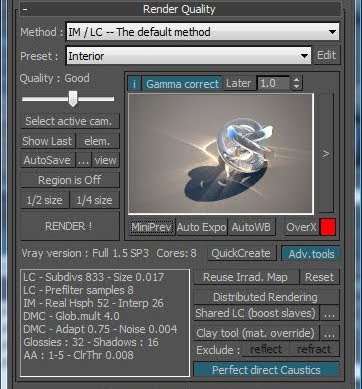
SolidRocks 0.85 Key Features
- Compatible with 3dsMax 2010
- Compatible with Vray RCx to 1.5 SP4
- Compatible with Vray RT !
- New GI method selector
- Ambient Occlusion management (SP3/SP3a)
- Vray QuickCreate Toolbar for creation speedup
- 1 click process for complete Vray setup
- friendly and Very simple interface
- Switch between basic and advanced interface
- custom parameters for each scene
- modifiable presets : exterior, interior…
- handle all Vray settings for best quality vs rendertime
- Full LWF gamma correction with useful options
- shareLightcache tool for speedup slaves warmup
- auto Exposure and Auto White balance tools
- materials and lights optimisation tools for best rendertimes
- mini preview showing overexposed areas for fast light setup
- All your needs in a single window
- Adapts Vray settings depending on choosen resolution
- switch between draft and production settings in one click !
- useful for Vray newbies, average and power users
- learn Vray watching SolidRocks at work
- Discover the power of universal mode and detail enhance
- gain time
http://www.solidrocks.subburb.com/
Scriptspot
http://www.scriptspot.com/3ds-max/scripts/solidrocks
if you like this script vote for it and also support the developer by buying it!
Download link Mirros:
http://www.multiupload.com/4ZG9BGGP5W
355 KB
RS:
http://rapidshare.com/files/374795075/SolidRocks_0.85b_Incl_KG_iND.rar.html
Forum info/links:
http://forum.cgpersia.com/f56/solidrocks_0-85b_incl_kg_ind-10179/
Note: Make sure to only enter the last 8 digits of the req code.
With special thanks to cracker (n0MAD)
Similar threads

- Replies
- 0
- Views
- 225


- Replies
- 0
- Views
- 213
- Replies
- 3
- Views
- 134
