


1.Download Rufus
Download
2.Plug Flash drive, and Select Windows 11 iso in rufus
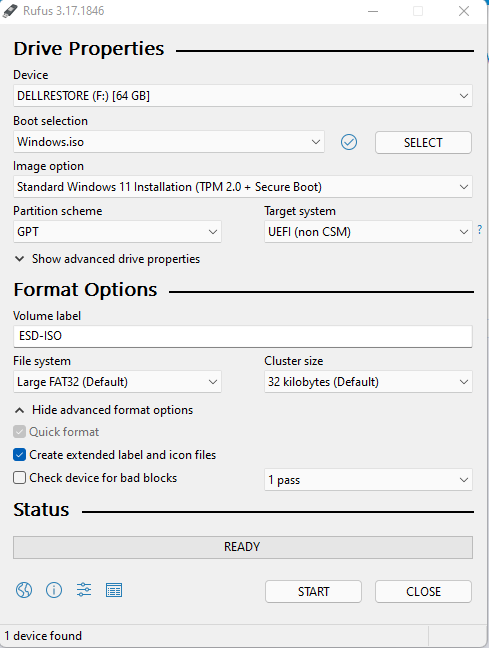
3.Select Extended Windows 11 Installation (no TPM / no Secure Boot) in Image option
If your PC Support to UEFI Boot Method Select GPT in Partition scheme otherwise Select MBR
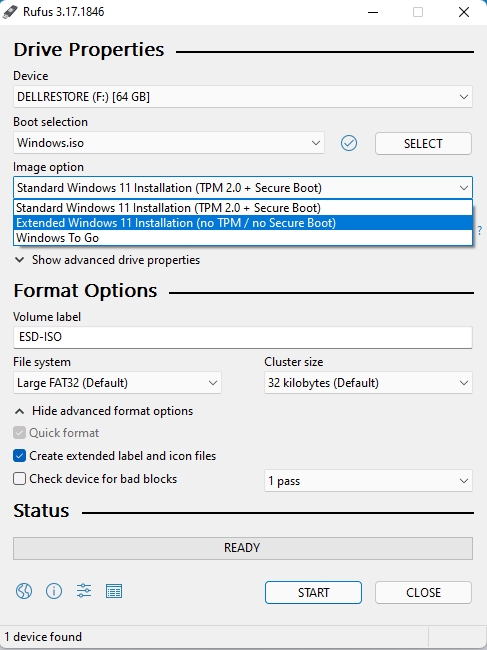
4.Click Start , Now you can install Windows 11 to Unsupported PC you want (for Clean installation)
Download
2.Plug Flash drive, and Select Windows 11 iso in rufus
3.Select Extended Windows 11 Installation (no TPM / no Secure Boot) in Image option
If your PC Support to UEFI Boot Method Select GPT in Partition scheme otherwise Select MBR
4.Click Start , Now you can install Windows 11 to Unsupported PC you want (for Clean installation)
Last edited:


