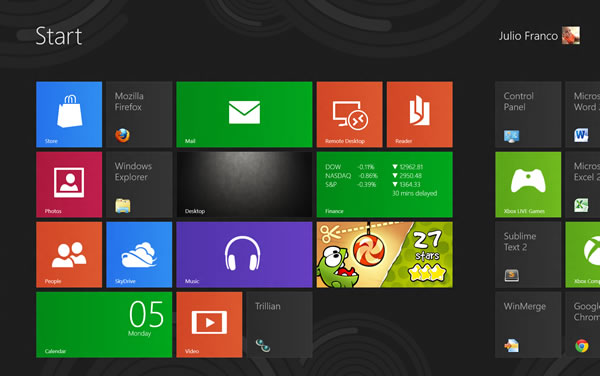
ඔන්න අදත් ගෙනාවා කාටත් වැදගත් වෙයි කියල හිතන කරුනු ටිකක්

කාටත් කිව්වට windows 8 අයට තමා වැදගත් වෙන්නෙ මේ ගැන මම කලින් දාපු thread එක තමා මෙ බලලා නැති අය බලන්න
http://www.elakiri.com/forum/showthread.php?t=1368000
මෙන්න අද කියන්න යන වැඩ කැලි ටික
checking your login password before submitting
ලොග් වෙන්න කලින් ලොගින් පාස්වර්ඩ් එක බලාගන්න vista,windows 7 වල බැ නමුත් 8 වල පුලුවන් password එක ගහල මෙන්න මේ ඇහැ ලකුන ඔබාගන ඉන්න එතකොට පෙන්නනවා හරි කියන sure කරගනම submit කරන්න පුලුවන්

Logging into windows 8
එක විදියක් මම කලින් thred එකෙ දැම්මා මෙන්න දෙවනි විදිය මෙන්න මේ screen එක

ආවහම මොනවහරි type කරන්න එතකොට පට ගාලා මෙන්න මෙ screen එක එනවා එතකොට ලොග් වෙන්න ලේසි

Add Shut down and restart option to desktop
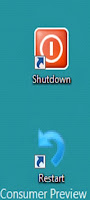
shutdown සහ restart කරගන්න shortcut දාගන්නෙ මෙහෙමයි මුලින්ම shutdown කරගන්න නම් desktop එකෙ right click කරලා new ගිහින් shortcut යන්න
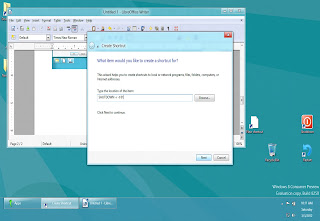
මෙතන location එකට
SHUTDOWN -s -t 01
දෙන්න
Restart button එක ඕන නම්
SHUTDOWN -r -t 01
දෙන්න
මෙන්න windows 8 වල keyboard shortcut සෙට් එකක්
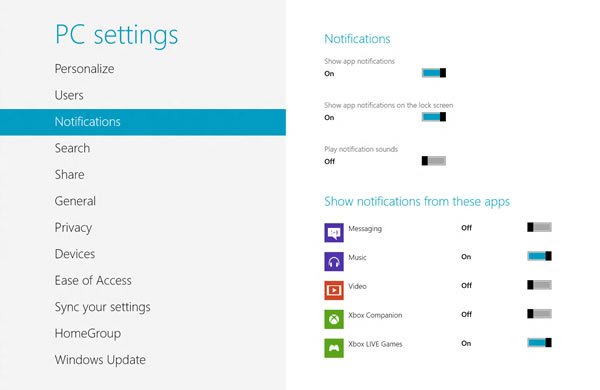
මෙක කරගන්න නම් more pc settings ගිහින් එතන තියන notification tab එකට යන්න එතකොට මෙන්න මෙ screen එක එයි මෙතනින් කරගන්න පුලුවන්
කාටත් කිව්වට windows 8 අයට තමා වැදගත් වෙන්නෙ මේ ගැන මම කලින් දාපු thread එක තමා මෙ බලලා නැති අය බලන්න
http://www.elakiri.com/forum/showthread.php?t=1368000
මෙන්න අද කියන්න යන වැඩ කැලි ටික
checking your login password before submitting
ලොග් වෙන්න කලින් ලොගින් පාස්වර්ඩ් එක බලාගන්න vista,windows 7 වල බැ නමුත් 8 වල පුලුවන් password එක ගහල මෙන්න මේ ඇහැ ලකුන ඔබාගන ඉන්න එතකොට පෙන්නනවා හරි කියන sure කරගනම submit කරන්න පුලුවන්

Logging into windows 8
එක විදියක් මම කලින් thred එකෙ දැම්මා මෙන්න දෙවනි විදිය මෙන්න මේ screen එක

ආවහම මොනවහරි type කරන්න එතකොට පට ගාලා මෙන්න මෙ screen එක එනවා එතකොට ලොග් වෙන්න ලේසි

Add Shut down and restart option to desktop
shutdown සහ restart කරගන්න shortcut දාගන්නෙ මෙහෙමයි මුලින්ම shutdown කරගන්න නම් desktop එකෙ right click කරලා new ගිහින් shortcut යන්න
මෙතන location එකට
SHUTDOWN -s -t 01
දෙන්න
Restart button එක ඕන නම්
SHUTDOWN -r -t 01
දෙන්න
මෙන්න windows 8 වල keyboard shortcut සෙට් එකක්
- Windows key Shows the new Start screen (Metro).
- Win + type keyword Instant application search (same as in Windows 7).
- Win + D Standard Windows desktop. Also minimizes/restores all open windows in desktop mode.
- Win + Q Shows all installed apps.
- Win + W Instant search for settings.
- Win + F Instant search for files.
- Win + I Settings sidebar (control panel, network, volume, brightness, notifications, and more).
- Win + P Shows multi-monitor options, also useful for connecting an external monitor or projector.
- Win + X Power user shortcut menu (Device Manager, Control Panel, Command Prompt, Power Options, etc.).
- Win + Z Shows App Bar in Metro applications.
- Win + . (period) Snaps the current Metro app to the right side of the screen. Do it twice and it will snap to the left.
- Win + . (period) + Shift Snaps the current Metro app to the left side of the screen.
- Win + J Switches focus between snapped Metro apps.
- Win + Page Up / Down Moves full-screen Metro app to secondary monitor.
- Win + Left / Right arrow Moves and snaps desktop applications in that direction, or to a different monitor.
- Win + Tab Switches between open applications. Similar to using the left-upper hot corner with a mouse.
- Win + L Locks Windows.
මෙක කරගන්න නම් more pc settings ගිහින් එතන තියන notification tab එකට යන්න එතකොට මෙන්න මෙ screen එක එයි මෙතනින් කරගන්න පුලුවන්


 )
)