

Latest ads
-
 Singapore V2ray VPN for Tunneling
- hu KANNA
- Updated:
-
Web hosting for your business
- avishka777
- Updated:
-
GOOGLE AI PRO - 18 Month - Rs.500.00
- Sanathbh
- Updated:
-
 📸 SIGMA 85mm F1.4 DG HSM | Art — Nikon Mount
- romeshnonis
- Updated:
-
Singapore V2Ray VPN for Tunneling
- hu KANNA
- Updated:
Windows Phone (WP8 & WP8.1)
- Thread starter dinuka rukshan
- Start date
You are using an out of date browser. It may not display this or other websites correctly.
You should upgrade or use an alternative browser.
You should upgrade or use an alternative browser.


How do I block unwanted calls on my Nokia Windows Phone?

There will be a time in life when you need to block someone, be it a cold sales contact or someone who may be harassing you. Unfortunately, Windows Phone 8 doesn't currently have a built-in blocking feature to prevent numbers from sending messages to your smartphone, nor can the operating system halt calls in their tracks. But Microsoft did make tools for manufacturers to enable this feature, should they want to make it for their customers.
This is where Nokia came in with its 'call + SMS filter', which launched on Windows Phone 8 last year for Lumia devices (Samsung has it in their ATIV line of Windows Phones too).
We'll quickly walk you through how to set everything up, just in case you've yet to fire up the filter settings area for the first time.
The filter is not enabled by default, so you'll need to turn it on. Luckily, everything can be found under your phone's Settings.
call + SMS filter (for Nokia Lumia phones only)
Swipe right to the app list
Scroll down until you find 'Settings' (tap)
System
Scroll down until you find 'call+SMS filter' down the list, then tap to open
If you haven't accessed the feature yet, you'll have to accept the terms of use and privacy policy, which will be displayed with an option to accept or cancel. Hint: if you wish to use the filtering system, hit accept.

To add contacts to the block list
Head into phone history (Phone) or messaging (Messaging)
Long press on a contact or message
On the pop-up dialog, select 'block number...'

Back to the filter settings area. Selecting 'advanced' will open up some handy options to configure the blocking of withheld numbers automatically, enable/disable the Live Tile and toggle toast notifications. It's all simple stuff. Pinning the Live Tile to your Start screen is a convenient way to monitor what's being blocked, as well as providing quick access to the settings area.
Advanced settings for call/message filtering
Settings
System
call+SMS filter
advanced
Enable/disable 'Block withheld numbers'
Enable/disable 'App Live Tile'
Enable/disable 'Notification'
Limitations?
Unfortunately, there doesn't seem to be a way to pre-block someone through your People hub (aka contacts), so you'll have to wait until they call or message you first before filtering.

There will be a time in life when you need to block someone, be it a cold sales contact or someone who may be harassing you. Unfortunately, Windows Phone 8 doesn't currently have a built-in blocking feature to prevent numbers from sending messages to your smartphone, nor can the operating system halt calls in their tracks. But Microsoft did make tools for manufacturers to enable this feature, should they want to make it for their customers.
This is where Nokia came in with its 'call + SMS filter', which launched on Windows Phone 8 last year for Lumia devices (Samsung has it in their ATIV line of Windows Phones too).
We'll quickly walk you through how to set everything up, just in case you've yet to fire up the filter settings area for the first time.
The filter is not enabled by default, so you'll need to turn it on. Luckily, everything can be found under your phone's Settings.
call + SMS filter (for Nokia Lumia phones only)
Swipe right to the app list
Scroll down until you find 'Settings' (tap)
System
Scroll down until you find 'call+SMS filter' down the list, then tap to open
If you haven't accessed the feature yet, you'll have to accept the terms of use and privacy policy, which will be displayed with an option to accept or cancel. Hint: if you wish to use the filtering system, hit accept.

To add contacts to the block list
Head into phone history (Phone) or messaging (Messaging)
Long press on a contact or message
On the pop-up dialog, select 'block number...'

Back to the filter settings area. Selecting 'advanced' will open up some handy options to configure the blocking of withheld numbers automatically, enable/disable the Live Tile and toggle toast notifications. It's all simple stuff. Pinning the Live Tile to your Start screen is a convenient way to monitor what's being blocked, as well as providing quick access to the settings area.
Advanced settings for call/message filtering
Settings
System
call+SMS filter
advanced
Enable/disable 'Block withheld numbers'
Enable/disable 'App Live Tile'
Enable/disable 'Notification'
Limitations?
Unfortunately, there doesn't seem to be a way to pre-block someone through your People hub (aka contacts), so you'll have to wait until they call or message you first before filtering.
Last edited:
How To Flash & Brick/Dead Flash Your Nokia Lumia with Nokia Software Updater for Retail

The New Nokia Software Updater for Retail version 4.1.0 allows you to flash (Re-install, Update firmware) your Nokia (Nokia Lumia, Asha, S40 & Symbian) and Special for Nokia Lumia with Windows Phone 8 you can do flashing with brick/dead flash mode
Flashing with Brick/dead flash mode will helps you to recover your Nokia Lumia with Windows Phone 8 when your phone is getting stuck on rotating gear when updating or restoring. After flashing, your Nokia Lumia Windows Phone will be recovered (all data and apps will be erased).
Before Flashing (Normal & Brick/Dead Flash Mode)
Flashing with Nokia Software Updater for Retail will erase all data and applications on your Nokia devices.
Flashing may void your warranty
Please recharge your Nokia first before flashing
Nokia Software Updater for Retail v 4.1.0 only compatible with Windows 7 & 8
You will need Internet connection to download firmware
Do it with your own risk
How To Flashing Your Nokia (Normal Flash)
Normal Flash is used to Update/Re-install firmware. Available for All Nokia devices
Download Nokia Software Updater for Retail 4.1.0
Install it
Open Nokia Software Updater for Retail 4.1
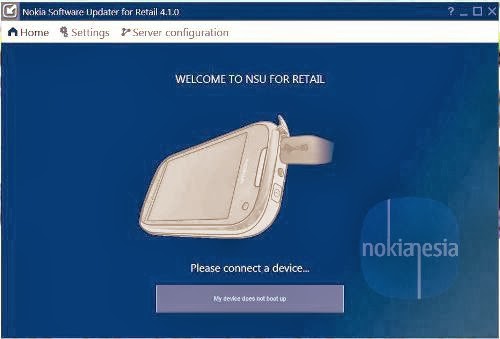
Connect your Nokia
Update notification will appear if Available, click "Update" to Update your firmware or re-install your firmware
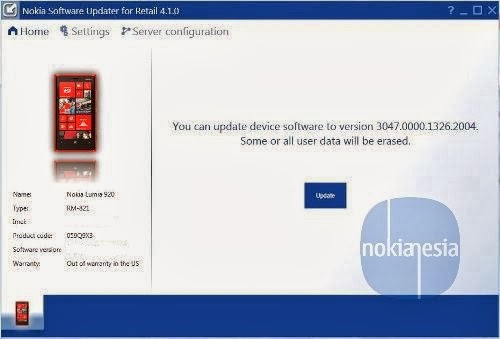
Please read carefully the terms & condtions, checked list "I Understand.." and click "Continue"

Now you will downloading firmware package, just wait until downloading process is finish. After that you will go automatically to flashing process. Don not unplug your cable until all the process are finish

Finish, Your Nokia already flashed and ready to use
How To Flashing Your Nokia Lumia Windows Phone 8 (Brick/Dead Flash)
Available only for Nokia Lumia with Windows Phone 8
Download Nokia Software Updater for Retail 4.1.0
Install it
DO NOT CONNECT your Nokia Lumia Windows Phone 8 to PC/Laptop
Open Nokia Software Updater for Retail 4.1
Click "My device does not Bot Up"
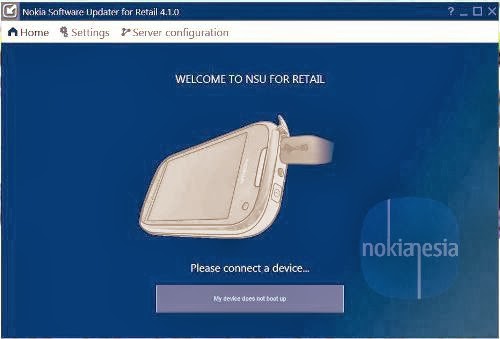
Click "Continue" to recover your Nokia Lumia Windows Phone 8
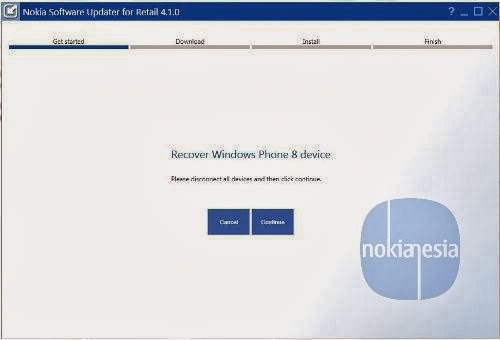
Connect your Nokia Lumia Windows Phone 8, please wait for device connection, you will need do some task (press and hold the power button and the volume down button until the phone vibrates), Just follow the instruction until your PC/Laptop detects your Nokia Lumia Windows Phone 8.
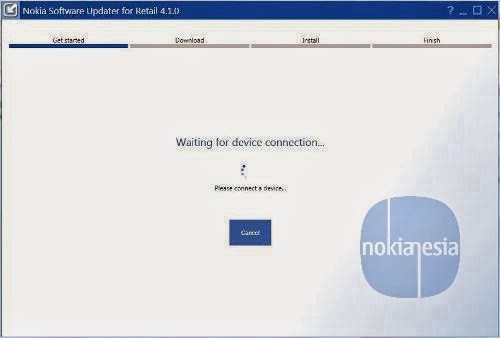
After That, you will downloading the firmware (if needed) and just wait until downloading process is finish. After that you will go automatically to flashing process. Don not unplug your cable until all the process are finish. Finish, Your Nokia already flashed and ready to use

The New Nokia Software Updater for Retail version 4.1.0 allows you to flash (Re-install, Update firmware) your Nokia (Nokia Lumia, Asha, S40 & Symbian) and Special for Nokia Lumia with Windows Phone 8 you can do flashing with brick/dead flash mode
Flashing with Brick/dead flash mode will helps you to recover your Nokia Lumia with Windows Phone 8 when your phone is getting stuck on rotating gear when updating or restoring. After flashing, your Nokia Lumia Windows Phone will be recovered (all data and apps will be erased).
Before Flashing (Normal & Brick/Dead Flash Mode)
Flashing with Nokia Software Updater for Retail will erase all data and applications on your Nokia devices.
Flashing may void your warranty
Please recharge your Nokia first before flashing
Nokia Software Updater for Retail v 4.1.0 only compatible with Windows 7 & 8
You will need Internet connection to download firmware
Do it with your own risk
How To Flashing Your Nokia (Normal Flash)
Normal Flash is used to Update/Re-install firmware. Available for All Nokia devices
Download Nokia Software Updater for Retail 4.1.0
Install it
Open Nokia Software Updater for Retail 4.1
Connect your Nokia
Update notification will appear if Available, click "Update" to Update your firmware or re-install your firmware
Please read carefully the terms & condtions, checked list "I Understand.." and click "Continue"

Now you will downloading firmware package, just wait until downloading process is finish. After that you will go automatically to flashing process. Don not unplug your cable until all the process are finish

Finish, Your Nokia already flashed and ready to use
How To Flashing Your Nokia Lumia Windows Phone 8 (Brick/Dead Flash)
Available only for Nokia Lumia with Windows Phone 8
Download Nokia Software Updater for Retail 4.1.0
Install it
DO NOT CONNECT your Nokia Lumia Windows Phone 8 to PC/Laptop
Open Nokia Software Updater for Retail 4.1
Click "My device does not Bot Up"
Click "Continue" to recover your Nokia Lumia Windows Phone 8
Connect your Nokia Lumia Windows Phone 8, please wait for device connection, you will need do some task (press and hold the power button and the volume down button until the phone vibrates), Just follow the instruction until your PC/Laptop detects your Nokia Lumia Windows Phone 8.
After That, you will downloading the firmware (if needed) and just wait until downloading process is finish. After that you will go automatically to flashing process. Don not unplug your cable until all the process are finish. Finish, Your Nokia already flashed and ready to use

machan windows 8 os eaka samsung glaxy s3 eakada danna pluwanda
BUMP
machan windows 8 os eaka samsung glaxy s3 eakada danna pluwanda
 බෑ
බෑ


මචන් ලුමියා 1320ක් තියෙනවා. එකට ආව අලුත්ම අප්ඩේට් එක මොකක්ද? Denim Cyan Black කියන්නේ මොනද? asia වලට අවේ නැති අප්ඩේට් තියනවලු නේද? පොඩ්ඩක් පැහැදිලි කරන්නකෝ

ow ban thama denim update eka sl walata na.EMINƎM;17862641 said:මචන් ලුමියා 1320ක් තියෙනවා. එකට ආව අලුත්ම අප්ඩේට් එක මොකක්ද? Denim Cyan Black කියන්නේ මොනද? asia වලට අවේ නැති අප්ඩේට් තියනවලු නේද? පොඩ්ඩක් පැහැදිලි කරන්නකෝ
cyn kiyanne 8.1 eka
ow ban thama denim update eka sl walata na.
cyn kiyanne 8.1 eka
macho a phone eke tyne Black kiyala ekak. Denim enna godak kal yanwada bn? Cyan eke monada bn wenaskm tynne? eka update size eka GB kiyak wage weida?


call recording app ekak & apps locker & image video locker
Puluwan nam mewa deepan
App Locker nam na neda bn


Similar threads


- Replies
- 28
- Views
- 1K