


YOUTUBE VIDEOS PLAY වෙනවා SLOW ද? මෙන්න එහෙනම් විසදුම

අදනම් ඔයාලට ගොඩක් වටින trick එකක් අරන් තමා ඇවිත් ඉන්නේ. ඔයාලා youtube එකේ මොකක් හරි එකක් play කරන්න ගියාම ගොඩක් වෙලාවට හිර (buffering) වෙනවා නේද? ඉතින් එකට විසදුමක් තමා මේ අද කියන්න යන්නේ, ඒ කියන්නේ හිර වෙන්නේ නැතිව youtube එකේ videos බලන්න පුළුවන් විදිහක්. Speed Internet Connection තියන අයගෙනම් මෙහෙම වෙන්නේ නැතිව ඇති. එත් ගොඩක් අයගේ internet speed නෑනේ. හොදයි එහෙනම් අපි වැඩේට බහිමුකො..
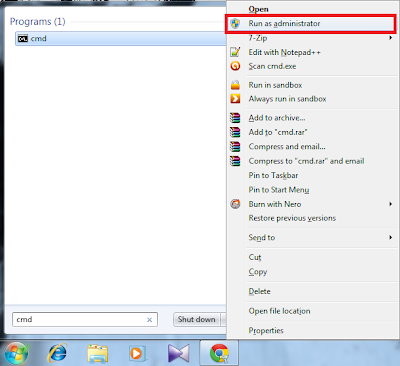
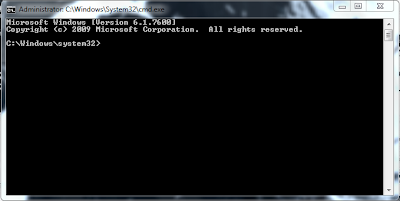
1. මුලින්ම Command Prompt (cmd) එක open කරගන්න. මතක ඇතිව cmd එකopen කරද්දී 'Run as administrator' විදියට open කරගන්න.
2. දැන් මේ දීලා තියන code එක ඒ විදිහටම cmd එකේ type කරන්න.
netsh advfirewall firewall add rule name="YouTubeHack" dir=in action=block remoteip=173.194.55.0/24,206.111.0.0/16 enable=yes
3. Type කරලා ඉවරවෙලා enter press කරන්න. වැඩේ හරි නම් 'Ok' කියල කියල එයි.
4. දැන් web browser එක open කරලා youtube එකට ගිහින් video එකක් play කරලා බලන්න. ඔයාලටම හොදට වෙනස තේරෙයි.
5. මේක අයින් කරන්න ඕනෙනම්, මේ code එක type කරලා enter කරන්න.
netsh advfirewall firewall delete rule name="YouTubeHack"
වැඩේ හරිනේ, තේරෙන්නේ නැති දෙයක් තියනවනම් පහළින් comment එකක් දාන්න..
අදනම් ඔයාලට ගොඩක් වටින trick එකක් අරන් තමා ඇවිත් ඉන්නේ. ඔයාලා youtube එකේ මොකක් හරි එකක් play කරන්න ගියාම ගොඩක් වෙලාවට හිර (buffering) වෙනවා නේද? ඉතින් එකට විසදුමක් තමා මේ අද කියන්න යන්නේ, ඒ කියන්නේ හිර වෙන්නේ නැතිව youtube එකේ videos බලන්න පුළුවන් විදිහක්. Speed Internet Connection තියන අයගෙනම් මෙහෙම වෙන්නේ නැතිව ඇති. එත් ගොඩක් අයගේ internet speed නෑනේ. හොදයි එහෙනම් අපි වැඩේට බහිමුකො..
1. මුලින්ම Command Prompt (cmd) එක open කරගන්න. මතක ඇතිව cmd එකopen කරද්දී 'Run as administrator' විදියට open කරගන්න.
2. දැන් මේ දීලා තියන code එක ඒ විදිහටම cmd එකේ type කරන්න.
netsh advfirewall firewall add rule name="YouTubeHack" dir=in action=block remoteip=173.194.55.0/24,206.111.0.0/16 enable=yes
3. Type කරලා ඉවරවෙලා enter press කරන්න. වැඩේ හරි නම් 'Ok' කියල කියල එයි.
4. දැන් web browser එක open කරලා youtube එකට ගිහින් video එකක් play කරලා බලන්න. ඔයාලටම හොදට වෙනස තේරෙයි.
5. මේක අයින් කරන්න ඕනෙනම්, මේ code එක type කරලා enter කරන්න.
netsh advfirewall firewall delete rule name="YouTubeHack"
වැඩේ හරිනේ, තේරෙන්නේ නැති දෙයක් තියනවනම් පහළින් comment එකක් දාන්න..


