
Latest ads
-
Singapore V2Ray VPN for Tunneling
- hu KANNA
- Updated:
-
 Plan your Crypto & Forex entries before you take the trade
- romeshnonis
- Updated:
-
 RHCSA, RHCE, AWS, Docker, Kubernetes Training
- Sanjeewani95
- Updated:
-
 🛡️ Kaspersky Antivirus – 1 Year / 1 Device | Rs. 2,300 | Only 9 Left
- KSPathirana
- Updated:
-
Professional CCTV Installation Service
- Techguy231
- Updated:
maxxa New Facebook Account Security option..
- Thread starter **cut
- Start date
You are using an out of date browser. It may not display this or other websites correctly.
You should upgrade or use an alternative browser.
You should upgrade or use an alternative browser.

 hehe
hehe
fhone ekata msg eka ene na machan....e ai kiyapanko
facebook contacts walata hari number eka add karala thiyanawada balanna.


මචන් මම එක ගොඩක් දවස් දැකල එත් එක මට කරගන්න බැරි උන හින්ද මම වැඩේ අතහැරලා දැම්ම....
මට මේ වගේ message එකක් එනවා...
මොකක්ද කරන්න ඕනේ කියල කියපන්කො..............
මට මේ වගේ message එකක් එනවා...
මොකක්ද කරන්න ඕනේ කියල කියපන්කො..............
මචන් මම එක ගොඩක් දවස් දැකල එත් එක මට කරගන්න බැරි උන හින්ද මම වැඩේ අතහැරලා දැම්ම....
මට මේ වගේ message එකක් එනවා...
View attachment 31096
මොකක්ද කරන්න ඕනේ කියල කියපන්කො..............
cookies clear karala karapan.et hariyan nattam wena browser ekakin karahan.

machan device eka kiyala recognize karanne mokakda,
IP address ekada? nathinam mage lap eken wenas than waladi log wenna haduwoth mama code eka denna onada?
mama hithanne ban IP eka.internet conection eka wenas karanawanam twice add karanna wenawa device eka.
mama hithanne ban IP eka.internet conection eka wenas karanawanam twice add karanna wenawa device eka.
thanks machan, very useful thread..
rep adata barilu, passe ewannam..

machan mama office computer eken saha gedaradi mage laptop eken FB log wenawa ethakota e log wena hama welawatama security code ekak Enter karanna wenawada? ehemanam eka hari karadarayak neda?
na ban.eka parak devices 2 add karama a devices walin eta passe log wenakota code ekak awashyawen na.

na ban.eka parak devices 2 add karama a devices walin eta passe log wenakota code ekak awashyawen na.
ok thanks machan
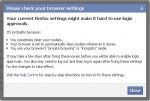
machan me error eka ennawa mekata mokada karanne
Please check your browser settings
Your current Firefox settings might make it hard to use login approvals.
It's probably because:
Visit the Help Center for step-by-step directions on how to fix these settings.
Please check your browser settings
Your current Firefox settings might make it hard to use login approvals.
It's probably because:
- You sometimes clear your cookies.
- Your browser is set to automatically clear cookies whenever it closes.
- You use your browser's "private browsing" or "incognito" mode.
Visit the Help Center for step-by-step directions on how to fix these settings.
cookies clear karala karapan.et hariyan nattam wena browser ekakin karahan.
mama ayeth try 1k dala balannam......
machan me error eka ennawa mekata mokada karanne
Please check your browser settings
Your current Firefox settings might make it hard to use login approvals.
It's probably because:
It may take a few days after fixing these issues before you will be able to enable login approvals. You also may need to log out and then log in again after fixing these settings for the changes to take effect.
- You sometimes clear your cookies.
- Your browser is set to automatically clear cookies whenever it closes.
- You use your browser's "private browsing" or "incognito" mode.
Visit the Help Center for step-by-step directions on how to fix these settings.
cookies clear karala balapan.hariyan nattam browser eka change karala karapan.


....::::::::::PROUD TO BE A
 SRI LANKAN::::::::::.....
වටිනව යාලු
හොදට පැහැදිලි කරල දීල තියෙනව
ගොඩක් මහන්සි වෙලා
ගොඩක් ස්තූතී අපිත් එක්ක බෙදාගත්තට!

වටිනව යාලු
හොදට පැහැදිලි කරල දීල තියෙනව
ගොඩක් මහන්සි වෙලා
ගොඩක් ස්තූතී අපිත් එක්ක බෙදාගත්තට!

Similar threads

- Replies
- 33
- Views
- 1K


- Replies
- 17
- Views
- 730


