

Latest ads
-
Colombo Hard Disk For Sale
- mazza
- Updated:
-
 land for sale
- justasking
- Updated:
-
 AMD AM 5 Ryzen setup
- prabodhamadusanka
- Updated:
-
 Gampaha ACER OKW223 Wired RGB Keyboard
- chint
- Updated:
-
 Gampaha FANTECH R1 V2 RACING WHEEL
- chint
- Updated:
You are using an out of date browser. It may not display this or other websites correctly.
You should upgrade or use an alternative browser.
You should upgrade or use an alternative browser.

kastya free GPS software 1 hoyala deepalako DUbai walata weda karana
galaxy s2 device 1 kata hariyana
galaxy s2 device 1 kata hariyana


ඉස්සෙල්ලා ෆොන් එක ලිදට දන්න ඔනෙ ඉට පස්සෙ උබත් ලිදට පයින්න ඔනෙඇන්ඩ්රොයිඩ් මාර්කට් එකෙන් apps ඇන්ඩ්රොයිඩ් ෆෝන් එකේ SDකාඩ් එකට කෙලින්ම ඉන්ස්ටෝල් කරන්නෙ කොමද කියල දන්නවද?

machan chathu mata ice creem sandwich theme eka go launcher ex ekata one....plzzz aran denna.....


new android market
What's changed?
* New setting: Auto-update apps (presumably, sets all apps to auto-update mode, woohoo!)
* New setting: Update over Wi-Fi only
* New setting: Auto-add shortcuts (automatically adds homescreen shortcuts for new apps, ala Honeycomb)
* Smaller font
* New app drawer icon
* Microphone (voice command) button in search menu
* Star rating chart on app pages
* Minor UI tweaks


Download Android Market 3.3.11
If normal installation didn't work out well for you, use any of the methods below.
Procedure to install via CWM Recovery
According to popular requests, I made a flashable version of the new Market 3.3.11 . This will solve all the installation issues.
1. Download the Flashable zip file here.
2. Do a Nandroid Backup.
3. Reboot into Recovery & Flash the zip.
4. Now reboot & enjoy.......
Procedure to install via Root Explorer Method
1. Download the apk file from the above link to your sd card.
2. Now using Root explorer, go to /system/app
3. Mount the system to r/w.
4. Now search for Vending.apk & rename it to Vending.apk1
5. Copy the file you just downloded to /system/app & rename it to Vending.apk
6. Now press & hold the app and select Permissions
7. Select only the options given below. Now REBOOT & enjoy.....
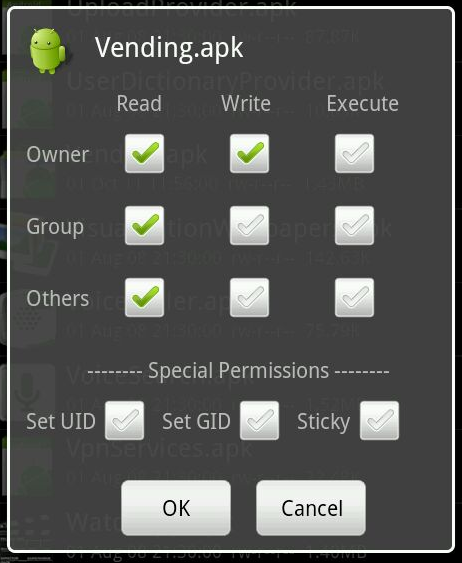
all credit goes to febycv forum.xda-developers.com
http://forum.xda-developers.com/showthread.php?t=1328849
What's changed?
* New setting: Auto-update apps (presumably, sets all apps to auto-update mode, woohoo!)
* New setting: Update over Wi-Fi only
* New setting: Auto-add shortcuts (automatically adds homescreen shortcuts for new apps, ala Honeycomb)
* Smaller font
* New app drawer icon
* Microphone (voice command) button in search menu
* Star rating chart on app pages
* Minor UI tweaks


Download Android Market 3.3.11
If normal installation didn't work out well for you, use any of the methods below.
Procedure to install via CWM Recovery
According to popular requests, I made a flashable version of the new Market 3.3.11 . This will solve all the installation issues.
1. Download the Flashable zip file here.
2. Do a Nandroid Backup.
3. Reboot into Recovery & Flash the zip.
4. Now reboot & enjoy.......
Procedure to install via Root Explorer Method
1. Download the apk file from the above link to your sd card.
2. Now using Root explorer, go to /system/app
3. Mount the system to r/w.
4. Now search for Vending.apk & rename it to Vending.apk1
5. Copy the file you just downloded to /system/app & rename it to Vending.apk
6. Now press & hold the app and select Permissions
7. Select only the options given below. Now REBOOT & enjoy.....
all credit goes to febycv forum.xda-developers.com
http://forum.xda-developers.com/showthread.php?t=1328849

machnla mata lg optimus 0ne(p500) phone ekata support karna video call app ekka denakoo.sewa nee.plzz help mee


aya elakiri eka ata arala giya ban
balapanko ithin??? apith idala idala android ekak gattha gaman wade atha arala daala gihilla

meeka sira thread eka bn

chathuwata ayeth enna kiyanna berida??


balapanko ithin??? apith idala idala android ekak gattha gaman wade atha arala daala gihilla
meeka sira thread eka bn
chathuwata ayeth enna kiyanna berida??
Chathu ge FB page ekata join weyan !! eka update wenawa


Chathu ge FB page ekata join weyan !! eka update wenawa
link eka deepanko
Similar threads

- Replies
- 21
- Views
- 2K


- Replies
- 200
- Views
- 20K


- Question
- Replies
- 40
- Views
- 3K


- Replies
- 15
- Views
- 1K
