
Latest ads
-
Singapore V2Ray VPN for Tunneling
- hu KANNA
- Updated:
-
 Dating Website & Online Chat Room
- hotvideo
- Updated:
-
 DJI Mini 4 Pro Drone Combo Plus
- Hawaka
- Updated:
-
USA Linux OpenVZ VPS අඩු මිලකට
- Nadun26
- Updated:
-
Shared Hosting වාර්ෂිකව රු 2200 සිට!
- Nadun26
- Updated:
.:: ANDROID වැඩකාරයෝ Part II ::.
- Thread starter චිරි චිරි වැස්ස
- Start date
You are using an out of date browser. It may not display this or other websites correctly.
You should upgrade or use an alternative browser.
You should upgrade or use an alternative browser.


machan la mama S3 ekak gaththa mata root karanna hoda tutorials tikak hoyala dipanko.mata boot loader unlock karanna one nam naha.
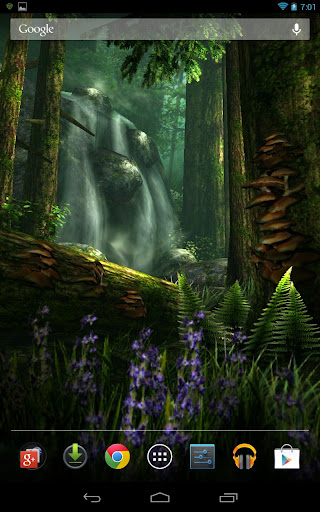
Forest HD Live Wallpaper

Description
Discover a peaceful forest teeming with wildlife and surrounded by natural beauty every time you use your device.
Sunlight filters through the trees as a gentle breeze rustles the leaves. Pause for reflection at the path while birds flutter past and deer graze contentedly in the rich foliage and quiet solitude of the undisturbed woods.
Choose the Natural theme, and your forest becomes pristine as you discover a cascading waterfall. Or, rest at your private cabin before setting out on a hike through the woods at the pathway signs - it's all up to you!
Interact with the birds and watch the deer gaze at the forest. Customize the wildlife, flowers, cabin, signs, grass, waterfall, and much more!
Several add-on packs are coming soon, allowing you to choose the features most meaningful to you:
* The ‘Field Pack’ allows you to explore a completely new scene featuring a field of tall waving grass, butterflies, additional deer, and more.
* In the ‘Stream Pack’, just one of the new features is a babbling brook winding through the forest while a buck sips from the clear waters in changing weather conditions, fish, and more.
* The ‘Customization Pack’ features even more personalization options such as your own text and images in the scene, dynamic time of day, fireflies at night, and more.
This visually stunning live wallpaper is true 3D with hand-crafted artwork. Our wallpapers feature silky-smooth animations while conserving your battery life and works great with phones, tablets, or any device that supports live wallpapers.



- Download -
Description
Discover a peaceful forest teeming with wildlife and surrounded by natural beauty every time you use your device.
Sunlight filters through the trees as a gentle breeze rustles the leaves. Pause for reflection at the path while birds flutter past and deer graze contentedly in the rich foliage and quiet solitude of the undisturbed woods.
Choose the Natural theme, and your forest becomes pristine as you discover a cascading waterfall. Or, rest at your private cabin before setting out on a hike through the woods at the pathway signs - it's all up to you!
Interact with the birds and watch the deer gaze at the forest. Customize the wildlife, flowers, cabin, signs, grass, waterfall, and much more!
Several add-on packs are coming soon, allowing you to choose the features most meaningful to you:
* The ‘Field Pack’ allows you to explore a completely new scene featuring a field of tall waving grass, butterflies, additional deer, and more.
* In the ‘Stream Pack’, just one of the new features is a babbling brook winding through the forest while a buck sips from the clear waters in changing weather conditions, fish, and more.
* The ‘Customization Pack’ features even more personalization options such as your own text and images in the scene, dynamic time of day, fireflies at night, and more.
This visually stunning live wallpaper is true 3D with hand-crafted artwork. Our wallpapers feature silky-smooth animations while conserving your battery life and works great with phones, tablets, or any device that supports live wallpapers.


- Download -


Theme Line Adw Apex Go Nova 1.66
Theme Line Adw Apex Go Nova

Updated: 9 April 2013
Current Version 1.66
Requires Android 2.2 and up
Category: Personalization
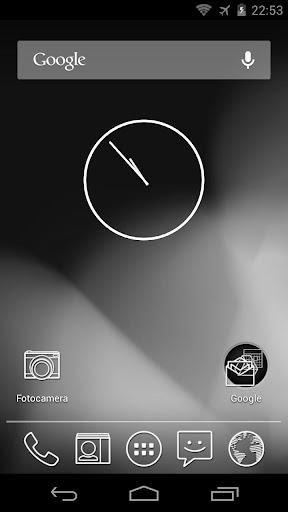
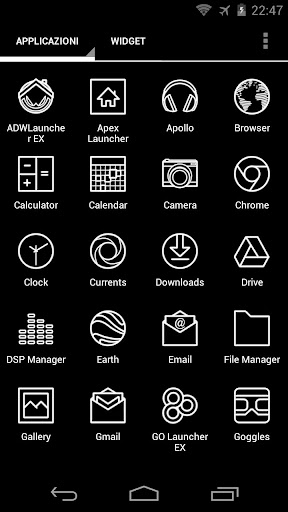
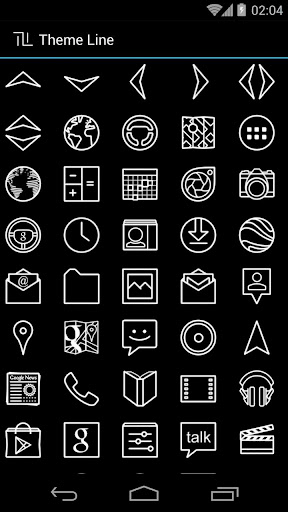
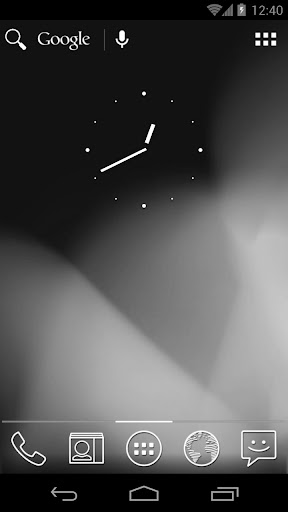
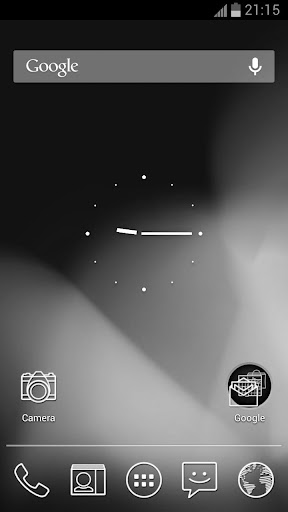
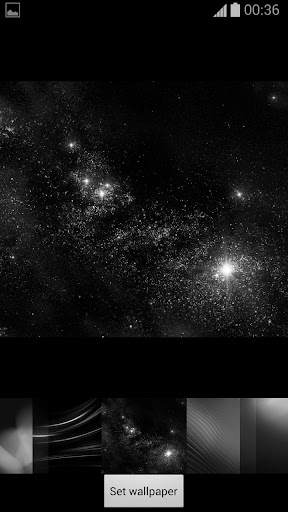
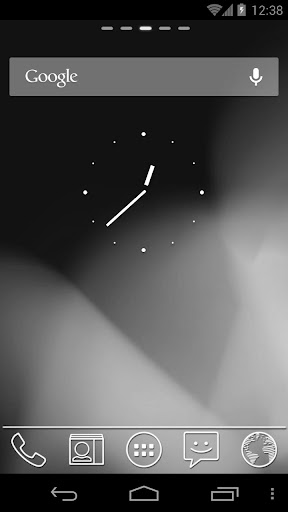
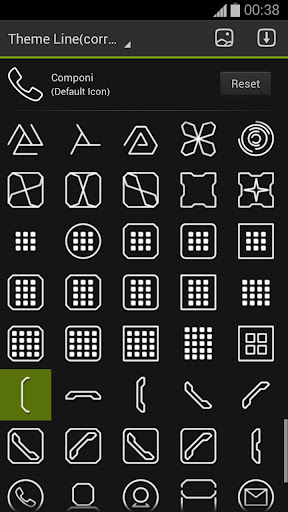
Theme Line Adw/Apex/Nova/Go Apk works with:


Pass : hasi
Updated: 9 April 2013
Current Version 1.66
Requires Android 2.2 and up
Category: Personalization
Theme Line Adw/Apex/Nova/Go Apk works with:
- ADW Launcher
- ADW Launcher EX
- Apex Launcher
- Go Launcher Ex
- Holo Launcher
- Holo Launcher HD
- Nova Launcher
- Add icons requested:
- Feedly
- Pocket.
- New icons coming soon.
- Only need first upgrade too Holo and Red version.
- All icons is drawed by me line after line…


Pass : hasi
මචන් මගේ sony xperia P එකෙ msg notification tone එක වැඩ නැනේ..4n එක restart කරාම ආයෙත් හරි,එත් ටික වෙලාවකින් වැඩ නතිව යනවා..උබලා දන්නවා නම් solution එකක් කියපල්ලකො..ලොකු උදව්වක්....
මචං ඕක P එකේ ගොඩාක් දුරට එන common issues එකක්
චිරි චිරි වැස්ස;14773783 said:මචං ඕක P එකේ ගොඩාක් දුරට එන common issues එකක්
eka tamai machn...mekata solution ekak nadda?mat dakka godak un dala tiyenawa unta tiyenawa kiyala case eka..

eka tamai machn...mekata solution ekak nadda?mat dakka godak un dala tiyenawa unta tiyenawa kiyala case eka..
මටත් ඕක ටික කාලෙකට කලින් ආරංචි උනා බං., බලමු. solution එකක් ලැබුනොත් කියන්නම්.
චිරි චිරි වැස්ස;14773838 said:මටත් ඕක ටික කාලෙකට කලින් ආරංචි උනා බං., බලමු. solution එකක් ලැබුනොත් කියන්නම්.
එල එල..thnkz මචන්..එකේ තව මොනවද තියෙන අවුල්??
එල එල..thnkz මචන්..එකේ තව මොනවද තියෙන අවුල්??
තව මචං battery drain issue එකක් ඇවිත් තියනව. ඒ වගේම තව GB වලයි, some ics versions වලයි cam bug එකකුත් ඇවිත් තියනව

චිරි චිරි වැස්ස;14773045 said:official නම් නැහැ මචෝ. custom එකක් තමා දාන්න වෙන්නෙ
machan mata fully instructions dipanko daganna custom hari..

මොකද්ද මේ රූට් ( root ) කරනවා කියන්නේ ?
සරළව කියන්න ඔන නිසා මම ඒක මේ විදියට පැහැදිලි කරන්නම්. අපි පරිගණක පාවිච්චි කරනවා නේ. ඒවයේ තියනවා නේ ඔය Admin login ( high privilege user ) සහ Guest login ( low privilege user ) වගේ එක එක level එකේ logins ( privileges ). ෆොන් වලත් එහෙම තමා. අපිට සාමාන්යයෙන් එන්නේ guest නැත්නම් අඩු privilege level එකක් තියන login එකක්. මේ යටතේ අපිට soltware (apps) install කරන්න එහෙම පුළුවන්. ඒත් ෆෝන් එකේ අභ්යන්තර දේවල් ( Core OS එකේ දේවල් ) වෙනස් කරන්න බෑ. ෆොන් එක root කරනවා කියන්නේ අන්න ඒ වගේ Admin privileges තියන user ව enable කර ගන්නවා වගේ වැඩක්. රූට් කියන්නේ ඇත්තටම කිව්වොත් ෆෝන් එකේ තියන (default) එක user account එකක්. Android කියන්නේ linux ගණයට වැටෙන OS එකක් නිසා root කියන user ව අනිවාර්යෙන් ඕන වෙනවා. නමුත් ෆෝන් එක එනකොට ඒ user ව අපිට පාවිච්චි කරන්න බැරි විදියට lock කිරීමක් වගේ දෙයක් කරලා තමා එන්නේ. රූට් කරන එකෙන් අපි කරන්නේ මේ root user ව ආයිත් පාවිචියට ගන්න එකයි.
රූට් කලාම ඇත්තටම වෙන්නේ මොකද්ද ?
රූට් කලාම ඇත්තටම වෙන්නේ ෆොන් එකේ super privileges තියන root user ව enable වෙන එක. මේකට පොඩි exploit එකක් කරන්න ඕනේ. ඒ කියන්නේ පොඩි hack එකක් වගේ. root ව enable උනාට පස්සේ ඒක පාවිච්චි කරලා, අර කලින් කරන්න බැරි උන් දේවල්, කලින් access කරන්න බැරි උන තැන් access කරන්න පුළුවන්.
ඒ විතරක් නෙමේ root commands හරියට වැඩ කරන්න නම්, BusyBox Binaries කියලා හඳුන්වන තවත් files ටිකක් අවශ්ය වෙනවා. ඔය busybox binary වල තමයි රූට් commands අන්තරගත වෙන්නේ.
root කලා කියලා අපිට ලැබෙන දේවල් මොනවාද ?
අලුතින් ලැබෙන්නේ නම් super user privilege එකයි, සමහර විට busybox binary ටිකයි විතරයි. ඒත් ඒකෙන් වැඩ ගන්න එක අපේ වැඩක්. නමුත් කරන්න පුළුවන් සරළ දේවල් ටිකක් කියන්නම්.
1. අපිට අවශ්ය නැති, ෆෝන් එක ගන්නකොට ෆෝන් එකත් එකක එන, සාමාන්ය විදියට අයින් කරන්න බැරි apps අයින් කරන්න පුළුවන්. ( මේ වගේ අයින් කරන්න බැරි, වැඩකට නැති apps වලට කියන්නේ bloatware කියලා ). ඔය Chinese, Korean වගේ ෆෝන් ගත්ත අයට නම් මේක හොඳට දැනෙනවා ඇති.
2. ෆෝන් එකේ සාමාන්යයෙන් අපිට බලන්න පුළුවන් Internal or External USB Storage එක විතරයි. ඔය ෆෝන් එකත් එක්ක එන file browser එකනේ බලන්න පුළුවන් ඒ ටික තමා. නමුත් root කලාට පස්සේ, වෙනත් File browser apps ( මේවා Android Play Store එකේ තියනවා ) පාවිච්චි කරලා මුළු system එකම බලන්න පුළුවන්. අපි මේවට කියන්නේ root explorer apps කියලා. ඇයි මේවා බලන්න ඕනේ වෙන්නේ කියලා මම පසුව විස්තර කරන්නම්.
3. සමහර developers ලා හදන apps තියනවා, root access අනිවාර්යයෙන් අවශ්ය වෙන ඒවා. ඒවා හරියට පාවිච්චි කරන්නත් root access ඕන කරනවා.
4. ෆෝන් එකේ සමහර දේවල් ( OS level, Hardware level ), සමහර වෙලාවට ඒ ෆෝන් එක හදන නිශ්පාදකයා විසින් disabled කරලා එවනවා. සමහර features පවා disable කරලා තියෙන අවස්ථා තියෙනවා. සමහර Android developers/ hackers ලා මේවා හොයාගෙන ඒ දේවල් enable කරන්න අවශ්ය software patches ( අපි මේවාට MODs කියලා කියනවා ) දෙනවා. ඒ දේවල් install කරන්නත් root access තිබීම අත්යාවශ්ය ම යි.
හැමදාම එකම ෆෝන් එකේ, එකම features දැකලා එපා වෙලා නම්, ඒකටත් තියනවා විසඳුමක්. ඒ තමා Custom ROMs. හැමදාම Stock ROM (Custom ROM, Stock ROM ගැන දන්නේ නැති අයට පහල ඒ ගැන විස්තරයක් තියනවා. එක බලන්න ) එකම දැකලා එපා වෙලා නම්, root කරපු අයට පුළුවන් Custom ROMs දාලා බලන්න.
root කලාම ෆෝන් එක speed වැඩි වෙනවාද ?
නැත. speed එක අඩු වෙන්නෙත් නැත. නමුත් ඕනේ නම් root access වලින් වැඩ දාලා, speed එක වැඩි කර ගන්න නම් පුළුවන්. උදාහරණයක් විදියට, කලින් කිව්වා වගේ bloat apps අයින් කලා නම් අනිවා Booting speed එකේ ඉඳන් හැම දේකම speed එක වැඩි වීමක් බලා ගන්න පුළුවන්.
root කලාම warranty එක නැති වෙනවාද ?
නීතියේ හැටියට නම් නෑ (මොකද අපි කරන්නේ ෆෝන් එකේ තියන user account එකක් enable කරන එක නේ ). ඒත් සාමාන්යයෙන් warranty නැති වෙනවා කියලා කියනවා. හැබැයි බය වෙන්න දෙයක් නෑ, ෆෝන් එකක් root කරනවා වගේම unroot කරන්නත් ක්රම තියෙනවා.
Stock ROMs කියන්නේ මොනවාද ?
මුලින්ම, සරලව කිවුවොත් ROM එකක් කියලා මෙතන අදහස් කරන්නේ, Android OS එකට. එතකොට stock ROMs කියන්නේ, ෆෝන් එක හදන company එකෙන් දෙන Android ROMs වලට. Stock ROM එක තමයි ෆෝන් එක ගන්නකොට තියෙන්නේ. පස්සේ එයාලා අපිට අලුත් updates එවනවා. ෆෝන් එකේ Settings -> About device -> Software update වලට ගිහින් අලුත් updates තියනවද කියලා බලන්න පුළුවන්. මෙහෙම දෙන updates වලට අපි කියන්නේ FOTA ( Firmware over-the-air ) නැත්නම් කෙටියෙන් OTA ( over-the-air ) updates කියලා.
ඒ වගේම මේ updates රටකින් රටකට පවා වෙනස් වෙනවා. ඉතින් එක රටකට Jelly Beans updates එනකොට තව රටකට තාමත් Ice Cream Sandwich ( ICS ) updates ලැබෙන්න පුළුවන්. හැබැයි මෙතන පොඩි හොර පාරකින් අර වෙන රටකට එන අලුත් updates එහෙමත් දා ගන්න බැරි කමක් නෑ. එහෙම ආපු update එකක්, download කරලා, ඒවා phone එකට write ( Flash කරනවා කියලා සරලව කියනවා ) කරන්න පුළුවන් tool එකක් පාවිච්චි කරලා දා ගන්න පුළුවන්. හැබැයි මේ වැඩේට root තිබීම අත්යාවශ්ය නෑ. නමුත් ඉතා ප්රවේශමෙන් කරන්න ඕනේ. වැඩේ වැරදුනොත් ප්රශ්න ගොඩයි.
Custom ROMs කියන්නේ මොනවද ?
මේ කියන්නේ, අර ෆෝන් එක දීපු company එකෙන් ( Official ) නොවන, එක එක Android developers ලා, හදන වෙනත් ROMs වලට. මේවා නොමිලේම ලබාගෙන දා ගන්න පුළුවන්. ගොඩක් දෙනා මේවා හදන්නේ ලාභ උපයන්නම නෙමේ. සාමාන්යයෙන් Custom ROMs වර්ග ගනනාවක් තියනවා. මේවා අතරින් කැපී පෙනෙන Custom ROMs වර්ග දෙකක් තියෙනවා.
1. Stock Based ROMs
Stock based ROMs කියන්නේ, Stock ROM එක අරගෙන, කපලා කොටලා, Features add කරලා, එක එක MODs දාලා, හැඩ වැඩ කරලා එවන ROMs. Custom ROMs වලට කැමති ඒත් Stock පැත්තට නැඹුරු ROM එකක් ඕනේ අයට හරි යන්නේ මේක තමා. මේ විදියට ROMs develop කරන එක තරමක් ලේසියි.
2. AOSP Based ROMs
AOSP Based ROMs කියන්නේ, Google relies කරන pure Android OS ( Source codes ) එක අරගෙන, එක එක devices ( Phones ) වලට ගැලපෙන විදියට හදලා, තව features, MODs දාලා හදන ඒවාට. මේක තරමක් අමාරු වැඩක්. Pure ( Vanilla ) Android Sources වලින් එක එක devices වලට ගැලපෙන විදියට OS එක හදනවා කියන්නේ සෑහෙන්න අමාරු වැඩක්. මොකද ෆෝන් එකේ features ඔක්කොම වැඩ කරන්න නම්, ( camera, wifi, 3G වගේ ) drivers පවා නැවත හදන්න ඕනේ. මොකද මේ drivers ( වල source codes ) සමහර වෙලාවට අදාල company එකෙන් මේ developers ලාට දෙන්නේ නෑ. ඒ නිසා මේ වැඩේට අත ගහන්නේ හොඳම Android වැඩ කාරයෝ තමයි.
අනේ මචන්ල මගේ galaxy s2 එක රූට් කරන්න කියල දීපල්ලකෝ....මන් jely bean වලට update කරලා තියෙන්නේ...අනේ ලොකු උදව්වක්.


USB Storage Manager eke parana version ekak hoya diyanko
aluth eka dammata wada na.aparade
https://play.google.com/store/apps/...SwxLDEsImFwcC5nb3ByYXNvZnQudXNiLm1hbmFnZXIiXQ..
naththan me wage hoda wena ekak
aluth eka dammata wada na.aparade
https://play.google.com/store/apps/...SwxLDEsImFwcC5nb3ByYXNvZnQudXNiLm1hbmFnZXIiXQ..
naththan me wage hoda wena ekak

Forest HD Live Wallpaper
Description
Discover a peaceful forest teeming with wildlife and surrounded by natural beauty every time you use your device.
Sunlight filters through the trees as a gentle breeze rustles the leaves. Pause for reflection at the path while birds flutter past and deer graze contentedly in the rich foliage and quiet solitude of the undisturbed woods.
Choose the Natural theme, and your forest becomes pristine as you discover a cascading waterfall. Or, rest at your private cabin before setting out on a hike through the woods at the pathway signs - it's all up to you!
Interact with the birds and watch the deer gaze at the forest. Customize the wildlife, flowers, cabin, signs, grass, waterfall, and much more!
Several add-on packs are coming soon, allowing you to choose the features most meaningful to you:
* The ‘Field Pack’ allows you to explore a completely new scene featuring a field of tall waving grass, butterflies, additional deer, and more.
* In the ‘Stream Pack’, just one of the new features is a babbling brook winding through the forest while a buck sips from the clear waters in changing weather conditions, fish, and more.
* The ‘Customization Pack’ features even more personalization options such as your own text and images in the scene, dynamic time of day, fireflies at night, and more.
This visually stunning live wallpaper is true 3D with hand-crafted artwork. Our wallpapers feature silky-smooth animations while conserving your battery life and works great with phones, tablets, or any device that supports live wallpapers.
- Download -


අනේ මචන්ල මගේ galaxy s2 එක රූට් කරන්න කියල දීපල්ලකෝ....මන් jely bean වලට update කරලා තියෙන්නේ...අනේ ලොකු උදව්වක්.
Machan Jelly Bean 4.1.2 valata update karata passe mehema root karaganna..
- Download the SU root file from this official source You should get a file named: “CWM-SuperSU-v0.97.zip”.
- Rename the file you’ve just downloaded with “update.zip”.
Note: Do not extract it.- Connect your Galaxy S2 to the computer using a compatible USB cable.
- Now you have to save the “.zip” file directly on your device’s SD card (external). Don’t place it inside any folder.
- Turn your Galaxy off.
- Now you have to enter your device into Recovery Mode. Just press and hold the “Volume Up” > “Home” and “Power” buttons down for a few moments.
- Once you are in Recovery you have to use the Volume keys for navigation and the Power button for selection.
- Select “Install zip from SD card” / “apply update from external storage”.
- Select the “update.zip” file.
- Wait for the rooting process to complete.
- Select “Go Back” and the choose “Reboot system now”.
- You are done!


චිරි චිරි වැස්ස;14771346 said:
Thanks dennatama
You must spread some Reputation around before giving it to deestheman again
You must spread some Reputation around before giving it to චිරි චිරි වැස්ස again. :/
Similar threads

- Replies
- 5
- Views
- 524


- Replies
- 13
- Views
- 567

- Replies
- 6
- Views
- 309

- Replies
- 9
- Views
- 643

- Replies
- 18
- Views
- 1K
