පහළ තට්ටුවේ වයිෆයි උඩතට්ටුව

xnfa

Well-known member
  • Apr 7, 2025
    1,076
    1,520
    113
    krama 3 yi

    1.Router eke idan cable ekak through AP ekak 2nd floor ekata ywana eka.
    - less ping, more reliable Connections. costly if available POE AP ekak use karannath puluwan.

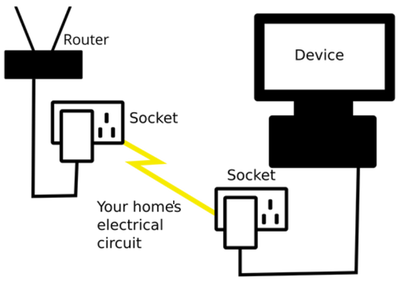
    2. Powerline Adapter ------------- Access Point
    -- Costly, not so reliable as Option 1, ping eka tikak wadi wenna puluwan

    3. Use another AP and connect to the router through extend mode.
    --- Cheap., moderate ping level ,no cables needed

    1st method ekata honda device ekak recomand karapanko machan.
     

    thilangr8

    Well-known member
  • Sep 18, 2008
    21,439
    5,771
    113
    හෝම් ස්වීට් හෝම්
    powerline_1.png


    best option i see
     

    RandomGuy

    Well-known member
  • Oct 15, 2014
    17,376
    16,218
    113
    පහළ තට්ටුවේ තියන වයිෆයි කනෙක්ෂන් එක කොහොමද බං උද තට්ටුවටත් එක්ස්ටෙන්ඩ් කරන්නේ ලොකු ස්පිඩ් ලොස් එකක් නැතුව.

    පඩිපෙළ දිගේ යවන්න ඕන
     
    • Haha
    Reactions: Inigo Montoya

    infernocus

    Well-known member
  • Jul 8, 2025
    2,791
    5,610
    113
    powerline_1.png


    best option i see
    This is so unrealliable and expensive. Speed is not constant. Don't use this if your priority is speed.

    Cheap wireless extenders have limited processing power, so you can't get the full speed if you connect these to your main router wirelessly, but yo can get good speed if you connect a cheap accesspoint to the main router via a cable.

    I had(got for 7500LKR) MI AC1200 connected to my main router(via cable), good speed and very reilable connection. Ethernet port of this AP is 100/10 so maximum speed you can get is 100Mbps.

    Now I am using dialog mesh, got two mesh devices for 15000, these are AC 1800x devices, and has Gigabit ethernet, so wifi speed can go upto 800Mbps (tested). These are also very realible, but Dialog home app is shitty, but once you configure evrything, you don't need the app.
     

    itguy77

    Well-known member
  • Nov 10, 2023
    5,191
    5,711
    113
    1st method ekata honda device ekak recomand karapanko machan.
    budget eka anuwa thama mchn

    POE ekakata yanna puluwan nam hodayi. power denna point hoyanna karadara wenna one.
    ceiling mount karala lassanata wade karanna puluwan.

    Budget option--- TP Link TL-WA1801 / EAP610 AX1800 / low budget nam TL-Wa801n

    mewage ewath thiyenwa
    habayi gedarakata nam overkill option.

    Ubiquiti UniFi U6+ / Aruba Instant On AP22

    methana dala thiyena low budget TP Link eka arenna anik okkoma WIFI 6 ewa. Fibre connection ekak ekka thama wdath hoda.,

    normal 4G line ekak extend karanna mewa use karana eka aparade.