You have been blocked from our website! virus (TRUSTe website unlocker scam) - how to remove?
Message which states that Internet user was blocked from accessing popular websites (Google.com, Facebook.com, ebay.com etc.) and asking to fill online surveys in order to restore access to blocked websites is a scam. It's a rogue website to which Internet users gets redirected when their computers are infected with a Hosts file modifying malware. Notice that operating system's Hosts file is used to resolve some canonical names of websites to IP addresses, when this file is changed users may be redirected to malicious websites while still seeing a good URL in Internet browsers address bar.
The deceptive message which is used to trick unsuspecting PC users into filling online surveys states that this website block was applied because of security reasons and forces users into downloading "TRUSTe Website Unlocker" which would supposedly remove all the malware that affects one's Internet browsing. In reality this message is a total scam and the name of TRUSTe is being exploited by Cyber criminals who are responsible for creating a Hosts file hijacker which redirects Internet users to this website. If you can't access Google.com or other popluar websites and you see a message "You have been blocked from our website!" you can be sure that your operating system's Hosts file was modified by malware. Ignore this message and don't fill any online surveys.
You have been blocked from our website! virus is being distributed using fake downloads - for example Internet users can get tricked into downloading this virus by malicious websites which supposedly promotes Facebook password hacking tools, WiFi password hacking tools etc. Other popular source of this Hosts file hijacker is P2P networks and drive-by downloads infections. Notice that filling online surveys when asked by this deceptive message can easily end-up in signing for some costly mobile services - avoid such online survey scams. To protect your PC from such Hosts file modifying malware one should always use legitimate antivirus and anti-spyware software. If your computer is already infected use the provided removal guide and eliminate this virus from your PC.
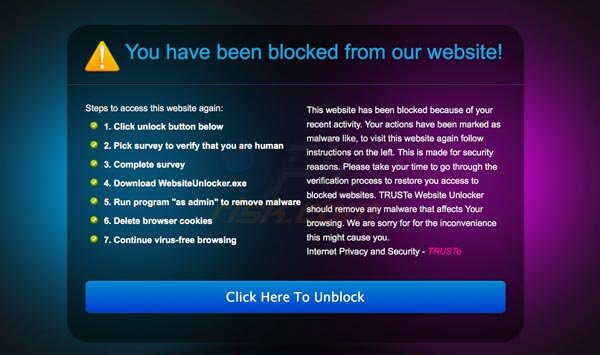
Deceptive message used to trick Internet users into filling online surveys:
You have been blocked from our website!
"This website has been blocked because of your recent activity. Your actions have been marked as malware like, to visit this website again follow instructions on the left. This is made for security reasons. Please take your time to go through the verification process to restore you access to blocked websites. TRUSTe Website Unlocker should remove any malware that affects Your browsing. We are sorry for for the inconvenience this might cause you.
Internet Privacy and Security - TRUSTe
Steps to access this website again:
1. Click unlock button below
2. Pick survey to verify that you are human
3. Complete survey
4. Download WebsiteUnlocker.exe
5. Run program "as admin" to remove malware
6. Delete browser cookies
7. Continue virus-free browsing"
"You have been blocked from our website!" virus removal:
Internet browsers redirect to 173.83.222.101 (a malicious website which tries to force computer users into filling online surveys) are caused by a Trojan which modifies one's operating system's Hosts file. To remove this Trojan download a recommended anti-spyware software and run a full system scan.
"unblocker download"
After eliminating this Trojan you should check your operating system's Hosts file. Information stored in this file is responsible for resolving canonical names of websites - if the information in this file is changed by malicious program you could encounter redirect problems while surfing the Internet.
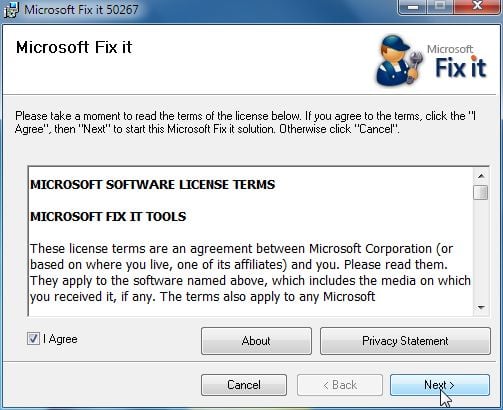
Hosts file is used to resolve some canonical names of websites to ip addresses. When it is changed, the user may be redirected to malicious site still seeing good URL in address bar. It is very hard to find out if the site is genuine or not, when hosts file is modified. To fix this, please download Microsoft Fix It tool, that restores your hosts file to Windows default. Run this tool when downloaded and follow the on-screen instructions. Download link below:
Mirosoft fix it
You should also check some settings manually. Follow these instructions and check if everything is in place.
Check your proxy settings. (Internet Explorer)
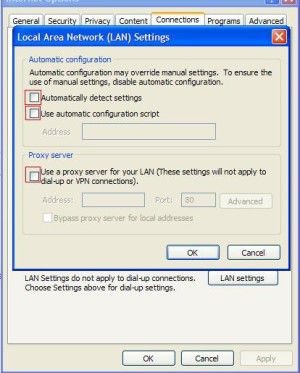
Start Internet Explorer. Click Internet Options. Select Connections. Click LAN settings. Check if none of the boxes are selected.
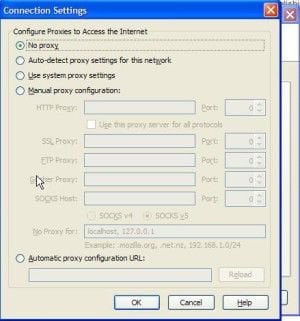
Start Mozilla FireFox. Click Tools, select Options. Click Advanced. Select Network Tab and click Settings. Check if "No proxy is selected"
To check if there are no unusual entries added to one's Hosts file you can follow this information (Google redirect virus removal guide with examples of default Windows Hosts file values).
Check if there are no unwanted browser add-ons installed without your consent:
Internet Explorer:
Click "Tools" (or gear icon in Internet Explorer 9), select "Manage Add-ons". Look for unwanted add-ons and disable them.
Mozilla FireFox:
Click "FireFox" (at the top left of the main window), select "Add-ons". Click on "Extensions" and disable unwanted add-ons.
Google Chrome:
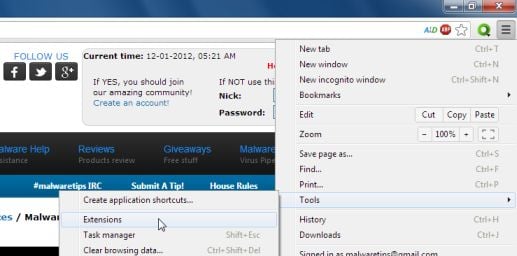
Click on a wrench or bars icon (top right of the screen), select "Tools" and click on "Extensions". Locate unwanted add-ons and click on the trash can icon.
General tips on removing "You have been blocked from our website!" scam:
*If you can't download anti-spyware software: Click on the download link, when the save dialog opens change the file name (example: when downloading mbam-setup.exe rename it to iexplore.exe).
*If you have installed anti-spyware program but you can't run it: Click Run, type %ProgramFiles% and press Enter. Open folder of your anti-spyware program, search for executable file and rename it. (example: Open Malwarebytes’ Anti-Malware folder, right-click on the main executable file (mbam.exe) then click rename. Rename the mbam.exe file to iexplore.exe, winlogon.exe firefox.exe ...
*If you can't access your anti-spyware software, try creating a new user account:
Click Start -> Settings -> Control panel.
Click User Accounts and create a new account.
Reboot your computer and log in using a newly created user account.
*After this procedure you should be able to access your anti-spyware programs. Update and run a full system scan.





 . Malwarebytes Anti-Malware දාල ස්කෑන්කරගනින්. ටිකක් නාගන්නවෙයි. හැබැයි ගොඩදාගන්න පුලුවන්.