නොමිළේ දෙන මෘදුකාංග (Freeware Applications) - Daily Updated

Hitler Z Back

Member
Jan 15, 2010
1,372
137
0
ශ්‍රී ලංකාවෙ :D
Free Video Converter

Convert video free to AVI, MP4, WMV, MKV, SWF, 3GP, DVD, MPEG, MP3, iPod, iPhone, PSP, Android, rip & burn DVD, convert online videos directly from 40+ sites, burn Blu-ray, and upload to YouTube with our free video converter!

test.jpg


1. සම්පුර්ණයෙන්ම නොමිළේ ලබාදේ
2. 200+ ෆයිල් වර්ග බාවිතා කිරීමට හැක
3. ඔන්ලයින් විඩියෝ convert කීරීමේ හැකියාව
4. iPod, iPhone, iPad, PSP, PS3, Android වලට අවශ්‍ය පරිදි convert කීරීමේ හැකියාව
5. Blu-ray Video Burn කීරීමේ හැකියාව
6. DVD කීරීමේ හැකියාව
7. Subtitles ඇතුළු කීරීමේ හැකියාව
8. Advanced Preset Editor
8. CUDA තාක්‍ෂණය මගින් convert ක්‍රියාවලිය ඉක්මන් කරදේ.
8. YouTube upload කිරීමේ පහසුකම්
9. Slideshows and Visualizations සෑදීමේ හැකියාව
10. Cut, Join, Rotate, Limit size, Adjust to aspect ratio


එල මම මේක යූස් කරනවා...මැක්සා සොෆ්ට් එක... ++
 
  • Like
Reactions: nismok

nismok

Well-known member
  • Jun 27, 2008
    9,377
    672
    113
    MyPaint (චිත්‍ර අඳින අයට)

    MyPaint_logo.png


    MyPaint is a fast and easy open-source graphics application for digital painters. It lets you focus on the art instead of the program. You work on your canvas with minimum distractions, bringing up the interface only when you need it.
    • exists for several platforms (Windows පමණක් නොව Linux හා Mac OSවල බාවිතා කල හැක)
    • supports pressure sensitive graphics tablets (graphics tablet සමග වැඩ කල හැක)
    • extensive brush creation and configuration options
    • unlimited canvas (you never have to resize)
    • basic layer support
    minibrushlist.png


    MyPaint comes with a large brush collection including charcoal and ink to emulate real media, but the highly configurable brush engine allows you to experiment with your own brushes and with not-quite-natural painting. Before beginning it is a good idea to read the quick-start tutorial to see how the program is meant to be used. You can also visit the MyPaint Wiki.

    ColorSelect-150x150.png


    Tutorials


    Download


    Last edited:

    nismok

    Well-known member
  • Jun 27, 2008
    9,377
    672
    113
    kep it up..

    Thanks

    elaaaaaaaaaaaaaz

    11.gif


    keep posting machan.
    rep++

    Thanks :)

    keep it up!!

    Thanks

    hmm.... ela ela

    11.gif


    3.gif


    11.gif


    11.gif


    Good work keep posting :)

    Thanks Machan

    ela ela.. keep it up bro

    Thanks Bro.

    ela ela reped

    Thanks

    Great work machan

    Thanks Machan

    My top freeware stuff are-
    7zip
    Firefox
    thunderbird
    mosssoft free calculator
    mp3tag
    flash renamer
    cdart display
    Media Player Classic
    Handbreak
    super
    rainmeter

    Nice, I use some of them :)

    elakiri.............

    Elaz

    kep it up..

    11.gif


    elaaaaaaaaaaaaaz

    11.gif


    keep posting machan.
    rep++

    Thanks Machan

    keep it up!!

    11.gif


    එල මම මේක යූස් කරනවා...මැක්සා සොෆ්ට් එක... ++

    මැක්සා
    11.gif


    patta digatama geniyamu.

    Aniwa
    11.gif


    thanx
    rep

    Thanks Machan


    Elaz

    good work
    keep posting........
    +5
    :)

    Thanks a Lot

    good work

    keep it up...

    Thanks
     

    nismok

    Well-known member
  • Jun 27, 2008
    9,377
    672
    113
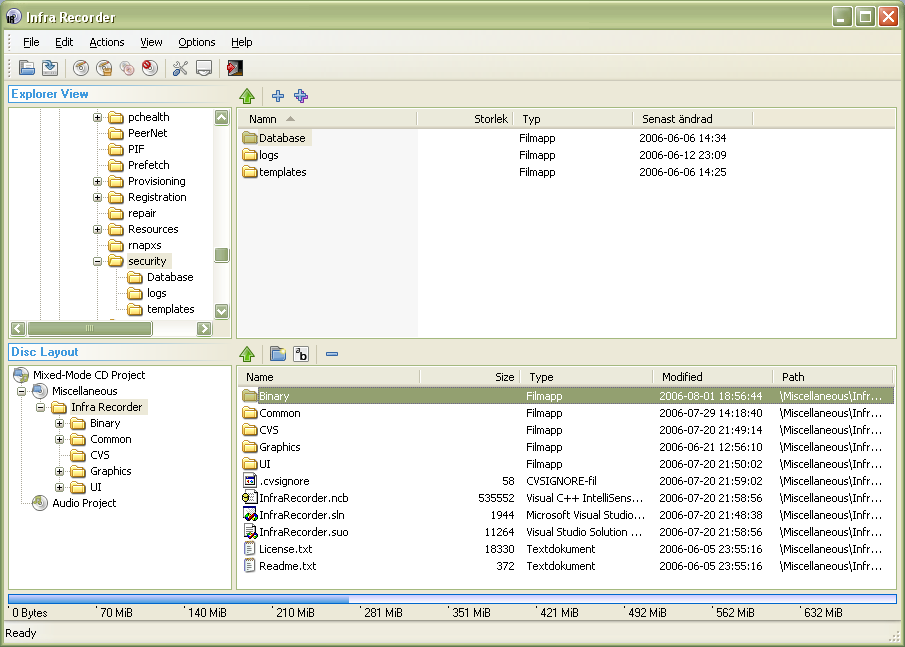
    kubrickheader.jpg


    InfraRecorder
    (CD/DVD burn කිරීමට)

    InfraRecorder is a free CD/DVD burning solution for Microsoft Windows. It offers a wide range of powerful features; all through an easy to use application interface and Windows Explorer integration.

    InfraRecorder is released under GPL version 3.

    Features
    • data, audio mixed-mode cd/dvd හා image සැදීමේ හැකියාව
    • dual-layer DVDs බාවිතා කල හැක.
    • Blank (erase) rewritable discs using four different methods.
    • Record disc images (ISO and BIN/CUE).
    • Fixate discs (write lead-out information to prevent further data from being added to the disc).
    • Scan the SCSI/IDE bus for devices and collect information about their capabilities.
    • Create disc copies, on the fly and using a temporary disc image.
    • Import session data from multi-session discs and add more sessions to them.
    • Display disc information.
    • Save audio and data tracks to files (.wav, .wma, .ogg, .mp3 and .iso).


    Download version 0.52 for Windows 2000/XP/Vista/7 (3.90 MiB).
    Note: The InfraRecorder installation package does not include the plug-in needed to encode MP3-files due to patent license restrictions. This does not affect all countries. Click here to download the MP3 plug-in separately.
    All download options:

     
    • Like
    Reactions: ModelSriLanka

    nismok

    Well-known member
  • Jun 27, 2008
    9,377
    672
    113
    මෙන්න file upload කරන්න අලුත් ක්‍රමයක්‌ ...

    imrrVe.png


    1. http://min.us වෙත ගොස් account එකක් සාදාගන්න (Goto min.us and click Register).
    2. ඉන්පසු මෙම මෘදුකාංගය download කර install කරන්න (Download this software and install)
    3. එවිට ඔබගේ taskbarය මත මෙම (
    favicon2.png
    ) අයිකනය පෙන්වයි. නැතහොත් Star > Programs > Mins > Minus Desktop Tool වෙත යන්න.
    4.
    favicon2.png
    අයිකනය මත right click කර Sign In වෙත යන්න. ඉන්පසු ඔබ පෙර සාදන ලද account information ඇතුළු කරන්න.
    5. ඔබට upload කිරීමට අවශ්‍ය files
    favicon2.png
    අයිකනය මතට ගෙන ගොස් drop කිරීමෙන් පහසුවෙන් upload කරගත හැක. අයිකනය මත double click කර පෙර upload කරන ලද file ලබාගත හැක


    About Minus

    Sharing is universal. We created Minus to make sharing pictures, documents, music, videos and files fast, easy, and fun. Minus lets you drag files from your desktop and folders directly to your browser to start sharing. For more information on using Minus, please see our FAQ.

    Why "Minus", the name?

    We wanted the product Minus to emphasize simplicity and minimalism. Part of this experience involves a simple and short name.
    How was Minus started?

    We (Carl and John) met in September of 2010 in Boston and set up the first founder's meeting that week. Having Vietnamese pho in Brookline, MA, our ideas started bouncing off of each other and soon we decided on the creation of Minus. We wanted to offer the simplest possible sharing service. The first prototype for Minus was inspired by Glen Murphy's design and was launched on October 13th, 2010.

    What is Minus?

    Minus is a drag-and-drop sharing platform. Drag your pictures, documents, music, videos and other files onto our homepage, and we’ll do the rest.
    Why is Minus absolutely free?

    We plan to implement a few business models to cover the cost of running Minus in the future.
    What is the technology behind Minus?

    Minus uses the latest Cloud computing technologies. We're deployed on Amazon's EC2 and S3 Cloud storage.
    How long do you keep the files?

    We keep all files indefinitely unless deleted by the uploader or if it goes against our terms of service.
    Why should I create an account?

    Registration is free but not required. By creating an account and signing in, you can:

    • Have own Profile at http://min.us/u/yourusername.
    • Follow and subscribe to other users to see their latest galleries via home page.
    • Publish your galleries onto your profile for your followers and fans. (Your galleries will always be private by default)
    • Track your own galleries from anywhere on the go.
    • More features come soon!
    How do I use Minus?

    Drag file(s) from your desktop and folders onto Minus and a new gallery will be automatically created.

    • Use the Left Arrow ← and Right Arrow → to browse the gallery or simply navigate with your mouse.
    • Save & Manage your gallery with the Editor Link. Use the shorter Share link to share your gallery.
      • Customize your gallery link by clicking on the "Pencil Icon" next to the Share or Edit link.
      • Name your gallery by clicking on the top right "Add Title" link.
      • Add caption to your photos and files by clicking on the "Add Caption" link above each item.
      • Rename your files by clicking on the "Pencil Icon" next to the filename in Gallery menu.
      • Change the order of item displays in gallery by dragging item titles on top right up and down.
      • Add more items into gallery by dragging files onto gallery page.
      • Delete items from the gallery by clicking the X icons.
      • Delete the entire gallery by clicking the Trash icon.
    • Hover over any text links to auto-highlight and to copy simply hit Ctrl + C or Cmd + C.
    • Share the gallery with your friends using the gallery Share Link.
    • Share a single item with your friends using the Share Button under each item.
    • Click on Download all as zip link in gallery menu to download entire gallery in Zip format.
    • Click on My Galleries button at bottom right of your screen to see history of your created and viewed galleries.
    • Click on Register / Login button at bottom right of your screen to create a new account or login.
    • Share Anonymously or Logged In.
      • When sharing anonymously , your galleries are tracked via a cookie that is attached to one computer.
      • When sharing while logged in, your galleries are tracked permanently until you clear the gallery history.
      • My Galleries tracking between anonymous and logged in state are separate.
      • If you wish to import galleries, simply re-open the editor or viewer links for the galleries while logged in.
    • Click on the
      dark-mode.png
      icon in footer to toggle background themes.

    Is hotlinking and embedding allowed?

    Yes it is, however we encourage all users to link to our galleries such as linking images using our Forum code or HTML code.
    Is there a maximum file size I can upload?

    The size limit currently is 50 MB per item. This will become more flexible in the near future.
    Is there a maximum item number per gallery?

    There can be a max of 50 items per gallery. This will become more flexible in the near future. There is no limit to number of galleries you can create.
    What file types are allowed for uploads?

    All file types are allowed on Minus. Gallery viewing of all images are supported. We will support PDF preview, MP3 music player as well as Text Reader in galleries. Support for Microsoft documents and videos coming soon. Click here to view an interactive gallery.
    How can I help?

    The easiest way to help is to spread the word and share Minus! Create and share new galleries, tell your friends, your family, your mailman, or anyone else about Minus! Post and share on forums, blogs, Reddit, Digg, Facebook, YouTube, or anywhere. Just get the word out and have fun with Minus!
    Which browsers are fully supported?

    We currently support all major browsers, however for best experience please use the latest version Firefox, Google Chrome or Safari for Mac.
    Is Minus on desktop or mobile?

    Please visit the Tools Page to download Minus for Windows, Mac, Linux and Android.
    Are the files uploaded anonymous?

    Yep, Minus provides a sharing service that allows anonymous uploading and all items and galleries will be kept anonymous.
    Will other people be able to see my uploads?

    No, only you and the people you choose to share your gallery and item link with will be able to see it. Your galleries are stored confidentially. For registered users you can choose to make your galleries Public if you wish to publish it to your user profile.
    How can I keep track of the galleries I created?

    Minus tracks your uploads via two options. Note you can disable either options. First is tracking by cookies, in which you will not have to register or login and may return at any time to find your previous uploads, given that you do not clear your cookies or change browsers/computers. The second option is a simple and easy login system to track your uploads.
    What information about me is kept?

    Just your ip address is logged in case there is extremely inappropriate materials uploaded such as child pornography, then we will have to report it to law enforcement.
    How often will there be updates?

    We aim to deploy new updates weekly with release notes posted on our blog. Be sure to subscribe to our blog.
     
    Last edited:
    • Like
    Reactions: creativeN

    creativeN

    Well-known member
  • Jul 13, 2009
    5,666
    991
    113
    CATCH ME IF U CAN
    මෙන්න file upload කරන්න අලුත් ක්‍රමයක්‌ ...

    imrrVe.png


    1. http://min.us වෙත ගොස් account එකක් සාදාගන්න (Goto min.us and click Register).
    2. ඉන්පසු මෙම මෘදුකාංගය download කර install කරන්න (Download this software and install)
    3. එවිට ඔබගේ taskbarය මත මෙම (
    favicon2.png
    ) අයිකනය පෙන්වයි. නැතහොත් Star > Programs > Mins > Minus Desktop Tool වෙත යන්න.
    4.
    favicon2.png
    අයිකනය මත right click කර Sign In වෙත යන්න. ඉන්පසු ඔබ පෙර සාදන ලද account information ඇතුළු කරන්න.
    5. ඔබට upload කිරීමට අවශ්‍ය files
    favicon2.png
    අයිකනය මතට ගෙන ගොස් drop කිරීමෙන් පහසුවෙන් upload කරගත හැක. අයිකනය මත double click කර පෙර upload කරන ලද file ලබාගත හැක

    Rep ++
     
    • Like
    Reactions: nismok

    nismok

    Well-known member
  • Jun 27, 2008
    9,377
    672
    113
    Kaspersky Rescue Disk

    ikjXm6.jpg


    Kaspersky Rescue Disk is a safe way to remove viruses from a computer without the risk of getting infected. Boot from the Kaspersky Rescue Disk to scan and remove threats from an infected computer without the risk of infecting other files or computers. Burn this ISO image to a CD/DVD, insert it into the infected system´s CD/DVD-ROM drive, enter the PC´s BIOS, set it to boot from the CD/DVD and reboot the computer.
    System Requirements:

    • CD-ROM / DVD (to install Kaspersky Rescue Disk from the installation CD).
    • USB socket (to install Kaspersky Rescue Disk from a removable boot drive).
    • Writing CD-ROM / DVD (for writing Kaspersky Rescue Disk image).
    • Support for booting from USB and CD / DVD.
    • Support for file systems FAT32/NTFS/Ext2/Ext3/Ext4/Reiser.
    • VESA-compatible video card.
    Download
     
    Last edited:

    070348K

    Member
    Jan 1, 2008
    1,094
    26
    0
    Sri Lanka
    This is a good thread. I've been promoting FOSS as i could past few years ..... most people simply don't get the idea that they are using "illegal" "pirate" softwares :(:(:(:(:(

    I'm using fedora -14 x86_64 (64bit) as my main desktop operating system. In laptop, i use ubuntu 10.10 x86

    So whatever i use , are FOSS or atleast free ........ i mean everything... from kernel to the drawing program (i'm using kolourpaint by the way, mypaint and gimp are kinda confusing to me :lol::lol:)

    keep up the good work .... if you want to know about linux-based free softwares, ask me:lol: