
Latest ads
-
V2ray VPN for Tunneling
- hu KANNA
- Updated:
-
 ඕනම රටකට සෙට් වෙන CV එකක්
- ErMurazor
- Updated:
-
 Hambantota 7 Acres Beachfront Land For Sell DownSouth , PerPerch Price 420 000
- 1024 Digital
- Updated:
-
 Baseus PI LITE INDOOR CAMERA
- ErMurazor
- Updated:

නොමිළේ දෙන මෘදුකාංග (Freeware Applications) - Daily Updated
- Thread starter nismok
- Start date
You are using an out of date browser. It may not display this or other websites correctly.
You should upgrade or use an alternative browser.
You should upgrade or use an alternative browser.


WinMend File Copy (ඉක්මනින් file copy කීරීමට ) - 300% faster than the system default
WinMend File Copy is a free and excellent batch file copy tool. Based on extensive testing, and by constantly maximizing the potential of the operating system, WinMend File Copy developed a unique key technique that makes up for the inadequacy of the system’s default copy functionality and increases the speed of file copy to be 3 times of the system default. It can resume the interrupted replication and display a list of failed files, such as files occupied by other applications. It is the best help you can ever get to speed up system backup.
Features:

Download
WinMend File Copy is a free and excellent batch file copy tool. Based on extensive testing, and by constantly maximizing the potential of the operating system, WinMend File Copy developed a unique key technique that makes up for the inadequacy of the system’s default copy functionality and increases the speed of file copy to be 3 times of the system default. It can resume the interrupted replication and display a list of failed files, such as files occupied by other applications. It is the best help you can ever get to speed up system backup.
Features:
- High-Speed Copy - When copying big files and large number of files, the unique duplication engine of this product works 300% faster than the system default, and saves you a lot of time!
- Copying Resume - If copying is interrupted for various reasons such as system crash, it can be resumed from the last breakpoint when you run this application again.
- Error List - When copying is complete and if there are files that failed for any reason, they will appear in a list with error details. You can copy them again at any time later.
- Three Copy Modes - You can copy files in one of the three modes: "Skip files of the same name", "Match and overwrite files of the same name" and "Overwrite files of the same name".
- Suspend Copy - The copy process can be stopped temporarily at any time to lower CPU and disk usage, so you can perform other tasks faster. You can resume copy when other tasks are completed. The integrity of the file being copied will not be affected.

Download
WinMend Folder Hidden (folder hide කීරීමට)
WinMend Folder Hidden is a free file/folder hiding tool. While ensuring the absolute system safety, this application can quickly hide files and folders on local partitions and/or on removable devices. The hidden files/folders will be safely hidden whether the drive is accessed in another operating system on the same computer or reinstalled on another computer. You can set a password for this application. Hidden data can be displayed and unhidden only when the user enters the valid password. The data is completely invisible to other programs or on other operating systems.
However, please keep in mind that this application is for home use only. It’s not recommended for commercial settings where more strict confidentiality is required.
Features:

Download
WinMend Folder Hidden is a free file/folder hiding tool. While ensuring the absolute system safety, this application can quickly hide files and folders on local partitions and/or on removable devices. The hidden files/folders will be safely hidden whether the drive is accessed in another operating system on the same computer or reinstalled on another computer. You can set a password for this application. Hidden data can be displayed and unhidden only when the user enters the valid password. The data is completely invisible to other programs or on other operating systems.
However, please keep in mind that this application is for home use only. It’s not recommended for commercial settings where more strict confidentiality is required.
Features:
- Safety First - The hiding technology will never damage any file data. It is safe and reliable.
- High-Speed Hiding and Unhiding - Whether it’s a file of dozens of GB, or a folder containing a lot of files, the file or the folder can be hidden and unhidden instantly.
- Removable Drives Are Supported - Files and folders on removable drives such as USB drives hidden by WinMend Folder Hidden are invisible not only in the computer where the hiding was completed, but in any computer.

Download

Free Video Converter
Convert video free to AVI, MP4, WMV, MKV, SWF, 3GP, DVD, MPEG, MP3, iPod, iPhone, PSP, Android, rip & burn DVD, convert online videos directly from 40+ sites, burn Blu-ray, and upload to YouTube with our free video converter!

1. සම්පුර්ණයෙන්ම නොමිළේ ලබාදේ
2. 200+ ෆයිල් වර්ග බාවිතා කිරීමට හැක
3. ඔන්ලයින් විඩියෝ convert කීරීමේ හැකියාව
4. iPod, iPhone, iPad, PSP, PS3, Android වලට අවශ්ය පරිදි convert කීරීමේ හැකියාව
5. Blu-ray Video Burn කීරීමේ හැකියාව
6. DVD කීරීමේ හැකියාව
7. Subtitles ඇතුළු කීරීමේ හැකියාව
8. Advanced Preset Editor
8. CUDA තාක්ෂණය මගින් convert ක්රියාවලිය ඉක්මන් කරදේ.
8. YouTube upload කිරීමේ පහසුකම්
9. Slideshows and Visualizations සෑදීමේ හැකියාව
10. Cut, Join, Rotate, Limit size, Adjust to aspect ratio

machan meke HD puluwanda?

machan meke HD puluwanda?
Ya, If your PC can handle them. (with CUDA supported VGA)


මෙන්න Free (simple) Hacking software ටිකක්...
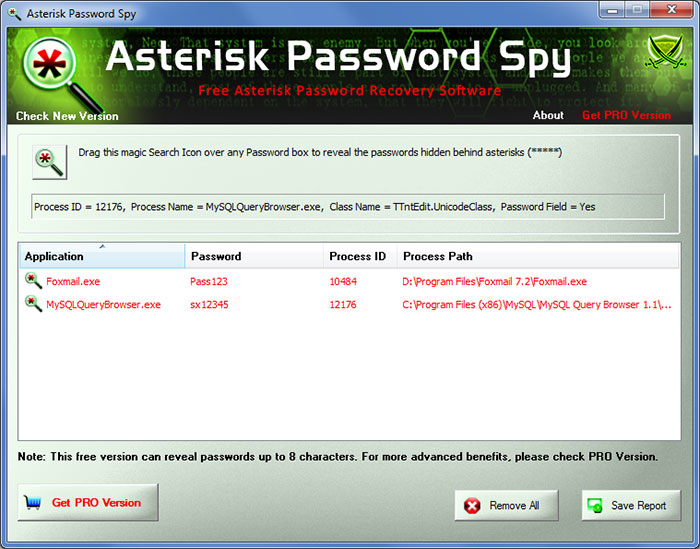
AsteriskPasswordSpy (Asterisk වලින් තියෙන password බලන්න)
Download
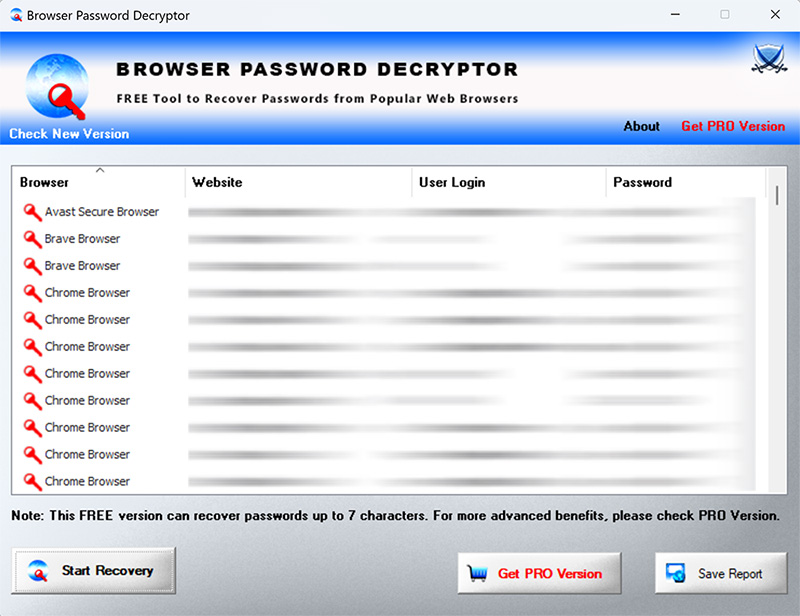
BrowserPasswordDecryptor (web browser password hack කිරීමට)
Download
More >>>
AsteriskPasswordSpy (Asterisk වලින් තියෙන password බලන්න)
- Instantly reveal the hidden password behind asterisks.
- Support most of the windows based applications
- Nice user friendly GUI interface makes it easier & faster
- Show password of any length & complexity
- Sort feature to quickly arrange and search through discovered passwords.
- Save the recovered password list to HTML file.
- Support for local Installation and uninstallation of the software.
Download
BrowserPasswordDecryptor (web browser password hack කිරීමට)
- Instantly decrypt and recover stored encrypted passwords from popular web browsers.
- Comes with both GUI interface as well as Command-line version.
- Recover password of any length and complexity.
- Automatically discovers all supported Applications and recovers all the stored passwords.
- Sort feature to arrange the recovered passwords in various order to make it easier to search through 100's of entries.
- Save the recovered password list to HTML file for transferring to other system or for future use.
- Easier and faster to use with its enhanced user friendly GUI interface.
- Installed tool is completely Portable which can be directly run on second system
- Support for local Installation and uninstallation of the software.
Download
More >>>
Last edited:

Recuva (ෆයිල් recover කීරීමට)
1. delete වුන file නැවත ලබාගත හැක.


1. delete වුන file නැවත ලබාගත හැක.
Deleted a file by mistake? Recuva brings lost files on your computer, USB drive, camera or iPod.
2. format හෝ damage වුන disk වලින් files නැවත ලබාගත හැක.
Even if you've formatted a drive so that it looks blank, Recuva can still find your files on it.
3. delete වුන email නැවත ලබාගත හැක.
Emptied your email trash and need it back? Recuva's got you covered with full support for Microsoft Outlook Express, Mozilla Thunderbird, or Windows Live Mail.
4. delete වුන iPod music නැවත ලබාගත හැක.
Deleted music from your iPod or MP3 player? No problem, Recuva will get this back for you along with any additional track data.
5. save නොකරන ලද word file නැවත ලබාගත හැක.
Did Microsoft Word crash or did you forget to save that important Word document. No problem with Recuva! As it can intelligently rebuild Word documents from their temporary files.
6. Quick-Start Wizard
If you need your files back right away without fiddling with options, Recuva's Quick-Start Wizard is the answer.
7. Deep Scan
Recuva can find most files within a minute. Or, set the Deep Scan to look for more deeply-buried results.
8. Securely delete files you want to erase forever
Want to protect your deleted files? Recuva also allows you to permanently erase any traces of deleted files.
9. Portable version
Take Recuva with you wherever you go with the portable version.
10. Full Windows OS support and many languages
Recuva has support for every modern version of Windows and 37+ languages.


Power Data Recovery Free Edition - Free for home users (ෆයිල් recover කීරීමට)
MiniTool Power Data Recovery is an easy-to-use and all in one free file recovery software for home users. With this most effective free file recovery tool, you do not need to have technical background to use it. All the data recovery steps are logical and easy like 1-2-3. Just follow the data recovery step, and you will get your lost data back. Unlike other free file recovery software. MiniTool Power Data Recovery is very powerful and professional. It not only helps you recover deleted files, but also recovers data from damaged, reformatted hard drive as well. Furthermore, MiniTool Power Data Recovery not only recovers data from hard disk and RAID device, but also supports to recover data from CD, DVD disks, memory card, memory stick, and flash drive.
As a data recovery software suite, MiniTool Power Data Recovery includes five data recovery modules - Undelete Recovery, Damaged Partition Recovery, Lost Partition Recovery, Digital Media Recovery and CD/DVD Recovery. Each data recovery module focuses on different data loss condition.
And we provide Power Data Recovery Boot Disk for you. With our Data Recovery Boot Disk, you could recover data after system crash, hard drive crash and booting problems without Operating System.
Data Recovery Abilities:
(Spanned Volume, Stripped Volume, Mirrored Volume and RAID5 Volume)
Supported Windows Operating Systems:
* You need to register your copy of MiniTool Power Data Recovery with a commercial license.

MiniTool Power Data Recovery is an easy-to-use and all in one free file recovery software for home users. With this most effective free file recovery tool, you do not need to have technical background to use it. All the data recovery steps are logical and easy like 1-2-3. Just follow the data recovery step, and you will get your lost data back. Unlike other free file recovery software. MiniTool Power Data Recovery is very powerful and professional. It not only helps you recover deleted files, but also recovers data from damaged, reformatted hard drive as well. Furthermore, MiniTool Power Data Recovery not only recovers data from hard disk and RAID device, but also supports to recover data from CD, DVD disks, memory card, memory stick, and flash drive.
As a data recovery software suite, MiniTool Power Data Recovery includes five data recovery modules - Undelete Recovery, Damaged Partition Recovery, Lost Partition Recovery, Digital Media Recovery and CD/DVD Recovery. Each data recovery module focuses on different data loss condition.
And we provide Power Data Recovery Boot Disk for you. With our Data Recovery Boot Disk, you could recover data after system crash, hard drive crash and booting problems without Operating System.
Data Recovery Abilities:
- Recover deleted files and folders
- Recover data from damaged partition
- Recover data from inaccessible hard drive
- Recover data after re-partition
- Recover data from a crashed hard drive
- Recover data after an MBR corruption
- Recover data after reinstalling windows
- Recover data from formatted partition with original path and filename
- Recover photos from memory card
- Recover music and video from iPod
- Recover data from quick formatted CD/DVD disk
- Recover data from an unfinalized DVD disk
- Recover files from scratched or defective CD and DVD disk
- Recover data from Windows Dynamic Disk Volume
(Spanned Volume, Stripped Volume, Mirrored Volume and RAID5 Volume)
Supported Windows Operating Systems:
- Windows 7 (32 & 64 bit)
- Windows Vista (32 & 64 bit)
- Windows XP (32 & 64 bit)
- Windows 2000 Professional
- Windows Server 2008 (32 & 64 bit) *
- Windows Server 2003 (32 & 64 bit) *
- Windows 2000 Server Family *
* You need to register your copy of MiniTool Power Data Recovery with a commercial license.

PHP Generator for MySQL (PHP Web Develop කරන අයට)

PHP Generator for MySQL is a MySQL GUI frontend that allows you to generate high-quality PHP scripts for the selected tables, views and queries for the further working with these objects through the web. Key features include:

Download

PHP Generator for MySQL is a MySQL GUI frontend that allows you to generate high-quality PHP scripts for the selected tables, views and queries for the further working with these objects through the web. Key features include:
- Data management: add, edit, delete and copy records
- Customization of the HTML appearance
- Filtering and sorting abilities
- Data protection with a lot of security settings
- Master-detail presentations
- Event-driven content management
- Data export to PDF, XML, CVS, Excel and Word

Download

NetWorx – Free Bandwidth Monitoring and Usage Reporting
NetWorx is a simple and free, yet powerful tool that helps you objectively evaluate your bandwidth situation. You can use it to collect bandwidth usage data and measure the speed of your Internet or any other network connection. NetWorx can help you identify possible sources of network problems, ensure that you do not exceed the bandwidth limits specified by your ISP, or track down suspicious network activity characteristic of Trojan horses and hacker attacks. The program allows you to monitor all your network connections or a specific network connection (such as Ethernet or PPP) only. The software also features a system of highly customizable visual and sound alerts. You can set it up to alert you when the network connection is down or when some suspicious activity, such as unusually heavy data flow, occurs. It can also automatically disconnect all dialup connections and shut down the system.
The incoming and outgoing traffic is represented on a line chart and logged to a file, so that you can always view statistics about your daily, weekly and monthly bandwidth usage and dialup duration. The reports can be exported to a variety of formats, such as HTML, MS Word and Excel, for further analysis.
Key Features
With NetWorx You Can ...
Right-click the NetWorx system tray icon (as shown on the picture) to bring up the program's menu. This menu lets you control the utility. Left-clicking the system tray icon displays the current NetWorx state. NetWorx can also display the real time traffic data.
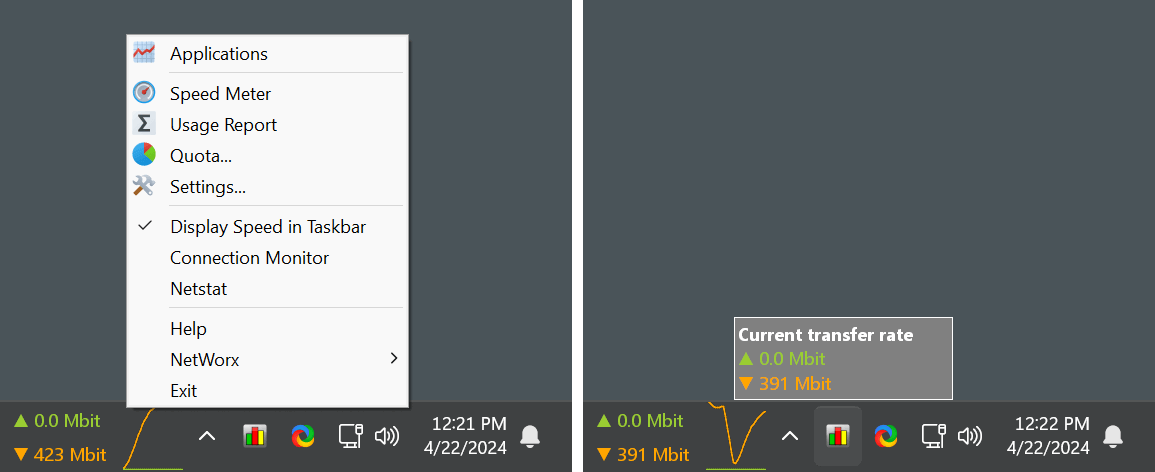

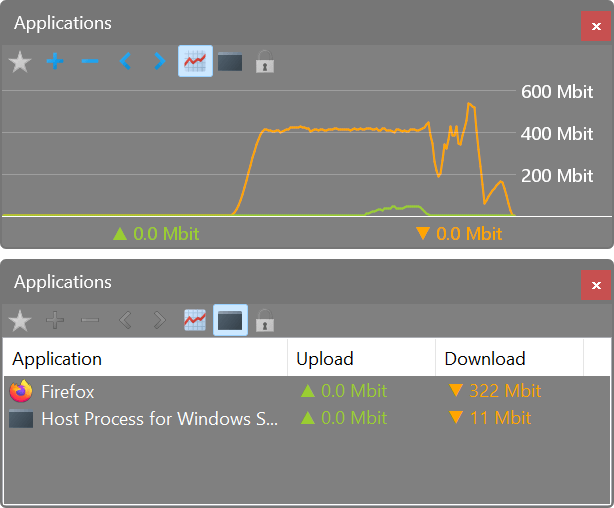
As well as accumulated daily, weekly and monthly totals, and lets you export that information to a number of formats. Click a picture to enlarge!


NetWorx is highly customisable and includes network tools such as ping, trace route and netstat.
Download : http://www.softperfect.com/download/freeware/networx_setup.exe
NetWorx is a simple and free, yet powerful tool that helps you objectively evaluate your bandwidth situation. You can use it to collect bandwidth usage data and measure the speed of your Internet or any other network connection. NetWorx can help you identify possible sources of network problems, ensure that you do not exceed the bandwidth limits specified by your ISP, or track down suspicious network activity characteristic of Trojan horses and hacker attacks. The program allows you to monitor all your network connections or a specific network connection (such as Ethernet or PPP) only. The software also features a system of highly customizable visual and sound alerts. You can set it up to alert you when the network connection is down or when some suspicious activity, such as unusually heavy data flow, occurs. It can also automatically disconnect all dialup connections and shut down the system.
The incoming and outgoing traffic is represented on a line chart and logged to a file, so that you can always view statistics about your daily, weekly and monthly bandwidth usage and dialup duration. The reports can be exported to a variety of formats, such as HTML, MS Word and Excel, for further analysis.
Key Features
- Clear graphic and/or numeric display.
- Usage reports with export to a variety of file formats, including Excel, MS Word and HTML.
- Permits close supervision of uploads and downloads.
- Works with dial-up, ISDN, cable modems, ADSL, Ethernet cards, and more.
- Includes network information & testing tools with advanced netstat that displays applications using your Internet connection.
- Scalable to your own modem download capabilities.
- Option to notify user or disconnect from the Internet automatically when network activity exceeds a certain level.
- Speed meter to accurately time downloads and report the average transfer rates.
- Dial-up session journal with detailed information about every session.
- Absolutely free and does not contain any adware/spyware/malware.
With NetWorx You Can ...
- Find out and monitor how fast your Internet connection is.
- Find out and monitor how much Internet traffic you consume.
- Verify whether your ISP charges your Internet usage fairly.
- Detect a suspicious network activity on your computer.
- Perform simple network tests such as ping and trace route.
- Be notified about excessive Internet usage.
Right-click the NetWorx system tray icon (as shown on the picture) to bring up the program's menu. This menu lets you control the utility. Left-clicking the system tray icon displays the current NetWorx state. NetWorx can also display the real time traffic data.

As well as accumulated daily, weekly and monthly totals, and lets you export that information to a number of formats. Click a picture to enlarge!


NetWorx is highly customisable and includes network tools such as ping, trace route and netstat.
Download : http://www.softperfect.com/download/freeware/networx_setup.exe
SoftPerfect Network Scanner
 SoftPerfect Network Scanner is a free multi-threaded IP, NetBIOS and SNMP scanner with a modern interface and many advanced features. It is intended for both system administrators and general users interested in computer security. The program pings computers, scans for listening TCP/UDP ports and displays which types of resources are shared on the network (including system and hidden).
In addition, it allows you to mount shared folders as network drives, browse them using Windows Explorer, filter the results list and more. SoftPerfect Network Scanner can also check for a user-defined port and report back if one is open. It can also resolve host names and auto-detect your local and external IP range. It supports remote shutdown and Wake-On-LAN.
Key features
The network scanner main window with some scan results.


The network scanner can be easily configured according to your needs.


In addition, it allows you to mount shared folders as network drives, browse them using Windows Explorer, filter the results list and more. SoftPerfect Network Scanner can also check for a user-defined port and report back if one is open. It can also resolve host names and auto-detect your local and external IP range. It supports remote shutdown and Wake-On-LAN.
Key features
- Pings computers and displays those alive.
- Detects hardware MAC-addresses, even across routers.
- Detects hidden shared folders and writable ones.
- Detects your internal and external IP addresses.
- Scans for listening TCP ports, some UDP and SNMP services.
- Retrieves currently logged-on users, configured user accounts, uptime, etc.
- You can mount and explore network resources.
- Can launch external third party applications.
- Exports results to HTML, XML, CSV and TXT
- Supports Wake-On-LAN, remote shutdown and sending network messages.
- Retrieves potentially any information via WMI.
- Retrieves information from remote registry, file system and service manager.
- It is absolutely free, requires no installation, and does not contain any adware/spyware/malware.
The network scanner main window with some scan results.


The network scanner can be easily configured according to your needs.


Similar threads


- Replies
- 11
- Views
- 1K


