මේ විදියට ප්‍රින්ට්අවුට් එකක්??

Aug 2, 2009
31,526
1,506
0
Good bye machan
මේ විදියට ප්‍රින්ට්අවුට් එකක්??

මට මේ වගේ කවර් පේජ් එකක් ප්‍රින්ට් කරගන්න ඕනෙ වෙලා තියනවා.
ප්‍රින්ට් එක මුලු පේජ් එකේම වදින්න (වටේට මාජින් එකක් හිටින්නෙ නැතිවෙන්න) ප්‍රින්ට් කරගන්නයි ඕනෙ.
මෙන්න මේ විදියට.

attachment.php


මේක මම ඩිසයින් කරලා තියෙන්නෙ Photoshop CS6 වලින්.
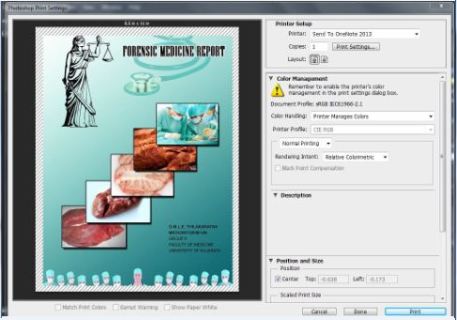
ඒකෙ ප්‍රින්ට් ඔප්ෂන් එකට ගියාම පෙන්නන ප්‍රීවීවු එකේ මේ වගේ බෝඩර් එකක් එනවා. :growl:

attachment.php


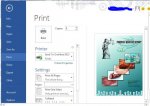
වර්ඩ් වලින් ප්‍රින්ට් කරන්න ගියාම මෙහෙම වම් පැත්තෙයි උඩයි මාජින් දෙකක් එනවා. :growl:
පේජ් සෙටප් එකෙන් මාජින් 0 කරලා තියෙන්නෙ.
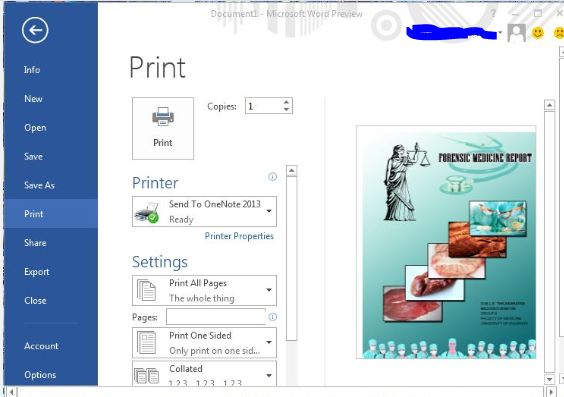
attachment.php


මේක වටේ මාජින් නැතුව ප්‍රින්ට් කරගන්න විදියක් තමා දැන ගන්න ඕනෙ.
දැං මේක තියෙන්නෙ ඉමේජ් එකක් විදියට. :(

උදවුවක් දියල්ලා මචංලා....
 

Attachments

  • 1.JPG
    1.JPG
    17.9 KB · Views: 297
  • 3.JPG
    3.JPG
    34.1 KB · Views: 278
  • 2.jpg
    2.jpg
    40 KB · Views: 270

nrjayasinghe

Well-known member
  • Mar 7, 2007
    18,119
    3,545
    113
    46
    Buttala
    Aniwaren Margin ekak ithuru wenawa. eka printer head eka protet karanna hadapu option ekak. one nam podi wedak karanna puluwan. Ube PC eka XP da?
     

    nrjayasinghe

    Well-known member
  • Mar 7, 2007
    18,119
    3,545
    113
    46
    Buttala
    Machan Ube Printer eke Maximum paper width eka A4 size eka nam sorry thamai. eeta wada chuttak hari wediy nam godama thamai.

    Meka balannako. Printer ekata Aluth paper ekak add karaganna. Width ekai. Hight ekai A4 walata wediya 10mm withara wedi wenna.

    With Printer Server Properties, you can manage Forms, Printer Ports, Drivers, and various settings relating to the printer, i.e. enable or disable the informational notification for either local or network printers. In Windows XP, you can easily find that properties window fairly easily through Printers and Faxes. But in Windows 7, the Printers and Faxes has been replaced with Devices and Printers, in which I just couldn’t find a place called Printer Server Properties. So where it went?
    It’s hidden in Print Management, which you can launch either from typing “Print management” in the search box from Start Menu or from Control Panel -> Administrative Tools.

    Expand Printer Servers and right click on the name of your computer, and select Properties.

    And under Advanced Tab, you can turn on or off the Informational notifications for both network or local printers. you can even control the beep on errors when printing.


    Create a custom paper size in Windows 7 for docPrint and docPrint PDF Driver
    docPrint Printer supports custom paper sizes, but some paper sizes may need to be added manually in order to appear in the paper size list in docPrint Printer. Microsoft�s latest operating system, Windows 7, requires a few different steps than older versions. Read more to find out how.

    Add Custom Paper Size

    To define a new page size (form), follow these steps:


    1. Click the Start menu, then Control Panel, and finally View devices and printers.
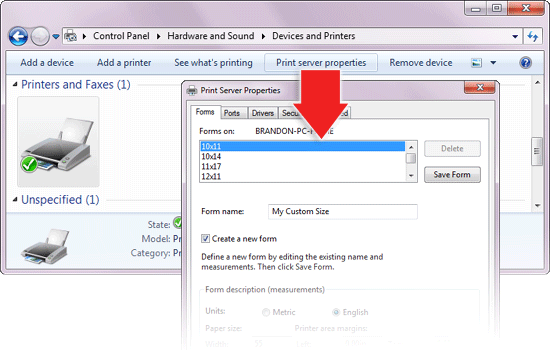
    2. Click a printer in the list (e.g. docPrint), then click Print server properties.
    3. In the dialog box that appears, check the box for Create a new form.
    4. Give the new page size a unique and descriptive Form name, such as �24�36′ or �Custom A size�.
    5. Select Metric or English units as required.
    6. Define the page size with the long dimension as the width and the short dimension as the height.
    7. Click the Save Form button.
    8. Click the OK button when finished.
    docprint-add-printer.png

    The new sizes should now appear in the page size selector in the docPrint Printer Configuration. If it does not appear, then it is it too large or too small to be printed by docPrint Printer.
     
    • Like
    Reactions: පැටියා
    Aug 2, 2009
    31,526
    1,506
    0
    Good bye machan
    Photoshop vala canvas eka hariyata thiyenava da?
    කොහොමද අයියා ඒක හදන්නෙ? පොඩ්ඩක් විස්තර කියන්නකො තරහ නැතුව :)
    Aniwaren Margin ekak ithuru wenawa. eka printer head eka protet karanna hadapu option ekak. one nam podi wedak karanna puluwan. Ube PC eka XP da?
    7 මචං :)
    Machan Ube Printer eke Maximum paper width eka A4 size eka nam sorry thamai. eeta wada chuttak hari wediy nam godama thamai.

    Meka balannako. Printer ekata Aluth paper ekak add karaganna. Width ekai. Hight ekai A4 walata wediya 10mm withara wedi wenna.

    With Printer Server Properties, you can manage Forms, Printer Ports, Drivers, and various settings relating to the printer, i.e. enable or disable the informational notification for either local or network printers. In Windows XP, you can easily find that properties window fairly easily through Printers and Faxes. But in Windows 7, the Printers and Faxes has been replaced with Devices and Printers, in which I just couldn’t find a place called Printer Server Properties. So where it went?
    It’s hidden in Print Management, which you can launch either from typing “Print management” in the search box from Start Menu or from Control Panel -> Administrative Tools.

    Expand Printer Servers and right click on the name of your computer, and select Properties.

    And under Advanced Tab, you can turn on or off the Informational notifications for both network or local printers. you can even control the beep on errors when printing.


    Create a custom paper size in Windows 7 for docPrint and docPrint PDF Driver
    docPrint Printer supports custom paper sizes, but some paper sizes may need to be added manually in order to appear in the paper size list in docPrint Printer. Microsoft�s latest operating system, Windows 7, requires a few different steps than older versions. Read more to find out how.

    Add Custom Paper Size

    To define a new page size (form), follow these steps:


    1. Click the Start menu, then Control Panel, and finally View devices and printers.
    2. Click a printer in the list (e.g. docPrint), then click Print server properties.
    3. In the dialog box that appears, check the box for Create a new form.
    4. Give the new page size a unique and descriptive Form name, such as �24�36′ or �Custom A size�.
    5. Select Metric or English units as required.
    6. Define the page size with the long dimension as the width and the short dimension as the height.
    7. Click the Save Form button.
    8. Click the OK button when finished.
    docprint-add-printer.png

    The new sizes should now appear in the page size selector in the docPrint Printer Configuration. If it does not appear, then it is it too large or too small to be printed by docPrint Printer.
    Thanks bro. Uba nam deiyek :D
    Karala balala kiyannam wede goda da kiyala.
    Thanks machan :D
    බුම්ප් තම මචන් ...

    Illustrator walata daala balanna........

    photoshop walin print karana..nathnam A$ nathuwa letter size dela balana

    bmp machan


    Thanks okkotoma
    Center image option eka disable karanna
    bounding box ain kala da ?
    scale to fit media dala balanna.

    කරන විදියත් පොඩ්ඩක් කියපංකො :)
     
    • Like
    Reactions: nrjayasinghe

    mudrana

    Member
    Jan 29, 2007
    16,995
    1,313
    0
    50හෙ පන්තියේ
    ooka oyaata normal A4 printer ekakin print karanwanam Print Setup eken paper size eka LGL (Legal) karanna. habai oya LGL paper ekaka thamai print karanna oone. print kalaata passe oyaata A4 walata kapagaana puluwan.

    A4 size eka 210mm x 297mm (i.e 8.27" x 11.69")
    LGL size eka 215.9mm x 355.6mm (i.e. 8.5" x 14")

    Habai samahara printers wala thiyanawa Seamless Printing kiyala option ekak. eekenuth oya weda karaganna puluwan.
     

    pavithra_uk

    Well-known member
  • Oct 6, 2009
    53,552
    22,246
    113
    Gotland
    oya mona de karala dammath print margins gannawa. karana thiyenne LGL wala print karala A4 walata kapana eka witharai.

    ehema nathinam loku A3 printer ekaka (Bizhub wage) 9" x 12" sheet ekaka print karala A4 walata kapanna oone


    aaa ow printer eken ena margin nam ain karanna ba thama.
     
    Aug 2, 2009
    31,526
    1,506
    0
    Good bye machan
    ooka oyaata normal A4 printer ekakin print karanwanam Print Setup eken paper size eka LGL (Legal) karanna. habai oya LGL paper ekaka thamai print karanna oone. print kalaata passe oyaata A4 walata kapagaana puluwan.

    A4 size eka 210mm x 297mm (i.e 8.27" x 11.69")
    LGL size eka 215.9mm x 355.6mm (i.e. 8.5" x 14")

    Habai samahara printers wala thiyanawa Seamless Printing kiyala option ekak. eekenuth oya weda karaganna puluwan.
    Thanks bro. Mama anik aya kiyapu widiyata try kala but margin 1k anawa kohoma kalath. LGL papers koheda ganna tiyanne bro? Thanks udaw kalata. :)

    oya mona de karala dammath print margins gannawa. karana thiyenne LGL wala print karala A4 walata kapana eka witharai.

    ehema nathinam loku A3 printer ekaka (Bizhub wage) 9" x 12" sheet ekaka print karala A4 walata kapanna oone

    aaa ow printer eken ena margin nam ain karanna ba thama.

    Thanks machanla udaw kalata :cool: