


In this exercise lets look at how can we interface a LCD display with 16F877A PIC microcontroller.
The mikroC PRO for PIC provides a library for communication with LCDs (with HD44780 compliant controllers) through the 4-bit interface.
HD44780 Pinout
- Vss (Ground)
- VCC (5V)
- Contrast (use a potentiometer for variable contrast, or just connect to GND)
- Register Select (RS), 0 = command write, 1 = data write
- Read/Write (R/W), 0 = write to display, 1 = read from display
- Enable (EN) - used to clock in data
- DB0 (not used in 4-bit mode) - LSb
- DB1 (not used in 4-bit mode)
- DB2 (not used in 4-bit mode)
- DB3 (not used in 4-bit mode)
- DB4 - LSb in 4-bit mode
- DB5
- DB6
- DB7 - MSb
- Backlight + (5V)
- Backlight - (GND)
4-bit and 8-bit modes
An HD44780 LCD can be operated in two different modes: 4-bit mode and 8-bit mode. In 8-bit mode, pins 7-14 of the LCD are connected to eight I/O pins on the microcontroller; while in 4-bit mode, pins 11-14 on the LCD are connected to four I/O pins on the microcontroller. The advantage to operating in 8-bit mode is that the programming is a bit simpler and data can be updated more quickly. The obvious reason to operate in 4-bit mode is to save four I/O pins on the PIC microcontroller.
Circuit Diagram for 16x2 LCD
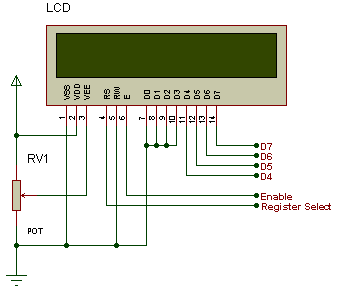
Complete Circuit Diagram with PIC Microcontroller

To get MikroC Code & PROTUES Design: Click Here
Last edited:


