
Latest ads
-
V2ray VPN for Tunneling
- hu KANNA
- Updated:
-
 ඕනම රටකට සෙට් වෙන CV එකක්
- ErMurazor
- Updated:
-
 Hambantota 7 Acres Beachfront Land For Sell DownSouth , PerPerch Price 420 000
- 1024 Digital
- Updated:
-
 Baseus PI LITE INDOOR CAMERA
- ErMurazor
- Updated:

You are using an out of date browser. It may not display this or other websites correctly.
You should upgrade or use an alternative browser.
You should upgrade or use an alternative browser.


i have seen similar sort of error with my router, when it says router is not ready to connect to internet and it refuses connection. So when i called SLT helpdesk and they asked me to try without the splitter and it worked. Maybe it also work for u.

do U have a splitter. ?
Its seems the initial handshaking has failed. unplug your all other phones & see if it works. (unplug means pull the telephone cable from the phone )
If so U need to splitter. But normally more of the modems comes with an inbuilt splitter. Its weird though but try
Its seems the initial handshaking has failed. unplug your all other phones & see if it works. (unplug means pull the telephone cable from the phone )
If so U need to splitter. But normally more of the modems comes with an inbuilt splitter. Its weird though but try

you will need to enter your user name and password (double chkd) correctly on the modem connection wizard. chk your bills are uptodate  . call the slt and ask your connection is ok.
. call the slt and ask your connection is ok.
Pathumlk said:Unplug Your ADSL Modem. Then remove Modem Drivers. also remove USB drivers. Delete Temp files. Restart your PC. Install USB drivers and next to modem drivers. It will work. sure.. If not let me know..

AlienX said:do U have a splitter. ?
Its seems the initial handshaking has failed. unplug your all other phones & see if it works. (unplug means pull the telephone cable from the phone )
If so U need to splitter. But normally more of the modems comes with an inbuilt splitter. Its weird though but try
Yes I have a splitter
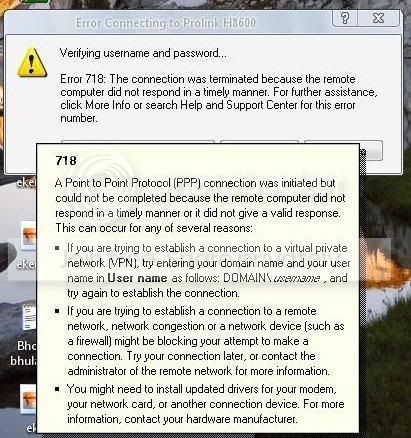

did you get this each time?hul2000 said:I'm also getting this error when authenticating the username and password

Machan Modem use karana eka cha bun ADSL walata...Man gawa thibbe Prolink H9601 kiyana eka....Mara widiyata leda dunna...Epa wela hitiye...Dan Router ekak use karanne...Eka ela..
sriflipflop said:did you get this each time?
No, this error comes sometimes
but the other one comes all the time

as i said chk the user and password, have you paid your bills?, and all payments are uptodate?. this is nothing to do with hardware or software. the server can't simply log you in for some reason. chk your pc got infected with some virus
charmer said:as i said chk the user and password, have you paid your bills?, and all payments are uptodate?. this is nothing to do with hardware or software. the server can't simply log you in for some reason. chk your pc got infected with some virus
It got nothing to do with username and password
I get the error when connecting to the ADSL network
after that authenticating the username and password goes fine
machan is it possible for you to try another modem of a friend to make sure nthing is wrong with it. Or take your modem to a friend's place n see if it works @ there...
Some modems are outdated now, (ex: AlliedTelesyn 520 model ) & does not work anymore or gives troubles... poddak balapan
Cheers,

Some modems are outdated now, (ex: AlliedTelesyn 520 model ) & does not work anymore or gives troubles... poddak balapan
Cheers,

Similar threads


- Replies
- 12
- Views
- 359


- Replies
- 47
- Views
- 2K
