

Latest ads
-
 Google Pixel 9 Pro
- vgp
- Updated:
-
Jobreceive.com for sale
- Blogerwiki
- Updated:
-
 Post Your Vehicle for Sale — FREE! - https://libro.lk
- Kalu_Puth
- Updated:
-
 ඔයාගෙ Assignment හෝ Thesis එක හරියට හදාගමු
- ErMurazor
- Updated:
-
BlackWall V2ray servers
- hu KANNA
- Updated:
You are using an out of date browser. It may not display this or other websites correctly.
You should upgrade or use an alternative browser.
You should upgrade or use an alternative browser.
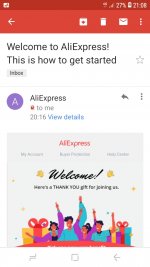


ඊමේල් එක හැක් කරලා දැන් උබ ඉවරයිමචං මට aliexpress එකෙන් මෙහෙම email එකක් ආවනේ මං register වෙලා නැහැනේ මොකක්ද මේ සීන් එක බං
Up
------ Post added on Mar 20, 2021 at 9:15 PM


Email eke athi bn registration eka cancel krnna link ekak
මොකක්ඊමේල් එක හැක් කරලා දැන් උබ ඉවරයි
නෑනේ බංEmail eke athi bn registration eka cancel krnna link ekak


Ehnm oka ad ekk wennathi bn.ubta sure nttm aliexpress ekta ghin forgot password deela ube mail eka dala blapnමොකක්
නෑනේ බං

Verification code එකක් ආවනේ බං එහෙම කරාට පස්සෙEhnm oka ad ekk wennathi bn.ubta sure nttm aliexpress ekta ghin forgot password deela ube mail eka dala blapn
Ehnm ube mail ekata account ekak thiyenawa bn.oya verification link eken ghin password eka reset karapan.etpsse on nm account ekata ghin delete karanna puluwanVerification code එකක් ආවනේ බං එහෙම කරාට පස්සෙ
එහෙම කොහොමද බං වෙන්නේ මං නොදැන account එකන් හදන්නේ උංEhnm ube mail ekata account ekak thiyenawa bn.oya verification link eken ghin password eka reset karapan.etpsse on nm account ekata ghin delete karanna puluwan

Ube phone eka aran wena kenek haduwada dan nane bnඑහෙම කොහොමද බං වෙන්නේ මං නොදැන account එකන් හදන්නේ උං
ඒ බං මං දැං account එකේ pw වෙනස් කරා අනේ මන්දාාා බං මොන මරාලයක්ද මේUbe phone eka aran wena kenek haduwada dan nane bn
Promotion ban oya. New Registar wena ayata unge discount ekak denawa. Ube mail eka unge system eke thiyenawa. Ubata thiyenne mail eka verify karanna.one nattam oka amathaka karapanමචං මට aliexpress එකෙන් මෙහෙම email එකක් ආවනේ මං register වෙලා නැහැනේ මොකක්ද මේ සීන් එක බං
Up
------ Post added on Mar 20, 2021 at 9:15 PM
හරි ඉතිං ඔන්න ඔහේ එයින් එකකුත් හදාගත්තා එච්චරයි අඩුවට තිබ්බේPromotion ban oya. New Registar wena ayata unge discount ekak denawa. Ube mail eka unge system eke thiyenawa. Ubata thiyenne mail eka verify karanna.one nattam oka amathaka karapan
ඔහොම එකක් නෑනේ බං කොහොමද delete කරන්නේ computer එකකින් ගියොත් හරියයිද
Uba app ekenda giyeඔහොම එකක් නෑනේ බං කොහොමද delete කරන්නේ computer එකකින් ගියොත් හරියයිද
Step 1: Visit the official website of AliExpress at the link hereඔහොම එකක් නෑනේ බං කොහොමද delete කරන්නේ computer එකකින් ගියොත් හරියයිද
Step 2: Log in to your account and click on 'My AliExpress'.
Step 3: Click on the 'Account Settings' option, then select 'Edit Member Profile'.
Step 4: Click on 'Deactivate Account' button.
Step 5: Now, you will be asked to enter your email or Member ID. Once you have done that, you simply need to type in “Deactivate my account” in the field below the instructions.
Step 6: AliExpress will now ask you to select a reason for deleting your account. Choose any of the options and click on 'Delete My Account' button.
හරි මචං තැන්කියු deactivate කරාStep 1: Visit the official website of AliExpress at the link here
Step 2: Log in to your account and click on 'My AliExpress'.
Step 3: Click on the 'Account Settings' option, then select 'Edit Member Profile'.
Step 4: Click on 'Deactivate Account' button.
Step 5: Now, you will be asked to enter your email or Member ID. Once you have done that, you simply need to type in “Deactivate my account” in the field below the instructions.
Step 6: AliExpress will now ask you to select a reason for deleting your account. Choose any of the options and click on 'Delete My Account' button.
Similar threads


- Replies
- 0
- Views
- 165

- Replies
- 37
- Views
- 1K

