Amazing...

snishantha

Junior member
  • Nov 25, 2007
    977
    0
    16
    42
    Negombo
    aththatama mata Nero 7 eka illannai avashya vune. ehema daala kavuruvath reply kale nathi nisa thamai mehema post ekak damme.

    sorry ehema kalata...

    puluwan nam mata windows 7 compatible Nero 7 wage ekak denna puluwanda kaata hari.. :rolleyes:
     

    Snowl

    Member
    Oct 1, 2011
    1,016
    137
    0
    Virtual Realm

    sanddun

    Well-known member
  • Jun 8, 2008
    12,542
    1,237
    113
    PX3-808
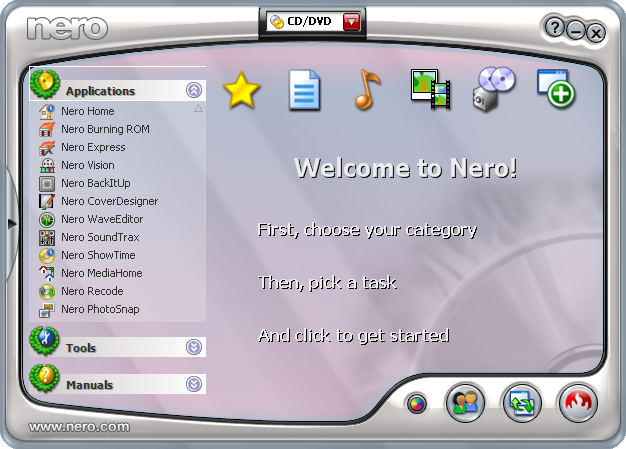
    Nero Premium v​​7.11.10.0 Ultra – Silent Installation / Unattended | 430 MB

    Nero 7 Premium enables you to experience your digital media in completely new and innovative ways. With the addition of a Nero Home – media manager, you can now have the complete PC and TV experience. Whether you want to access your media files from the comfort of your living room, or complete digital media projects on your PC, Nero 7 Premium is all you need.

    Now, with more features than ever before, this powerful software can transform your digital photos into professional animated slideshows, backup all of your valuable data, manage or search your media files, edit video or photos, create DVDs (including menus), and stream your files over a media server, and compress files to take on the go.
    Nero 7 Premium supports Blu-ray technology and gives you the ability to burn your data to BD-RE and BD-R (Blu-ray) media, which enables you to store enormous amounts of data (25-50 GB) onto a single disc.

    Highlights:
    • Nero Mobile: Media Center for you Mobile Devices
    • Nero Sipps: Free VoIP Telephony
    • Blu-ray and HD DVD capability
    • Full MP3 and mp3PRO support
    • Complete media center solution
    • Improved video authoring features

    New Features at a glance:
    • Quick & easy access to all your digital media files from the comfort of your living room using a remote control
    • Integrates TV time-shifting, DVD, video, photo and audio playback
    • Easy wizard setup and user interface
    • Support for all popular media formats
    • Powerful database for storing and organizing of media files into playlists
    • Complete multiple tasks concurrently
    • Advanced search options with Nero Scout
    • Redesigned to maximize ease-of-use, efficiency and speed
    • LightScribe support
    • Support for DVD-R Dual Layer format and DVD+R Double Layer

    Content of Nero 7 Download Package:
    • Nero Mobile
    • Nero Home
    • Nero Scout
    • Nero StartSmart
    • Nero Burning ROM 7
    • Nero Express 7
    • Nero WaveEditor 3
    • Nero SoundTrax 2
    • Nero Vision 4
    • Nero Recode 2
    • Nero ShowTime 3
    • Nero MediaHome
    • Nero PhotoSnap
    • Nero CoverDesigner
    • Nero Toolkit
    • Nero BackItUp 2
    • InCD 5
    • Nero SoundBox
    • Nero ImageDrive

    Features of Nero Premium 7:


    Supported formats:
    - CD: CD-ROM, CD-ROM XA, Audio CD, Mixed-Mode CD, Video CD, Super Video CD, miniDVD, CD Extra, Bootable CD, HFS, ISO/HFS Hybrid, UDF, UDF/ISO Bridge, InCD discs
    - DVD : DVD ISO, DVD UDF, DVD ISO/UDF (Bridge), bootable DVD, DVD Copy on-the-fly and via image, DVD Images
    BackUp options:
    - ISO Level 1 + 2
    - Joliet with 2-byte characters
    - ISO Mode 1 and XA Mode 2
    - ISO, ASCII and DOS character sets
    - User-selectable ISO/Joliet-requirement relaxation
    - Dynamic ISO filename conversion
    - Single-track “on-the-fly” recording (up to 12X)
    - Small-file caching from disk and network
    - User-selectable file filters
    - Multimounter
    - Complex read-error handling
    - Editable file structure and file names
    - Multisession with track linking
    - Full OFAS support (optimal file-access speed)
    - Bootable CD creation (from floppy disk or hard drive partition)

    Audio Track options:
    - Retrieve title/artist info from free Internet CD database (http://freedb.freedb.org)
    - Local database creation supported
    - Compatible with user programs and CD databases
    - Read and write M3U title playlists
    - Add CD Text to CD backups
    - Expanded file names for stored audio tracks (e.g., “The Beatles-Help.wav” instead of “Track01.wav”)
    - Audio index dialog with innovative “oscilloscope” display
    - Track-at-Once / Disc-at-Once / Session-at-Once recording
    - Extract multiple audio tracks
    - Fast digital audio extraction
    - User selectable audio extraction speed
    - Digital and analog playback
    - “On-the-fly” format conversion
    - Variable pause length
    - ISRC (song ID code) support
    - Graphical audio file display
    - Audio index (CD track index) support
    - Optional jitter/CRC correction
    - Click / hiss filters
    - Wide stereo / normalize / crossfade* / karaoke filters
    - Multiple filters for each audio track
    - Test and apply most audio filters in real time (as you play the file)
    - Drag and drop files directly from other CD drives

    CD Copy:
    - Track-at-Once / Disc-at-Once / Session-at-Once recording
    - Disc Image creation/burning
    - “On-the-fly” (drive-to-drive) copying
    - Complex read-error handling
    - Optional jitter/CRC correction
    - CD Extra / Multisession CD copying

    Disc Image options:
    - Track-at-Once / Disc-at-Once / Session-at-Once recording
    - Import HFS images
    - Write images from other platforms (*.ISO)

    Burn options:
    - Updated burning engine with lower CPU load, more robust burn process
    - Track-at-Once, Disc-at-Once, and Session-at-Once recording
    - CD recorder buffer display*
    - Disc-at-Once CDs no longer need to be finalised*
    - User-setable record-buffer size
    - Multiple copies of same disc / image
    - Automated performance testing
    - Automatic maximum-speed selection, burn simulation, and burning
    - Dynamically disable auto-insert notification
    - 80- and 90-minute CD-R support
    - Overburning*
    - BURN-Proof*
    - Extra-long joliet filename support

    Multi-function user interface:
    - Modern and familiar Explorer-type design
    - Drag and drop files from Windows Explorer, File Manager, and between Nero windows
    - Built-in file browser
    - CD content, information, and summary windows
    - Toolbar, status bar, multiple compilation windows, tips
    - Context-sensitive help and detailed help topics


    4fbae6.jpg

    filesonic
    Code:
    http://safelinking.net/p/535cd36c35
    wupload
    Code:
    http://www.wupload.com/file/62838210/Nero.Premium.7.11.10.0.Ultra.Edition.Full.exe
    fileserve
    Code:
    http://safelinking.net/p/332dd741a0
    uploadstation
    Code:
    http://www.uploadstation.com/file/Z9FYU7q/Nero.Premium.7.11.10.0.Ultra.Edition.Full.exe
    rapidshare
    Code:
    http://safelinking.net/p/824a01353e
    megaupload
    Code:
    http://safelinking.net/p/7ce96bf8d3

    no pass
     

    Godage

    Member
    Jun 3, 2009
    4,658
    795
    0
    Searching...

    මිත්‍රයා ත්‍රෙඩ් එකේ title එක වෙනස් කලා කියල වැඩක් නැ..:no: උදව් කරන්න පුලුවන් අය අනිවා උදව් කරයි..:yes:
    අනික හෙල්ප් සෙක්ශන් එකේ මේ ත්‍රෙඩ් එක දැම්ම නම් මීට වඩා කට්ටිය ඔයාට උදව් කරයි.. :)

    sc001.jpg


    nero7ultra_screen.png


    System Requirements: XP/Vista/7 tested

    fileserve

    Code:
    http://www.fileserve.com/file/kxmaZbd