Dual Monitors Task Bar Location

XeducationSL

Member
Oct 1, 2021
15
17
3
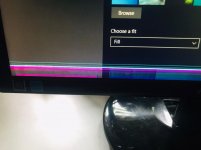
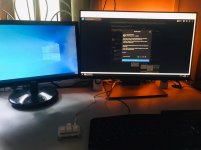
මගේ dual monitor setup එකක් තියෙන්නේ. එක මොනිටර් එකක display එකේ යට ටික වැඩ කරන්නේ නෑ.
ඒ හින්දා ඒ මොනිටර් එකේ විතරක් task bar එක side එකට ගන්න විදියක් තියෙනවද?:baffled:

එක මොනිටර් එකක විතරක් task bar location එක වෙනස් කර ගන්න ඕන.
settings වලින් වෙනස් කලාම මොනිටර් දෙකේම task bar එකේ location එක වෙනස් වෙනවා.

Pls help!
 

Attachments

  • WhatsApp Image 2021-10-06 at 7.27.54 AM.jpeg
    WhatsApp Image 2021-10-06 at 7.27.54 AM.jpeg
    81.8 KB · Views: 212
  • WhatsApp Image 2021-10-06 at 7.27.53 AM.jpeg
    WhatsApp Image 2021-10-06 at 7.27.53 AM.jpeg
    72.9 KB · Views: 206

XeducationSL

Member
Oct 1, 2021
15
17
3
muta pissu meka OESL eke hada ganna hati onewatath wada kiyala thibba. eth mu ganan ganne na. ubalage welawa nasthi karanna epa.
dekma ekama welawe post kale.

Right-click on the taskbar, and select “Settings” (Left image). In the “Settings > Taskbar” menu, scroll down to “Multiple displays” and you can choose how the taskbar will be displayed on each device.


this makes changes in both monitors. I want to adjust task bar location separatly in both monitors.
------ Post added on Oct 7, 2021 at 7:53 AM
 

hasithayad

Well-known member
  • Sep 28, 2011
    30,793
    1
    44,991
    113
    taskbar එක උඩ right click කරලා, lock all taskbars එක uncheck කරලා අවුල් වෙච්ච මොනිටරේ taskbar එක මවුස් එකෙන් ඔබාගෙන ඕනෙ තැනට ගිහින් අතාරින්න
     

    XeducationSL

    Member
    Oct 1, 2021
    15
    17
    3
    වැඩේ කර ගත්තා. මේක තමා හරි ගියේ
    taskbar එක උඩ right click කරලා, lock all taskbars එක uncheck කරලා අවුල් වෙච්ච මොනිටරේ taskbar එක මවුස් එකෙන් ඔබාගෙන ඕනෙ තැනට ගිහින් අතාරින්න
     
    • Like
    Reactions: hasithayad