
Latest ads
-
V2ray VPN for Tunneling
- hu KANNA
- Updated:
-
 ඕනම රටකට සෙට් වෙන CV එකක්
- ErMurazor
- Updated:
-
 Hambantota 7 Acres Beachfront Land For Sell DownSouth , PerPerch Price 420 000
- 1024 Digital
- Updated:
-
 Baseus PI LITE INDOOR CAMERA
- ErMurazor
- Updated:

You are using an out of date browser. It may not display this or other websites correctly.
You should upgrade or use an alternative browser.
You should upgrade or use an alternative browser.


Deff Rude said:mee tiyena codes tika copy karala , notepad eke paste karala , "registryfix.vbs" kiyala save karala , file eka uda double click karanna
Code:
'Enable/Disable Registry Editing tools
'DragonD
Option Explicit
'Declare variables
Dim WSHShell, n, MyBox, p, t, mustboot, errnum, vers
Dim enab, disab, jobfunc, itemtype
Set WSHShell = WScript.CreateObject("WScript.Shell")
p = "HKCU\Software\Microsoft\Windows\CurrentVersion\Policies\System\"
p = p & "DisableRegistryTools"
itemtype = "REG_DWORD"
mustboot = "Log off and back on, or restart your pc to" & vbCR & "effect the changes"
enab = "ENABLED"
disab = "DISABLED"
jobfunc = "Registry Editing Tools are now "
'This section tries to read the registry key value. If not present an
'error is generated. Normal error return should be 0 if value is
'present
t = "Confirmation"
Err.Clear
On Error Resume Next
n = WSHShell.RegRead (p)
On Error Goto 0
errnum = Err.Number
OYA KAWDA? DragonD OYATA LINK UNE HOHOMADA? NATHNAM OYA Dragond DA?


aththata ehema kohomada une registry ekata defa oka wtenawa athikinkon said:"DragonD" keyala code ekak awe khomada

registry newei wena widiyak thiyanawa soft ware ekakin karannamim_arshadh said:folder options nathi unuth ganne kohamadha.........?
onanam mawa PM ekak ewanna
Dreams001 said:OYA KAWDA? DragonD OYATA LINK UNE HOHOMADA? NATHNAM OYA Dragond DA?
oka mata hamba una 1k, mama oka karala ne, post 1 avulak nam mama ain karannam
Last edited:


machan meka try karala balanna......
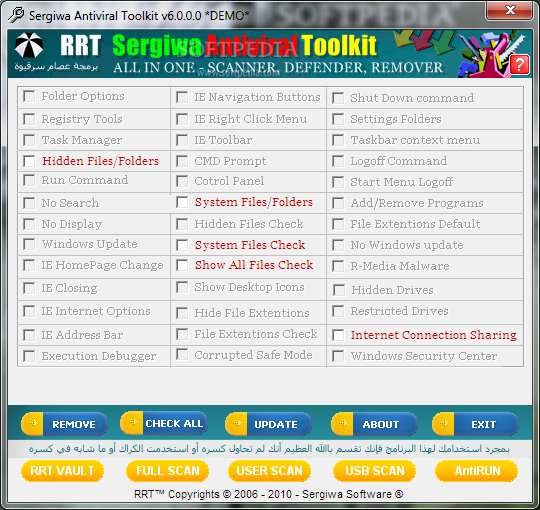
RRT (Remove Ristrictions Tool) - A tool to re-enable Ctrl+Alt+Del, Folder Options and Registry tools
In many cases, I was forced to do the hard work curing the computers that are infected because they were with no AV already installed on them at all, yes that's true, many people doesn't know whether their computers need an AV software or not, they don't know even know what a computer virus is!
When someone of those ask me for help, I first do an offline scan & clean.
When I boot the computer, I usually be faced with the same thing
every time; the virus made some system restrictions in order to make himself hidden, those restrictions are usually the following :
· Disable Ctrl+Alt+Del >> so the user can't see the virus and the other running applications!
· Disable Folder Options >> so the user can't set the option to show hidden files!
· Disable Regedit >> so the user can't see what is going on in system startup!
Unfortunately, AV Softwares have nothing to do with these restrictions and do nothing to re-enable them!
Until AV softwares come with such tool in their next versions, here, you'll find a tiny tool that does the work for AVs, it Re-Enables all what the virus had disabled, and brings every thing back.
RRT (Remove Restrictions Tool) was designed FOR FREE for every one need to use it!

RRT (Remove Ristrictions Tool) - A tool to re-enable Ctrl+Alt+Del, Folder Options and Registry tools
In many cases, I was forced to do the hard work curing the computers that are infected because they were with no AV already installed on them at all, yes that's true, many people doesn't know whether their computers need an AV software or not, they don't know even know what a computer virus is!
When someone of those ask me for help, I first do an offline scan & clean.
When I boot the computer, I usually be faced with the same thing
every time; the virus made some system restrictions in order to make himself hidden, those restrictions are usually the following :
· Disable Ctrl+Alt+Del >> so the user can't see the virus and the other running applications!
· Disable Folder Options >> so the user can't set the option to show hidden files!
· Disable Regedit >> so the user can't see what is going on in system startup!
Unfortunately, AV Softwares have nothing to do with these restrictions and do nothing to re-enable them!
Until AV softwares come with such tool in their next versions, here, you'll find a tiny tool that does the work for AVs, it Re-Enables all what the virus had disabled, and brings every thing back.
RRT (Remove Restrictions Tool) was designed FOR FREE for every one need to use it!


oyaage virus ekak nisaa ooka vunaanum mulin virus eka remove karala inna oona. ehema nathuvanum velaa thiyenne me vidiyata karanna.
Start> Run ena dialog box eke gpedit.msc kiyala type karala OK karanna. eeta passe enava Group Policy kiyana window eka. eeke User Configuration yatathe thiyana
Administrative Templates\Windows Components\Windows Explorer\ yanna. eeka click kalahama oyaata Right Side eke peenava Setting kiyala deeval vagayak. eeke thiyanava Removes the Folder Options menu item from the Tools Menu kiyala ekak. eeka uda Double Click karanna. ethakota enava thava window ekak. eeke thiyena Disable kiyana option eka select karala OK karanna.
Start> Run ena dialog box eke gpedit.msc kiyala type karala OK karanna. eeta passe enava Group Policy kiyana window eka. eeke User Configuration yatathe thiyana
Administrative Templates\Windows Components\Windows Explorer\ yanna. eeka click kalahama oyaata Right Side eke peenava Setting kiyala deeval vagayak. eeke thiyanava Removes the Folder Options menu item from the Tools Menu kiyala ekak. eeka uda Double Click karanna. ethakota enava thava window ekak. eeke thiyena Disable kiyana option eka select karala OK karanna.
*danushka* said:machan meka try karala balanna......
RRT (Remove Ristrictions Tool) - A tool to re-enable Ctrl+Alt+Del, Folder Options and Registry tools
In many cases, I was forced to do the hard work curing the computers that are infected because they were with no AV already installed on them at all, yes that's true, many people doesn't know whether their computers need an AV software or not, they don't know even know what a computer virus is!
When someone of those ask me for help, I first do an offline scan & clean.
When I boot the computer, I usually be faced with the same thing
every time; the virus made some system restrictions in order to make himself hidden, those restrictions are usually the following :
· Disable Ctrl+Alt+Del >> so the user can't see the virus and the other running applications!
· Disable Folder Options >> so the user can't set the option to show hidden files!
· Disable Regedit >> so the user can't see what is going on in system startup!
Unfortunately, AV Softwares have nothing to do with these restrictions and do nothing to re-enable them!
Until AV softwares come with such tool in their next versions, here, you'll find a tiny tool that does the work for AVs, it Re-Enables all what the virus had disabled, and brings every thing back.
RRT (Remove Restrictions Tool) was designed FOR FREE for every one need to use it!
 ookennum leesiyen karanna puluvan thamai


Similar threads

- Replies
- 16
- Views
- 710


- Replies
- 33
- Views
- 1K

- Replies
- 37
- Views
- 1K


- Replies
- 9
- Views
- 494

