Great Software

SAN_APIIT

Well-known member
  • Mar 8, 2007
    4,611
    196
    63
    In a Chip !!!
    TweakVI Basic 1.0.1065

    Info

    weakVI - The first software designed to both tweak and optimize Windows Vista.
    Tweak hundreds of hidden features of Windows Vista, optimize your machine and customize it to your needs. The best tweaking software ever!

    The main application of TweakVI together with many plugins is available completely for free. Additional plugins can be downloaded after subscribing.

    tweakvi_m.jpg


    Unlike other tweaking utilities, TweakVI bundles lots of different utilities in one. It was developed to combine both tuning and optimizing features to increase the speed of your Windows Vista system. It´s the worlds first software for Windows Vista to combine both customization, tweaking and optimization features.

    Activate hundreds of hidden Windows Vista settings, clean your registry, activate system and software restrictions, protect your privacy, display detailed system information, create a 256 MB RAM drive, clean your harddrive, manage TrueType fonts, optimize your CPU, optimize your RAM, improve your internet connection, manage system updates and much more.

    tweakvi-uac-off-350.jpg


    Heaps of free plugins are included with the freeware ´Basic Edition´ of TweakVI.

    Direct Download Link - Click Me
    RS Download Link - Click Me
     

    SAN_APIIT

    Well-known member
  • Mar 8, 2007
    4,611
    196
    63
    In a Chip !!!
    Easy Screen Capture 1.2

    fazaal24 said:
    hi guyz...can i hav a screen capturing software...a gud 1....:D

    Here u go...

    Info

    Easy Screen Capture is a full featured screen capture software that can capture any part of screen from your desktop. It can capture scrolling windows and entire web pages.

    3dc1356d33e899279e1e92a9666800b8_Easy_Screen_Capture.gif


    Capture full screen, active window, active window without frame.
    Capture windows, buttons, toolbar, controls and other windows objects.
    Capture selected region, three shape supported: rectangle, round and ellipse.
    Capture scrolling windows and entire web pages.
    Can capture some DirectX mode games and movies.
    Include mouse cursor in capture.
    Can pan last region and repeat last capture.

    Direct Download Link - Click Me
     
    Last edited:

    SAN_APIIT

    Well-known member
  • Mar 8, 2007
    4,611
    196
    63
    In a Chip !!!
    Easy Screen Recorder 1.2

    Info

    Easy Screen Recorder is a powerful record screen software for recording screen activities into AVI movies. With this useful program, you can create demo videos that record what's happening on your PC desktop screen.

    It can record the entire screen, a window, a fixed region, or any part of the screen. Audio can also be recorded from any source, including microphone, line-in, or speakers. You can choose video and audio codec and quality.

    ann.gif


    Direct Download Link - Click Me
     

    SAN_APIIT

    Well-known member
  • Mar 8, 2007
    4,611
    196
    63
    In a Chip !!!
    Total Commander 7.01

    Info

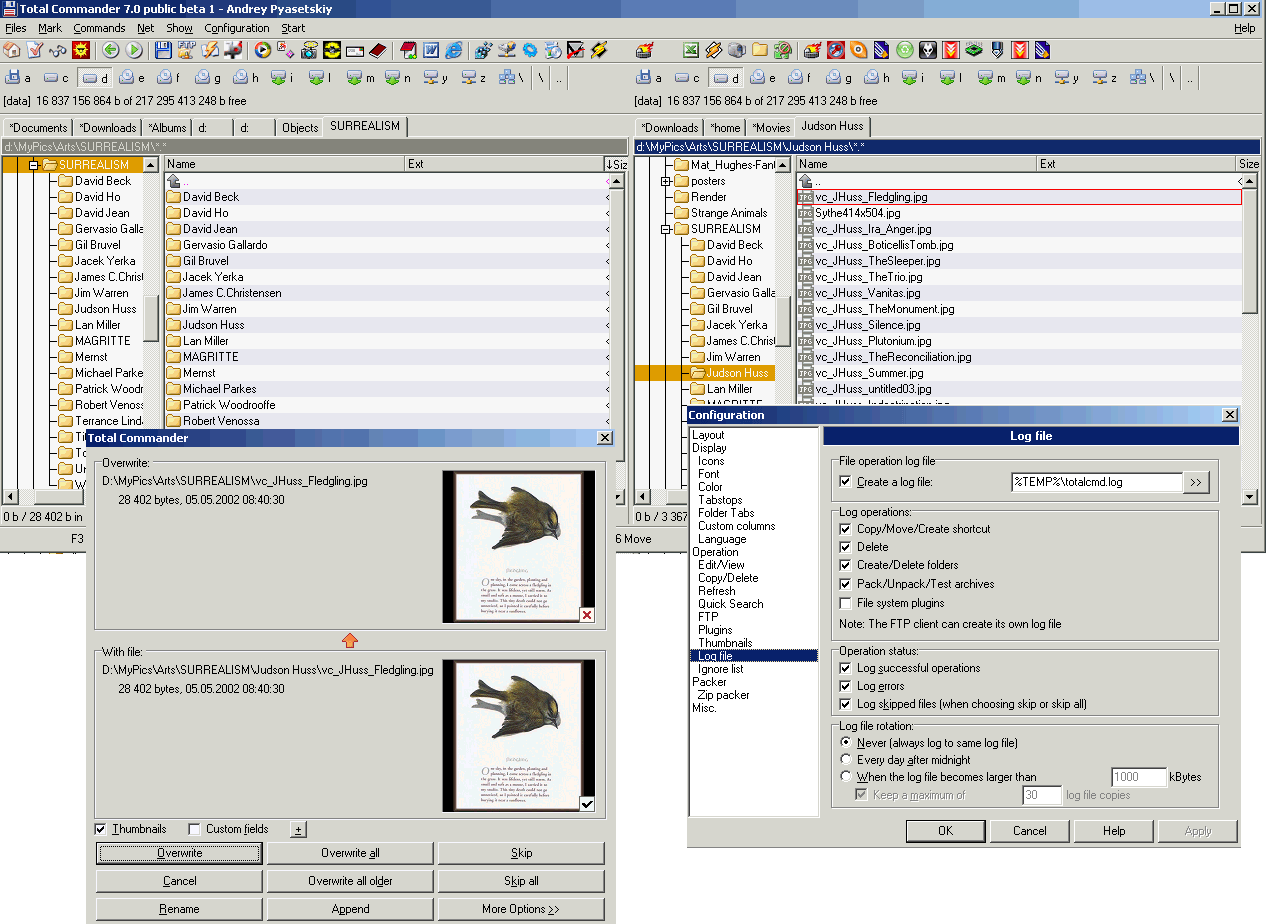
    Total Commander is a file manager for Windows, a program like Windows Explorer to copy, move or delete files. However, Total Commander can do much more than Explorer, e.g. pack and unpack files, access ftp servers, compare files by content, etc!

    totalcmd7beta.gif


    Features

    * Updated user interface: flat buttons also on XP, new file list icons, drive icons, and bar icons (by external designer)
    * Separate background color can be set for odd and even lines
    * Compare by content now allows to edit files, and to re-synchronize manually
    * Separate tree panel: Either one for both file panels, or one for each
    * Lister now supports a text cursor, allows to center images, and resize only larger
    * Change attributes allows to use/change content plugin values
    * File operation logging
    * Show drive letter in folder tabs
    * File system plugins can now support custom columns and thumbnails
    * Multi-rename-tool: Allow to edit target names directly
    * More options in copy overwrite dialog: Compare by content, Rename target, automatic rename, copy all smaller or all larger
    * Exclude directories in "Show"-"Custom...", e.g. with *.* | .cvs\
    * Increased maximum command line length to 8191 (XP) and 2047 characters (Windows 2000), respectively
    * Sort by additional columns, e.g. by size, then by date/time: Ctrl+click on additional columns
    * Auto-complete path in command line, current directory, copy dialog etc.
    * Use Shift+Del to remove unwanted entries from various comboboxes: Command line, search function, multi-rename-tool etc.
    * Secure FTP over SSL/TLS, enter the URL as follows: ftps://ftp.servername.com . Needs openssl dlls stored in Totalcmd directory (not included for legal reasons).
    * Custom user-defined commands for main menu and hotkeys
    * Alias commands for the command line for internal commands or external programs
    * Overwrite dialog allows to show preview images and custom fields
    * When a copy/move/delete/create directory operation fails due to insufficient rights, ask user whether he wants to copy as administrator. Also allow a user to give himself permanent read rights to a directory if he knows the administrator password.
    * Create ZIP archives > 2GB
    * and many more...

    b274b36aed4ad850b1c705d695b8b631.gif


    Direct Download Link - Click Me
    RS Download Link - Click Me
     

    G-Force

    Well-known member
  • Jul 5, 2006
    21,295
    85
    48
    ( ( ム乇 ) )
    SAN_APIIT said:
    Here u go...

    Info

    Easy Screen Capture is a full featured screen capture software that can capture any part of screen from your desktop. It can capture scrolling windows and entire web pages.

    3dc1356d33e899279e1e92a9666800b8_Easy_Screen_Capture.gif


    Capture full screen, active window, active window without frame.
    Capture windows, buttons, toolbar, controls and other windows objects.
    Capture selected region, three shape supported: rectangle, round and ellipse.
    Capture scrolling windows and entire web pages.
    Can capture some DirectX mode games and movies.
    Include mouse cursor in capture.
    Can pan last region and repeat last capture.

    Direct Download Link - Click Me

    Thx SAN_APIIT.....:yes::yes::cool::)
     

    fazaal24

    Member
    Nov 10, 2006
    33,026
    18
    0
    Carbon Canyon Dehiwala
    Originally Posted by SAN_APIIT Here u go... Info Easy Screen Capture is a full featured screen capture software that can capture any part of screen from your desktop. It can capture scrolling windows and entire web pages. Capture full screen, active window, active window without frame. Capture windows, buttons, toolbar, controls and other windows objects. Capture selected region, three shape supported: rectangle, round and ellipse. Capture scrolling windows and entire web pages. Can capture some DirectX mode games and movies. Include mouse cursor in capture. Can pan last region and repeat last capture. Direct Download Link - Click Me
    Thx dude...chkin....
     

    SAN_APIIT

    Well-known member
  • Mar 8, 2007
    4,611
    196
    63
    In a Chip !!!
    Agnitum Outpost Security Suite 2007 Pro

    Info

    Agnitum Outpost Security Suite - a robust combination of award-winning firewall, fast and effective anti-malware, personalized antispam and proactive Host Protection module to defend against the majority of Internet risks. Includes automated configuration service and other user aids.

    outpost21_eng.gif


    Outpost Security Suite Pro provides the first line of defense against rogue software by proactively controlling how programs behave and interact on a PC. The Host Protection safeguard, which proactively monitors for and blocks the kinds of sophisticated hacking techniques used to compromise or steal data, means that malicious activity is no longer possible. By analyzing threats and displaying actionable alerts, Host Protection stops zero-day attacks and shields the computer against inappropriate operations, rendering it “defended in advance” against security risks like botnets and inadvertent data disclosure.

    3700-w520.jpg


    Features

    Best-in-class ID-theft protection
    Outpost Firewall Pro will detect and prevent (using the most effective data leak prevention technology available) malicious applications from trying to transmit data out of your PC. The security of that information is assured.

    Advanced protection against network attacks
    Outpost Firewall Pro detects and prevents any attempted hack attacks from outside the network.

    360-degree protection against spyware
    Outpost Firewall Pro detects all attempts by spyware to activate; instead, spyware is instantly removed from the PC.

    Self-protection against malicious software
    Outpost Firewall Pro protects itself from being terminated by malware

    *Prevents all types of data theft
    *Attachment quarantine
    *Defeats all types of spyware infections
    *Protects all types of network connectivity
    *Detects all types of hacker attacks

    AgnitumOutpostFirewallPro0.jpg


    Direct Download Link (32Bit) - Click Me
    Direct Download Link (64Bit) - Click Me
     

    SAN_APIIT

    Well-known member
  • Mar 8, 2007
    4,611
    196
    63
    In a Chip !!!
    ConvertXtoDVD (Make DVD's From AVI Files)

    Info

    1. Convert ur Downloaded avi movie files in to DVD's
    2. Easy Converting with no quality loss.
    3. Add menus, add subtitles and much more


    X2D-box-lights.gif


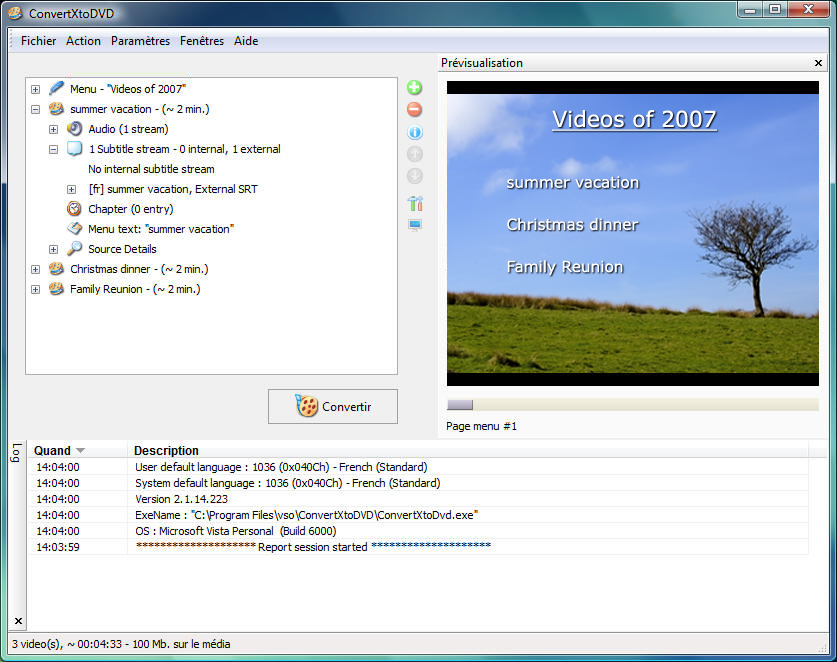
    ConvertXtoDVD is a video converter software to convert and burn your videos to DVD. With ConvertXtoDVD and a few clicks you can backup your movies to DVD playable on any home DVD player.

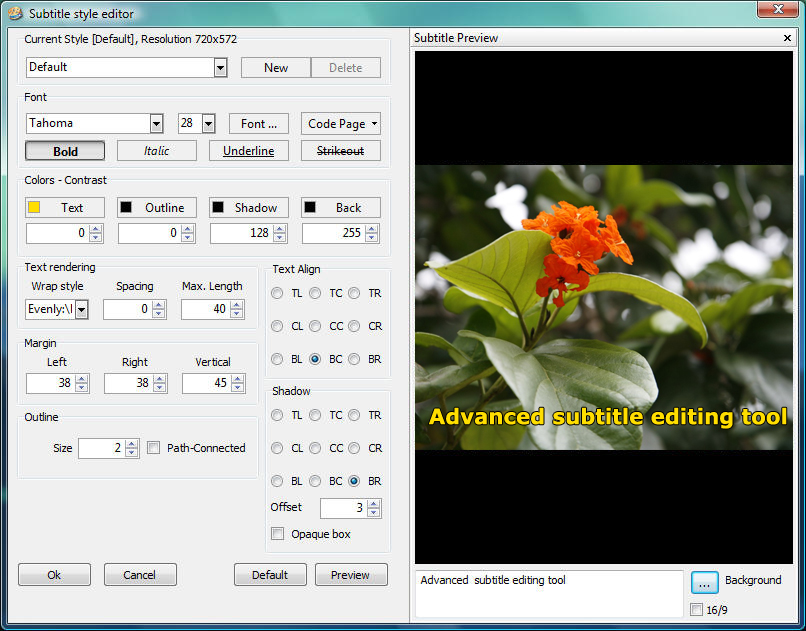
    X2Dsubtitle-editor_en.jpg


    ConvertXtoDVD supports most popular formats such as AVI to DVD; Mpeg, Mpeg, Mpeg4, MP4, VOB, WMV, DV and stream formats to DVD. It converts your files into a compliant DVD Video set of files and burns it on a DVD media. The ConvertXtoDvd does not need an external AVI codec download. It uses its own AVI codecs.

    X2Dmain_en.jpg


    Key Features

    * Supported video formats: Convert AVI, Mpeg, Mpeg4, DivX, Xvid, MOV, WMV, WMV HD, DV, MKV, DVD to DVD and more...
    * Supported sources: existing files from digital camcorders, TV/Sat, capture cards
    * Can merge up to 4 hours of material from several movies or episodes
    * Supported audio formats: AC3, DTS, PCM, OGG, MP3, and more...
    * Handles subtitles files (.SRT .SUB/IDX .SSA) with color and font selection, and supports tags (italic, bold)
    * Video format choice: NTSC, PAL, or automatic and PULL-DOWN
    * Picture output: Widescreen, Fullscreen, or automatic
    * Create Automatic chapters or edit your own
    * Fast preview mode to check if the source is loaded correctly
    * Save the DVD structure on hard drive or burn it to a blank DVD
    * Reliable burn engine integrated (supports all DVD formats)
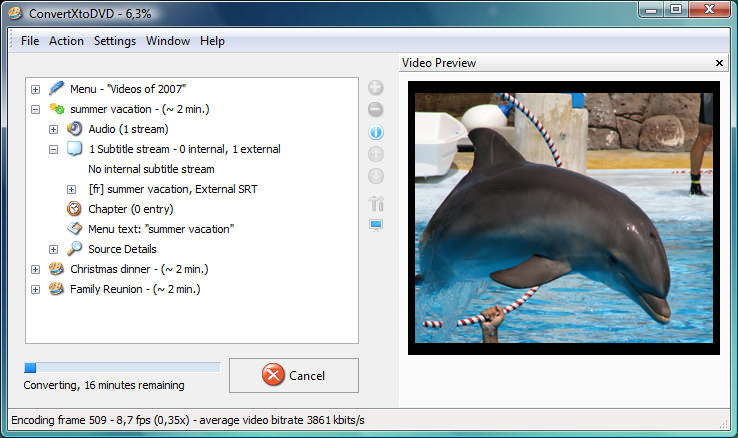
    * Fast and quality encoder (typically less than 1 hour for converting 1 movie)
    * Variable options and settings for advanced users
    * Control of the conversion speed vs quality
    * DVD Menu control (auto-start, loop etc)
    * DVD Menu edition (background, font, color)
    * Customizable interface (themes, dockable windows)
    * Multilingual support (available languages...)
    * Optimized for Windows 2000 / XP / Vista

    X2Dconverting_en.jpg


    Direct Download Link - Click Me
    RS Download Link - Click Me
     

    GNS

    Member
    Jan 3, 2007
    11,148
    16
    0
    UF., Gampaha.
    SAN_APIIT said:
    rarpf6.jpg


    ***This is a pre creacked version of win rar no need of cracks or serials.

    Info...

    WinRAR is a 32-bit Windows version of RAR Archiver, an archiver and archive manager. RAR files can usually compress content by 8 percent to 15 percent more than ZIP files can. WinRAR's main features include strong general and multimedia compression, the ability to process non-RAR archive formats, ZIP compression and decompression, support for long filenames, programmable self-extracting archives (SFX), repair of damaged archives, authenticity verification, embedded file comments, and encryption. Unicode is supported in archive filenames, allowing non-English filenames to be handled painlessly.


    Version 3.70 ChangeLogs:

    1. Numerous Windows Vista compatibility changes:

    a) help format changed from old HLP to newer HTML based CHM;

    b) GUI self-extracting modules attempt to request for
    administrator permissions if they cannot create destination
    folder under current user account;

    c) Log file rar.log and WinRAR theme files are stored
    in %APPDATA%\WinRAR folder instead of WinRAR program files folder.

    Exported settings file settings.reg is also stored
    in %APPDATA%\WinRAR folder by default, but it is possible to
    select another folder in "Save WinRAR settings" and "Load WinRAR
    settings" dialogs.

    WinRAR searches for registration key and settings.reg
    both in its program files folder and in %APPDATA%\WinRAR;

    It is possible to set the string value "AppData" in Registry key
    HKEY_CURRENT_USER\Software\WinRAR\Paths to override the default
    %appdata%\WinRAR path for WinRAR settings.

    For example, if you wish to store theme files in WinRAR folder,
    set this value to "c:\Program Files\WinRAR".

    d) Vista compatibility changes in WinRAR shell integration;

    e) New "Request administrative access" option in "Advanced" page
    of "Advanced SFX options" allows to create SFX archive,
    which will request the administrative access when started
    in Windows Vista.

    Command line equivalent of this option is -iadm switch.

    2. Added support for ISO 13346 (UDF) file format. This format
    is frequently used in ISO images of DVD disks.

    3. Added Unicode support for ISO 9660 files, so WinRAR should
    handle non-English file names in .iso files better.

    4. Design changes in window displaying archiving and extraction
    progress:

    a) it provides more space for file names, allowing lengthy names;

    b) it displays the current archive name in separate line,
    allowing much longer archive names than before;

    c) when archiving, it displays the current compression ratio
    in separate line;

    d) it can use both standard Windows and classic WinRAR progress bars.
    Turn on "Windows progress bars" option in WinRAR "Settings/General"
    dialog to use standard progress bars. By default this option is
    on if some Windows visual style is active and off if Windows Classic
    theme is selected.

    Windows progress bars are two color only, so they do not indicate
    the current compression ratio. But now the ratio is displayed
    in separate line;

    e) "Mode..." button moved to bottom of window.

    5. GUI self-extracting modules support following command line
    switches:

    -d<path> set the destination path
    -p<pwd> specify a password
    -s silent mode, hide all
    -s1 same as -s
    -s2 silent mode, hide start dialog
    -sp<par> specify parameters for setup program

    6. GUI self-extracting modules do not pass the entire command line
    to setup program like they did in previous versions.
    If you need to get access to entire command line of SFX archive,
    parse sfxcmd environment variable which contains this command line.

    7. New switch -sc<charset>[objects] allowing to select character
    sets for archive comments and list files. It replaces -fcu switch
    introduced in RAR 3.60, which was removed from list of supported
    switches. Now you need to specify -scuc instead of -fcu to use
    Unicode comments. Unlike -fcu, -sc also supports OEM and ANSI charset.

    8. New "Save archive copy as..." command in "File" menu.
    This command may be useful if you opened an archive from Internet
    directly in WinRAR and then decided to save it on local disk.

    9. "Word wrap" command added to "View" menu of WinRAR internal viewer,
    so you can change the wrapping mode of already opened viewer window.

    State of this option is not stored between viewing sessions.
    If you need to change the default word wrap mode, use WinRAR
    "Settings/Viewer" dialog.

    10. Buttons "Up" and "Down" added to "Organize profiles" dialog.
    Using these buttons you can change position of selected profile
    in the list.

    11. Operation progress is displayed when adding the recovery record.

    12. If WinRAR is minimized to tray and mouse is over its icon,
    WinRAR diplays a message about the current operation progress.
    In previous versions it included only percent done, now it also
    contains the time left information.

    13. Console RAR displays "Calculating the control sum" message
    when calculating CRC32 control sum for newly created RAR volume.
    Previous versions also calculated the volume control sum,
    but did it silently.

    14. Archives history list in "File" menu allows Unicode names,
    providing more reliable support for non-English archive names.

    15. Stack overflow vulnerability has been corrected in password
    processing module of console RAR and UnRAR. GUI WinRAR is not
    affected. We are thankful to the iDEFENSE LABS for reporting this bug.


    Download Link - Click Me


    Enjoy................


    Thanx SAN...
     

    GNS

    Member
    Jan 3, 2007
    11,148
    16
    0
    UF., Gampaha.
    SAN_APIIT said:
    Info

    Aston is a new Desktop and Shell replacement for Windows 98/2000/XP/Vista.
    It replaces the standard Windows Desktop and provides you with a host of new features, such as Sidebars, clock, weather monitor, animated buttons, transparency effects and much more.

    Aston features a powerful and user friendly interface, which lets you change your new desktop's appearance and behavior in few seconds.

    A great balance between performance and appearance allows you to launch Aston even on out of the date PCs or its enjoy many advanced features on more modern computers. Aston is very stable and has a small memory footprint and low CPU usage, so you can free your processor time for other tasks.

    Just Look at the images... :cool: :cool: :cool:

    desktop4.jpg


    astonshell.jpg


    SingularityAstonShell.jpg


    307600978_f65cbde6e3_o.jpg


    Download Link (Serial Included) - Click Me

    WoW...

    that's Beautifulll... :lol:

    Thanx Bro...
     

    GNS

    Member
    Jan 3, 2007
    11,148
    16
    0
    UF., Gampaha.
    SAN_APIIT said:
    Info


    23916.gif


    * NEW! TuneUp Disk Doctor: Performs a thorough check of hard drives - automatically corrects errors in the file system and disk sectors to keep your data secure
    * NEW! TuneUp Disk Space Explorer: Uses a targeted approach to identify which files and file groups are taking up valuable disk space on your hard drives
    * IMPROVED! TuneUp System Control: Offers expanded configuration options for Internet Explorer 7, Firefox 2 and Office 2007
    * IMPROVED! Improved 1-Click Maintenance: Allows you to perform even more thorough system checks and error correction with a single click
    * IMPROVED! TuneUp DiskCleaner: Finds additional unnecessary file types and frees more disk space
    * IMPROVED! TuneUp RegistryCleaner: Targets unnecessary entries in the Windows registry using an improved scanning technology and removes them
    * Now Windows Vista™-compatible: TuneUp Utilities 2007
    The new version of TuneUp Utilities 2007 contains important
    new features, general improvements and can now be used for Windows Vista™, the newest operating system.


    Direct Download Link - Click Me
    Mirror Link - Click Me(Mirror)
    Download Crack - Click Me

    Oh! I was just finding it... :lol: