


Did you ever got into a situation where you felt the need to check the exact date when did you last installed your Windows?

Last week, my computer for some odd reasons felt really slow to work with. Most of the applications were slower to response then they usually do, Windows more often then not went into the annoying “Not Responding” mode.
I wanted to know how long it has been since I last reinstalled my OS? I first tried to look for the installation date in System Information (msinfo32.exe) but couldn’t find it there. After exploring a bit further, I found out that Windows has a built-in DOS-based utility called systeminfo.exe that shows complete information of the system including the exact date and time when was Windows installed. This .exe file resides in \Windows\System32\ can be accessed using Command Prompt in Windows.
1. Click on Start
 . Type cmd in Windows search and press enter to bring up Command Prompt.
2. Now type systeminfo and press enter.
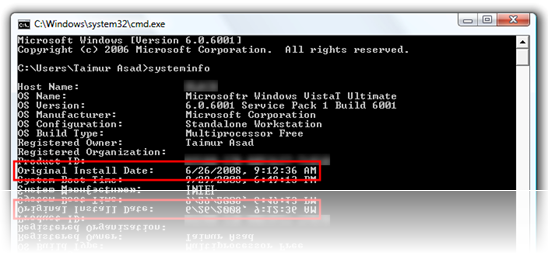
Once all the information is loaded up, scroll upwards to see the exact date and time under Original Install Date as also illustrated by the screenshot above.
So it took about 94 days for me to screw up my Windows install. This can come in handy when you want to know on average how long it takes before you are in need to reinstall your Windows.
Lets see if anyone here can bring up an older install date of Windows than me which is still in good shape to work with.
Last week, my computer for some odd reasons felt really slow to work with. Most of the applications were slower to response then they usually do, Windows more often then not went into the annoying “Not Responding” mode.
I wanted to know how long it has been since I last reinstalled my OS? I first tried to look for the installation date in System Information (msinfo32.exe) but couldn’t find it there. After exploring a bit further, I found out that Windows has a built-in DOS-based utility called systeminfo.exe that shows complete information of the system including the exact date and time when was Windows installed. This .exe file resides in \Windows\System32\ can be accessed using Command Prompt in Windows.
1. Click on Start

2. Now type systeminfo and press enter.
Once all the information is loaded up, scroll upwards to see the exact date and time under Original Install Date as also illustrated by the screenshot above.
So it took about 94 days for me to screw up my Windows install. This can come in handy when you want to know on average how long it takes before you are in need to reinstall your Windows.
Lets see if anyone here can bring up an older install date of Windows than me which is still in good shape to work with.


 ela ela Machan
  danne neti kattiyata useful wei ne mokada kiyanne.?


