Onna enam answer ekath magen ma

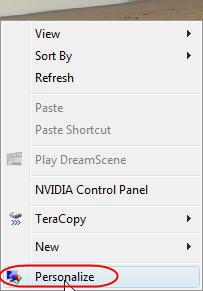
The first step is to right-click on your desktop and click on
'Personalize'.
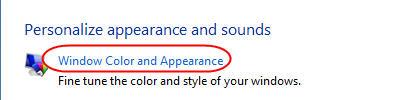
Then click on
'Window Color and Appearance'.
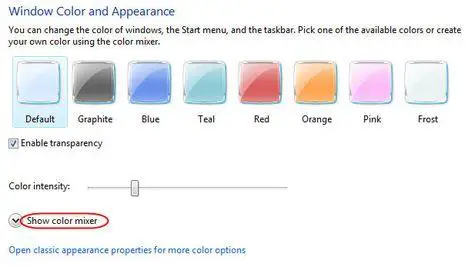
In this window you can change the color of the windows, start menu and taskbar. If you don't like the available options, you can click on
'Show color mixer' to create your custom colors.
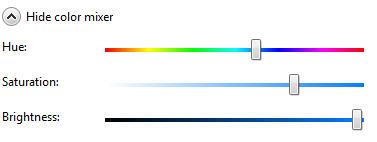
A small roll-out menu will reveal three options: hue, saturation and brightness. If you move the sliders right or left you will see the color of the windows and taskbar changing.
However there is a slight 'problem' that might annoy you: unless you pick out a very bright color, the color of the taskbar and all maximized windows will continue to have a shade of black. Unless you change the theme of your desktop, that shade of black will always remain.
After you have decided the color that you prefer, click on the
OK button and the new color will be applied.
POSSIBLE PROBLEM: Many users reported that, after they click on
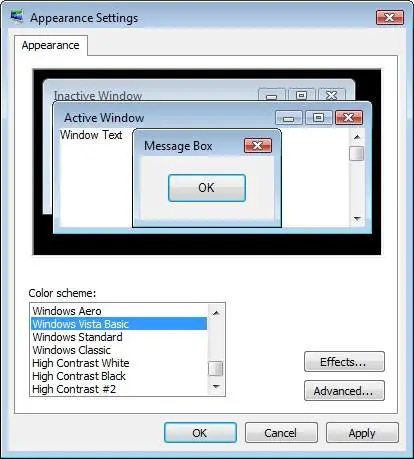
'Window Color and Appearance', they see a window like the one below.
If this applies to you, then choose
Windows Aero in the
Color scheme list, click on
OK and restart the procedure described above. You will now find all the menus and options described above.
NOTE: Windows Aero is not included in Windows Vista Home Basic. If you have this version, you won't be able to enable Aero and use it. You must upgrade to at least Windows Vista Home Premium

 Peppa Pig Family Plush Toy Set – 5 Characters
 Singapore V2ray VPN for Tunneling