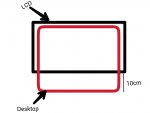
laptop display cut-off

Elakiri Bro

Member
Nov 27, 2013
198
9
0

Attachments

  • elakiri.jpg
    elakiri.jpg
    69 KB · Views: 110

AnuradhaRa

Well-known member
  • Dec 25, 2010
    61,437
    1
    42,510
    113
    resolution හදන්ඩ..
    වැරදි aspect ratio එකක් දීල තියෙන්නෙ..
    ඒ කියන්නෙ දිග පලල අනුපාතය..
     

    AnuradhaRa

    Well-known member
  • Dec 25, 2010
    61,437
    1
    42,510
    113
    ඩිස්ප්ලේ ඩ්‍රයිවර්ස් හරියට දැම්මද ? වින්ඩෝස් අප්ඩේට් කරලත් බලන්ඩ..
     

    Elakiri Bro

    Member
    Nov 27, 2013
    198
    9
    0
    resolution හදන්ඩ..
    වැරදි aspect ratio එකක් දීල තියෙන්නෙ..
    ඒ කියන්නෙ දිග පලල අනුපාතය..

    aspect ratio hadanna ba bn. :(
    drivers dala thiyenne.
    mn hithanne hardware awlkda koheda?
    danna kenek kiyanna plz.. :(
     

    Elakiri Bro

    Member
    Nov 27, 2013
    198
    9
    0
    Podi Silva - පොඩි සිල්වා;17998572 said:
    අනේ මේ යාලුවට හරියට පේන්නේ නැති එක හදාගන්න හරියට පේන යාලුවෝ උදව්වක් දීලා යන්න

    tnx..
     

    AnuradhaRa

    Well-known member
  • Dec 25, 2010
    61,437
    1
    42,510
    113
    තියෙන හැම රෙසලූෂන් එකක්ම දීල බලන්ඩ
     

    AnuradhaRa

    Well-known member
  • Dec 25, 2010
    61,437
    1
    42,510
    113
    මේක නෙට් එකෙන් කොපි පේස්ට්..:baffled:

    This might be an issue with the drivers for the Graphic card might require an update after installing Windows 7.

    1. Click Start.
    2. Type Device Manager in Start search.
    3. Expand Display adapters in device manager window.
    4. Right Properties.
    5. Click on driver tab.
    6. Click Update drivers.
    7. Click OK.

    Check if any exclamation marks are shown with the device. The exclamation mark shows an issue with the driver installed.
    Refer the link to update the drivers: http://windows.microsoft.com/en-us/windows7/Update-a-driver-for-hardware-that-isnt-working-properly

    You may also try downloading the drivers for the Graphic card manually from the manufacturer’s website and install the same and check.

    You may try changing the aspect ratio from the Video Settings of the Game.

    You may also try from the Display settings on the computer, follow the steps below:
    1. Right click on Desktop.
    2. Click on Personalize.
    3. Click on Display to the bottom left of the screen.
    4. Click on Change Display Settings on the left pane.
    5. Click on Advanced Settings.
    6. Click on Graphic card tab on the top.
    7. Click on Graphic Properties.
    8. Click on Display settings.

    Now try changing the aspect ratio.
     

    AnuradhaRa

    Well-known member
  • Dec 25, 2010
    61,437
    1
    42,510
    113
    හාඩ්වෙයා අවුලක් නෙමේ.. බය වෙන්ඩ එපා.. ඩ්‍රයිවර්ස් අවුල් ඇති..
    ඩිවයිස් මැනේජර් එකට ගිහින් බලන්ඩ ඩ්‍රයිවර්ස් අවුලක් නැද්ද කියල..
    ඒකෙ තියෙන ලිස්ට් එකේ ඩිස්ප්ලේ කියන තැන + ලකුන ක්ලික් කරල බලහං ! වගේ ලකුණක් තියෙනවද කියල.. එහෙමනං ඩ්‍රයිවර්ස් අවුල්..

    ඩ්‍රයිවර්ස් හරියට ආයෙ දාන්ඩ
     

    Radioactive

    Member
    Jul 22, 2014
    10,047
    732
    0
    Resolution එක දුන්නම display එකට, ඒක මුළු තිරයටම ගිහින් භාගයක් යට පේන්නේ නැද්ද නැත්නම් Resolution එක දුන්නම ඒක ඔය කියලා තියෙන පරිමාණයට විතරද යන්නේ?
     

    Elakiri Bro

    Member
    Nov 27, 2013
    198
    9
    0
    මේක නෙට් එකෙන් කොපි පේස්ට්..:baffled:

    This might be an issue with the drivers for the Graphic card might require an update after installing Windows 7.

    1. Click Start.
    2. Type Device Manager in Start search.
    3. Expand Display adapters in device manager window.
    4. Right Properties.
    5. Click on driver tab.
    6. Click Update drivers.
    7. Click OK.

    Check if any exclamation marks are shown with the device. The exclamation mark shows an issue with the driver installed.
    Refer the link to update the drivers: http://windows.microsoft.com/en-us/windows7/Update-a-driver-for-hardware-that-isnt-working-properly

    You may also try downloading the drivers for the Graphic card manually from the manufacturer’s website and install the same and check.

    You may try changing the aspect ratio from the Video Settings of the Game.

    You may also try from the Display settings on the computer, follow the steps below:
    1. Right click on Desktop.
    2. Click on Personalize.
    3. Click on Display to the bottom left of the screen.
    4. Click on Change Display Settings on the left pane.
    5. Click on Advanced Settings.
    6. Click on Graphic card tab on the top.
    7. Click on Graphic Properties.
    8. Click on Display settings.

    Now try changing the aspect ratio.

    aluthma update eka dala thiyenne bn. bios ehemath bageta penne. :( satart menu eka bageta penne.
     

    Elakiri Bro

    Member
    Nov 27, 2013
    198
    9
    0
    Resolution එක දුන්නම display එකට, ඒක මුළු තිරයටම ගිහින් භාගයක් යට පේන්නේ නැද්ද නැත්නම් Resolution එක දුන්නම ඒක ඔය කියලා තියෙන පරිමාණයට විතරද යන්නේ?
    Resolution eka oya widihama thama bn. akuru loku podi wenawa echcharai.
     

    Radioactive

    Member
    Jul 22, 2014
    10,047
    732
    0
    පැහැදිලි නෑ බන් උබ කියපු එක.

    මේ වගේද එන්නේ?
    2utia93.png


    නැත්නම් බාගෙට කැපිලද? ඒ කිව්වේ mouse cursor එක පහලට ගෙනියන්න පුලුවන් නමුත් පේන්නේ නෑ කැපිලා නිසා.
     

    Elakiri Bro

    Member
    Nov 27, 2013
    198
    9
    0
    පැහැදිලි නෑ බන් උබ කියපු එක.

    මේ වගේද එන්නේ?
    2utia93.png


    නැත්නම් බාගෙට කැපිලද? ඒ කිව්වේ mouse cursor එක පහලට ගෙනියන්න පුලුවන් නමුත් පේන්නේ නෑ කැපිලා නිසා.

    pic eke thiyena widihata newai bt.uba kiyapu widihata thamai enne. cursor eka ganiyanna puluwan bt penne na. (video ekak full screen dala play krnna ba yata kalla penne na)