
Latest ads
-
 Google Pixel 9 Pro
- vgp
- Updated:
-
Jobreceive.com for sale
- Blogerwiki
- Updated:
-
 Post Your Vehicle for Sale — FREE! - https://libro.lk
- Kalu_Puth
- Updated:
-
 ඔයාගෙ Assignment හෝ Thesis එක හරියට හදාගමු
- ErMurazor
- Updated:
-
BlackWall V2ray servers
- hu KANNA
- Updated:
You are using an out of date browser. It may not display this or other websites correctly.
You should upgrade or use an alternative browser.
You should upgrade or use an alternative browser.

එක තිරනයවෙන්නෙ යුසර් අනුව. අපි මෙහෙම කියමු. ඔයා වින්ඩොස් වල ඉදල ලිනක්ස් වලට එක පාර මාරුවෙනවනම් මම කියන්නෙ Linux Mint හොදයි කියල. ඔයා ටික කාලයක් ලිනක්ස් study කරල වින්ඩොස් වල ඉදල මාරුවෙනවනම් Ubuntu හොදයි. Fedora වලට මාරුවෙනවනම් මම හිතන්නෙ ඔයාට ලිනක්ස් ගැන හොද දැනුමක් තියෙන්න ඕන. මොකද Fedora community එක බේස් වෙලා තියෙන්නෙ Enterprise level එකෙ පොරවල්ගෙන්, නමුත් Ubuntu/Linux Mint වගෙ සප් එකක් එයාලගෙන් ලැබෙන්නැ.
ස්තුතියි පැහැදිලි කලාට


ඔය කියන කතාව ඇත්ත. Desktop users ල හුගදෙනෙක් කැමති නෑ.Ubuntu use karanawa VM ekaka dala mokada PC games gahana bari handa.
Ubunutu wala "unity" menu ekanam chaa maxx. Fedora walata maru wena one,
ඔයා Fedora වලට මාරුවෙන්න එපා. ඔයට පුලුවන් Ubuntu වලටම Cinnamon desktop environment එක දාල බලන්න. Cinnamon ආරම්භවුනේ GNOME Shell එක fork කරල.
I'm sure u will love it

එළ මචං.. නොදැනුවත්ව මෙහෙම දෙයක් කරගත්තා නම් මෙන්න smother ගෙන් idea එකක්...

Valve recently released an early-access preview of its future strategy for game distribution: the Steam Machine, and the SteamOS operating system that runs it. The company has developed a beta reference platform, but the really interesting part is SteamOS: an open OS with fairly flexible hardware specs that anyone can download and play with.
For a full SteamOS installation guide, including audio and wifi configuration, see Micah Ferrill’s tutorial on Linux.com.
SteamOS has generated a lot of interest, but the "beta" label makes one hesitate a bit. Is it a "Google beta", where most everything works pretty well, or is it a big pile of bugs and misfeatures? Let's find out. SteamOS Architecture
With previous releases of Steam for Linux, Valve had shown a preference for Ubuntu as a platform; it was therefore a bit of a surprise when SteamOS was revealed to be a direct derivative of Debian rather than Ubuntu. Valve's explanation pitches Debian as a better base for customization than Ubuntu, and they continue to recommend Ubuntu for Linux game development and the best Steam experience. Ubuntu is itself based on Debian, so the differences between the two environments are small.
Most of the interesting software consists of Steam itself and the games; all you need beyond that is "just enough OS" to deal with the hardware, graphics drivers, and so on, as well as infrastructure for installing and maintaining the complete system. SteamOS does provide a GNOME 3 desktop with the Iceweasel browser (a fork of Firefox); these are just carried over from Debian 7. A "Valve Bug Reporter" app is also included in the desktop, along with an icon which returns you to Steam.
But the clear intent of the system is to run the Steam client, and not a general-purpose desktop. You can't even get to the desktop without checking a box in the Steam client's settings (under "Interface" if you're interested). And you'll find that the desktop is missing lots of functionality you'd expect, with no way to install what's missing. This is not a Debian system so much as it is a Steam system which happens to use Debian under the hood.
Installation: For Experts Only
Arguably, SteamOS is targeted more at hardware integrators than end users, so the smoothness of the install process is probably not a high priority. Add to that its beta status, and you can understand how installing SteamOS is definitely "for experts only" at this point.
The "Custom" install I used started out trouble-free. The SteamOS installer is the Debian installer with SteamOS theming, with most steps automated. Be careful not to boot this USB stick on any system you care about, as the installer is preset to blow away the first disk on the system with no warning!
Not everything got set up correctly, however; I was greeted with a very nice-looking Steam client, but no sound. The SteamOS install process is clearly aimed at preferring the "connect to TV" environment, as it preferred my HDMI audio support on the video card to the motherboard's sound interface. If you're not running SteamOS on a HDTV, be prepared for a bit of fiddling with PulseAudio configuration and kernel module tweaking. One helpful tip: Debian 7 software works fine on SteamOS, so you can add Debian's repositories to SteamOS to get any missing utilities for getting things working.
(For a full installation guide, including audio and wifi configuration, see Micah Ferrill’s tutorial on Linux.com.)
Getting Down To Business
Once installation is complete and the hardware all works, SteamOS fades into the background, and you're presented with Steam in Big Picture Mode.
After answering a few questions and accepting the license, I was able to log in to my regular Steam account. Note that SteamOS counts as a new device from Valve's point of view; I had to type in an emailed code before I was able to successfully log in. It's also worth remembering that Steam only allows one device at a time to be logged in, so you'll be logged out of your SteamOS system if you try to run Steam anywhere else at the same time.
Gameplay was pretty much like Steam on Linux. My Steam for Linux games (or game, in my case) showed up in the Library. Downloading and running games from the Library was straightforward, and my saved games were also synchronized from my other system. Before long, I was
stumbling through Portal with the same ineptitude I was showing on Ubuntu.
Similarly, I was able to easily browse the Steam Store on SteamOS and pick up a few free-to-play favorites: DOTA 2 and Team Fortress 2. My video card turned out to be a little too weak for DOTA 2, but Team Fortress 2 played fine.
I had never played with Big Picture mode on Ubuntu, which turns out to be identical to the SteamOS environment. There were a few quirks with graphics not loading on the SteamOS version. I was occasionally irritated by the keyboard navigation; for example, Escape typically took you to the beginning of the last screen's entries, rather than where you left off. Overall, though, the interface works well.
Verdict: Promising, But Needs Work
SteamOS is off to a good start. Their previous work on Steam for Linux pays off in SteamOS, and the choice to wrap Steam in a Debian base seems to be working.
There are still a number of technical glitches to work out, especially in the installation process. It's not entirely clear how far Valve will go in providing a pain-free installer, given that it's targeted at system integrators and power users rather than the average consumer.
If you just want to play Steam games on your custom-built Linux box, your best bet for now is to stick with Steam for Linux running on Ubuntu (or, if you're so inclined, your favorite non-Ubuntu distribution). For the complete SteamOS experience, switch to Big Picture mode. It will tend to work more smoothly, and some may prefer the traditional Steam interface over Big Picture.
For Linux experts, SteamOS is an easy to moderate challenge, especially if the installer gets your hardware right the first time through. Brave and curious non-experts should anticipate getting an education in Linux hardware support. The challenge is worth taking, though, especially for those who want to help Valve make gaming on Linux as awesome as possible.
But if you're a Debian fan excited by the prospect of a Debian-flavored Steam experience, you're likely to be disappointed. It's nice to see the Debian installer handling installation duties, but after that, you could use SteamOS for years without seeing even a hint of Debian. Even if you're wanting a custom box running Steam on Debian, you might be happier with just that instead of SteamOS, if only because of the broader hardware support in the underlying OS and the support for non-gaming tasks.
Jeff Licquia
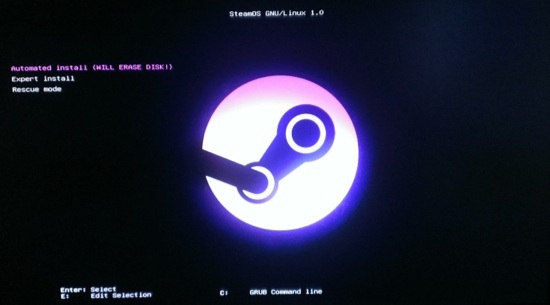 For a full SteamOS installation guide, including audio and wifi configuration, see Micah Ferrill’s tutorial on Linux.com.
Thankz මචං පොස්ට් එකට... ඕක Game ගහන එවුන්ට පට්ට.. මන් ඕක මිට දවස් 4 කට විතර කලින් Download කළා..
දාලා නම් බැලුවේ නැහැ බන්.... මොනවා වුනත් Game වලට එළකිරි OS එකක්..  උබ ඕක දාලා බැලුවද?
Last edited:
fatta .. i love this thread ..!!
Elaz...
Welcome to Linux User's Thread!


දැනට ආපු හොදම ලිනක්ස් ඕඑස් එකThankz මචං පොස්ට් එකට... ඕක Game ගහන එවුන්ට පට්ට.. මන් ඕක මිට දවස් 4 කට විතර කලින් Download කළා..
ෆෙඩෝරා තමයි හොදමmint Vs Fedora Vs Ubuntu ??
mokakda me thunen hondama ?? reasons ekkama kiyamuko balanna
හැබැයි ටිකක් ඇඩ්වාන්ස්
රෙඩ්හැට් වගේ
අල්ල ගත්තොත් අල්ලගත්තම තමා
ජීවිතේට වින්ඩෝස් වලටනම් අත තියන්නෑ පුතේ
mint Vs Fedora Vs Ubuntu ??
mokakda me thunen hondama ?? reasons ekkama kiyamuko balanna
ඕක තීරණය වෙන්නේ තමන්ගේ කැමැත්ත පරිදියි.. හොදයි කියලා එහෙම එකක් ගන්න අමාරුයි මට.. ඔක්කොම හොදයි..
පහසුවයි ලස්සනයි එක්ක බැලුවොත් Ubuntu, Linux Mint ඕවා ටික ගන්න පුළුවන්... Linux වලට අලුත් නම් Ubuntu / Linux Mint වගේ OS එකක් දාගන්නවනම් හොදයි.. Fedora නම් advanced හොදේ.. Reason නෙමේ.. ඔය ප්රධාන OS තුන ගැන විස්තරයක් දාන්නම්.. එතකොට පැහැදිලි වෙයි.. සුදු පුසා එහෙම SteamOS එක ගැන විස්තරයක් දාලා තිබ්බ.. Linux වලට එන්න කලින් ඒවා ගැන දැනගන්න එක හොදයිනේ.. :)ෆෙඩෝරා තමයි හොදම
හැබැයි ටිකක් ඇඩ්වාන්ස්
රෙඩ්හැට් වගේ
අල්ල ගත්තොත් අල්ලගත්තම තමා
ජීවිතේට වින්ඩෝස් වලටනම් අත තියන්නෑ පුතේ
අනිවා...
math duel ubuntu dala tiyeney e unata mata skype ekn epa wennwa ahaan ne viruse ehama en nathi hinda aulk ne eth hamawelama inne windows ekn thama bn
කෝ ඉතින්, මන් ඔයාගෙන් ඇහුවනේ 32bit/64bit ද කියල.. කෝ කිව්වේ නැහැනේ? thread එකේ බලන්න අහලා ඇති.. ඕක හදමු...
ඕවටයි, Linux දැනුම ලග තියන් ඉන්නේ නැතුව දැනුම බෙදාගන්නයි මේ Thread එක දැම්මේ.. මන් හිතුවට වඩා Linux එක්ක ඉන්න යාළුවො බොහොමයක් මේ Thread එකට එකතු වෙලා ඉන්නේ.. නියමයි mage pc ekla tiyana viruse makana barida bn ubuntu walain .vbs viruse 1k tiynanwa epa wennwa
Oya Singlish Type karana Ewa Pahadili Madi Yaluwa.. Hariyata Liyanna Tikak Huru wenna...

එක තිරනයවෙන්නෙ යුසර් අනුව. අපි මෙහෙම කියමු. ඔයා වින්ඩොස් වල ඉදල ලිනක්ස් වලට එක පාර මාරුවෙනවනම් මම කියන්නෙ Linux Mint හොදයි කියල. ඔයා ටික කාලයක් ලිනක්ස් study කරල වින්ඩොස් වල ඉදල මාරුවෙනවනම් Ubuntu හොදයි. Fedora වලට මාරුවෙනවනම් මම හිතන්නෙ ඔයාට ලිනක්ස් ගැන හොද දැනුමක් තියෙන්න ඕන. මොකද Fedora community එක බේස් වෙලා තියෙන්නෙ Enterprise level එකෙ පොරවල්ගෙන්, නමුත් Ubuntu/Linux Mint වගෙ සප් එකක් එයාලගෙන් ලැබෙන්නැ.
Ela Machn...
format eken ayn wennenaban
mala gemakl denna wenawa
kiyhnko balanna remove karana widiya
yako pen ekakata mount karala eka atulata ghn monawada code wagayakgahala eka gemak denna ona bn

Kohomada Linux OS eka Damme? Partition Ekakatada?

mula idan kiyala dunnoth apith linux.
but dannam windows machanz
Ela Ela.. Linux හෙමින් සැරේ කියලා දෙන්නම්කො කට්ටියට... මේකේ දැන් Linux කට්ටිය ගොඩක් ඉන්නවා... එයාලත් කියලා දෙයි... Thread මුල ඉදලා ටිකක් බලන්න.. OS වර්ග ගැන පොඩි අදහස් ගන්න පුළුවන් වෙයි... ඔයා Linux OS එකක් dual boot ක්රමයට දාගෙන පොඩ්ඩක් අත පත ගාල බලන්න.. එතකොට ඔය දන්නේ නැති දේවල්, එතකොට මොකක්හරි අවුලක් ආවහම හදාගන්න එහෙම ඕන වුනහම ඔයාගේ ඔලුවේ Linux දුවන්නේ..
ඔයා ඒවාට මොකක්හරි ක්රමයකින් හෝ මේ thread වලින් දැනගන්න පෙලබෙනවා.. ඕක තමා ලේසියෙන්ම ඉගෙන ගන්න පුළුවන් ක්රමය.. ඕක Linux වලට විතරක් නෙමේ ගොඩක් දේවල් ඉගෙනගන්න ගියහම වැදගත් වෙයි.. විශේෂයෙන් පාසල් ළමුන්ට...මමත් ඒ දවස් වල Windows use කළා.. අන්තිමට නතර වුණේ Linux වල.. දැන් Windows වලට ගියහම හුරු මදි වගේ.. මට linux හුරු වෙලා ඔයාලට Windows හුරුයි වගේ.. ඔයාටත් එහෙම වෙයි... linux වල අගය තේරෙනකොට...
මෙතන ඉන්න ගොඩක් අය මන් වගේ තමා.. හුරු වෙලා...
Welcome To Linux User's Thread..
Last edited:

මමනම් use කරන්නෙ cylon Linux මචන්. ආයෙ කියල වැඩක් නෑ බන් සුපිරී..... අපේ රටේ කොල්ලොන්ගේ නියම වැඩක්....උබලත් use කරල බලහල්ල...
Last edited:
Similar threads

- Replies
- 2
- Views
- 110
- Replies
- 0
- Views
- 680
- Replies
- 0
- Views
- 123

- Replies
- 31
- Views
- 1K

