
මචන් මේක install කරන හැටි සරලව පැහැදිලි කරන්න පුළුවන්ද?
Font da? ModemManger ekada?


මචන් මේක install කරන හැටි සරලව පැහැදිලි කරන්න පුළුවන්ද?


manjaro recover karaganna hati kiyahallako, mata aye windows install karanna una, dan boot option pennanne naha ,kelinma windows walata boot wenawa

just type this on terminal,then logout and logonthen enable the wijesekara keyboard from text entry settingsCode:sudo apt-get install ibus-m17n
#!/bin/bash
#
# Manjaro Linux - mesa-demos, curl, xorg-xdpyinfo, dmidecode
# Ubuntu - mesa-utils, curl, x11-utils, dmidecode
# Fedora - mesa-demos, curl, xorg-x11-utils, dmidecode
#
# Last updated on - 05:47 PM of 26/04/2014

# Input colors
bold=$(tput bold)
regular=$(tput sgr0)
red=$(echo -en '\e[1;31m')
green=$(echo -en '\e[0;32m')

# Run as root script
if [ "$(id -u)" != 0 ]; then
	echo "${red}${bold}You must run this script as root.${regular}"; exit 1
fi

# Detect window manager
pgrep xfce4-session > /tmp/xfce; XFCE=/tmp/xfce
pgrep gnome-session > /tmp/gnome; GNOME=/tmp/gnome
pgrep kde4 > /tmp/kde; KDE=/tmp/kde

# Clear screen
clear && sleep 1

# Display

echo ${green}${bold}System information${regular}
echo "Hostname                  :" $(uname -n)
echo "Operating system          :" $(lsb_release -sirc)
echo "Kernel name and version   :" $(uname -srm)
echo "Total RAM                 :" $(sed -n 's/MemTotal: *//gp' /proc/meminfo); echo
echo ${green}${bold}Machine information${regular}
echo "Board manufacturer        :" $(dmidecode -t 2 | sed -n '/Manufacturer/s/^.*: //p')
echo "Model name                :" $(dmidecode -t 2 | sed -n '/Product Name/s/^.*: //p')
echo "BIOS vendor               :" $(dmidecode -t 0 | sed -n '/Vendor/s/^.*: //p')
echo "BIOS version              :" $(dmidecode -t 0 | sed -n '/Version/s/^.*: //p')
echo "Released date             :" $(dmidecode -t 0 | sed -n '/Release Date/s/^.*: //p'); echo
echo ${green}${bold}Processor information${regular}
echo "Processor type            :" $(sed -rn '/model name/{s/^.*: |CPU//g;s/G/ &/p;q}' /proc/cpuinfo)
echo "Cache size                :" $(sed -n '/cache size/{s/^.*: //p;q}' /proc/cpuinfo); echo
echo ${green}${bold}Graphics information${regular}
echo "Graphic card(s)           :" $(lspci | sed -n '/VGA/{s/^.*: //p;q}')
echo "Graphic vendor            :" $(glxinfo | sed -n '/GL vendor/s/^.*: //p')
echo "Direct rendering          :" $(glxinfo | sed -n '/direct /s/^.*: //p')
echo "Screen resolution         :" $(xdpyinfo | awk '/dimensions/{print $2}')
echo "GLX renderer              :" $(glxinfo | sed -n '/renderer/s/^.*: //p')
echo "GLX version               :" $(glxinfo | sed -n '/GL version/s/^.*: //p'); echo
echo ${green}${bold}Audio and network information${regular}
echo "Audio card(s)             :" $(lspci | sed -n '/[Aa]udio controller/{s/^.*: //p;q}')
echo "Network card(s)           :" $(lspci | sed -n '/[Ee]thernet/{s/^.*: //p}')
echo "Network interface(s)      :" $(ip link | awk -F" *: *" 'NR>2 && /UP/{print $2}'); echo
echo ${green}${bold}Hard drive information${regular}
echo "Root disk free space      :" $(df -h / | awk 'NR>1{print gensub(/(.)$/," \\1B",1,$4)}')
echo "Root disk mounted at      :" $(df -h / | awk 'NR>1{print $1}')
echo "SWAP partition mounted at :" $(swapon -s | awk 'NR>1{print $1}'); echo
echo ${green}${bold}Location information${regular}
echo "External IP address       :" $(curl -s ifconfig.co)
echo "Connection type           :" $(curl -s ifconfig.co/connection)
echo "Country                   :" $(curl -s www.iptolatlng.com?ip=$(curl -s ifconfig.co) | awk -F"\"" '/countryFullName/{print $4}'); echo
echo ${green}${bold}Other information${regular}
echo "Uptime                    :" $(uptime | awk '{print $3}' | sed 's/,//g') "(HH:MM)"
echo "Shell client              :" $SHELL

if [ -s $XFCE ]; then
	echo "Session                   : Xfce" $(xfce4-session --version | grep xfce4-session | awk '{print $2}')
fi

if [ -s $GNOME ]; then
	echo "Session                   : GNOME" $(gnome-session --version | awk '{print $2}')
fi

if [ -s $KDE ]; then
	echo "Session                   : KDE" $(kded4 --version | grep -m 1 'KDE' | awk -F ':' '{print $2}' | awk '{print $1}')
fi

# End script
echo; exit 0කොහෙද text entry setting තියෙන්නේ?
..just type this on terminal,then logout and logonthen enable the wijesekara keyboard from text entry settingsCode:sudo apt-get install ibus-m17n
grub2(boot loader) eka aye daanna wenawa. tikak katta.. parissamin karanna wei.
http://www.noobslab.com/2012/10/installrecover-grub-from-linux-live-cd.html
*ubuntu live cd eka nathuwa manjaro eka use karanna.

මේ Bash script එක වැඩද කියලා බලලා දීපල්ලකො. Run as root හොදේ. Output එකත් මෙතනම දාන්න පුලුවන්නම් හොදයි.
Code:#!/bin/bash # # Manjaro Linux - mesa-demos, curl, xorg-xdpyinfo, dmidecode # Ubuntu - mesa-utils, curl, x11-utils, dmidecode # Fedora - mesa-demos, curl, xorg-x11-utils, dmidecode # # Last updated on - 05:47 PM of 26/04/2014 # Input colors bold=$(tput bold) regular=$(tput sgr0) red=$(echo -en '\e[1;31m') green=$(echo -en '\e[0;32m') # Run as root script if [ "$(id -u)" != 0 ]; then echo "${red}${bold}You must run this script as root.${regular}"; exit 1 fi # Detect window manager pgrep xfce4-session > /tmp/xfce; XFCE=/tmp/xfce pgrep gnome-session > /tmp/gnome; GNOME=/tmp/gnome pgrep kde4 > /tmp/kde; KDE=/tmp/kde # Clear screen clear && sleep 1 # Display echo ${green}${bold}System information${regular} echo "Hostname :" $(uname -n) echo "Operating system :" $(lsb_release -sirc) echo "Kernel name and version :" $(uname -srm) echo "Total RAM :" $(sed -n 's/MemTotal: *//gp' /proc/meminfo); echo echo ${green}${bold}Machine information${regular} echo "Board manufacturer :" $(dmidecode -t 2 | sed -n '/Manufacturer/s/^.*: //p') echo "Model name :" $(dmidecode -t 2 | sed -n '/Product Name/s/^.*: //p') echo "BIOS vendor :" $(dmidecode -t 0 | sed -n '/Vendor/s/^.*: //p') echo "BIOS version :" $(dmidecode -t 0 | sed -n '/Version/s/^.*: //p') echo "Released date :" $(dmidecode -t 0 | sed -n '/Release Date/s/^.*: //p'); echo echo ${green}${bold}Processor information${regular} echo "Processor type :" $(sed -rn '/model name/{s/^.*: |CPU//g;s/G/ &/p;q}' /proc/cpuinfo) echo "Cache size :" $(sed -n '/cache size/{s/^.*: //p;q}' /proc/cpuinfo); echo echo ${green}${bold}Graphics information${regular} echo "Graphic card(s) :" $(lspci | sed -n '/VGA/{s/^.*: //p;q}') echo "Graphic vendor :" $(glxinfo | sed -n '/GL vendor/s/^.*: //p') echo "Direct rendering :" $(glxinfo | sed -n '/direct /s/^.*: //p') echo "Screen resolution :" $(xdpyinfo | awk '/dimensions/{print $2}') echo "GLX renderer :" $(glxinfo | sed -n '/renderer/s/^.*: //p') echo "GLX version :" $(glxinfo | sed -n '/GL version/s/^.*: //p'); echo echo ${green}${bold}Audio and network information${regular} echo "Audio card(s) :" $(lspci | sed -n '/[Aa]udio controller/{s/^.*: //p;q}') echo "Network card(s) :" $(lspci | sed -n '/[Ee]thernet/{s/^.*: //p}') echo "Network interface(s) :" $(ip link | awk -F" *: *" 'NR>2 && /UP/{print $2}'); echo echo ${green}${bold}Hard drive information${regular} echo "Root disk free space :" $(df -h / | awk 'NR>1{print gensub(/(.)$/," \\1B",1,$4)}') echo "Root disk mounted at :" $(df -h / | awk 'NR>1{print $1}') echo "SWAP partition mounted at :" $(swapon -s | awk 'NR>1{print $1}'); echo echo ${green}${bold}Location information${regular} echo "External IP address :" $(curl -s ifconfig.co) echo "Connection type :" $(curl -s ifconfig.co/connection) echo "Country :" $(curl -s www.iptolatlng.com?ip=$(curl -s ifconfig.co) | awk -F"\"" '/countryFullName/{print $4}'); echo echo ${green}${bold}Other information${regular} echo "Uptime :" $(uptime | awk '{print $3}' | sed 's/,//g') "(HH:MM)" echo "Shell client :" $SHELL if [ -s $XFCE ]; then echo "Session : Xfce" $(xfce4-session --version | grep xfce4-session | awk '{print $2}') fi if [ -s $GNOME ]; then echo "Session : GNOME" $(gnome-session --version | awk '{print $2}') fi if [ -s $KDE ]; then echo "Session : KDE" $(kded4 --version | grep -m 1 'KDE' | awk -F ':' '{print $2}' | awk '{print $1}') fi # End script echo; exit 0

crap :/ his is complex, im afraid im gonna mess up something here ;/
ya. be careful. read about how linux mounts partitions before doing anything!
"sda" or "sdb" are used to identity different physical hard drives.
sda1 means 1st partition in sda.
you can mount sda1 to a mount point such as /mnt by
"sudo mount /dev/sda1 /mnt"
(this is done automatically when you click a partition in file browser for the first time. or some times they are mounted automatically by the system using fstab.
)
"sudo chroot /mnt" this command is to give you permissions to read /mnt which is where sda1 is mounted.
you have to mount your linux partition this way, before installing grub or otherwise it wont read your linux system.
"grub-install /dev/sda"
installs linux boot loader to your system.
thats it. all you have to do is identify the linux partition id. (sda1, sdb1, sda2...) do that with "sudo fdisk -l"
i think its safe to reinstall manjaro than reinstalling the grub :/ what u think?
so it's your choice if you don't have any files or settings in linux partition reinstalling would be fine.
i installed grub loader like 10 times and it only went wrong once..


කොහෙද text entry setting තියෙන්නේ?
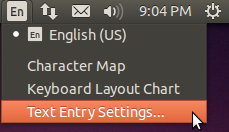

as i remember ur using KDE right? cinnomon slowed down u said? that happened to me too,can i see your desktop ScreenShot?


