


New Windows 7 theme
Oops V2 Theme
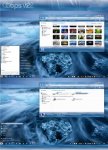
Oops V2 Theme | 2.37 MB
Year : 2011 | OS : Windows 7
Installation:
1.) Open the 'Theme' folder. which you download
2.) Drag both 'Oops V2.theme' and the 'Theme' folder to 'C:\Windows\Resources\Themes\'
3.) Right click on desktop -> Personalize...there you should see in Installed Themes.Click on it to apply theme.
Download
http://www.filesonic.com/file/1201554324

Oops V2 Theme
Oops V2 Theme | 2.37 MB
Year : 2011 | OS : Windows 7
Installation:
1.) Open the 'Theme' folder. which you download
2.) Drag both 'Oops V2.theme' and the 'Theme' folder to 'C:\Windows\Resources\Themes\'
3.) Right click on desktop -> Personalize...there you should see in Installed Themes.Click on it to apply theme.
Download
http://www.filesonic.com/file/1201554324


