Offical Java Thread

h_abeysinghe

Well-known member
  • Sep 4, 2008
    12,096
    435
    83
    32
    toronto,canada
    WRITTEN QUESTIONS

    11.List TWO code conventions associated with comments.

    12.List ONE code convention related to indentation.


    13.Identify FOUR violations of Code Conventions in the above application.

    Code:
    /**
     * PrintInternetRules.java
     * Name: WongPuter
     * Description: Displays student rules for accessing the Internet.
    /*
    
    public class PrintInternetRules
      public static void main(String[] args) {
        System.out.println("Internet Rules\n");
          System.out.println("1. Use school issued login and password.");
          System.out.println("2. Do not download any files.")
          system.out.println("3. Do not reveal personal information.");
      }
    }
    14.Identify FOUR errors in the above application.
    Code:
    /**
     * PrintInternetRules.java
     * Description: Displays student rules for accessing the Internet.
    /*
    
    public class PrintInternetRules
      public static void main(String[] args) {
        System.out.println("Internet Rules\n");
          System.out.println("1. Use school issued login and password.");
          System.out.println("2. Do not download any files.")
          system.out.println("3. Do not reveal personal information.");
      }
    }
     

    h_abeysinghe

    Well-known member
  • Sep 4, 2008
    12,096
    435
    83
    32
    toronto,canada
    ANSWERS and Marks for each MCQ :D

    1.Which is another name for package?
    Marks: 1.0

    a. object
    image.php

    b. library
    image.php

    c. method
    image.php

    d. string
    image.php


    2.Which is a set of guidelines for writing an application?
    Marks: 1.0

    a. algorithm
    image.php

    b. code conventions
    image.php

    c. comments
    image.php

    d. class
    image.php


    3.Which statement displays Hello, world! on the screen?
    Marks: 1.0

    a. System.out.println("Hello, world!");
    image.php

    b. system.println("Hello, world!");
    image.php

    c. System.println('Hello, world!');
    image.php

    d. System.out.println('Hello, world!');
    image.php


    4.Which is used to enclose single or multiline comments?
    Marks: 1.0

    a. \* *\
    image.php

    b. /* */
    image.php

    c. // //
    image.php

    d. \\ \\
    image.php


    5.What effect does \n have when included in an output string?
    Marks: 1.0

    a. A \n is displayed in the output.
    image.php

    b. A N is displayed in the output.
    image.php

    c. A tab (8 spaces) is displayed in the output.
    image.php

    d. Output is moved to the next line.
    image.php


    6.What effect does \t have when included in an output string?
    Marks: 1.0

    a. A \t is displayed in the output.
    image.php

    b. Output is moved to the next line.
    image.php

    c. A T is displayed in the output.
    image.php

    d. A tab (8 spaces) is displayed in the output.
    image.php


    7.The main() method is defined as
    Marks: 1.0

    a. public static void main(string[] args)
    image.php

    b. public static void Main(String[] args)
    image.php

    c. public static void main(String[] args)
    image.php

    d. public static main(String[] args)
    image.php


    8.Which describes the output displayed by the statement:
    Marks: 1.0

    System.out.format("%-10s %10s %8s", "Item", "Quantity", "Cost\n");
    a. Item,Quantity, and Cost will be left aligned.
    image.php

    b. Item will be left aligned, Quantity and Cost will be right aligned.
    image.php

    c. Item, Quantity, and Cost will be right aligned.
    image.php

    d. Item will be right aligned, Quantity and Cost will be left aligned.
    image.php


    9.What does the following symbol indicate in a flow chart?
    Marks: 1.0

    Symbol_Oval.gif

    a. Process
    image.php

    b. Start or End
    image.php

    c. Input or Output
    image.php

    d. Selection
    image.php


    10.What does the following symbol indicate in a flow chart?
    Marks: 1.0

    Symbol_Rectangle.gif


    a. Start or End
    image.php

    b. Process
    image.php

    c. Selection
    image.php

    d. Input or Output
     

    h_abeysinghe

    Well-known member
  • Sep 4, 2008
    12,096
    435
    83
    32
    toronto,canada
    Written Answers and Marks :D

    11.
    List TWO code conventions associated with comments.
    Marks: 2.0

    ANS:

    1. A comment block should be included before each class and method(except main method).
    2. Comments should not reiterate what is clear from the code.
    3. An introductory comment should begin a program.

    12.List ONE code convention related to indentation.
    Marks: 1.0

    ANS:
    1. Statements in a method should be indented.
    2. An open curly brace(bracket, { ) should be placed on the same line as the class or method declaration, and the closing curly brace (}) should be on a separate line and aligned with the class or method declaration.
    13.Identify FOUR violations of Code Conventions in the above application.
    Marks: 4.0

    Code:
    /**
     * PrintInternetRules.java
     * Name: WongPuter
     * Description: Displays student rules for accessing the Internet.
    /*
    
    public class PrintInternetRules
      public static void main(String[] args) {
        System.out.println("Internet Rules\n");
          System.out.println("1. Use school issued login and password.");
          System.out.println("2. Do not download any files.")
          system.out.println("3. Do not reveal personal information.");
      }
    }
    ANSWER

    1. Date is missing in the comment block.
    2. Class name should be a noun.
    3. The opening brace bracket ({) of main method should line up with the closing brace bracket (}).
    4. System.out.println("Internet Rules\n"); should line up with the rest of System.out.println.
    Correction:
    Code:
     /**
     * PrintInternetRules.java
     * Name: WongPuter
     *[COLOR=Red] Date: Feb 18, 2011[/COLOR]
     * Description: Displays student rules for accessing the Internet.
    */
    
    public class [COLOR=Red]InternetRules[/COLOR]
      public static void main(String[] args) 
    [COLOR=Red]  {[/COLOR]
          [COLOR=Red]System.out.println("Internet Rules\n");[/COLOR]
          System.out.println("1. Use school issued login and password.");
          System.out.println("2. Do not download any files.")
          system.out.println("3. Do not reveal personal information.");
      }
    }


    14.Identify FOUR errors in the above application.
    Marks: 4.0

    Code:
    /**
     * PrintInternetRules.java
     * Description: Displays student rules for accessing the Internet.
    /*
    
    public class PrintInternetRules
      public static void main(String[] args) {
        System.out.println("Internet Rules\n");
          System.out.println("1. Use school issued login and password.");
          System.out.println("2. Do not download any files.")
          system.out.println("3. Do not reveal personal information.");
      }
    }

    ANSWER


    1. The comment block should be closed with */ but not /*.
    2. A brace bracket is missing after the class declaration.
    3. A ; is missing at the end of System.out.println("2. Do not download any files.")
    4. "system" should be typed as "System"
    Correction:
    Code:
    /**
     * PrintInternetRules.java
     * Description: Displays student rules for accessing the Internet.
    [COLOR=Red] */[/COLOR]
    
    public class PrintInternetRules
    [COLOR=Red]{[/COLOR]
      public static void main(String[] args) {
        System.out.println("Internet Rules\n");
          System.out.println("1. Use school issued login and password.");
          System.out.println("2. Do not download any files.")[COLOR=Red];[/COLOR]
          [COLOR=Red]S[/COLOR]ystem.out.println("3. Do not reveal personal information.");
      }
    }
    :D
    meka apita dunne Online Quiz ekak widiyata pc eken karana :D so ekama copy karala damma ;)
     

    aloysius

    Well-known member
  • Aug 19, 2007
    273
    288
    63
    Java ඉතිහාසයෙන් ටිකක්

    • 1991 දී Bill Joy, James Gosling, Mike Sheradin, Patrick Naughton...... යන අය එකතු වෙලා තමයි Java හදලා තියෙන්නෙ. එතකොට Java අයිති Sun Microsystems ආයතනයට.
    • මුලින්ම නම දාල තියෙන්නෙ "Oak" කියලා.
    • Java කියන්නෙ සම්පූර්නයෙන්ම Platform Independent Language එකක්.(හේතුව පස්සෙ කියන්නම්).
    • 1994 දි world wide web සඳහා java යෙදාගෙන තියෙනවා.ඒ java වල තියෙන Byte code එක internet හරහා ඉක්මනට download කරගන්න පුලුවන් නිසා.
    • දැන් Java අයිති ORACLE සමාගමට.

    By: KPZ
     

    aloysius

    Well-known member
  • Aug 19, 2007
    273
    288
    63
    මේ මුල් ටික නම් හුගාක් කට්ටිය දන්නව අති. එත් නොදන්න අයට දැන ගන්නත් එක්කම කියන්නම් කෝ.

    Programming Language එකක් කියන්නේ මිනිස්සු විසින් හදගත්ත Language එකක්. මිනිස්සු ඒ විදිහට Language හදාගත්තෙ මොකක් හරි Machine එකකට හෝ Computer එකකට කියල වැඩ කරව ගන්න. එහෙම Machine එකකට හෝ Computer එකකට කියල වැඩ කරව ගන්න වැඩසටහනක් ලියනවට කියන්නෙ coding කරනව කියල.
    Programming Language එකකින් coding ලියද්දිත් අපි සාමාන්‍යයෙන් භාෂාවකින් ලියනව වගේම Grammar කොටසක් තියෙනව. ඒකට කියන්නෙ Syntax කියලා. එහෙම Grammar වැරදුනම කියන්නෙ Syntax errors කියල.

    Generations of Programming Languages
    Programming languages generation කිහිපයක් පසු කරමින් තමයි ඇවිත් තියෙන්නෙ.
    ඒව ,
    1st Generation
    2nd Generation
    3rd Generation
    4th Generation
    5th Generation කියල බෙදෙනව.,
    (මේ හැම දේම විස්තර කරන්න බලාපොරොතු වෙන්නෙ නැහ)

    Java කියන්නේ 3rd Generation Language එකක්.
    ඒ කියන්නෙ අපි Java වලින් code ලිව්වට Computer එකට ඒව තේරෙන්නෙ නැහැ. මොකද computer කියන්නෙ electronic භාණ්ඩයක්. computer එකට තේරෙන්නෙ voltage එකේ හා ධාරවේ අඩු වැඩි වීම් විතරයි. අපි code වලින් ලියන දේ computer එකට තෙරෙන Machine Language එකට හරවන්න අපිට අතර මැදියෙක් උවමනා වෙනවා. Java වල නම් මේ වැඩේ කරන්න අතර මැදියො දේන්නෙක් ඉන්නව. ඒ දෙන්නට කියන්නෙ Compiler & Interpreter කියල. මේ දෙන්න තමයි අපි ලියන Code එක Machine language එකට හරවන්නෙ. Java Install කරද්දි auto Install වෙනව.
    (වැඩි විස්තර ඕනිනම් කියන්න)

    Java වල Edition කිහිපයක්ම තියේනව J2SE, J2ME, J2EE....

    ඒ මුකුත් නෙවේ අපිට ඕන වෙන්නෙ JDK = Java Development Kit

    ඔයාලට පුලුවන් http://www.java.com/en/download/manual.jsp කියන link එකට ගිහින් ඔයාගෙ Operating System එකට හරියන Setup File එක අරගන්න.

    By: KPZ
     
    • Like
    Reactions: Rovin

    aloysius

    Well-known member
  • Aug 19, 2007
    273
    288
    63
    මෙන්න මේකයි සාමාන්‍ය පිළිවෙල.

    මම දුන්න Link එකෙන්
    Windows 7, XP Online download කලානම් Download වෙච්ච .exe file එක run කළාම තමයි Java instalation file එක download වෙන්නෙ.
    (Windows 7, XP Offline download කලානම් මීට වඩා වෙනස් වෙයි. හරියටම sure නෑ)

    Jdownload1.png


    Jdownload2.png


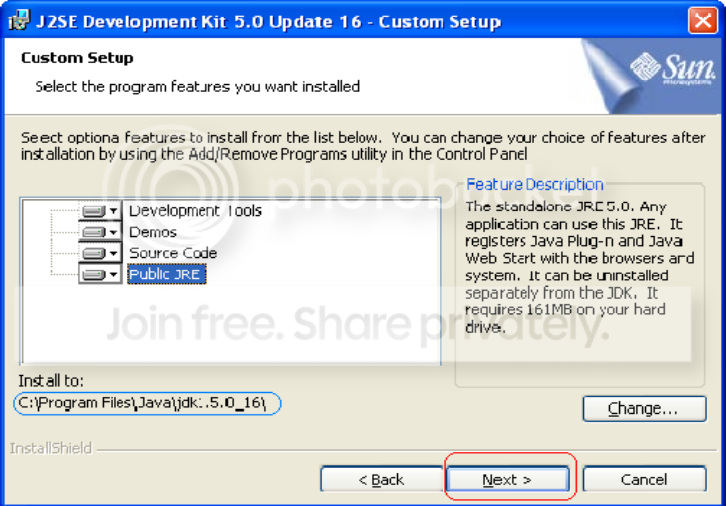
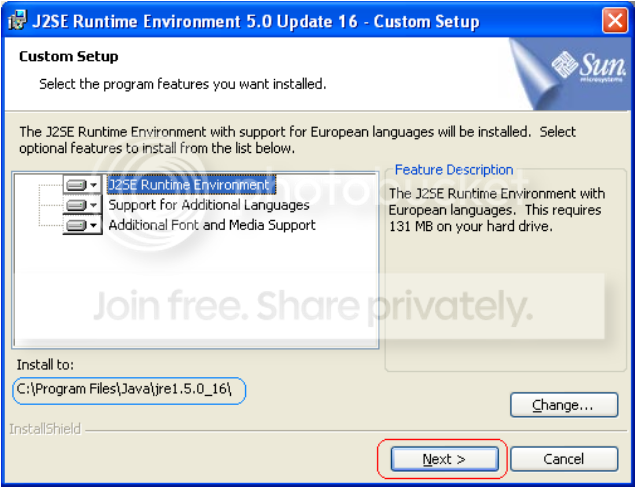
    ඊට පස්සෙ Install කරද්දි Install to: කියල destination address 2ක් ඉල්ලයි. එතනදි ඒ address වෙනස් නොකර default addresss එකටම install කරගන්න.
    මේකෙ jdk & jre වල වෙනස මම කියන්නම් ඉස්සරහට.
    Install කරද්දි මේ screenshoot බල බල හරියටම කරගන්න......


    jdk installation
    jdk_install.png


    jre installation
    jre_install.png

    By: KPZ
     

    aloysius

    Well-known member
  • Aug 19, 2007
    273
    288
    63
    Java ඉගෙන ගන්න කලින් මේ ටිකත් දැනගෙන ඉදිමු.
    මොකද Java වල වැඩ කරන්න මේ ටිකත් ඕනි වෙනවා.

    JDK - (Java Development Kit)
    අපි Java Install කරනවා කියල Install කරන්නෙ මේක තමයි. මේ JDK කියන කොටසෙ ජ්තමයි අපිට Java වල වැඩ කරන්න ඕනි කරන Tools ඔක්කොම තියෙන්නෙ.
    උදා :- java , javac , javadoc , compiler , debugger , ....... & JRE

    JRE - (Java Runtime Environment)
    අපි Java වලින් ලියන program එකක් run වෙන්නෙ මේ කියන Runtime Environment එකේදි තමයි. මේක අතුලෙ Java program එකක් ලියන්න ඕන කරන tools මුකුත් නැහැ. මේකෙ තියෙන්නෙ Java program එකක් run වෙන්න ඕනි කරන දේවල් විතරයි.
    උදා : - JVM , class Libraries සහ අනෙකුත් උවමනා කරන files

    JVM - (Java Virtual Machine)
    JVM කියන්නෙ JDK සහ JRE කියන දෙකටම අයිති දෙයක්. අපි Java code එකක් ලියලා එක් javac කියන එක හරහා compile කලාම අපිට byte code කියල කොටසක් ලැබෙනවා. අපි ලියන Java program එක lines 1000ක් විතර උනත් මේ byte code කියන එක 3KB - 4KB ට වඩා වැඩි වෙන්නෙ නැහැ. මේ byte code එකේ තියෙන්නෙ binary instructions.
    අපිට පුලුවන් Windows වලදි Java program එකක් compile කරලා, ඒකෙන් ලැබෙන byte code එක Unix OS එකක් ඇතුලෙ run කරන්න. ඒ වගේම Unix OS එකක compile කරලා හදාගත්ත bite code එකක් Windows වලදිත් run කරන්න පුලුවන්. අපිට Java වල තියෙන ලොකු ප්‍රයෝජනයක් තමයි ඒක.
    ඒත් එහෙම Run කරන්න නිකන් බැහැ. එකට වෙනම ක්‍රමයක් තියෙනවා. ඒකට තමයි මේ Java Virtual Machine එක ඉන්නෙ. අපේ ලඟ තියෙන byte code එක මේ කියන JVM එක ඇතුලෙ ඉන්න Interpreter කියන කෙනා හරහා Machine code එකට හරව ගන්න පුලුවන්.

    ** අපි byte code එක ඕනම OS එකක හදාගෙන වෙනත් OS එකක run කරන්න පුලුවන් උනාට byte code එක interpret කරල ලැබෙන Machine code එක එහෙම කරන්න බැහැ. Windows වලදි හදාගත්ත Machine code එකක් run වෙන්නෙ Windows වලදි විතරයි. ඒ වගේම Unix වලදි හදාගත්ත Machine code එකක් run වෙන්නෙ Unix වල විතරමයි.

    By: KPZ
     

    aloysius

    Well-known member
  • Aug 19, 2007
    273
    288
    63
    onnna damma machn :D

    අර ටික නම් මාර වටිනවා. ලොවෙත් නැති content එකක් තියෙන්නේ. මේ වෙලාවේ රෙප් නැහැ. හම්බ උන ගමන් අනිවා දෙනවා...
    Thumbs up for brother h_abeysinghe
     

    h_abeysinghe

    Well-known member
  • Sep 4, 2008
    12,096
    435
    83
    32
    toronto,canada
    අර ටික නම් මාර වටිනවා. ලොවෙත් නැති content එකක් තියෙන්නේ. මේ වෙලාවේ රෙප් නැහැ. හම්බ උන ගමන් අනිවා දෙනවා...
    Thumbs up for brother h_abeysinghe
    hehe :D ela ela rep one nae ubala athara share wenawa nam echarai :cool::cool::yes: thawa tikak tiyenwa puluwan welawaka Upload karanam :D eka ara thread eke dameth nae :yes:
    mehe ape skul eke man Java thamai grade 11 n 12 karane :D so owa kelinma Canadian ewa :cool::cool::yes::yes:
     

    aloysius

    Well-known member
  • Aug 19, 2007
    273
    288
    63
    hehe :D ela ela rep one nae ubala athara share wenawa nam echarai :cool::cool::yes: thawa tikak tiyenwa puluwan welawaka Upload karanam :D eka ara thread eke dameth nae :yes:
    mehe ape skul eke man Java thamai grade 11 n 12 karane :D so owa kelinma Canadian ewa :cool::cool::yes::yes:

    අම්මට සිරි! එහෙමත් එකක්ද... කොහොම උනත් ඒ ටික නම් සිරා...
     

    lankasuda

    Well-known member
  • Dec 25, 2008
    1,269
    133
    63
    JL
    dosthara.com
    මෙහෙම ඇහුවට තරහ වෙන්න එපා
    මට ඕව ගෙන දෙනුමක් නැති හින්දි අහන්නේ
    Java වලින් කරන්න පුළුවන් දේවල් කිහිපයක් කියන්න පුලුවන්ද?
     

    h_abeysinghe

    Well-known member
  • Sep 4, 2008
    12,096
    435
    83
    32
    toronto,canada
    මෙහෙම ඇහුවට තරහ වෙන්න එපා
    මට ඕව ගෙන දෙනුමක් නැති හින්දි අහන්නේ
    Java වලින් කරන්න පුළුවන් දේවල් කිහිපයක් කියන්න පුලුවන්ද?
    ජාවා කියන්නෙ මචන් computer programmin language එකක් :D එ වගෙ ගොඩක් එවා තියෙන්වා(VB,PHP,C,C++,C#,Python etc...) menna podi wasi tikak

    1.Java is simple: Java was designed to be easy to use and is therefore easy to write, compile, debug, and learn than other programming languages.
    2.Java is object-oriented: Java is object-oriented because programming in Java is centered on creating objects, manipulating objects, and making objects work together.
    3.Java is platform-independent: One of the most significant advantages of Java is its ability to move easily from one computer system to another.

    ඔය වගෙ තව ගොඩක් තියෙනෙවා :D අනික ජවා ගොඩක් පිළිගත්ත එකක් :D එවගෙම ගොඩක් ජංගම දුරකථන වලත් තියෙන්නෙ ජවා තමා :)
    http://en.wikipedia.org/wiki/Java_(programming_language)