
Latest ads
-
 Pure VPN - Up to 27 Months
- vgp
- Updated:
-
 Gemini AI PRO 18 months Offer
- Hawaka
- Updated:
-
koko account
- DasunEranga
- Updated:

You are using an out of date browser. It may not display this or other websites correctly.
You should upgrade or use an alternative browser.
You should upgrade or use an alternative browser.


මේ මුල් ටික නම් හුගාක් කට්ටිය දන්නව අති. එත් නොදන්න අයට දැන ගන්නත් එක්කම කියන්නම් කෝ.
Programming Language එකක් කියන්නේ මිනිස්සු විසින් හදගත්ත Language එකක්. මිනිස්සු ඒ විදිහට Language හදාගත්තෙ මොකක් හරි Machine එකකට හෝ Computer එකකට කියල වැඩ කරව ගන්න. එහෙම Machine එකකට හෝ Computer එකකට කියල වැඩ කරව ගන්න වැඩසටහනක් ලියනවට කියන්නෙ coding කරනව කියල.
Programming Language එකකින් coding ලියද්දිත් අපි සාමාන්යයෙන් භාෂාවකින් ලියනව වගේම Grammar කොටසක් තියෙනව. ඒකට කියන්නෙ Syntax කියලා. එහෙම Grammar වැරදුනම කියන්නෙ Syntax errors කියල.
Generations of Programming Languages
Programming languages generation කිහිපයක් පසු කරමින් තමයි ඇවිත් තියෙන්නෙ.
ඒව ,
1st Generation
2nd Generation
3rd Generation
4th Generation
5th Generation කියල බෙදෙනව.,
(මේ හැම දේම විස්තර කරන්න බලාපොරොතු වෙන්නෙ නැහ)
Java කියන්නේ 3rd Generation Language එකක්.
ඒ කියන්නෙ අපි Java වලින් code ලිව්වට Computer එකට ඒව තේරෙන්නෙ නැහැ. මොකද computer කියන්නෙ electronic භාණ්ඩයක්. computer එකට තේරෙන්නෙ voltage එකේ හා ධාරවේ අඩු වැඩි වීම් විතරයි. අපි code වලින් ලියන දේ computer එකට තෙරෙන Machine Language එකට හරවන්න අපිට අතර මැදියෙක් උවමනා වෙනවා. Java වල නම් මේ වැඩේ කරන්න අතර මැදියො දේන්නෙක් ඉන්නව. ඒ දෙන්නට කියන්නෙ Compiler & Interpreter කියල. මේ දෙන්න තමයි අපි ලියන Code එක Machine language එකට හරවන්නෙ. Java Install කරද්දි auto Install වෙනව.
(වැඩි විස්තර ඕනිනම් කියන්න)
Java වල Edition කිහිපයක්ම තියේනව J2SE, J2ME, J2EE....
ඒ මුකුත් නෙවේ අපිට ඕන වෙන්නෙ JDK = Java Development Kit
ඔයාලට පුලුවන් http://www.java.com/en/download/manual.jsp කියන link එකට ගිහින් ඔයාගෙ Operating System එකට හරියන Setup File එක අරගන්න.
Programming Language එකක් කියන්නේ මිනිස්සු විසින් හදගත්ත Language එකක්. මිනිස්සු ඒ විදිහට Language හදාගත්තෙ මොකක් හරි Machine එකකට හෝ Computer එකකට කියල වැඩ කරව ගන්න. එහෙම Machine එකකට හෝ Computer එකකට කියල වැඩ කරව ගන්න වැඩසටහනක් ලියනවට කියන්නෙ coding කරනව කියල.
Programming Language එකකින් coding ලියද්දිත් අපි සාමාන්යයෙන් භාෂාවකින් ලියනව වගේම Grammar කොටසක් තියෙනව. ඒකට කියන්නෙ Syntax කියලා. එහෙම Grammar වැරදුනම කියන්නෙ Syntax errors කියල.
Generations of Programming Languages
Programming languages generation කිහිපයක් පසු කරමින් තමයි ඇවිත් තියෙන්නෙ.
ඒව ,
1st Generation
2nd Generation
3rd Generation
4th Generation
5th Generation කියල බෙදෙනව.,
(මේ හැම දේම විස්තර කරන්න බලාපොරොතු වෙන්නෙ නැහ)
Java කියන්නේ 3rd Generation Language එකක්.
ඒ කියන්නෙ අපි Java වලින් code ලිව්වට Computer එකට ඒව තේරෙන්නෙ නැහැ. මොකද computer කියන්නෙ electronic භාණ්ඩයක්. computer එකට තේරෙන්නෙ voltage එකේ හා ධාරවේ අඩු වැඩි වීම් විතරයි. අපි code වලින් ලියන දේ computer එකට තෙරෙන Machine Language එකට හරවන්න අපිට අතර මැදියෙක් උවමනා වෙනවා. Java වල නම් මේ වැඩේ කරන්න අතර මැදියො දේන්නෙක් ඉන්නව. ඒ දෙන්නට කියන්නෙ Compiler & Interpreter කියල. මේ දෙන්න තමයි අපි ලියන Code එක Machine language එකට හරවන්නෙ. Java Install කරද්දි auto Install වෙනව.
(වැඩි විස්තර ඕනිනම් කියන්න)
Java වල Edition කිහිපයක්ම තියේනව J2SE, J2ME, J2EE....
ඒ මුකුත් නෙවේ අපිට ඕන වෙන්නෙ JDK = Java Development Kit
ඔයාලට පුලුවන් http://www.java.com/en/download/manual.jsp කියන link එකට ගිහින් ඔයාගෙ Operating System එකට හරියන Setup File එක අරගන්න.
කොකියල දෙන්නකො ලොක්කා.........
කියල දෙනවා සහෝ... මුකුත්ම දන්නෙ නැති අයට මුල ඉඳල කියන්න එපැයි......
Install කරන හැටි එහෙම

කියල දෙනවා සහෝ... මුකුත්ම දන්නෙ නැති අයට මුල ඉඳල කියන්න එපැයි......
Install කරන හැටි එහෙම
Me wade nam patta. Godak ayata loku help 1k wei. Matath prashna tikak thiyenawa. Niyama thanata awama ahannam.
keep it up bro...

Kohe lecture slides da brother..?
SLIIT
 mewwa daala un mata gahaida danneth naha
Me wade nam patta. Godak ayata loku help 1k wei. Matath prashna tikak thiyenawa. Niyama thanata awama ahannam.
keep it up bro...
එල මචෝ
Shall we start using Eclipse IDE???
Unlike other programming languages like .NET, Java is great.
The best Open Source IDE to develop would be Eclipse IDE.
Eclipse has a lot of other java related tools too.
So Eclipse will be a good place to start off with an IDE
Unlike other programming languages like .NET, Java is great.
The best Open Source IDE to develop would be Eclipse IDE.
Eclipse has a lot of other java related tools too.
So Eclipse will be a good place to start off with an IDE
SLIIT
මමත් SLIIT මචෝ. Lecture Slide දාන්න එපා. එක්කො එවා වෙනම Type කරල දාපං. අසිත sir password protection දාල තියෙන්නෙත් අපි copy කරයි කියල බයට වෙන්න ඇතිනෙ බං. ඒ උනාට sir ගෙ slide පිලිවෙලයි. ඒකයි මම ඒකෙ පිලිවෙලටම එලකිරි එකේ දාන්න හිතුවෙ. එතකොට java දන්න එඋන්ටත් ලේසියිනෙ පිලිවෙලට උන් දන්න දේවල් දාන්න පුලුවන්නෙ එතකොට
Unlike other programming languages like .NET, Java is great.
The best Open Source IDE to develop would be Eclipse IDE.
Eclipse has a lot of other java related tools too.
So Eclipse will be a good place to start off with an IDE
I think if we start using IDE, it may be difficult to learn who don't know anything about Java
මමත් SLIIT මචෝ. Lecture Slide දාන්න එපා. එක්කො එවා වෙනම Type කරල දාපං. අසිත sir password protection දාල තියෙන්නෙත් අපි copy කරයි කියල බයට වෙන්න ඇතිනෙ බං. ඒ උනාට sir ගෙ slide පිලිවෙලයි. ඒකයි මම ඒකෙ පිලිවෙලටම එලකිරි එකේ දාන්න හිතුවෙ. එතකොට java දන්න එඋන්ටත් ලේසියිනෙ පිලිවෙලට උන් දන්න දේවල් දාන්න පුලුවන්නෙ එතකොට
hari machan maath eka paara damme naththe eekai


මෙන්න මේකයි සාමාන්ය පිළිවෙල.
මම දුන්න Link එකෙන්
Windows 7, XP Online download කලානම් Download වෙච්ච .exe file එක run කළාම තමයි Java instalation file එක download වෙන්නෙ.
(Windows 7, XP Offline download කලානම් මීට වඩා වෙනස් වෙයි. හරියටම sure නෑ)

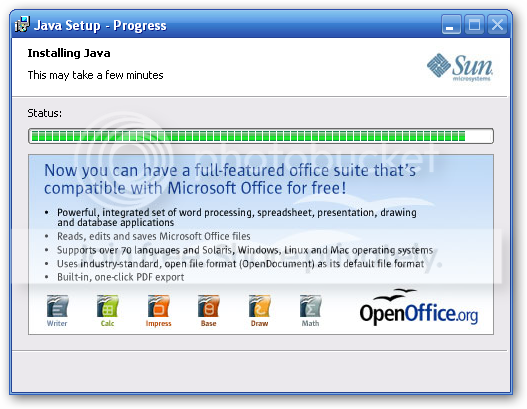
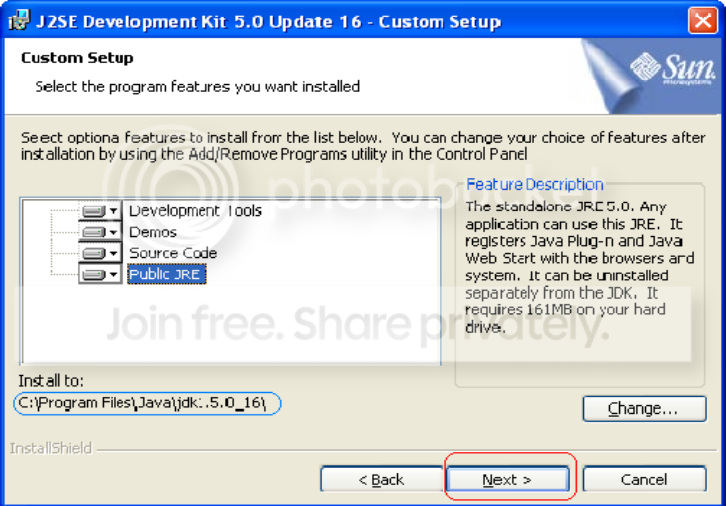
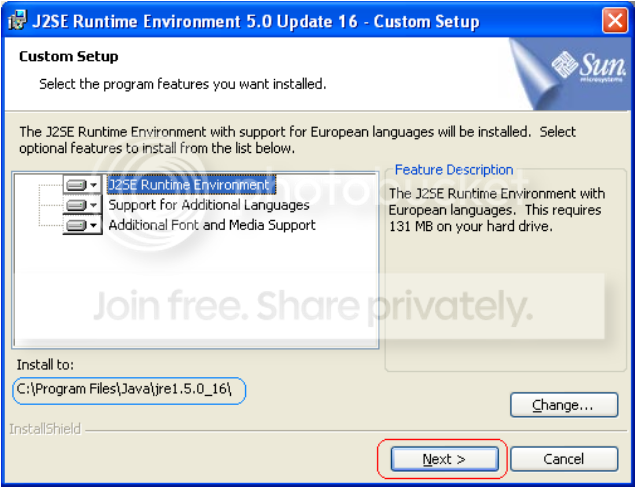
ඊට පස්සෙ Install කරද්දි Install to: කියල destination address 2ක් ඉල්ලයි. එතනදි ඒ address වෙනස් නොකර default addresss එකටම install කරගන්න.
මේකෙ jdk & jre වල වෙනස මම කියන්නම් ඉස්සරහට.
Install කරද්දි මේ screenshoot බල බල හරියටම කරගන්න......
jdk installation
jre installation
මම දුන්න Link එකෙන්
Windows 7, XP Online download කලානම් Download වෙච්ච .exe file එක run කළාම තමයි Java instalation file එක download වෙන්නෙ.
(Windows 7, XP Offline download කලානම් මීට වඩා වෙනස් වෙයි. හරියටම sure නෑ)

ඊට පස්සෙ Install කරද්දි Install to: කියල destination address 2ක් ඉල්ලයි. එතනදි ඒ address වෙනස් නොකර default addresss එකටම install කරගන්න.
මේකෙ jdk & jre වල වෙනස මම කියන්නම් ඉස්සරහට.
Install කරද්දි මේ screenshoot බල බල හරියටම කරගන්න......
jdk installation
jre installation

Hehe Most funniest talk of the day. Kawda ban umbata kiwwe java ajuuthay kiyala?? i ve been working in as a senior java engineer for more than 4 yrs now, never ever felt as u said. On the other hand .Net is a pain in ass. No fun at all. All most all the financial sites use java as their back end engine, cos ite reliable and secure un-like .Net.Memory management is 1000% better than .Net. True, its not fast as C or C++, but soo much faster than .net.
However, it wont be a waste to invest ur time to learn any programming language.
hell ya well said
Java ඉගෙන ගන්න කලින් මේ ටිකත් දැනගෙන ඉදිමු.
මොකද Java වල වැඩ කරන්න මේ ටිකත් ඕනි වෙනවා.
JDK - (Java Development Kit)
අපි Java Install කරනවා කියල Install කරන්නෙ මේක තමයි. මේ JDK කියන කොටසෙ ජ්තමයි අපිට Java වල වැඩ කරන්න ඕනි කරන Tools ඔක්කොම තියෙන්නෙ.
උදා :- java , javac , javadoc , compiler , debugger , ....... & JRE
JRE - (Java Runtime Environment)
අපි Java වලින් ලියන program එකක් run වෙන්නෙ මේ කියන Runtime Environment එකේදි තමයි. මේක අතුලෙ Java program එකක් ලියන්න ඕන කරන tools මුකුත් නැහැ. මේකෙ තියෙන්නෙ Java program එකක් run වෙන්න ඕනි කරන දේවල් විතරයි.
උදා : - JVM , class Libraries සහ අනෙකුත් උවමනා කරන files
JVM - (Java Virtual Machine)
JVM කියන්නෙ JDK සහ JRE කියන දෙකටම අයිති දෙයක්. අපි Java code එකක් ලියලා එක් javac කියන එක හරහා compile කලාම අපිට byte code කියල කොටසක් ලැබෙනවා. අපි ලියන Java program එක lines 1000ක් විතර උනත් මේ byte code කියන එක 3KB - 4KB ට වඩා වැඩි වෙන්නෙ නැහැ. මේ byte code එකේ තියෙන්නෙ binary instructions.
අපිට පුලුවන් Windows වලදි Java program එකක් compile කරලා, ඒකෙන් ලැබෙන byte code එක Unix OS එකක් ඇතුලෙ run කරන්න. ඒ වගේම Unix OS එකක compile කරලා හදාගත්ත bite code එකක් Windows වලදිත් run කරන්න පුලුවන්. අපිට Java වල තියෙන ලොකු ප්රයෝජනයක් තමයි ඒක.
ඒත් එහෙම Run කරන්න නිකන් බැහැ. එකට වෙනම ක්රමයක් තියෙනවා. ඒකට තමයි මේ Java Virtual Machine එක ඉන්නෙ. අපේ ලඟ තියෙන byte code එක මේ කියන JVM එක ඇතුලෙ ඉන්න Interpreter කියන කෙනා හරහා Machine code එකට හරව ගන්න පුලුවන්.
** අපි byte code එක ඕනම OS එකක හදාගෙන වෙනත් OS එකක run කරන්න පුලුවන් උනාට byte code එක interpret කරල ලැබෙන Machine code එක එහෙම කරන්න බැහැ. Windows වලදි හදාගත්ත Machine code එකක් run වෙන්නෙ Windows වලදි විතරයි. ඒ වගේම Unix වලදි හදාගත්ත Machine code එකක් run වෙන්නෙ Unix වල විතරමයි.
මොකද Java වල වැඩ කරන්න මේ ටිකත් ඕනි වෙනවා.
JDK - (Java Development Kit)
අපි Java Install කරනවා කියල Install කරන්නෙ මේක තමයි. මේ JDK කියන කොටසෙ ජ්තමයි අපිට Java වල වැඩ කරන්න ඕනි කරන Tools ඔක්කොම තියෙන්නෙ.
උදා :- java , javac , javadoc , compiler , debugger , ....... & JRE
JRE - (Java Runtime Environment)
අපි Java වලින් ලියන program එකක් run වෙන්නෙ මේ කියන Runtime Environment එකේදි තමයි. මේක අතුලෙ Java program එකක් ලියන්න ඕන කරන tools මුකුත් නැහැ. මේකෙ තියෙන්නෙ Java program එකක් run වෙන්න ඕනි කරන දේවල් විතරයි.
උදා : - JVM , class Libraries සහ අනෙකුත් උවමනා කරන files
JVM - (Java Virtual Machine)
JVM කියන්නෙ JDK සහ JRE කියන දෙකටම අයිති දෙයක්. අපි Java code එකක් ලියලා එක් javac කියන එක හරහා compile කලාම අපිට byte code කියල කොටසක් ලැබෙනවා. අපි ලියන Java program එක lines 1000ක් විතර උනත් මේ byte code කියන එක 3KB - 4KB ට වඩා වැඩි වෙන්නෙ නැහැ. මේ byte code එකේ තියෙන්නෙ binary instructions.
අපිට පුලුවන් Windows වලදි Java program එකක් compile කරලා, ඒකෙන් ලැබෙන byte code එක Unix OS එකක් ඇතුලෙ run කරන්න. ඒ වගේම Unix OS එකක compile කරලා හදාගත්ත bite code එකක් Windows වලදිත් run කරන්න පුලුවන්. අපිට Java වල තියෙන ලොකු ප්රයෝජනයක් තමයි ඒක.
ඒත් එහෙම Run කරන්න නිකන් බැහැ. එකට වෙනම ක්රමයක් තියෙනවා. ඒකට තමයි මේ Java Virtual Machine එක ඉන්නෙ. අපේ ලඟ තියෙන byte code එක මේ කියන JVM එක ඇතුලෙ ඉන්න Interpreter කියන කෙනා හරහා Machine code එකට හරව ගන්න පුලුවන්.
** අපි byte code එක ඕනම OS එකක හදාගෙන වෙනත් OS එකක run කරන්න පුලුවන් උනාට byte code එක interpret කරල ලැබෙන Machine code එක එහෙම කරන්න බැහැ. Windows වලදි හදාගත්ත Machine code එකක් run වෙන්නෙ Windows වලදි විතරයි. ඒ වගේම Unix වලදි හදාගත්ත Machine code එකක් run වෙන්නෙ Unix වල විතරමයි.

I think it's better to use an IDE. (I prefer IntelliJIDEA. And if you are interested in GUI(Graphical User Interface) stuff it should be NetBeans.)
The reason is today i don't think any company is coding with notepad. And being used well to an IDE will be one of the most important things if you are going to be a profetional java developer because it will make your life much more easier and about errors, syntax errors should be dealt by the IDE and you should not worry about that. But the logic is the thing that should be considered most. This is my idea...looking by an industrial view point.....
The reason is today i don't think any company is coding with notepad. And being used well to an IDE will be one of the most important things if you are going to be a profetional java developer because it will make your life much more easier and about errors, syntax errors should be dealt by the IDE and you should not worry about that. But the logic is the thing that should be considered most. This is my idea...looking by an industrial view point.....
Last edited:

Similar threads

- Replies
- 68
- Views
- 2K

- Replies
- 125
- Views
- 6K


- Replies
- 39
- Views
- 2K

