subtitle wada danne kauda???

HASITHA DIMANTHA

Well-known member
  • Mar 7, 2009
    7,709
    535
    113
    Kandy
    machan mata meka mara wadgath...
    mama godak welawata me wage apahasu thawan walata muhuna deela thiyenwa...
    mama igena ganna try kara eth hariyanne nama na....

    mekai prashne....mata subtitle ekak sync karanna igena ganna one...films banawa eth subtitle hari yanne na.....kohomada subtitle eke timing hadagann???
    sub eka speed wdi video ekata kalin sub eka yanwa.....eka ganata yana widihata hada gana one...????

    mama gaththa softwear -

    subtitle workshop
    subtitle edit

    mama hithanne me eken hodama eka subtitle edit kiyana eka
    eken hadanna dannawada...

    eken nemei moken hari lassanata yana widihata hadanna danna kenek kiyala denna....
     
    Last edited:

    ::neXGen::

    Well-known member
  • Jun 24, 2010
    4,454
    420
    83
    EK BO contact karanda man danwa athi


    Tools required:
    Latest ffdshow or latest vobsub.
    TMPGenc

    Preparation
    First be sure that you have your subs in sub or srt format. You find a lot of subtitles converters here if you have the subtitles in some other format or if you want to make your own subtitles.

    Rename the subtitle file to the same name as the video but with a .sub or .srt extension(Be sure to turn of Hide extension for known files types in Windows Explorer under Tools->Folder Options->View). Example:

    video.avi
    video.sub


    Guide

    First we must install a subtitle filter. You can use ffdshow or vobsub subtitle filter.

    Using vobsub filter
    Install vobsub and you are done. To change subtitles settings run the vobsub configure from the Start menu->vobsub.

    or Using ffdshow filter
    Install ffdshow and run the ffdshow Configuration from the Start menu->ffdshow->Configuration.
    1. Select Subtitles in the menu to the left
    2. Enable the subtitles.
    3. Hit Ok.
    ffdshowsubtitles.png


    Now should the subtitles appear if you play the video with Media Player. If not then the subtitles may be in wrong format.
    mediasubs.jpg


    Converting to VCD,SVCD,DVD or AVI

    Convert with TMPGenc
    Start TMPGEnc and close the Wizard. First change the Directshow priority in TMPGEnc (the Directshow reader reads the subtitles the same way as Media Player).
    1. Select Option->Enviromentel Settings
    2. Select VFAPI Plugin
    3. Right click on the Directshow Multimedia File Reader and select Higher Priority, repeat it until it is on the top of the list.
    dvdac34.png


    Open the video with wizard or manual. The subtitles should now appear. Use File->Preview in TMPGEnc to check that you can see the subtitles before encoding.
    tmpgencsubs.jpg


    Last just convert to VCD or SVCD or DVD as usual.

    To convert to AVI,DivX or XviD with permanent subtitles use TMPGEnc. In TMPGEnc first close the wizard, choose file->new project, open the video, choose File->Output to file->AVI File. Select a video compression like DivX or XviD and choose an audio compression like MP3 and hit save.

    Done.

    http://www.youtube.com/watch?v=VMngpHcDEdo
    http://www.youtube.com/watch?v=xMtqZl8ANqs
    http://www.youtube.com/watch?v=ZPIfvRb9jq8

    And yes, "permanently added subtitles", "hard-coded subtitles", "hard-subbed videos" and "embedded subtitles", these are all the same thing.

    Para empezar!

    Software needed:

    1. Virtualdub http://www.virtualdub.org/
    2. SRT-to-SSA Converter http://www.divx-digest.com/software/srt2ssa.html

    3. Avery Lee's own subtitle filter found here:
    http://www.virtualdub.org/virtualdub_filters.html


    The method is largely this:

    1. adding the subtitler filter to Virtualdub
    2. convert your .srt sub to a .ssa format.
    3. using both the resize filter and the subtitle filter in Virtualdub to ...
    4. ... add the .ssa subtitle to the video and cropping the resized video.
    5. Saving the file.

    background info (you can skip this)
    A FILTER in video editing speak is what they call a conversion thing. for example they have this resize "Filter", which means that it is a method of changing the size of the picture of the video, so it won't measure 40 inches by 30 inches but rather, 16 by 9 inches (and what men tell women is 10 inches is a whole other story entirely, and the primary reason women are so bad at math!
    wink.gif
    ^-^ )


    ad. 1. adding the subtitler filter to Virtualdub
    Download the filter from http://www.virtualdub.org/virtualdub_filters.html then unpack, unzip them.
    Avery Lee says:
    Filters can also be automatically loaded at startup if you copy the .vdf file into a plugins subdirectory under the VirtualDub program directory.

    IMHO, it's better to do this than to load them every time. To be perfectly honest, I don't even know how to do that. My own VirtualDub program directory is in C:\Programs\VideoPrograms\VirtualDub\plugins\, no doubt yours is in C:\Program Files\VirtualDub\plugins\. I have a lot of installed apps, so I have to order them by function, so there.

    ad. 2. convert your .srt sub to a .ssa format.
    I do this with a dedicated (specialized) converter, called SRT to SSA Converter
    Get it here www.divx-digest.com/software/srt2ssa.html or google it.
    See below pic. It's best to keep all values in the fields the same as below. Just add the .SRT-file in the Input file box-field, leave the Output box-field empty, and the program itself will generate the .SSA-file in the Output file box-field, when you press the big Convert-button at the bottom.
    (Be aware, if you redo this by pressing the Convert-button twice, this will overwrite an already made file without asking. To avoid this, just change the name in the Output file box-field.)
    01srttossa.jpg

    Sometimes it will give you some error warning, this indicates that the SRT-file is not formatted correctly, has spaces in the wrong places, etc. It will tell you in which line the error is. Then it will tell you that the job is done, but don't be fooled by that. Only if you DON'T see a error box, OR if it says the error is in the LAST line, it will be really okay.
    I mean, use whatever program you like to do this conversion, I like this one because it's by far the fastest converter of this kind, and you can adjust a lot of settings, including colour etc.

    step
    3. using both the resize filter and the subtitle filter in Virtualdub
    step
    3A-of-H. Add the first filter with Ctrl-F, or from the Video-menu
    02ctrl-f%28ilter%29.jpg


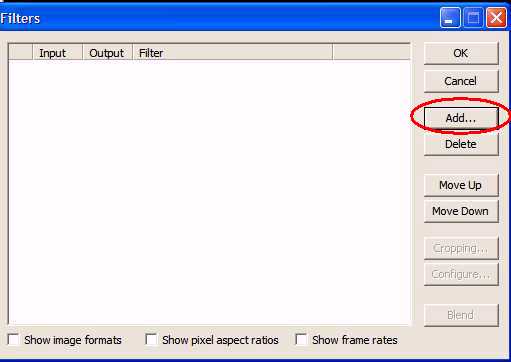
    If the Filter option is greyed out, check off the ''Full processing mode'', like it's done in the picture. (You will have to choose a compression codec etc.) This will call up the
    Filters box, click on the Add...-button.
    03filterbox-1empty.jpg


    step 3B-of-H. In the resulting Add Filter box, select the resize filter, click OK
    04addfilterresize.jpg


    (OMG! you're using filters! you're such a pro and really cool! Step back and do a little dance, pat yourself on the shoulders, cos if you don't do it, who else will?)
    step 3C-of-H. Now, the goal here is to add two (2) black borders of 40 pixel high, both top and bottom. In this example, the video is 624x352 or 624 pixels wide and 352 pixels high, and we wanna make it 624x432. Adjust the settings in the first section, called Size options, to just the same as what the settings are in the picture. (The width x height values YOU see will probably be different, since they are the width x height values for YOUR video. They should be the same ones you can see when you choose File|File Information, under Frame Size)

    Then, in the
    Framing options-section, click the radio-button for the option ''Letterbox/crop to size''. In the height box (big red circle) increase the value of the BLUE circle with 80. The values in the WIDTH boxes should remain the same. Then click OK
    04filterresizesettings.jpg


    step
    3D-of-H. You will be back in the Filters box, and you will see that in the output column, the height value is indeed 80 higher as opposed to the height value in the input column. In this example, 352 vs 432. Now, click on the Add...-button again.
    05filterresizeresults.jpg


    step
    3E-of-H. In the resulting Add Filters box, select the Subtitler -filter and click OK.
    06addfiltersubtitler.jpg


    step
    3F-of-H. In the Subtitler: Configuration-box, click on the normal browse button [...] on the right side, locate the .ssa subtitle file you made in step 1, click OK and you will see something like this:
    07filtersubtitlerresult1.jpg

    Hit OK.

    This will have this
    preliminary (= in between) result:
    07filtersubtitlerresult.jpg


    step
    3G-of-H. Now we're gonna crop the video (=cut off some pieces of off the width and height, but here we only do heights), select the Subtitler -filter by clicking it just once, then click the Cropping ....-button.
    07filtersubtitlerresult2.jpg


    In the
    Filter input cropping-box, only change Y1-offset from 0 to 40. This will remove the top black border, which you don't really need.
    08croppingtop.jpg


    step
    3H-of-H. You can check the results here, by looking at the changing values for height. They should increase with 80 pixels and then decrease with 40 pixels. In this example, from 352 pixelsup to 432 pixels, then back down to 392 pixels. The width stays the same, in my example: 624 pixels.
    09croppingtop.jpgresult.jpg


    The resulting video will look like this: The aspect ratio of the picture size
    (=framesize) is not altered, but there's an added underborder of exactly 40 pixels, with the hardcoded subtitles in it.


    Last edited:

    HASITHA DIMANTHA

    Well-known member
  • Mar 7, 2009
    7,709
    535
    113
    Kandy
    මගේ මේ ත්‍රේඩ් එක බලන්න..
    මේ ත්‍රේඩ් එකේ මම හැදුවා..
    මේක හදන්න හැටි ඉගෙන ගත්තේ මිගාරගේ ත්‍රේඩ් එකකින්..


    machan mata one subtitle ekak hadana hati nemei...hadala thiyena sub ekak sync karaganna one...

    danna kenek ehema innawanm kiyanna bro thankzz
     

    inranasingha

    Well-known member
  • Jan 27, 2008
    5,818
    1,785
    113
    රජයේ රෝහල
    mata one timing hadaganna....
    sub eka yanawa...video eka passen yanne...

    machan umba bagena thiyane weradhi sub file ekak wena ekak bagena balahan..

    oya case eka matath awa..
    bydefault timing set wela enne..
    hebei vlc player eke thiyanwa sub time eka delay karanna ++ karanna option eka tryak deela balahan..etha..
    set wela film eka bhagayak yaddhi ayeth sub passe yanna gani...
    umbe player eke setings defaut korala balahannn.......
    handama wede hari sub file eka ba ganna eka..
    allsubs.org
    opnsubtitles.com
    :rolleyes::rolleyes::rolleyes::rolleyes:
     

    HASITHA DIMANTHA

    Well-known member
  • Mar 7, 2009
    7,709
    535
    113
    Kandy

    machan umba bagena thiyane weradhi sub file ekak wena ekak bagena balahan..

    oya case eka matath awa..
    bydefault timing set wela enne..
    hebei vlc player eke thiyanwa sub time eka delay karanna ++ karanna option eka tryak deela balahan..etha..
    set wela film eka bhagayak yaddhi ayeth sub passe yanna gani...
    umbe player eke setings defaut korala balahannn.......
    handama wede hari sub file eka ba ganna eka..
    allsubs.org
    opnsubtitles.com
    :rolleyes::rolleyes::rolleyes::rolleyes:


    na na meke case eka sinhala sub ekak ne.....meka mata hada ganna one....