

Latest ads
-
 📸 SIGMA 85mm F1.4 DG HSM | Art — Nikon Mount
- romeshnonis
- Updated:
-
 Google AI PRO - 18 Month
- Sanathbh
- Updated:
-
Singapore V2Ray VPN for Tunneling
- hu KANNA
- Updated:
-
 Plan your Crypto & Forex entries before you take the trade
- romeshnonis
- Updated:
-
 RHCSA, RHCE, AWS, Docker, Kubernetes Training
- Sanjeewani95
- Updated:
What Antivirus Software you Use?
- Thread starter nismok
- Start date
You are using an out of date browser. It may not display this or other websites correctly.
You should upgrade or use an alternative browser.
You should upgrade or use an alternative browser.


tharinda76 said:thread eke avast walata idak neddooo ?? Avast is da best 4 me !! use karalama wenasa wataha ganna !!
Hmm.. I coudn't find Space to add It ne.. Max 10 Items per Poll
Malinga said:slow pc valata hondai Avira Antivirpenda aluth ekanum kohoma da dann nae. issara thibuna eevanum Avira valata vadaa resource use karanava
@Nw I'm Testing Avira Antivir Premium, I don't think it saves memory.

wow!! kaspersky has been gone to the top.. but I prefer Nod32 smart security for reliability and maximum safety !!!

nismok said:Hmm.. I coudn't find Space to add It ne.. Max 10 Items per Poll
I know macho !
 Thanks 4 da replying !
Kaspersky ... tibbata virus detect wenawa adui ! Avast eka nikamata use karala balanna ! trojan walata kiyapu anti virus soft eka ! Free Licence key ekak ALWIL software eken hamba wenawath ekka !


tharinda76 said:I know macho !
Kaspersky ... tibbata virus detect wenawa adui ! Avast eka nikamata use karala balanna ! trojan walata kiyapu anti virus soft eka ! Free Licence key ekak ALWIL software eken hamba wenawath ekka !
ewunata free licence mokatada keygens thiyeddi???

KAV walata wage keys hoya hoya dangalanna one na

Habai keygens pawa trojan kiyala detect karanawa

chamee777 said:Mama Nortan walata MAru Una...
E hari simple Plan ekak machan.....
Umbata Lagadima Sory.com
kepu said:wow!! kaspersky has been gone to the top.. but I prefer Nod32 smart security for reliability and maximum safety !!!
Yea, NOD32 AV 4 Looks Nice, Works well..

You can Download Original NOD32 AV from ESET site and use with Update Keys
Last edited:
Get Avira AntiVir Premium 1 Year License
To Get free Avira AntiVir Premium For 6 months, follow this steps:
1. Go to This Page (Germen)
2. Now Fill-up that Form
Salutation: (select Herr i.e Mr.)
Vorname: First Name
Nachname: Last Name
Email-Adresse: Email Address
Land : Country
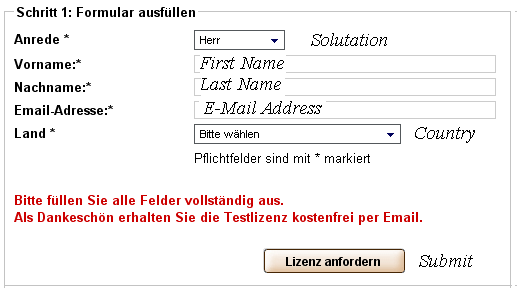
3. After you fill the form click lizenz anfordern
That’s it, Now wait for email to arrive from Avira which will contain Avira AntiVir Premium license for 1 Year
To Get free Avira AntiVir Premium For 6 months, follow this steps:
1. Go to This Page (Germen)
2. Now Fill-up that Form
Salutation: (select Herr i.e Mr.)
Vorname: First Name
Nachname: Last Name
Email-Adresse: Email Address
Land : Country
3. After you fill the form click lizenz anfordern
That’s it, Now wait for email to arrive from Avira which will contain Avira AntiVir Premium license for 1 Year
FREE 210 Days BitDefender Total Security 2009 Genuine License Key
1. Go to http://www.online-proxy.de/
2. Put promotional link below to the URL at Proxy-Service website and click GO.
http://www.bitdefender.de/site/Promotions/pcmag2009
Note: Both promotional site generates the same 20 digit license key. So use either one will do.
3. Fill in the form by entering your first and last name, email address and click the red colored registrieren button.

4. Now check your email that you entered in step 3. You should receive an email from BitDefender ([email protected]) with the subject BitDefender Total Security 180 -Tage Testversion. Note down the 20 digit license key in bold.
5. Download BitDefender Total Security 2009 (or here if you’re using 64bit Windows operating system) and install.
6. Restart your computer when prompted to. When Windows is booted up, BitDefender Registration Wizard should appear. Select “I want to register the product with a new key”, enter the 20 digit license key and click Next.

Complete the registration steps and voila! You should now see that BitDefender Total Security 2009 expires in 180 days.
To get 210 days, simply download and install the trial version of BitDefender Total Security 2009. Use it until the 30 days trial expires, then only enter the 180 days license key. Do take note that the 30 day trial allows you to use the 2GB online backup while the 180 days don’t. So make sure you either download all your backup before activating it with the 180 days license key or don’t use the online backup feature at all.
BitDefender products are well known for it’s lightness in system resource usage. BitDefender Total Security 2009 averagely only takes up approximately 17MB and it constantly cleans up the memory usage like what the Norton 2009 products are doing.
1. Go to http://www.online-proxy.de/
2. Put promotional link below to the URL at Proxy-Service website and click GO.
http://www.bitdefender.de/site/Promotions/pcmag2009
Note: Both promotional site generates the same 20 digit license key. So use either one will do.
3. Fill in the form by entering your first and last name, email address and click the red colored registrieren button.

4. Now check your email that you entered in step 3. You should receive an email from BitDefender ([email protected]) with the subject BitDefender Total Security 180 -Tage Testversion. Note down the 20 digit license key in bold.
5. Download BitDefender Total Security 2009 (or here if you’re using 64bit Windows operating system) and install.
6. Restart your computer when prompted to. When Windows is booted up, BitDefender Registration Wizard should appear. Select “I want to register the product with a new key”, enter the 20 digit license key and click Next.

Complete the registration steps and voila! You should now see that BitDefender Total Security 2009 expires in 180 days.
To get 210 days, simply download and install the trial version of BitDefender Total Security 2009. Use it until the 30 days trial expires, then only enter the 180 days license key. Do take note that the 30 day trial allows you to use the 2GB online backup while the 180 days don’t. So make sure you either download all your backup before activating it with the 180 days license key or don’t use the online backup feature at all.
BitDefender products are well known for it’s lightness in system resource usage. BitDefender Total Security 2009 averagely only takes up approximately 17MB and it constantly cleans up the memory usage like what the Norton 2009 products are doing.

Kaspersky Anti-Virus coz im satisfied with it,,,its the best ever...and the price is 1700rs for a 1year licence
its like 4.6rs per day ..isent it worth
its like 4.6rs per day ..isent it worth

kepu said:panda eke resources use karanawa dan godak adui..u should test it first!!!
narakama nae. habai slow nae kiyalanum kiyanna bae. eeke sahenna process vadi.
Panda Internet Security 2009


Last edited:


