වින්ඩෝස් 10 එකේ රීසන්ට් ෆයිල් හයිඩ් කරන්නේ කොහොමද බන් සෙට්න්ග් වල නැ නේ
windows7 Well-known member Feb 15, 2009 873 110 63 Aug 14, 2015 #1 වින්ඩෝස් 10 එකේ රීසන්ට් ෆයිල් හයිඩ් කරන්නේ කොහොමද බන් සෙට්න්ග් වල නැ නේ
Ace Viper Well-known member Jul 6, 2015 5,263 3,639 113 Aug 14, 2015 #2 වැල බලනකොට incognito window එකක බලපන් .. එතකොට hide කරන්න මහන්සි වෙන්න ඕනේ නෑ
Sadeepa Arosha Well-known member Aug 24, 2009 8,871 707 113 ඇයි එන්නද ? Aug 14, 2015 #3 Ace Viper said: වැල බලනකොට incognito window එකක බලපන් .. එතකොට hide කරන්න මහන්සි වෙන්න ඕනේ නෑ Click to expand...
Ace Viper said: වැල බලනකොට incognito window එකක බලපන් .. එතකොට hide කරන්න මහන්සි වෙන්න ඕනේ නෑ Click to expand...
DimuthTharindu Well-known member Dec 10, 2014 3,713 681 113 Behind you ✔ Aug 14, 2015 #4 Browser cache/ cookies සේරම clear කරන්න. History වල තියනවට කැමති නැත්නම් incognito විදියට යන්න. chrome > Setting > Show Advance Setting > Privacy - Clear browsing data... Last edited: Aug 14, 2015
Browser cache/ cookies සේරම clear කරන්න. History වල තියනවට කැමති නැත්නම් incognito විදියට යන්න. chrome > Setting > Show Advance Setting > Privacy - Clear browsing data...
Platy Active member Apr 8, 2013 590 112 43 :3 Aug 14, 2015 #5 මචන් file explr open කරල view>option ගිහින් එකේ ඇති උඩම open file explr to: කියල. ඒක this pc කියල select කරල apply කරන්න. වැඩේ ගොඩ Last edited: Aug 14, 2015
මචන් file explr open කරල view>option ගිහින් එකේ ඇති උඩම open file explr to: කියල. ඒක this pc කියල select කරල apply කරන්න. වැඩේ ගොඩ
windows7 Well-known member Feb 15, 2009 873 110 63 Aug 14, 2015 #6 vala magulak name photoshop files tikath ohomayi peanne
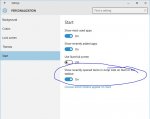
Bender Member Aug 18, 2009 4,920 286 0 Robot Arms Apartments Aug 14, 2015 #7 me option eka off karanna ethakota hari Attachments cf.JPG 46.3 KB · Views: 57 Reactions: windows7
Sub Zer0 Well-known member Aug 11, 2015 6,542 2,363 113 Aug 14, 2015 #8 Right click > Personalized > Start Reactions: windows7
windows7 Well-known member Feb 15, 2009 873 110 63 Aug 14, 2015 #9 Platy said: මචන් file explr open කරල view>option ගිහින් එකේ ඇති උඩම open file explr to: කියල. ඒක this pc කියල select කරල apply කරන්න. වැඩේ ගොඩ Click to expand... eth start menu eke ayin venne na ban
Platy said: මචන් file explr open කරල view>option ගිහින් එකේ ඇති උඩම open file explr to: කියල. ඒක this pc කියල select කරල apply කරන්න. වැඩේ ගොඩ Click to expand... eth start menu eke ayin venne na ban