


ඕනෙම_තැනක_ඉදල_file_send_කරන්න
මේක මම test කරලා තියන්නේ xp වල විතරයි.
අපිට අවශ්ය තැනකට ඕනෙම තැනක ඉදල file send කරන්න trick එකක්
අපි pen එකක් mechine එකට ගහල files send කරන විදිහට අපිට අවශ්ය තැනකට files send කරන්න පුළුවන් මේ විදිහට.

පියවර 1 : අපි send කරන files, copy වෙන තැනෙහි
short-cut එකක් හදන්න ඕනේ. උදාහරණයක් විදිහට මම C partition එකේ short-cut එකක් හදනවා. මුලින්ම C partition එක උඩ right click කරලා Shortcut එක Create කරන්න.
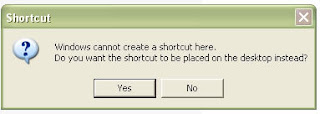
ඊට පස්සේ මෙහෙම message එකක් එයි.
"Windows cannot create a shortcut here. Do you want the shortcut to be placed on the desktop instead"
ඒක Yes කරන්න.
දැන් shortcut එක desktop එකේ හැදිලා ඇති.
(මෙහෙම message එකක් එන්නේ C වල shortcut එකක් හදන්න යද්දී විතරයි අනිත් places වල, එතනම හදා ගන්න පුළුවන්)
පියවර 2: අපි හදාගත්ත shortcut එක cut කරගෙන
C වල Documents and Settings වල ඔයාලගේ Account-name එකට අදාල folder එකේ තියෙන
SendTo කියන hidden folder එකට ගිහින් Paste කරන්න ඕන.
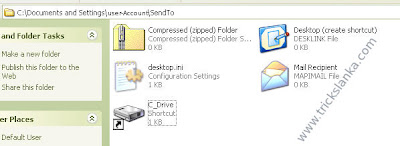
(මේ folders පෙන්නන්නේ නැත්නම් folder option ගිහින් hidden files & folders පේන විදිහට settings හදා ගන්න.)
එහෙනම් ඉතින් එච්චරයි . දැන් refresh පාරක් එහෙම දීල මොකක් හරි file එකක්
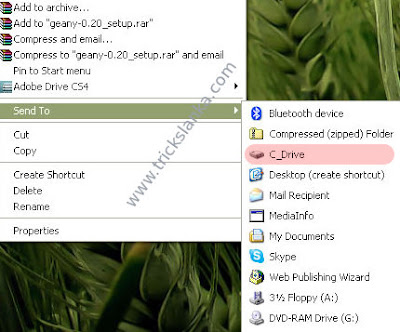
උඩ right click කරලා Send To ගිහින් බලන්න. list එකේ අපි දාපු location ඒක ඇවිල්ල ඇති..
අපි pen එකක් mechine එකට ගහල files send කරන විදිහට අපිට අවශ්ය තැනකට files send කරන්න පුළුවන් මේ විදිහට.

පියවර 1 : අපි send කරන files, copy වෙන තැනෙහි
short-cut එකක් හදන්න ඕනේ. උදාහරණයක් විදිහට මම C partition එකේ short-cut එකක් හදනවා. මුලින්ම C partition එක උඩ right click කරලා Shortcut එක Create කරන්න.
ඊට පස්සේ මෙහෙම message එකක් එයි.
"Windows cannot create a shortcut here. Do you want the shortcut to be placed on the desktop instead"
ඒක Yes කරන්න.
දැන් shortcut එක desktop එකේ හැදිලා ඇති.
(මෙහෙම message එකක් එන්නේ C වල shortcut එකක් හදන්න යද්දී විතරයි අනිත් places වල, එතනම හදා ගන්න පුළුවන්)
පියවර 2: අපි හදාගත්ත shortcut එක cut කරගෙන
C වල Documents and Settings වල ඔයාලගේ Account-name එකට අදාල folder එකේ තියෙන
SendTo කියන hidden folder එකට ගිහින් Paste කරන්න ඕන.
(මේ folders පෙන්නන්නේ නැත්නම් folder option ගිහින් hidden files & folders පේන විදිහට settings හදා ගන්න.)
එහෙනම් ඉතින් එච්චරයි . දැන් refresh පාරක් එහෙම දීල මොකක් හරි file එකක්
උඩ right click කරලා Send To ගිහින් බලන්න. list එකේ අපි දාපු location ඒක ඇවිල්ල ඇති..
මේක මම test කරලා තියන්නේ xp වල විතරයි.


